 Espruino JavaScript
Subsequently connecting to Puck seems to clear pin watch #3051

Replies: 21 comments

-
|
Posted at 2019-08-02 by AkosLukacs Just a guess: do you use Or do you use any other library that might contain a |
Beta Was this translation helpful? Give feedback.
-
|
Posted at 2019-08-02 by Fisu Thanks. I don't print or log anything on the Puck itself, there's no libs used and the only code that interacts with the Puck from the web page is that shown above. I tried the possible fix from the link, but the issue still persists. It doesn't always stop working on the first connect from the web page, but usually by the second or third time it's stopped. |
Beta Was this translation helpful? Give feedback.

-
|
Posted at 2019-08-02 by @gfwilliams Can you post your code for the Puck up since it sounds like you've modified the code on it a bit? What happens if you use the unmodified original code for the tutorial? Does that work? I'm using it here and it's been running for a month or more just fine. One thing that could be an issue is you're calling |
Beta Was this translation helpful? Give feedback.
-
|
Posted at 2019-08-02 by @gfwilliams Just to add: the setWatch could still be there - you can type One option is that you may be getting an error before the watch completes. For example: works fine, but if you'd called |
Beta Was this translation helpful? Give feedback.
-
|
Posted at 2019-08-02 by Fisu You're correct that the original code did work without issue. Thanks for the suggestion about nesting The current Puck code is as follows: When I type Regarding your comment about an error in |
Beta Was this translation helpful? Give feedback.
-
|
Posted at 2019-08-02 by Fisu @gfwilliams actually I was mistaken in the last message. When I check the |
Beta Was this translation helpful? Give feedback.
-
|
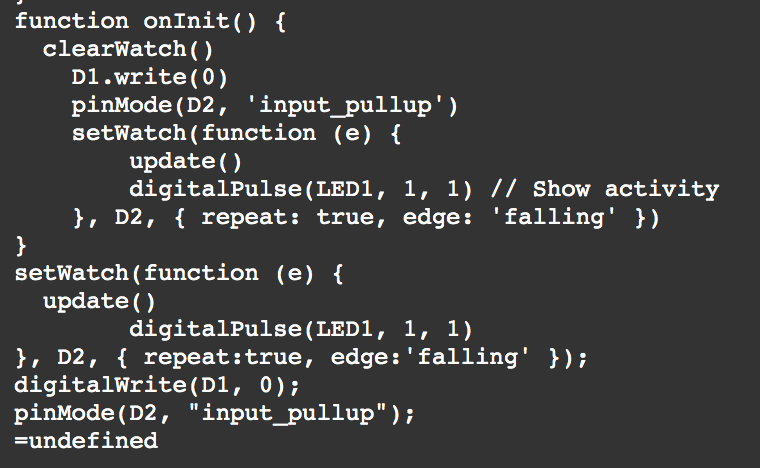
Posted at 2019-08-02 by Fisu @gfwilliams This is what the end of the
|
Beta Was this translation helpful? Give feedback.
-
|
Posted at 2019-08-05 by @gfwilliams Hi - that's what you'd expect - so what happens is So that all looks good. What happens if you're connected via Bluetooth when the LED flashes? Do you get any error messages? You could try putting ... or maybe: That'll flash green if it's ok, red if there was an error. Could you check
|
Beta Was this translation helpful? Give feedback.
-
|
Posted at 2019-08-09 by Fisu It looks like you were right about the battery. Although when I checked, it showed around 50%, every time I checked the percentage varied considerably. It was an old battery, so I changed it for a new one. It's been many days in now and there's not been a single issue with the watch not working. Many thanks for helping to fix this issue! |
Beta Was this translation helpful? Give feedback.
-
|
Posted at 2019-08-09 by Robin Fri 2019.08.09 @fisu should you be curious, we just wrapped up a discussion on the electrical characteristics, battery life and what to look out for with this exact same battery. Includes datasheet links and explanations:
|
Beta Was this translation helpful? Give feedback.
-
|
Posted at 2019-08-10 by Fisu Thanks for the link. Some interesting stuff there. |
Beta Was this translation helpful? Give feedback.
-
|
Posted at 2019-08-10 by Fisu I was so sure it was the battery that's the issue as it was working for 4-5 days without issue. Then last night (still with the new battery) it stopped working again. So whilst it is broken, when the light on the electric meter flashes, I don't get any light flashing on the Puck (I did implement the try/catch above, but neither the red nor green light flashes). I get no error messages when connected in the IDE. I wondered could it have something to do with the memory slots, but doing Would you happen to have any other ideas what I could try? |
Beta Was this translation helpful? Give feedback.
-
|
Posted at 2019-08-10 by Robin Sat 2019.08.10 So that you are not waiting, wondering, Did you catch this post? I'm not able to assist as we don't have that type of meter here in the US. However, have you attempted to go back to the original source that Gordon references in #4 and give that a go? Are you able to restart and continue, e.g. this is only a run time issue after a period of time, or are you forced to reboot/re-upload? Is it possible there is a counter or something related to the date that reaches an upper limit, then causes an over flow or error? Could placing that section inside a try/catch help in identifying a possible cause to investigate further?
Plenty.
Wow, I would expect one or the other, so it appears that Try placing a try/catch block(s) inside the update function to see if errors can be trapped, rather than bubbling up and possibly missed. As a last resort, pepper the entire flow with |
Beta Was this translation helpful? Give feedback.
-
|
Posted at 2019-08-10 by Fisu Many thanks. Plenty of ideas to try there. I'll implement what you suggest and report back what happens when it fails again. |
Beta Was this translation helpful? Give feedback.
-
|
Posted at 2019-08-10 by Robin Just spotted this:
Here is a likely spot. There are two division equations. If the divisor is ever zero, a divide by zero error will be thrown. Place the try/catch just inside this function wrapping all, or create two separate to isolate. Maybe a system call to time is not completing timely. Is L68 an acceptable practice? (combining a float with string text 'e' to return a number inside round?)
Could the const keyword be blocking a later assignment to that corresponding declaration. Try changing all const to var to test. Not likely, but worth a shot. Add a clearWatch() in every catch to immediately stop execution. Label each with a useful descriptor like a line number. Hopefully there will be enough previous console.log detail prior to the clearWatch() call to review. Run time debugging is a challenge and can be a real pain, . . . just waiting. |
Beta Was this translation helpful? Give feedback.
-
|
Posted at 2019-08-11 by Fisu Good catch with the division. I've now added the try/catch to see if the issue is with that. Regarding L68, I'm not sure it is acceptable practice, but it was a trick I found to round a number to x decimal places. If that is the issue, then the try/catch should catch that, although I've been using the same snippet in other work, so I'd be surprised if that is the issue. Thanks for the tips, I've updated the Puck code so I'll wait and see what gets logged out. |
Beta Was this translation helpful? Give feedback.
-
|
Posted at 2019-08-11 by AkosLukacs I think you don't have to format the Just use Separation of data & display concerns :) |
Beta Was this translation helpful? Give feedback.
-
|
Posted at 2019-08-11 by Robin Sun 2019.08.11 You beat me to it as a mod to your example will show Is this another anomaly but with toFixed()? *(re: "The number is rounded if necessary" )*
YES just posted > [Number.toFixed() not rounding per specification](http://forum.espruino.com/conversations/337198/) |
Beta Was this translation helpful? Give feedback.
-
|
Posted at 2019-08-11 by AkosLukacs The result of And yes, looks like some rounding anomaly: |
Beta Was this translation helpful? Give feedback.
-
|
Posted at 2019-08-11 by Robin Our posts are crossing each other and I hadn't finalized that post. Discovered the difference while ping-ponging between MDN and the WebIDE. Is an interesting subtlety one needs to be aware of. Thanks for confirming.
May I inquire as to which Espruino version those tests were done? (same 2v04 ?)
|
Beta Was this translation helpful? Give feedback.
-
|
Posted at 2019-08-12 by Fisu Yes, you're right, I should just format it on the page. Thanks. |
Beta Was this translation helpful? Give feedback.


Uh oh!
There was an error while loading. Please reload this page.
-
Posted at 2019-08-02 by Fisu
I've recreated and adapted the Smart meter tutorial. What I've noticed is, after I upload the code to the Puck, it watches the flashes correctly and will continue until I connect from the web page. From that moment on, it is as if the watch on the pin is removed. The Puck no longer flashes when the electric meter flashes, and there are no further records of the flashes. The variables stored in the Puck remain and are not reset, it seems it is just the watch method which has an issue after connection from the web page.
I'm not sure how to debug this issue. The only place
clearWatch()is called is in theonInit()function on the Puck. The connection code from the web page seems simple, and I cannot see anywhere there that might clear the watch. Any ideas on how I can further debug this issue?Here is the code from the website connection script (I don't call any Puck functions anywhere else apart from here):
Beta Was this translation helpful? Give feedback.
All reactions