 Espruino JavaScript
Simple Beacon for Android SmartLock workaround. #3117

Replies: 37 comments

-
|
Posted at 2019-01-22 by @gfwilliams Hi! Yes, I think either device would be fine for that. I'll have a quick check tomorrow to be absolutely sure though. By the look of it you may have to pair with the device first before it'll appear in the Smart Lock list, which may mean you have to turn it into something like a media control (play/stop/pause button) - but even so that's just a few lines of code. The act of just broadcasting its existence shouldn't be anything that draws a bunch of power so a Puck would work fine for you for around a year's battery life. So... you may be able to just power on the device and make it work as you say, it may require some tweaking. However I'd seriously recommend uploading some code to the device (http://www.espruino.com/Puck.js+Security) because potentially as it comes out of the box somebody in range in a different flat could just reprogram it to do something else :) I'll find out for sure tomorrow though |
Beta Was this translation helpful? Give feedback.

-
|
Posted at 2019-01-22 by FuzzyBumble Cool, thanks! Yeah, I figured that there were some basic initial tasks that would need to be done regardless of the eventual implementation. I probably will want to add a pin for the pairing and code to toggle discoverability with the button press. It looks like there's enough documentation around to figure out how to do all that. :) |
Beta Was this translation helpful? Give feedback.
-
|
Posted at 2019-01-23 by @gfwilliams Ok, just checked and yes it's easy. Power up the Puck/Pixl, pair it in the Android Bluetooth menu and it pops up a notification asking if you want to use it for Smart Lock. Tap it, follow through the menus and you're sorted. I'd still recommend:
Unfortunately there's no way to set a pairing pin at the moment, but there is an example of toggling discoverability with a button press here: http://www.espruino.com/Puck.js+Security#disable-bluetooth |
Beta Was this translation helpful? Give feedback.
-
|
Posted at 2019-01-23 by FuzzyBumble That's great! Thanks again for your help. |
Beta Was this translation helpful? Give feedback.
-
|
Posted at 2019-01-26 by FuzzyBumble The puck arrived today; it looks pretty cool. Only recently however did I catch the part that my Windows 7 laptop is not compatible as-is with the Web IDE tool to communicate with the Puck, so I have to wait until tomorrow for the BLE adapter to be delivered before I can proceed. :-) But I managed to update the firmware using nRF Connect from my phone at least. So I figure I'll run the whitelisting code (NRF.on('connect',function(addr) {...) to prevent any device besides my phone and my laptop to connect to the puck, and I'll run the code to toggle the BT with the button press. So, if I understand correctly, once I get the IDE tool connected and running, all I have to do is put those two bits of code into the editor on the right side, then click the Send button and the puck will be all set for what I want. And then, once I confirm that everything is good, run save() to save the code to flash for when the battery dies in a year and I'm all set. I can also be extra safe and run the NRF.setServices() code to disable the console and prevent any further changes (although I think that's redundant with the whitelist, or am I overlooking something?) unless the puck is reset by removing the battery. That should cover it, I think. Yes? |
Beta Was this translation helpful? Give feedback.
-
|
Posted at 2019-01-26 by @allObjects Yep... you got that right... in a nutshell... That's how @gfwilliams intended it to be... The battery thing is heavily dependent on what you do, though. Like using the phone as flashlight... works, but bring your battery down... almost like a always lit screen... or apps in the background that keep communicating. Your app though needs the puck to advertise only, and the phone knows what to do with it. And with that the battery life should make it. |
Beta Was this translation helpful? Give feedback.
-
|
Posted at 2019-01-27 by FuzzyBumble So it works and it also doesn't work. The SmartLock part of it works fine, as long as I stay paired. But if the connection is broken for any reason (I turn off BT on my phone, I go far away, I turn off BT on the puck, etc...), it does not automatically get re-established. Now, from looking around a bit, I think that's probably a bug with Android and/or my Pixel 3. However, even when I try to manually repair by going into "previously connected devices" and clicking "Connect" next to the Puck entry, nothing happens. I have to forget the connection completely and re-pair by picking "pair new device". The Puck doesn't even show up in the list of devices for my phone to connect to until I forget it first, but it's still advertising, as I can see it in the list of devices when I scan from my PC, so obviously the phone is filtering out discovered devices that it hasn't forgotten yet. So I'm not sure if the inability to manually reconnect without forgetting first is a bug on the phone side or on the puck side. My next step is to test similar conditions with a BT speaker that I have, so I can see if it's an issue with the phone. |
Beta Was this translation helpful? Give feedback.
-
|
Posted at 2019-01-28 by @gfwilliams That's a bit strange about the reconnect, but maybe it just doesn't reconnect if there's no service provided that it 'wants'. It's be worth trying without the whitelisting first just in case that is causing you issues. Maybe try making the Puck a HID device: http://www.espruino.com/Puck.js+Keyboard#multimedia-keys So literally just adding the lines: That'll make it a 'multimedia control' (for play/stop/pause/etc) that the phone will probably want to stay connected to. |
Beta Was this translation helpful? Give feedback.
-
|
Posted at 2019-01-28 by FuzzyBumble I think the issue was on the phone side. I added a Tasker profile to automatically connect when the puck is detected, and so far it's looking good. |
Beta Was this translation helpful? Give feedback.
-
|
Posted at 2019-01-28 by FuzzyBumble Also, I think the issue is only if I turn BT off and on again on my phone. If instead I disable BT on the puck then turn it back on, or take the puck far away from the phone then come back, the connection reestablishes automatically. |
Beta Was this translation helpful? Give feedback.
-
|
Posted at 2019-01-28 by FuzzyBumble I'm almost hesitant to post this, because I recognize that the code is sloppy (my javascript fluency is cursory at best) and there are probably several much better ways of doing what I did (particularly the LED stuff), but just in case anyone might find this useful, here's the code I'm running on the puck: |
Beta Was this translation helpful? Give feedback.
-
|
Posted at 2019-01-28 by FuzzyBumble Oh, one thing that I know is definitely not correct in my code (but not fatally) is the fact that even the long-presses of the button set off the short-press function. I figure that, as written, the short-press watch is watching for presses of at least 50ms rather than just around 50ms, so the long-press sets off both watches. What's a better set of arguments for the watch to detect, say, a press of between 50ms-100ms? |
Beta Was this translation helpful? Give feedback.
-
|
Posted at 2019-01-29 by @gfwilliams Thanks for posting it up - it looks good! The only thing I'd say it generally using Strings as arguments to setInterval/setTimeout is considered bad form in JS (and usually you'd just use functions like
Ahh - yes, there's a trick to it :) If you detect the falling edge instead of the rising edge, then you're called when the button is released and you can compare how long it was held down for: |
Beta Was this translation helpful? Give feedback.
-
|
Posted at 2019-01-29 by FuzzyBumble Thanks for the feedback! And I'll definitely try that watch code out at some point. |
Beta Was this translation helpful? Give feedback.
-
|
Posted at 2019-01-29 by @allObjects Like your celebration light show. Btw, obvious code and code w/ comments / (inline) documentation is practically always the better code than what many would call 'better' in what ever aspect. For short / long button presses and combinations thereof and related actions / functions take a look at Software Buttons - Many buttons from just one hardware button. This almost-module alows you to configure timings. |
Beta Was this translation helpful? Give feedback.
-
|
Posted at 2019-01-31 by FuzzyBumble I came up with an imperfect hacky workaround... I set up the whitelisting code to capture the MAC address of the most recently rejected connection attempt, and then I set a watch for a medium-length button press that whitelists that captured MAC. So whenever my phone ends up with a different MAC, and the connection is rejected, I can tell the puck to accept it and then try again. But obviously, if there's any way I can revert to how the puck was behaving a couple of days ago, that would be infinitely more preferable. |
Beta Was this translation helpful? Give feedback.
-
|
Posted at 2019-01-31 by FuzzyBumble Oh, I just saw your reply.... yeah, that should be a workable solution. I'll check it out. |
Beta Was this translation helpful? Give feedback.
-
|
Posted at 2019-01-31 by FuzzyBumble quick question, what would be the syntax to clear the security setting? Would it just be ? |
Beta Was this translation helpful? Give feedback.
-
|
Posted at 2019-02-01 by @gfwilliams Yes, that should do it. |
Beta Was this translation helpful? Give feedback.
-
|
Posted at 2019-02-05 by FuzzyBumble Ok, so I upgraded the firmware and applied the NRF.setSecurity() call and everything seems to be working just fine. It's still getting the random MAC, but with the PIN, I'm not bothering with the whitelist, so that's fine. The only thing I noticed is that the pin only comes into play when connecting with the phone. When I try to connect to the Puck via the IDE, it connects without asking for anything. It's not really a big deal, since I'm six floors up and I doubt my neighbors are really into hacking, but I was just curious if that was as designed and/or if there was a way to make the PIN always necessary. |
Beta Was this translation helpful? Give feedback.
-
|
Posted at 2019-02-05 by @gfwilliams Ahh, it's possible that doing When Espruino is connecting to other devices you can query the state of the connection to see if it's bonded or secure, but looking at it there doesn't seem to be a way to query the state of the connection when Espruino is acting as a peripheral :( Just a quick note about |
Beta Was this translation helpful? Give feedback.
-
|
Posted at 2019-03-16 by FuzzyBumble Update: So everything has been working pretty much perfectly now, but there's just one problem. I've gone through 2 batteries over the last almost 2 months. The first battery I just attributed to the heavy load from all the experimentation and testing and bugs leading to infinite connect/disconnect loops. :) But the second battery did not experience anything but normal (and what should be low-drain) use as the beacon that I built it to be. I'm attaching a file of all the code that has been running on the puck this whole time. Maybe someone can spot something I did wrong to put an undue draw on the power. I'm already going to comment out the lightshows that happen on connect and disconnect, so that should help (although I spend a lot of time at home, so those should not be firing that much anyway) and I'll add a counter to increment on each connect and disconnect, so the next time the battery dies I can get an idea of how much activity there has been. But if this keeps up and there's no obvious fix, maybe I should get the pixl instead for its ability to be plugged into a wall socket for power?Attachments: |
Beta Was this translation helpful? Give feedback.
-
|
Posted at 2019-03-16 by FuzzyBumble I just realized that I had an interval set to run every 15 minutes to shut off all the LEDs, just as a backstop because sometimes the lightshows would not stop. I wonder if that was doing it. Since I'm disabling the lightshows, I can disable that too; hopefully that will help. |
Beta Was this translation helpful? Give feedback.
-
|
Posted at 2019-03-17 by Robin Sat 2019.03.16 Hi @FuzzyBumble what duration is the 'whole time' as it isn't really spelled out? A day, week, month?
Although I did a quick peek at the code file, I didn't spend much time attempting to comprehend it. These might help: Excessive LED usage along with repeated advertising and endless Javascript loops are battery killers. 240mAhr capacity. The function
and under heading Power Consumption
More authentic Espruino boards are a good thing !! ;-) Have you considered a 5V wall wort, micro USB female receptacle and a 3V regulator? My development setup is wired to Gnd and 3V (adj to D2) Image under heading Pinout |
Beta Was this translation helpful? Give feedback.
-
|
Posted at 2019-03-18 by @gfwilliams Hi - it's a shame about your power consumption issues. And you're on a pretty recent firmware, because you're using setSecurity? You could try upgrading to the latest on 'cutting edge' release again as I know there have been a few battery power tweaks recently, but nothing too major. Realistically the 15 min interval shouldn't really affect your power consumption noticeably. Just to be sure:
For when you're connected you could try Only thing to watch out for is that'll then make any interactions with the Puck quite slow, so you want to call it after you've finished the upload (maybe in a setTimeout). |
Beta Was this translation helpful? Give feedback.
-
|
Posted at 2019-03-18 by FuzzyBumble I work from home (and live in NYC where food delivery is ubiquitous), so I would say that I'm probably connected far more than I'm disconnected. I have on more than one occasion gone almost a week without leaving the apartment. I've run the SetConnectionInterval() call, so I'll see if that helps. BTW, while I connected via the IDE to do that, I did a call to Puck.getBatteryPercentage() to see where I was at after three days on the new battery, and it returned 100, so I'm not sure if that means my drain is really low or if the unrealistically high value means that the function is not returning the proper value. :-) |
Beta Was this translation helpful? Give feedback.
-
|
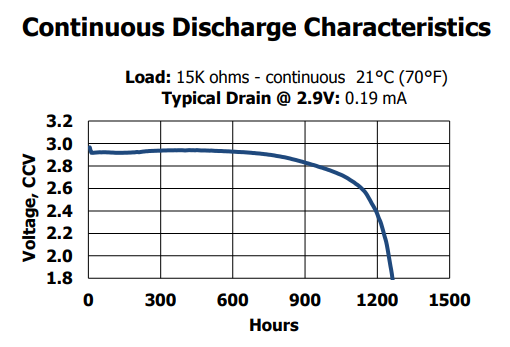
Posted at 2019-03-19 by @gfwilliams With the battery percentage, that's about what you'd expect. I've attached a the discharge curve I copied from a CR2032 datasheet I googled: http://data.energizer.com/pdfs/cr2032.pdf Basically the voltage doesn't change noticeably for the first 50% of the battery life (in fact it might even rise!) so it's very difficult to come up with any accurate measurement based on it, especially as the voltage changes far more with temperature (and the amount depends on the exact cell used). Puck.js's battery measurement doesn't try to do anything smart, it just returns how far the voltage is between 2.8 and 2.2v -so by the time it's registering a drop the battery is already reasonably empty.Attachments: |
Beta Was this translation helpful? Give feedback.
-
|
Posted at 2019-10-14 by FuzzyBumble One more update. Looks like the changes I made to try to fix the power consumption issue were successful. I only just now had to change the battery for the first time since I made the changes 7 months ago. So everything is going great. Just thought I'd let everyone know. Thanks for all the help! |
Beta Was this translation helpful? Give feedback.
-
|
Posted at 2019-10-14 by @gfwilliams That's great! Thanks for the update! Do you remember what the changes were? Just setConnectionInterval? |
Beta Was this translation helpful? Give feedback.
-
|
Posted at 2019-10-14 by FuzzyBumble I ran the setConnectionInterval call, but I think what really fixed things was removing the LED lightshows that I would launch on connects and disconnects, as well as removing this setInterval call that I had in my code: which was there because sometimes the light shows would persist. |
Beta Was this translation helpful? Give feedback.


Uh oh!
There was an error while loading. Please reload this page.
-
Posted at 2019-01-22 by FuzzyBumble
Hi! I just discovered puck.js and pixl.js and I think it might be a solution to an issue I've been having and I wanted to see what people familiar with the devices thought about it.
So Android has a "SmartLock" feature that lets me define criteria for circumstances for which the phone should not automatically lock (requiring the PIN to be re-entered) as long at the criteria are true. One criterion is GPS location, so basically you can say that the phone should not lock as long as it is at your home. Another criterion is a BT pairing with a trusted device, for instance, your phone should not lock as long as it is paired with your car's BT.
The GPS criterion does not work particularly well for my home because I live in an apartment and the device frequently loses track of where it is (it works just fine when I'm at my parent's house though).
So what I would like to be able to do is have some sort of BT device that sits in my apartment that I can have my phone stay paired with, thus invoking the SmartLock "keep unlocked" function based on the trusted device pairing. I have a BT speaker, but that's not an option because it then hijacks either the phone calls or the media output, and disabling those also breaks the pairing. So I need something that will stay paired, but also not hijack any features from the phone. And also I'd preferably like to keep it plugged into a power supply, so the pixl seems like a better choice for this than the puck, but I can go with either.
Am I correct in thinking that either of these devices would do exactly what I need here?
Also, since I don't actually need the device to do anything, can I just take it out of the box, power it up, and just pair my phone with it, or is there still some manual programming that needs to be done?
Beta Was this translation helpful? Give feedback.
All reactions