 Espruino JavaScript
Bangle watch: Unable to retrieve board information. Connection Error? #3187

Replies: 12 comments

-
|
Posted at 2019-11-25 by @gfwilliams Try setting 'programmable' to true in settings - 99% of the time that's the issue... A proper 2 button reset should have done it but maybe you didn't hold BTN1 down for long enough that the Bangle.js logo showed? It'd be great if you got the maze working! |
Beta Was this translation helpful? Give feedback.

-
|
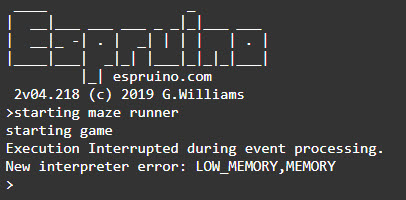
Posted at 2019-11-30 by bertyhell Yes that worked I reworked the project structure a bit so i can have a desktop (canvas) and a bangle version to build automatically. Had to write my own packaging algorithm since the webpack wrapper code didn't play well with the espruino interpreter. I also added minification using unglifyJS which replaces all the function names and variables by single letters. With an exclusion list for the Bangle. and g. functions Even with all that it seems the Bangle goes out of memory when i start the game. How can i inspect what is eating memory in my app? I tried with the chrome dev tools on the desktop version to look at the heap size, but i think too much stuff is loading to support to the canvas rendering, that i won't translate well to the heap inside the Bangle. If you want to try and run it, i've included the built file in the repository: Repo: https://github.com/bertyhell/nodewatch-mazerunnerAttachments: |
Beta Was this translation helpful? Give feedback.
-
|
Posted at 2019-11-30 by AkosLukacs There is |
Beta Was this translation helpful? Give feedback.
-
|
Posted at 2019-11-30 by @allObjects welcome to the 70'... regarding memory consumption... rather say: non-consumption! All the good stuff we learned since then how to build good, robust, extensible, tool supported and all the virtues that come to your mind about software construction ... just aren't good enough anymore when it comes to resourcefulness - in the context of Espruino context / interpreter implementation. Minification is a good start, and so is pre-tokenizing, and storing modules as functions, and saving to flash on upload... Since Espruino interprets on the source, you may buy some space with some cycles - the old law still applies that nothing is for free - and make 'global'/public names as short as possible... even references to very often used functions that have a nice but not really helpful name when it comes to space. I did not use pre-tokenize yet, but I used alternate variable names when it comes even to elements of the JS language... for example I used a lot of Math.min, max, floor, ceil, abs functions... and made them short named properties of the object that uses it. Furthermore, I abandoned nice object orientation and replaced it with indexed arrays where bit encoding was not an option (Have though no real figure for what I saved... but I got it working). Another thing I did - a while ago - I described the pac man maze in a coded way... otherwise, just now way to get it into the space of the Original Espruino... Storing stuff as functions and save to Flash on upload helps a lot to get the code out of the way... but all the other variable things have to fit into the memory. Looking forward to see your maze game working! |
Beta Was this translation helpful? Give feedback.
-
|
Posted at 2019-12-01 by bertyhell fyi Minification -> Pretokenise code break this code sample: This might be something that should still be fixed in the beta |
Beta Was this translation helpful? Give feedback.
-
|
Posted at 2019-12-01 by @allObjects ...forgot to mention: Initially, in my setup for a ui I had a lot of level 0 code that built the ui, which means: code that is immediately executed on upload. To have the build in level 0 intended to make what is built to be saved. But it made me run out of memory. After packing it into a function and run it onInit() overcame the memory issue. Whit that I conclude that Espruino deals better with functions invoked at or after onInit() than with lengthy level 0 code. Could be a double buffering issue or a-like, but have no further details. |
Beta Was this translation helpful? Give feedback.
-
|
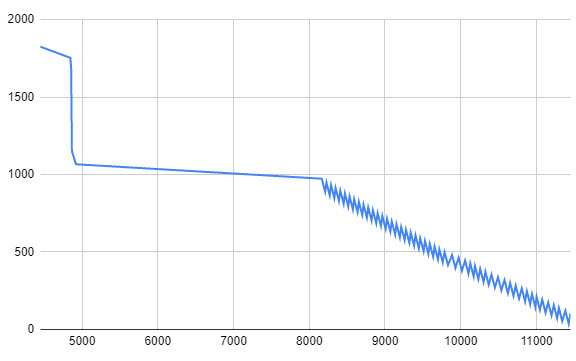
Posted at 2019-12-01 by bertyhell @allObjects At startup i use about 40% of the available memory. So i only have to make my program around 2.5 times more efficient :pAttachments: |
Beta Was this translation helpful? Give feedback.
-
|
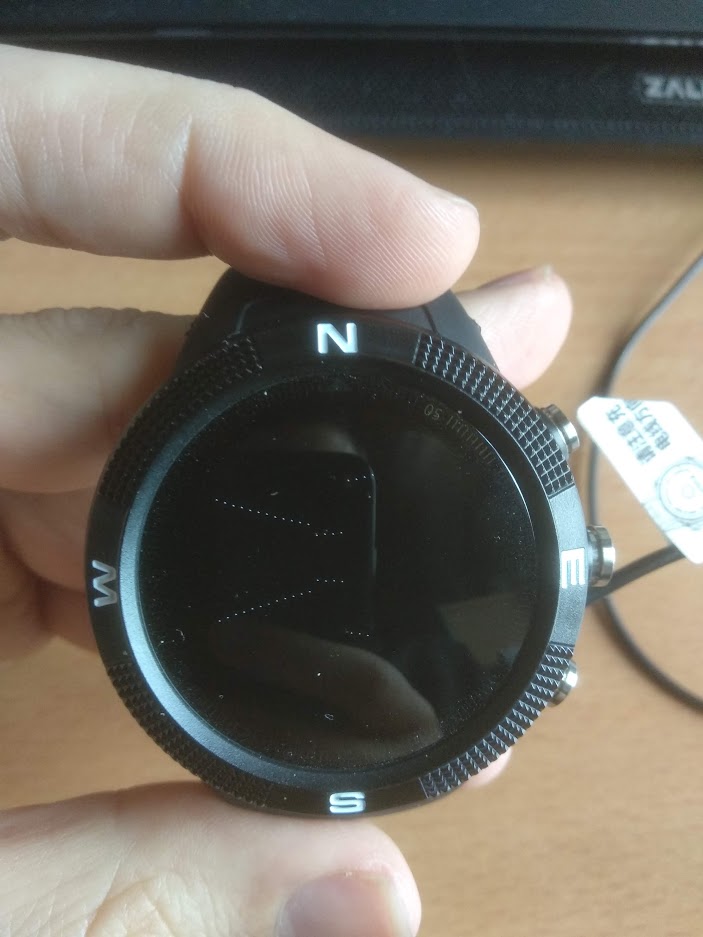
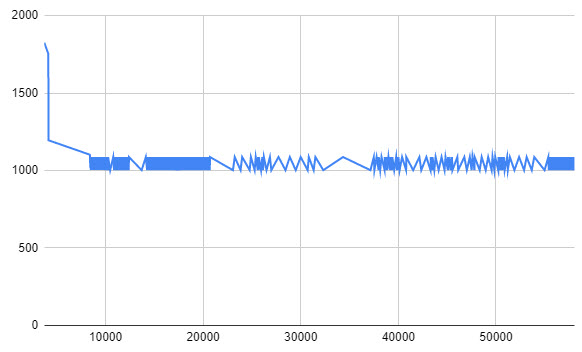
Posted at 2019-12-01 by bertyhell ok, quick update skipping the postprocessing step needed for drawing the vertical walls, i can get the memory under control. Then the game runs at about 1 frame every 8 seconds. If i reduce the number of rays that are cast to 240/8, then it runs at 1 frame per second. I guess i can optimize it more by keeping track of the time it takes to do the render function and see where the bottlenecks are. If you want to try it: https://github.com/bertyhell/nodewatch-mazerunner/blob/master/dist/bangle.min.js Attachments: |
Beta Was this translation helpful? Give feedback.
-
|
Posted at 2019-12-01 by @allObjects Post made right after #8 (before #9 just showed). Quite interesting graph... Have to take a closer look at the code to understand what it does and why all of a sudden such a degrade happens. Is there a lot of data recursion depth? - It cannot be code, because the stack is 'very' shallow... |
Beta Was this translation helpful? Give feedback.
-
|
Posted at 2019-12-01 by @allObjects Since the 'geometry' is quite simple, could a different approach - with limited / course granularity regarding rate of stepping thru the maze and viewing direction - not yield higher frame rate? |
Beta Was this translation helpful? Give feedback.
-
|
Posted at 2019-12-01 by @MaBecker Wow, this gone be fun! |
Beta Was this translation helpful? Give feedback.
-
|
Posted at 2019-12-04 by @gfwilliams Nice - thanks for the graph! Looks like you're dumping scanlines in an array? Using Uint8Array or some other typed array may be a lot faster and more memory efficient. I'll look into the pretokenise - pretty sure it's an IDE issue with it using the wrong IDs for tokens, so I should be able to clear that up without a firmware update |
Beta Was this translation helpful? Give feedback.


Uh oh!
There was an error while loading. Please reload this page.
-
Posted at 2019-11-25 by bertyhell
When i try connecting to my bangle watch i get this error:
Unable to retrieve board information.
Connection Error?
Connected to Web Bluetooth, Bangle.js 0f49 (No response from board)
I tried resetting the device by holding buttons 1 and 2 according to this guide: https://nodewatch.dev/troubleshooting
I'm trying to get a new game to run on this watch. It's a maze runner based on the wolfenstein3d raytracing algorthm.
You can try it on desktop here: https://bertyhell.github.io/nodewatch-mazerunner/
The github repo: https://github.com/bertyhell/nodewatch-mazerunner
Attachments:
Beta Was this translation helpful? Give feedback.
All reactions