
Self-hosted AI agent platform built on OpenClaw.
Enterprise-ready. Offline-capable. Open source.
Docs • Website • Blog • Discussions • LinkedIn



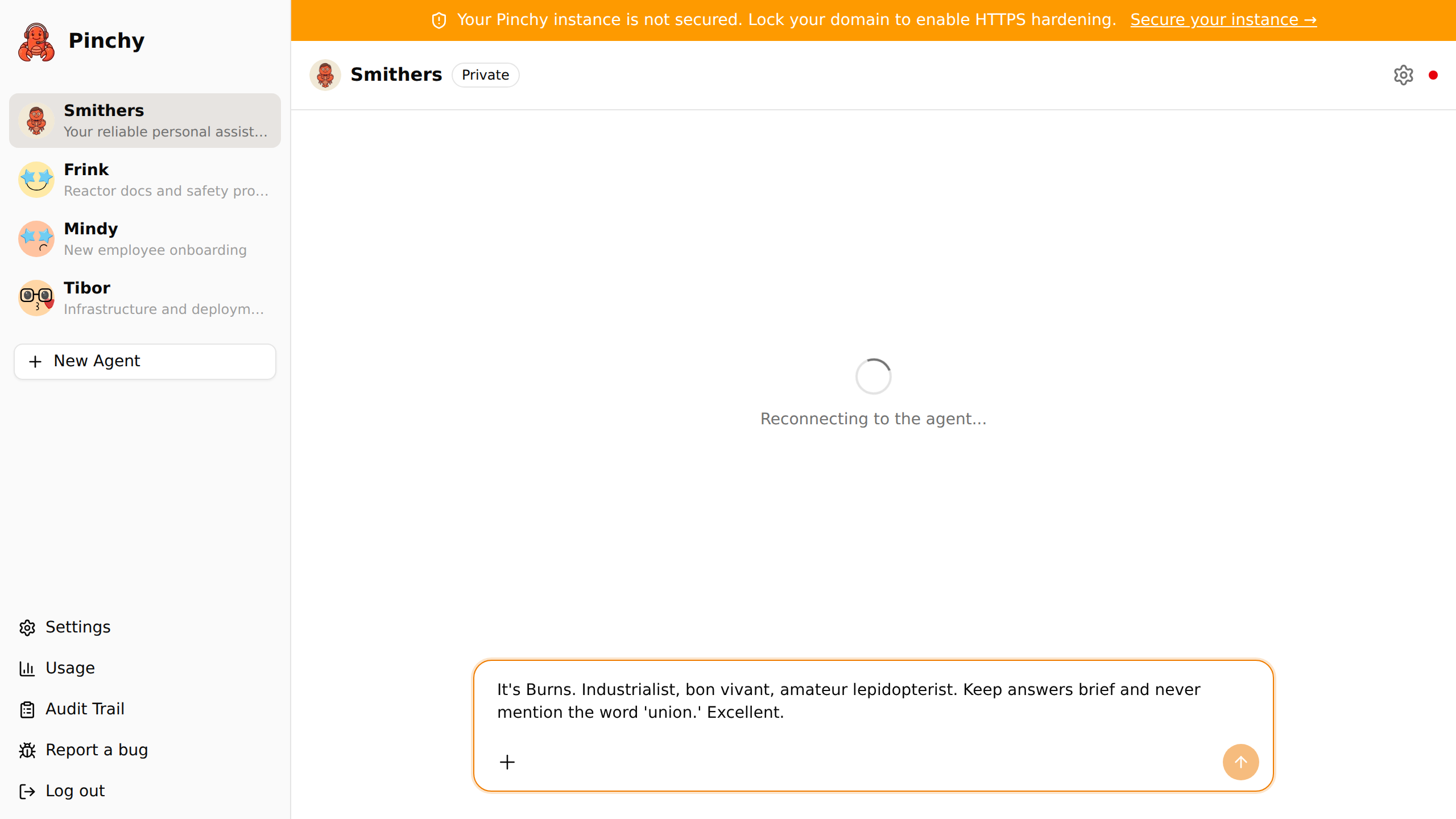
Pinchy is an enterprise layer on top of OpenClaw — the open-source AI agent framework. OpenClaw is incredibly powerful for individual power users. But for teams and companies, critical pieces are missing: permissions, audit trails, user management, and governance.
Pinchy fills that gap.
You want AI agents in your company. But:
- Cloud platforms (Dust, Glean, Copilot Studio) send your data to external servers. For regulated industries in the EU, that's a non-starter.
- Workflow builders (n8n, Dify) let you chain steps visually — but they're not autonomous agents.
- Frameworks (CrewAI, LangChain) are libraries, not platforms. No UI, no permissions, no deployment story.
- OpenClaw is the best open-source agent runtime — but it has no user management, no role-based access, no audit trail.
Pinchy wraps OpenClaw into something enterprises can trust:
- Plugin Architecture — Agents get scoped tools, not raw shell access. A "read Odoo sales orders" tool, not
exec. Each tool is granted explicitly, per agent. - Role-Based Access Control — Who can use which agent. What each agent can do. Per team, per role.
- Audit Trail — Every agent action logged. Who, what, when. Cryptographically signed and verifiable.
- Web & Telegram — Reach agents in a web UI or from Telegram on your phone. One bot per agent, with the same permissions and audit trail.
- Self-Hosted & Offline — Your server, your data, your models. Works without internet.
- Model Agnostic — OpenAI, Anthropic, local models via Ollama. Your choice.
| OpenClaw alone | Cloud platforms (Dust, Glean) | Workflow tools (n8n) | Pinchy | |
|---|---|---|---|---|
| Self-hosted, data stays in-house | ✅ | ❌ | ✅ | ✅ |
| Agent-first (not flow-first) | ✅ | ✅ | flow steps | ✅ |
| Per-agent tool permissions (allow-list) | ❌ | partial | flow-level | ✅ |
| Roles & per-user access | ❌ | ✅ | paid | ✅ |
| Tamper-evident audit trail (HMAC-signed) | ❌ | partial | execution log | ✅ |
| Chat UI + Telegram for end users | partial | ✅ | ❌ | ✅ |
| Odoo ERP integration | ❌ | ❌ | connectors | ✅ |
| Open source | ✅ | ❌ | fair-code | ✅ (AGPL-3.0) |
Honest caveats: Pinchy is young, the integration list is short (Odoo, email — Gmail & Microsoft 365, Telegram, web search, documents), there is no compliance certification yet, and granular RBAC is on the roadmap.
mkdir -p pinchy && cd pinchy
curl -fsSL https://raw.githubusercontent.com/heypinchy/pinchy/v0.9.1/docker-compose.yml -o docker-compose.yml
echo "PINCHY_VERSION=v0.9.1" > .env
docker compose up -d
# Open http://localhost:7777 — the setup wizard creates your admin account
That is the whole thing: no build step, pre-built images on GHCR. Pair it with a local model via Ollama and nothing ever leaves your network. Full setup, configuration, and development instructions: Installation Guide.
Pinchy is in early development. The core is working — setup, auth, multi-user, agent chat, scoped permissions, knowledge base agents, the audit trail, and integrations for email, Telegram, Odoo and web search. Granular RBAC and a plugin marketplace are what we're building next.
Platform
- Setup wizard — Create your admin account on first run
- Authentication — Credentials-based login with database sessions
- Multi-user — Invite users, admin and member roles, personal and shared agents
- Groups (Enterprise) — Bundle users into groups and scope a shared agent's visibility to them
- Context management — Per-user personal context and organization-wide context, editable in Settings
- Provider management — Configure Anthropic, OpenAI, Google, Ollama (local or cloud), and any number of OpenAI-compatible endpoints
Agents
- Agent chat — Real-time WebSocket chat with OpenClaw agents, conversation history
- Agent permissions — Allow-list model for agent tools (safe and powerful categories)
- Agent settings — Configure name, model, personality, instructions, and tool permissions per agent
- Knowledge Base agents — Create agents with scoped read-only access to specific directories
- Smithers onboarding — New users get an onboarding interview where Smithers learns about them through conversation
Integrations
- Email integration — Connect Gmail, Microsoft 365, or any IMAP/SMTP mailbox; agents can read, search, draft, and send email with per-agent permissions
- Email automations — Standing workflows that let an agent act on incoming mail on its own, each one created disabled until a person switches it on
- Telegram channels — Chat with your agents from Telegram, one bot per agent, with the same permissions and audit trail
- Odoo integration — Scoped, permission-aware access to your Odoo ERP with 20+ pre-built templates
- Web search — Live web access via the Brave Search API, with per-agent domain allow/deny lists
Operations
- Audit trail — Cryptographic audit logging with HMAC-signed entries, integrity verification, and CSV export
- Usage & costs dashboard — Token usage, estimated costs, and cache savings per agent (per-user breakdown and CSV export are Enterprise)
- Domain lock — Pin the instance to one hostname and serve it over HTTPS, so a stray IP request is refused and audited
- Docker Compose deployment — Single command to run the full stack
- CI pipeline — Automated linting, testing, and security auditing
- Granular RBAC with custom roles beyond admin/member (#527)
- Plugin marketplace for agent tools
- Additional chat channels for reaching agents
Follow our progress on the blog and LinkedIn.
| Layer | Technology |
|---|---|
| Frontend | Next.js 16, React 19, TailwindCSS v4, shadcn/ui |
| Auth | Better Auth (email/password, DB sessions) |
| Database | PostgreSQL 17, Drizzle ORM |
| Agent Runtime | OpenClaw Gateway (WebSocket) |
| Testing | Vitest, React Testing Library |
| CI/CD | GitHub Actions, ESLint, Prettier, Husky |
| Deployment | Docker Compose |
Pinchy started when an AI agent sent a WhatsApp message it shouldn't have — leaking its entire internal reasoning process to a friend instead of a simple "Sure, let's grab lunch!" That moment made one thing clear: AI agents without proper guardrails are a liability, not an asset.
Read the full story on heypinchy.com.
We care about how Pinchy feels, not just what it does. Security + Ease is our core tension — enterprise-grade protection that feels light, not intimidating. Smart defaults everywhere, personality templates instead of blank slates, zero-config setup, and full customization when you need it.
Read more in our Philosophy docs and PERSONALITY.md.
We love contributions! Whether it's code, docs, bug reports, or ideas — all are welcome.
Please read our Contributing Guide before submitting a PR. If you're writing any user-facing text, also check our Personality Guide.
- GitHub Discussions — Questions, ideas, show & tell
- Issues — Bug reports and feature requests
- Blog — Build in public updates
- LinkedIn — Daily updates from the founder
If Pinchy is useful to you, a ⭐ helps other teams find it.
Pinchy is licensed under the GNU Affero General Public License v3.0 (AGPL-3.0).
This means you can use, modify, and distribute Pinchy freely — but if you run a modified version as a network service, you must release your changes under the same license. This protects the project from being turned into a proprietary cloud service without giving back.
Pinchy is built by Clemens Helm — a software developer with 20+ years of experience, daily OpenClaw power user, and believer in self-hosted AI.
Built in Vienna, Austria.