This repository was archived by the owner on Mar 10, 2026. It is now read-only.
Method 2. Using RVX Builder (Windows MacOS Linux Android)
- remove all YouTube related modules
- remove directories:
/data/adb/service.d,/data/adb/post-fs-data.d,/data/adb/revanced - reboot device
1. Check the README.md of revanced-patches for supported YouTube versions
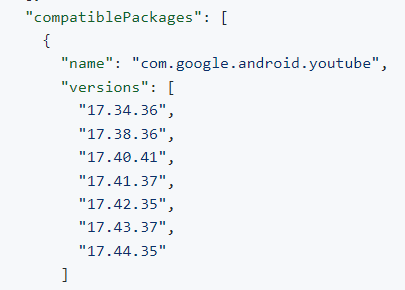
※ For YouTube Music, all versions are supported
2. Download the supported version of YouTube / YouTube Music from APKMirror and install it on your device.
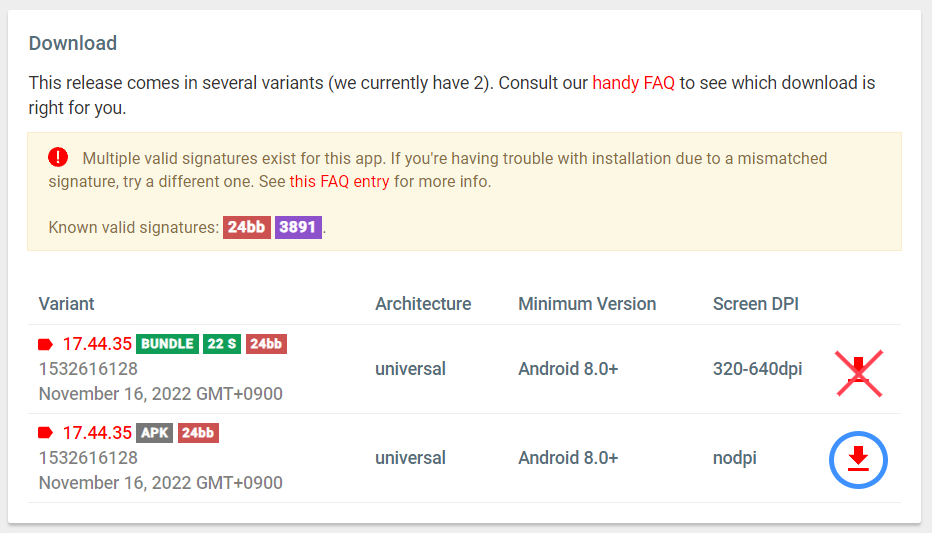
※ You must download the nodpi version.
-
I recommend including all, except for some patches.
-
Because ReVanced Extended is designed assuming all patches are included.
-
Also, since my patch does not support
settings-framework, excluding the patch will not remove it from the Settings UI. -
Read this document for a list of patches you can include or exclude.
- Download the rvx-builder from Latest releases, and Run
※ For most rvx-builder errors (PC environment), please refer to this issue pages
※ Please report any other issues on the github issues page.