 Espruino JavaScript
Puck.JS connection to Bluno Beetle #3263

Replies: 8 comments

-
|
Posted at 2020-01-27 by @gfwilliams I can't find too much information on the Bluno Beetle in my quick look, but Espruino can communicate with basically any Bluetooth LE device so you should be fine. Obviously I don't have one here to test, but going by the code that's at https://evothings.com/doc/examples/bluno-helloworld.html It seems that you can just connect with the Puck.js and write to characteristic The radio module on Puck.js is CE/FCC/etc certified, and since that's the only emitting component we self-certify Puck.js itself. So short answer - yes, it's CE certified. I'm not 100% sure what you mean by EMS-proofed, but as part of the CE testing for the module there's a bunch of electromagnetic testing, and since there's nothing conductive on Puck.js's exterior I'd be confident in it even in pretty electrically harsh environments. |
Beta Was this translation helpful? Give feedback.

-
|
Posted at 2020-01-27 by psc1988 Hi Gordon, first of all, thank you for your great support and your time! I would like to develope a wireless button. So I could use the Puck.JS as finished product and I have to develope then the receiver module with the Bluno Beetle inside, which controls the outputs to other end devices via Jack connectors (3,5mm). The Jack connectors are common in the sector I would like to use it. The incoming 3,3V Signal from the external devices (3,5 Jack cabel) will be switched by a NPN-bipolar Transistor by the Bluno Beetle in the receiver module. Best regards |
Beta Was this translation helpful? Give feedback.
-
|
Posted at 2020-01-28 by @gfwilliams Sounds great! You could use something like a ULN2003 which has a bunch of NPN transistors plus all the resistors needed built in. If you're actually looking at making a product then I'd seriously suggest you look at the MBDT42Q breakout board (or even using the bare MBDT42Q module if you're making your own PCB). While the Bluno Beetle will work, using another Espruino device gives you loads of extra options - for example for adding some kind of security to the Bluetooth connection. |
Beta Was this translation helpful? Give feedback.
-
|
Posted at 2020-01-28 by psc1988 Hi Gordon, thank you very much for your suggestion. You are right, this make sense. I think I will do it with a MBDT42Q Breakout Board. I would connect it to my specific PCB with the Jack output and to place the needed transistor on that is no problem as well. The only thing I want to create is a receiver module as small as possible. What I need to check is, if the tactile button is easy to press or if not that I could change this maybe. The thing is, the project would be for people with muscular deseases or tetraplegics who use a electric power wheelchair. To reduce the cable management there would be a great benefit. Best regards |
Beta Was this translation helpful? Give feedback.
-
|
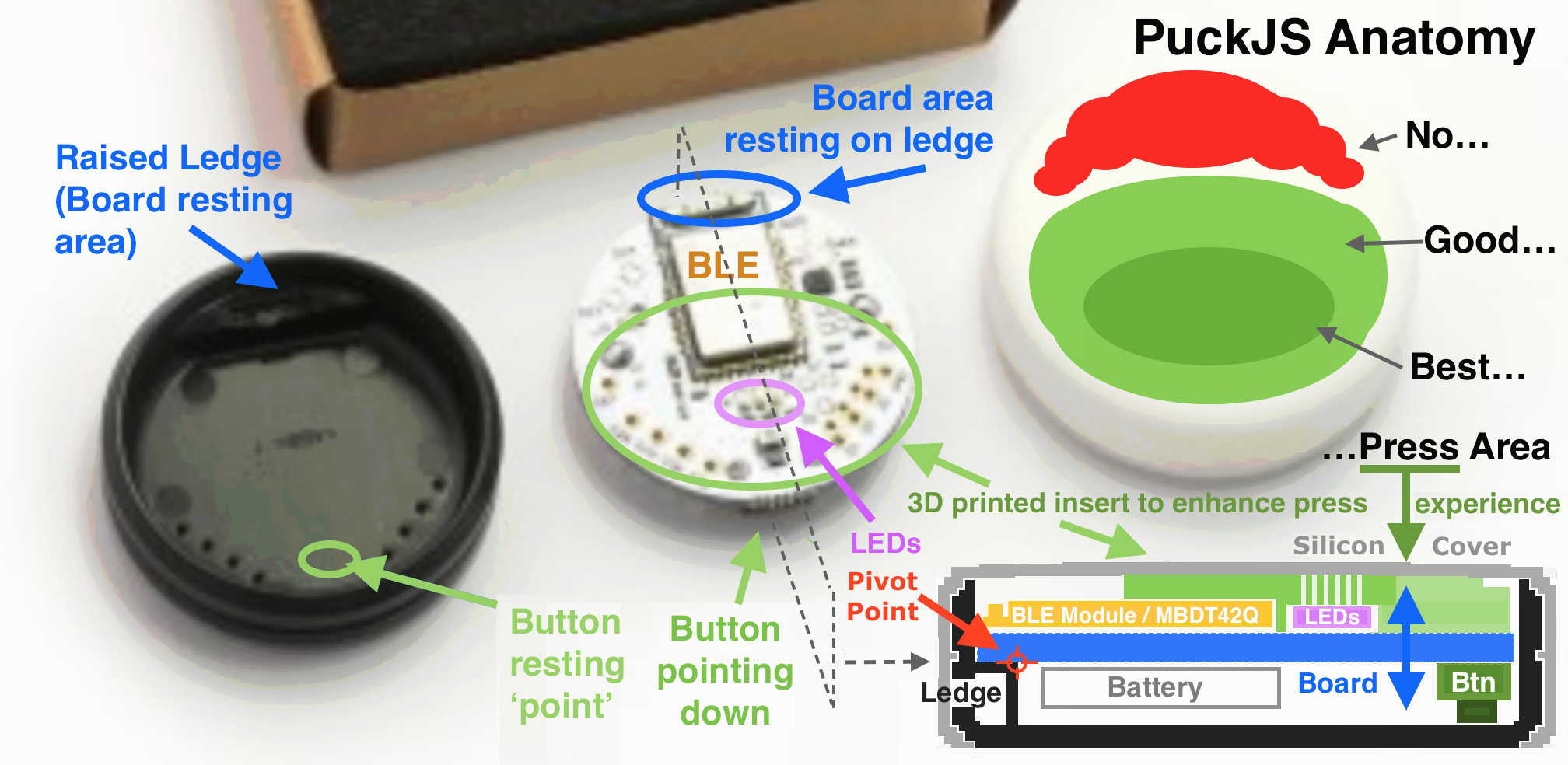
Posted at 2020-01-28 by @allObjects @user108865 to give you an idea of PuckJS' Anatomy and its button press experience, take a look at annotated picture below. I 'styled' cross cut - at bottom right - you can see how the button indirectly is pressed: By pressing on the board the button is pressed against the bottom of the case. Therefore, I suggest to create a board / component protective insert to enhance the press experience and make the touch area on the silicon cover more pronounced. Since the board acts like a leverage, best pressing point is at the opposite end of the pivot point / ledge side, and press experience decreases the closer to the pivot point / ledge to become practically impossible close to and over the pivot point / ledge (pure mechanics from physics). Some filed tries with different inserts (and covers) could answer usability. Cover with hard area where pivot point is and soft - with matching insert - where button is located. Of course, if you can go without changing the cover design, that would be great. Inserts should have a small opening where LEDs are or be transparent to keep LEDs useable. With no insert center is the best press area - edge of the BLE module, opposite of the antenna.Attachments: |
Beta Was this translation helpful? Give feedback.
-
|
Posted at 2020-01-28 by psc1988 Wow great explanation :) Thank you very much !! |
Beta Was this translation helpful? Give feedback.
-
|
Posted at 2020-01-29 by psc1988 Is the code above for the Bluno? Because I use the Arduino IDE to program but as I see, I am a noob in BLE. Really hard as beginner. |
Beta Was this translation helpful? Give feedback.
-
|
Posted at 2020-01-30 by @allObjects @user108865 code in post #2 from @gfwilliams is code to run on any Espruino BLE platform (for example Puck.js) and is in JavaScript. |
Beta Was this translation helpful? Give feedback.


Uh oh!
There was an error while loading. Please reload this page.
-
Posted at 2020-01-27 by psc1988
Hi,
is it possible to make a bluetooth connection to the Bluno Beetle Module (ATMega328P, Bluetooth Chip: CC2540)?
I want to transmit three single signals of the button from Puck.JS (Single Click, Double Click and Hold Down). I saw too late there is also a breakout board from espruino (MBDT42). I ordered now a Bluno Beetle for Prototyping.
My second question if the Puck.JS has CE conformity and is it EMS-proofed?
Best regards
Beta Was this translation helpful? Give feedback.
All reactions