  ▄██▀ ▀█  ▄██▀ █▄  ▀██  ██▀  ▄██▀ ▀█  ▄██▀ █▄   █▄   ▄█
 ▐▒▒▒     ▐▒▒▒  ▒▒▌  ▒▒  ▒▒  ▐▒▒▒     ▐▒▒▒  ▒▒▌  ▒▒▒▄▒▒▒
 ▐▒▒▒     ▐▒▒▒  ▒▒▌  ▒▒▌ ▒▒  ▐▒▒▒     ▐▒▒▒  ▒▒▌  ▒▒ ▀ ▒▒
  ▀██▄ ▄█  ▀██▄ █▀    ▀█▄▀    ▀██▄ ▄█  ▀██▄ █▀  ▄██▄ ▄██▄

XChaCha20 · ML-KEM-768 · Ed25519 · BLAKE3 · SPQR · E2EE · ephemeral · N-party
Note
How to install, configure, and run the COVCOM server and clients. Install channels, flags, and usage patterns come first; building from source and all developer tooling live in development.
Every message is encrypted with XChaCha20-Poly1305. That is the core cipher. Everything else exists to get a fresh, unique XChaCha20 key to the right people at the right time.
Each participant owns one send chain: a stateful KDFChain that steps
forward on every message via HKDF-SHA-256, producing a unique 32-byte key
and wiping the previous chain key. Message keys are wiped after use.
Past keys are unrecoverable from current state.
Epoch transitions use ML-KEM-768 (FIPS 203). When a ratchet fires, the sender generates a shared seed, KEM-encapsulates it separately for each peer, and broadcasts the result. Every peer derives the same new chain from that seed. The KEM ciphertext travels in-band; the decapsulator's keypair rotates immediately after use.
The group uses a Sender Keys model: one send chain per participant, not one per pair. O(N) state regardless of room size.
Every session also mints a fresh Ed25519 signing keypair on construction.
Identity claims and every broadcast are signed under it. Each peer's
claims form a BLAKE3-chained log: every claim binds the previous payload's
hash, so the server cannot reorder, drop, or substitute a structural event
mid-session without breaking the chain. The session signing public key
derives a fingerprint surface (BLAKE3(sessionPk, 16) → eight OKLCh
swatches + 16-char hex) for out-of-band verification. Both clients expose
a sidebar with two panels: Verify lists your fingerprint and every
peer's side-by-side; Event Log captures every inbound/outbound
WebSocket frame and every crypto action with redacted payloads and
expandable detail rows.
This implements the Sparse Post-Quantum Ratchet from Signal's Double Ratchet spec (§5, Revision 4). For more detail, see PROTOCOL.md.
Cryptographic primitives are provided by leviathan-crypto.
Nothing needs Bun at runtime. Every component installs
manually (a release binary, the Docker image, or the single-file
covcom.html web page) or from the npm registry with any JS package
manager. Bun is required only to develop or build from source.
| Component | Channel | Requires |
|---|---|---|
| Web client | hosted page | a modern browser (Chrome, Firefox, or Safari) |
| Web client | covcom.html release asset |
a modern browser; open from disk or any static host |
| CLI | release binary | nothing |
| CLI | npm i -g covcom |
Node 18 or newer, or Bun (launcher shim only) |
| Server | release binary | nothing |
| Server | Docker image | Docker |
| Server | npm i -g covcom-server |
Node 18 or newer, or Bun (launcher shim only) |
| All of it | source: develop, build, test | Bun v1.3.14 or later (the packageManager pin) |
The release binaries and the npm platform packages embed the runtime they were compiled with, which is why the shim's Node is the only requirement on the npm rows. See SECURITY-POLICY for how that frozen runtime is patched.
COVCOM ships ready to run. Pick a channel; none of them need Bun, a build step, or a repository checkout. Building from source is covered in development.
Every release attaches xz-compressed standalone binaries for the CLI and the server, plus the single-file web client. Each binary embeds its own runtime: one downloaded file, zero dependencies.
Install the CLI:
curl -sLO https://github.com/xero/covcom/releases/latest/download/covcom-linux-x64.xz
xz -d covcom-linux-x64.xz
chmod +x covcom-linux-x64
sudo mv covcom-linux-x64 /usr/local/bin/covcom
Install the server the same way:
curl -sLO https://github.com/xero/covcom/releases/latest/download/covcom-server-linux-x64.xz
xz -d covcom-server-linux-x64.xz
chmod +x covcom-server-linux-x64
sudo mv covcom-server-linux-x64 /usr/local/bin/covcom-server
Swap the asset name for your platform. CLI targets:
| Asset | Target |
|---|---|
covcom-macos-arm64 |
macOS Apple Silicon |
covcom-macos-x64 |
macOS Intel |
covcom-linux-x64 |
Linux x86_64, glibc |
covcom-linux-x64-musl |
Linux x86_64, musl (alpine) |
covcom-linux-arm64 |
Linux arm64, glibc |
covcom-linux-arm64-musl |
Linux arm64, musl (alpine) |
covcom-win-x64.exe |
Windows x86_64 |
The server builds for the same seven targets; its assets are tabled under
standalone binary. The musl builds of both apps link
the C++ support libraries dynamically, so a stock alpine container needs
apk add libstdc++ libgcc before the binary runs.
Verify before unpacking. The SHA256SUMS file and the GitHub
build-provenance attestation cover the .xz assets as downloaded;
covcom.html verifies as-is:
sha256sum -c SHA256SUMS --ignore-missing
gh attestation verify covcom-linux-x64.xz --repo xero/covcom
npm i -g covcom # CLI client
npm i -g covcom-server # relay serverThe packages carry the same prebuilt binaries with the runtime embedded, so
npm installs need no Bun. Each meta package pulls the one
@covcom/<app>-<platform> package matching your os, cpu, and libc, and a
small shim execs the binary; the shim runs on Node 18 or newer, or on Bun.
The server, with the web client baked in and Caddy terminating TLS, ships as a container image on every release. The quickstart is two commands; the full reference is docker below.
The web client needs no install at all. Download covcom.html from any
release and open it straight from disk, or use a hosted instance. See
web client.
The server ships four ways. Same code, same flags and env vars, same wire contract; the modes differ only in how you launch them.
| Mode | Launch | Requires |
|---|---|---|
| docker | a published image | docker |
| binary | ./covcom-server-<target> |
nothing |
| npm | npm i -g covcom-server |
node 18+ |
| source | bun start:server (see development) |
bun |
Every mode reads the same configuration; see command-line flags for the flags, the env vars, and the precedence between them. How each mode picks up new releases and security fixes is covered in upgrading.
The Docker image runs the WebSocket server behind Caddy with automatic TLS via ACME. There are no build arguments; all configuration is runtime environment variables.
The image is published to two registries on every release:
- Docker Hub:
xerostyle/covcom - GHCR:
ghcr.io/xero/covcom
Two tags are published per release:
X.Y.Zis the pinned semantic version. Use this in production.latestmoves with each release. A new release will silently upgrade you on the next pull.
If a vulnerability is disclosed, the affected X.Y.Z tag is hard-deprecated
via a tombstone wrapper: pulling it then exits nonzero with an error message
pointing at the safe replacement. Pinning a specific version means you find
out immediately. See SECURITY.md for the full disclosure
and deprecation policy.
Pull and run:
docker pull xerostyle/covcom:latest
docker run -d \
  -p 80:80 -p 443:443 \
  -e DOMAIN=chat.example.com \
  -v covcom_caddy_data:/data \
  -v covcom_caddy_config:/config \
  xerostyle/covcom:latest
DOMAIN is required; the container exits immediately without it. Caddy
provisions a TLS certificate for $DOMAIN on first start, and the volume
mounts persist Caddy's certificates and config across container restarts.
Without them, Caddy re-provisions a certificate on every start, which will
hit Let's Encrypt rate limits, or break SSL pinning if used.
Stop and logs:
docker ps                  # find the container id
docker logs -f <container>
docker stop <container>
Extend the image:
The published image is a sensible base for layering your own Caddy config, extra binaries, or sidecar tooling. Pin to a specific version so your custom image does not drift on every COVCOM release.
FROM ghcr.io/xero/covcom:1.0.0

# example: drop in additional Caddy directives
COPY my-caddy-extras.conf /etc/caddy/extras.conf

# example: add a sidecar utility (base image is debian-based)
RUN apt-get update && apt-get install -y --no-install-recommends \
      dnsutils \
    && rm -rf /var/lib/apt/lists/*
The base image's entrypoint and exposed ports (80, 443) remain in effect unless you override them. The same environment variables documented in environment variables below apply to your derived image.
Building the image from a checkout is covered in docker (local build).
Every release attaches compiled server binaries, so a deployment is one
downloaded file: no bun, no node, no npm. Binaries are xz-compressed; every
asset, including the uncompressed covcom.html web client, is covered by a
SHA256SUMS file and a GitHub build-provenance attestation. Verify the
download first; the commands are in
release binaries.
| Asset | Target |
|---|---|
covcom-server-macos-arm64 |
macOS Apple Silicon |
covcom-server-macos-x64 |
macOS Intel |
covcom-server-linux-x64 |
Linux x86_64, glibc |
covcom-server-linux-x64-musl |
Linux x86_64, musl (alpine) |
covcom-server-linux-arm64 |
Linux arm64, glibc |
covcom-server-linux-arm64-musl |
Linux arm64, musl (alpine) |
covcom-server-win-x64.exe |
Windows x86_64 |
covcom.html |
the web client, any browser |
Unpack and run:
xz -d covcom-server-linux-x64-musl.xz
chmod +x covcom-server-linux-x64-musl
./covcom-server-linux-x64-musl --port 1337
The binary takes the same flags and env vars as every other mode, reports
its baked-in version with --version, and auto-loads .env from its
working directory; see command-line flags.
The musl builds link the C++ support libraries dynamically, so a stock
alpine container needs apk add libstdc++ libgcc before the binary runs.
The glibc builds run on mainstream distros as-is.
Warning
Like the no-docker path below, the binary serves plain HTTP on localhost. Your reverse proxy must terminate TLS and set the security headers; see Deployment Hardening.
The same compiled binaries publish to npm on every release:
npm i -g covcom-server
covcom-server --port 1337
The covcom-server meta package lists one
@covcom/server-<platform> package per target as an optional dependency;
npm installs only the one matching your os, cpu, and libc, and a small
shim execs the binary. The shim runs on Node 18 or newer, or on Bun; the
binary embeds its own runtime, so Bun is never required. On linux the
shim picks the glibc or musl package by probing process.report.
| platform | libc | package |
|---|---|---|
| darwin-arm64 | - | @covcom/server-darwin-arm64 |
| darwin-x64 | - | @covcom/server-darwin-x64 |
| linux-x64 | glibc | @covcom/server-linux-x64 |
| linux-x64-musl | musl | @covcom/server-linux-x64-musl |
| linux-arm64 | glibc | @covcom/server-linux-arm64 |
| linux-arm64-musl | musl | @covcom/server-linux-arm64-musl |
| win32-x64 | - | @covcom/server-win32-x64 |
The musl packages carry the same dynamic-linking caveat as the release
binaries: a stock alpine container needs apk add libstdc++ libgcc
first. The same warning as above applies too: the server speaks plain
HTTP and expects your reverse proxy to terminate TLS.
Runs the server directly, with no TLS and no Caddy. Use this when fronting COVCOM with your own reverse proxy. It applies to the release binary, the npm install, and source mode alike:
covcom-server --port 1337The server listens on 127.0.0.1:$PORT (default 1337). Set
HOST=0.0.0.0, or pass --host, to bind all interfaces when your reverse
proxy lives on another host.
Warning
The bundled Caddy provides TLS termination and the X-Frame-Options: DENY
response header. On this path the server provides neither, so your reverse
proxy must terminate TLS and set the equivalent security headers. See
Deployment Hardening.
| Variable | Default | Description |
|---|---|---|
DOMAIN |
required | Domain name for Caddy TLS (Docker image only) |
PORT |
1337 |
Internal port the server listens on |
HOST |
127.0.0.1 |
Interface the server binds. Loopback by default; set 0.0.0.0 to expose directly |
ADMIN_TOKEN |
unset | Optional token required to create rooms |
ROOM_TTL |
24 |
Hours of inactivity before an empty room is deleted. 0 disables TTL |
MAX_ROOM_SIZE |
20 |
Maximum participants per room. 0 is unlimited |
ADMIN_TOKEN gates room creation only. Joining is gated by the
roomSecret embedded in the invite, which the server generates at creation
time. You do not need ADMIN_TOKEN set to run a private server; the
roomSecret alone prevents uninvited joins.
Every environment variable above (except DOMAIN, which is Caddy's) has a
matching flag. Pass them to the compiled binary, the npm shim, or source
mode; all behave identically.
| Flag | Short | Env var | Default | Description |
|---|---|---|---|---|
--port |
-p |
PORT |
1337 |
Port the server listens on |
--host |
- | HOST |
127.0.0.1 |
Interface to bind |
--max-room-size |
- | MAX_ROOM_SIZE |
20 |
Max participants per room. 0 is unlimited |
--admin-token |
- | ADMIN_TOKEN |
unset | Token required to create rooms |
--room-ttl |
- | ROOM_TTL |
24 |
Hours before an empty room is pruned. 0 is never |
--help |
-h |
- | - | Print the usage screen and exit |
--version |
-v |
- | - | Print the version and protocol byte and exit |
Precedence is flag > environment variable > default: a provided flag overrides its env var, and an absent flag leaves the env behavior untouched. Flags fail loudly: a non-numeric or negative numeric value, or an unknown flag, prints usage to stderr and exits 1.
Flags and environment variables are the whole configuration interface, and
they behave identically whether the server runs from source or as a compiled
binary. That includes .env handling: Bun auto-loads a .env file from the
working directory in both modes, verified on Bun 1.3.14, the version pinned
by packageManager. Loaded .env values rank below real environment
variables, so the full chain is flag > environment variable > .env >
default.
The behavior behind each setting (room caps, TTL pruning, admin gating) is specified in SERVER-SPEC § configuration, and the binary, npm, and source entry paths in SERVER-SPEC § launch modes.
Caution
A .env file in the directory you launch from configures the server
silently, in binary mode too. Audit the working directory of a production
deployment, or pass explicit env vars or flags, which always win over
.env values.
Warning
--admin-token is visible in process listings (ps) and shell history.
Prefer the ADMIN_TOKEN environment variable for secrets.
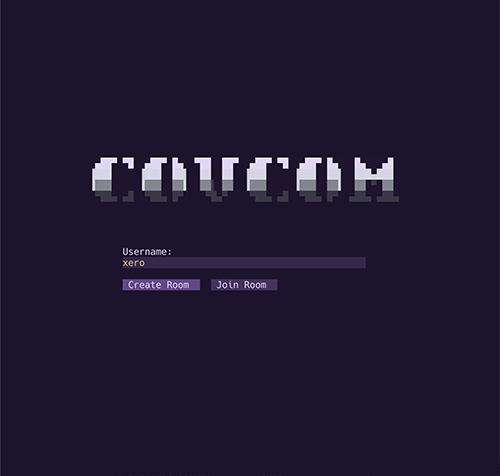
The CLI is a compiled standalone binary with a custom zero-dependency TUI.
Install from npm:
npm i -g covcom
covcom
The covcom meta package pulls the prebuilt @covcom/cli-<platform>
binary for macOS arm64 or x64, Linux x64 (glibc), or Windows x64; the
install needs Node 18 or newer (or Bun) for the launcher shim and nothing
else. Other platforms can use a release binary (see
release binaries) or build from source (see
building).
Join directly from a .room file:
covcom --join /path/to/invite.roomcovcom [-h|--help] [-v|--version] [-x|--clean] [-a|--anon] [-c|--config <path>] [-j|--join <path>]
all flags are optional and order-independent. unknown args are ignored. each
flag has a short and a long form, and the two value flags accept either a space
or an = between the flag and its value (--config <path> or --config=<path>,
-c <path>, -c=<path>, or the glued -c<path>).
short flags bundle the usual way: -xa is -x -a, and a value flag can end a
bundle, taking the rest of the token or the next argument as its value (-xac <path> is -x -a -c <path>). a value that looks like another flag is treated
as missing, so a flag is never read as a path (--join --clean leaves the join
path unset).
| flag | argument | notes |
|---|---|---|
-h, --help |
none | prints the banner and a usage summary, then exits without starting the TUI. |
-v, --version |
none | prints the covcom version and protocol byte, then exits without starting the TUI. the values are baked in at build time. |
-c, --config |
path | path to the config file, used in place of the default location. see configuration. a missing or dangling value (e.g. --config --clean) is ignored. |
-j, --join |
path | path to a .room invite file, read at startup. with a username already saved in config, it routes the user straight to the Join screen with the invite prefilled, skipping Landing. without a saved username (a fresh setup, or --clean/--anon suppressing it) the user lands on Landing to enter a username, then the Join screen opens with the invite prefilled. a missing or dangling value (e.g. --join --clean) is ignored rather than treated as a path. |
-x, --clean |
none | disables config persistence entirely for the run. see configuration. |
-a, --anon |
none | narrower variant of --clean scoped to server and username. see configuration. |
--join pairs with the paranoia flags for a fully ephemeral session, e.g. covcom --clean --join /path/to/invite.room joins from a file without reading or writing any config.
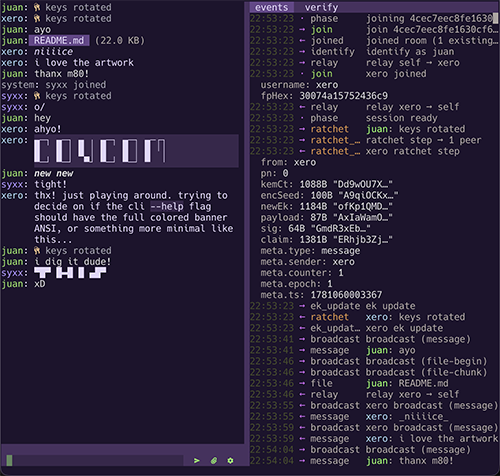
config is read at startup and written back by the CLI when the user changes a persisted setting (currently just the sidebar width). the config file path is resolved in this order:
--config <path>, used verbatim.$XDG_CONFIG_HOME/covcom/config.jsonwhenXDG_CONFIG_HOMEis set.~/.config/covcom/config.json, the XDG default.
every field is optional; missing fields fall back to the documented default. a field present with the wrong type is dropped back to its default rather than crashing the client, and the ignored settings are named in a startup modal (see theme for the same treatment of color values). a config file that is not valid json falls back to defaults entirely.
two paranoia level flags are exposed to control how the config file is used.
passing the --clean CLI flag disables config persistence entirely for that
run: the file is neither read (nothing is prefilled into the lobby screens, all
fields fall back to defaults) nor written (no server/username save after a
successful create, no sidebar-width persistence).
passing the --anon CLI flag is a narrower variant scoped to server and
username only: those two are neither read (not prefilled into the lobby
screens) nor written (no save after a successful create, and the on-disk values
are left untouched). all other fields (theme, copyCmd, showSystem,
sidebar, icons), read and persist exactly as normal. if both flags are
passed, --clean takes precedence.
| field | type | default | notes |
|---|---|---|---|
server |
string | unset | prefilled into the Server DNS input on the create screen. updated after a successful create. skipped under --clean and --anon. |
username |
string | unset | prefilled into the Username input on the landing screen. updated after a successful create. skipped under --clean and --anon. |
copyCmd |
string | unset | clipboard command for "Copy Code". whitespace-split into argv. see copyCmd. |
showSystem |
boolean | true |
when false, system messages (<peer> joined, server errors, etc.) are not appended to the chat scroll. event log still receives them. |
sidebar |
{ width?: number } |
{} |
see sidebar. |
icons |
{ send?, attach?, ratchet?, keys?, events?, verify?, escape?: string } |
{} |
glyph overrides for the chat input bar, key-rotation status, and the keys-display units. see icons. |
theme |
Partial<Theme> |
{} |
per-slot color overrides. see theme. |
the value is a single command string. covcom splits on whitespace and spawns the result with the armored invite piped to stdin.
{ "copyCmd": "xsel -b" }
{ "copyCmd": "xclip -selection clipboard" }
{ "copyCmd": "wl-copy" }
{ "copyCmd": "pbcopy" }
if unset, covcom probes pbcopy, xclip -selection clipboard, xsel -b,
wl-copy in that order and uses the first one that succeeds.
| field | type | default | range | notes |
|---|---|---|---|---|
sidebar.width |
number | 30 |
10-70 | percent of terminal width. clamped on read. |
stepping + / - from inside the sidebar adjusts this value by 5% per
press and writes it back to disk immediately. the sidebar is force-hidden
when screen.w < 80 regardless of this value.
| field | type | default | notes |
|---|---|---|---|
icons.send |
string | ">" |
label for the send button. |
icons.attach |
string | "+" |
label for the attach button. |
icons.ratchet |
string | "R" |
label for the ratchet (key rotation) button. |
icons.keys |
string | "" |
optional glyph shown before keys rotated in chat history when a ratchet occurs. empty (default) renders just keys rotated; a non-empty value renders <icon> keys rotated with one space between. emojis in terminals can mis-render width or break cursor positioning, which is why the default is unset. |
icons.events |
string | "" |
optional glyph for the events unit in the keys-display. unset renders the unit with no leading glyph (and no bookend space). |
icons.verify |
string | "" |
optional glyph for the verify unit in the keys-display. unset renders the unit with no leading glyph. |
icons.escape |
string | "" |
optional glyph for the return to chat unit in the keys-display. unset renders the unit with no leading glyph. |
labels can be any string, including multi-character text and Nerd Font /
PUA glyphs. valid values include ">", "send", "❯", ">>",
"". each button is sized as cellWidth(label) + 2, giving exactly one
column of background padding on each side. cell width is measured as the
codepoint count, which is accurate for ASCII, BMP unicode, and the
single-cell glyphs in the Nerd Font PUA ranges. labels containing
combining marks or wide CJK characters render correctly but may not center
visually.
the three buttons render in this order from left to right: send,
attach, ratchet. the rightmost button sits one column in from the
right edge of the chat pane.
pressing Esc while the chat input is focused replaces the input bar with the
keys-display: a row of ratchet, events, verify, and return to chat
units. each unit reads its leading glyph from the matching icon
(icons.ratchet, icons.events, icons.verify, icons.escape); an unset icon
renders nothing and skips the space that would bookend it, so a config without
these glyphs shows just the key and label. unlike the bar buttons, these read
the raw config value with no fallback, so the ratchet unit shows a glyph only
when icons.ratchet is explicitly set.
theme is a partial map of Theme slots. each slot accepts a
ColorValue:
type ColorValue =
  | { type: 'ansi16'; n: number }     // 0-15, the user's terminal palette
  | { type: '256';    n: number }     // 0-255, xterm 256-color
  | { type: 'hex';    value: string } // '#rrggbb' truecolor
  | null                              // inherit terminal default (bg/fg only)
prefer ansi16 for consistency with the user's shell theme. 256 and
hex are escape hatches for users who want a specific color independent
of the terminal palette.
each value is validated on launch: ansi16 n must be 0-15, 256 n
must be 0-255, and hex must be #rrggbb. an invalid value is dropped
back to that slot's default rather than rendering as a broken escape, and
a config file that is not valid json falls back to defaults entirely. when
anything is ignored, a modal on startup names the offending settings. extra
keys you add yourself (for example _inputBg comment keys) are left alone.
| slot | default (ansi16 n) | role |
|---|---|---|
bg |
null |
screen background. null keeps the terminal default. |
fg |
null |
default text. null keeps the terminal default. |
inputBg |
0 (black) | text input background. |
inputFg |
15 (bright white) | text input foreground. |
btnBg |
8 (dark gray) | unfocused button background. |
btnFg |
15 (bright white) | unfocused button foreground. |
btnFocusBg |
4 (blue) | focused button background. |
btnFocusFg |
15 (bright white) | focused button foreground. |
btnDisabledBg |
8 (dark gray) | disabled button background. |
btnDisabledFg |
8 (dark gray) | disabled button foreground (invisible label). |
barBg |
8 (dark gray) | chat input bar and sidebar tab strip background. |
barFg |
15 (bright white) | chat input bar foreground. |
barBtnBg |
8 (dark gray) | unfocused background of the bar action buttons (send / attach / ratchet / attach-mode cancel). Defaults to btnBg. |
barBtnFg |
15 (bright white) | unfocused foreground of the bar action buttons. Defaults to btnFg. |
barBtnFocusBg |
4 (blue) | focused background of the bar action buttons. Defaults to btnFocusBg. |
barBtnFocusFg |
15 (bright white) | focused foreground of the bar action buttons. Defaults to btnFocusFg. |
peer0 |
10 (bright green) | your own username prefix in the chat scroll. Reserved for self; peers never use it, so no peer can wear your color. |
peer1 |
14 (bright cyan) | peer username prefix in the chat scroll (and verify panel). Each peer is assigned one of peer1-peer7 by join order, wrapping after 7 (so a peer never lands on peer0 or the system color). |
peer2 |
12 (bright blue) | peer username color, slot 2 (see peer1). |
peer3 |
13 (bright magenta) | peer username color, slot 3. |
peer4 |
11 (bright yellow) | peer username color, slot 4. |
peer5 |
9 (bright red) | peer username color, slot 5. |
peer6 |
5 (magenta) | peer username color, slot 6. |
peer7 |
2 (green) | peer username color, slot 7. |
yourMsg |
7 (white) | own message body. |
peerMsg |
15 (bright white) | peer message body. |
codeFg |
15 (bright white) | inline code and fenced-block foreground. |
codeBg |
8 (dark gray) | fenced-block background fill. |
keyFg |
3 (yellow) | icons.keys glyph in the in-chat "keys rotated" ratchet notice (any user). |
ratchetTxtFg |
8 (dark gray) | "keys rotated" label text in the in-chat ratchet notice (any user). |
attachBg |
6 (cyan) | attachment chip background. |
attachFg |
0 (black) | attachment chip foreground. |
attachSelectedBg |
2 (green) | attachment chip background when keyboard-selected. |
attachSelectedFg |
0 (black) | attachment chip foreground when keyboard-selected. |
barAttach |
6 (cyan) | attach-mode icon prefacing the input box (foreground on barBg). Defaults to attachBg. |
calloutBg |
3 (yellow) | legacy callout strip background. unused; the waiting screen reports copy/download through modals now. retained for config compatibility. |
calloutFg |
0 (black) | legacy callout strip foreground. unused (see calloutBg). |
modalBg |
0 (black) | modal body background. |
modalFg |
15 (bright white) | modal body foreground. |
modalBorder |
6 (cyan) | modal border ring. |
modalTitle |
14 (bright cyan) | modal title row. |
disabled |
8 (dark gray) | secondary or muted UI text (status lines, attachment size, fingerprint hex, scroll bar). |
system |
256-color 250 (light gray) | in-chat system notices and /help output (the system: name prefix and body). Distinct from disabled so it can be recolored on its own. |
error |
9 (bright red) | error text (parse errors, server errors, etc.). |
evtTime |
8 (dark gray) | event-log timestamp column. |
evtArrow |
15 (bright white) | event-log direction glyph (→, ←, ·). |
evtMsg |
15 (bright white) | event-log summary body text. |
evtKey |
8 (dark gray) | event-log expanded-detail key label. |
evtVal |
15 (bright white) | event-log expanded-detail value. |
evtSelf |
5 (magenta) | event-log username prefix when the user is you. |
evtPeer |
6 (cyan) | event-log username prefix when the user is a peer. |
evtKindDefault |
4 (blue) | event-log kind column for uncategorized kinds. |
evtKindError |
1 (red) | event-log kind column for error, fatal, message-fail, claim-reject, decrypt-fail, send-fail. |
evtKindMember |
2 (green) | event-log kind column for join, rejoin, part, peer_joined, peer_left. |
evtKindRatchet |
3 (yellow) | event-log kind column for ratchet, ratchet-step, ratchet-step-fwd, ratchet_step, ratchet_step_fwd. |
simple user config:
{
"server": "chat.example.com",
"username": "xero",
"copyCmd": "xsel -b",
"showSystem": true,
"icons": {
"send": "",
"attach": "",
"ratchet": "",
"keys": "",
"events": "",
"verify": "",
"escape": ""
},
"theme": {
"btnFocusBg": { "type": "256", "n":33 },
"peer0": { "type": "hex", "value": "#ff8800" },
"peer1": { "type": "ansi16", "n":13 },
"evtKindRatchet": { "type": "ansi16", "n":5 }
}
}(evangelion) color theme:
{
	"theme": {
		"bg": null,
		"fg": null,
		"inputBg":          { "type": "hex", "value": "#39274C" },
		"inputFg":          { "type": "hex", "value": "#E6BB85" },
		"btnBg":            { "type": "hex", "value": "#483160" },
		"btnFg":            { "type": "hex", "value": "#E1D6F8" },
		"btnFocusBg":       { "type": "hex", "value": "#67478A" },
		"btnFocusFg":       { "type": "hex", "value": "#E1D6F8" },
		"btnDisabledBg":    { "type": "hex", "value": "#A1A0AD" },
		"btnDisabledFg":    { "type": "hex", "value": "#222222" },
		"barBg":            { "type": "hex", "value": "#483160" },
		"barFg":            { "type": "hex", "value": "#E1D6F8" },
		"barBtnBg":         { "type": "hex", "value": "#483160" },
		"barBtnFg":         { "type": "hex", "value": "#87FF5F" },
		"barBtnFocusBg":    { "type": "hex", "value": "#67478A" },
		"barBtnFocusFg":    { "type": "hex", "value": "#E1D6F8" },
		"system":           { "type": "hex", "value": "#A1A0AD" },
		"peer0":            { "type": "hex", "value": "#8EDF5F" },
		"peer1":            { "type": "hex", "value": "#A4D2EC" },
		"peer2":            { "type": "hex", "value": "#AB92FC" },
		"peer3":            { "type": "hex", "value": "#9F50E1" },
		"peer4":            { "type": "hex", "value": "#C586C0" },
		"peer5":            { "type": "hex", "value": "#E6BB85" },
		"peer6":            { "type": "hex", "value": "#B968FC" },
		"peer7":            { "type": "hex", "value": "#CE67F0" },
		"yourMsg":          { "type": "hex", "value": "#D4D4D4" },
		"peerMsg":          { "type": "hex", "value": "#E1D6F8" },
		"codeFg":           { "type": "hex", "value": "#E1D6F8" },
		"codeBg":           { "type": "hex", "value": "#39274C" },
		"attachBg":         { "type": "hex", "value": "#67478A" },
		"attachFg":         { "type": "hex", "value": "#E1D6F8" },
		"attachSelectedBg": { "type": "hex", "value": "#87FF5F" },
		"attachSelectedFg": { "type": "hex", "value": "#000000" },
		"barAttach":        { "type": "hex", "value": "#67478A" },
		"calloutBg":        { "type": "hex", "value": "#A4D2EC" },
		"calloutFg":        { "type": "hex", "value": "#000000" },
		"modalBg":          { "type": "hex", "value": "#201430" },
		"modalFg":          { "type": "hex", "value": "#D4D4D4" },
		"modalBorder":      { "type": "hex", "value": "#A4D2EC" },
		"modalTitle":       { "type": "hex", "value": "#A4D2EC" },
		"disabled":         { "type": "hex", "value": "#ADA4A0" },
		"error":            { "type": "hex", "value": "#DB6088" },
		"evtTime":          { "type": "hex", "value": "#43492A" },
		"evtArrow":         { "type": "hex", "value": "#CE67F0" },
		"evtMsg":           { "type": "hex", "value": "#ADA4A0" },
		"evtKey":           { "type": "hex", "value": "#ADA4A0" },
		"evtVal":           { "type": "hex", "value": "#D4D4D4" },
		"evtSelf":          { "type": "hex", "value": "#87FF5F" },
		"evtPeer":          { "type": "hex", "value": "#A4D2EC" },
		"evtKindDefault":   { "type": "hex", "value": "#ADA4A0" },
		"evtKindError":     { "type": "hex", "value": "#DB6088" },
		"evtKindMember":    { "type": "hex", "value": "#8BD450" },
		"evtKindRatchet":   { "type": "hex", "value": "#D99145" },
		"keyFg":            { "type": "hex", "value": "#E6BB85" },
		"ratchetTxtFg":     { "type": "hex", "value": "#A1A0AD" }
	}
}
Tip
See example.config.json for a fully annotated config with all the default values. The complete config surface and color system are specified in CLI-SPEC § defaults.
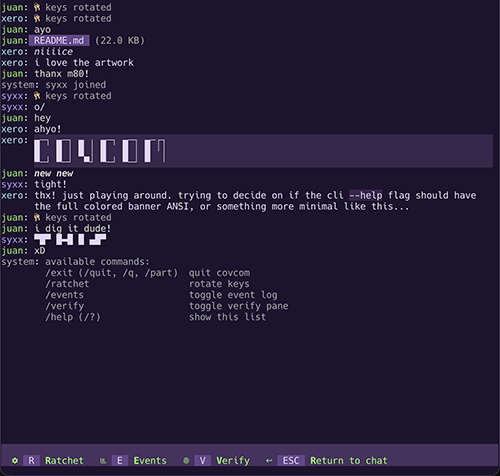
| Key | Action |
|---|---|
Tab / Shift+Tab |
Cycle focus |
Enter |
Send message / confirm |
Ctrl+C |
Confirm-quit prompt; press again to quit and wipe session |
Esc (in input) |
Open the modal keys-display over the input bar |
Ratchet, event log, and verify are reached through the keys-display: press Esc
while the chat input is focused and the input bar is replaced by the keys row.
From there R ratchets, E toggles the event log, and V toggles verify (shift
does not matter). Any action closes the display: ratchet returns to the input,
E/V defer to the toggle's own focus move (sidebar on open, input on close),
and Esc just returns to the input. The /ratchet, /events, and /verify
commands do the same from the message box. This is the web client's hotkey path
too, since Ctrl-key chords are taken by the browser.
When the sidebar has focus, ↑/↓ move selection in the event log, PgUp/PgDn
page through, Enter expands the selected entry's details, and +/- step
the sidebar width by 5%. Esc closes the sidebar. The sidebar is auto-hidden
on terminals narrower than 80 columns.
Files attach via the + button. Type or paste a path and use Tab for
completion. Received files save to the current working directory; existing
filenames get a numeric suffix.
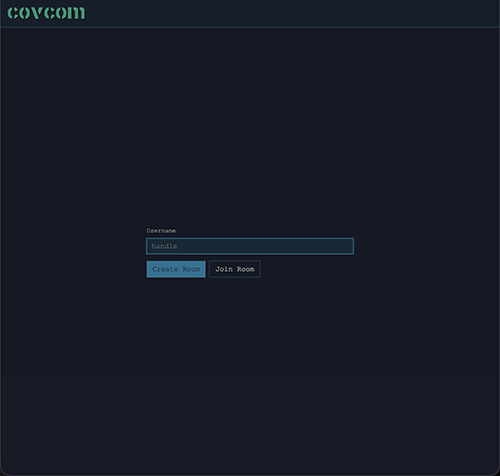
The web client is a single-page app that runs entirely in the browser. It opens on a landing screen where you create or join a room, then moves through the lobby into the chat. The screen flow is the same as the CLI and is covered in starting a session.
Release asset. Every release attaches the entire client as one inlined
page, covcom.html, checksummed and attested next to the binaries. No
install, no build step: download it, open it straight from disk (file://)
or serve it from any static host, and point the create screen at your
relay.
Hosted. The Docker image serves the same page behind Caddy, so a single-container deployment gives every participant a URL to open. The create screen prefills the server field with the host serving the page, which is the relay in that deployment.
All crypto, including chunked encrypted file transfer, runs as WASM on the
main thread, so the page works under the strictest possible content
security policy, default-src 'none', in Chrome, Firefox, and
Safari/WebKit (see
leviathan-crypto/docs/csp.md).
Building the page from a checkout is covered in building.
Once you are in a room, the chat fills the window and a row of controls sits in the header. Two of those controls open a sidebar on the right; the rest act on the chat directly. Everything below is per-session UI. None of it is saved.
Three buttons live in the top-right of the header. They appear only when they have something to act on.
Fingerprint badge. Opens the verify panel. It shows from the lobby onward, and its background is the first swatch of your own fingerprint, so you carry a small splash of your identity color in the header.
Event log. Toggles the event log panel. It appears once the chat is open.
Hide system messages. An eye that toggles the "joined", "left", and connection notices in the chat scroll. System messages show by default; click the eye to hide them and click again to bring them back. The icon flips between open and closed to show the current state. Hiding them in the chat does not remove them from the event log.
The sidebar holds two panels, Verify and Event Log, each opened by its header button. Clicking a button while its panel is already open closes the sidebar.
Drag the divider between the chat and the sidebar to resize it. Double-click the divider to snap back to the default. The width ranges from 10% to 70% of the window and starts at 30%. The width lasts for the session only.
When the sidebar (or an item inside it) has keyboard focus, + / - resize it
by 5% per press and Esc closes it and returns focus to the chat input. Tab
into the sidebar to reach these: the event log's rows are focusable, and the
verify panel is a single focus stop.
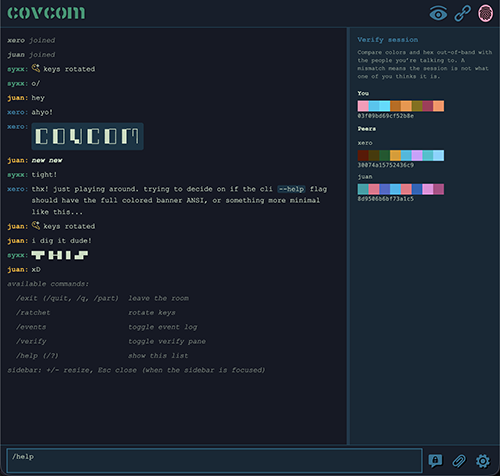
The verify panel proves you are in the session you think you are in. It lists your own fingerprint under You and every peer under Peers. Each fingerprint is eight color swatches followed by a 16-character hex string; hover a swatch to read its hex value.
Read your colors and hex aloud to the people you are talking to, over a channel the server does not control, and confirm theirs match what the panel shows. A mismatch means the session is not what one of you thinks it is. The derivation of these surfaces from the session signing key is described in how it works and specified in CRYPTOGRAPHY § fingerprint derivation; the signed claim log they anchor is PROTOCOL § identity claims.
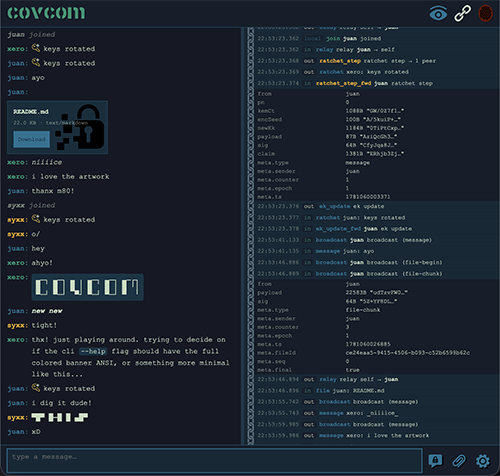
The event log records every WebSocket frame and every local crypto action as it happens. Each row has four columns: a timestamp, a direction glyph for inbound or outbound, the event kind, and a one-line summary. Payload bytes are redacted, so the log never exposes plaintext or key material.
Click any row to expand a key/value table with the frame's structural detail. The log holds the most recent 500 entries; older ones drop off as new frames arrive. It is not saved and clears on reload.
Send a file with the Attach button, or drag one anywhere onto the page. On drag a "drop file to send" overlay appears across the window; release to send. There is no paste-to-attach.
Files travel in signed, encrypted 64 KiB chunks over the same broadcast path as messages, so the server sees only opaque blobs. A received file lands in the chat as a card with its name and size and a Download button that saves it locally.
Sending and formatting messages:
| Key | Action |
|---|---|
Enter |
Send the message |
Shift+Enter |
Insert a newline |
The Rotate button next to the input triggers a key rotation (ratchet step) on demand. Message bodies render the same small markdown subset as the CLI; see formatting messages.
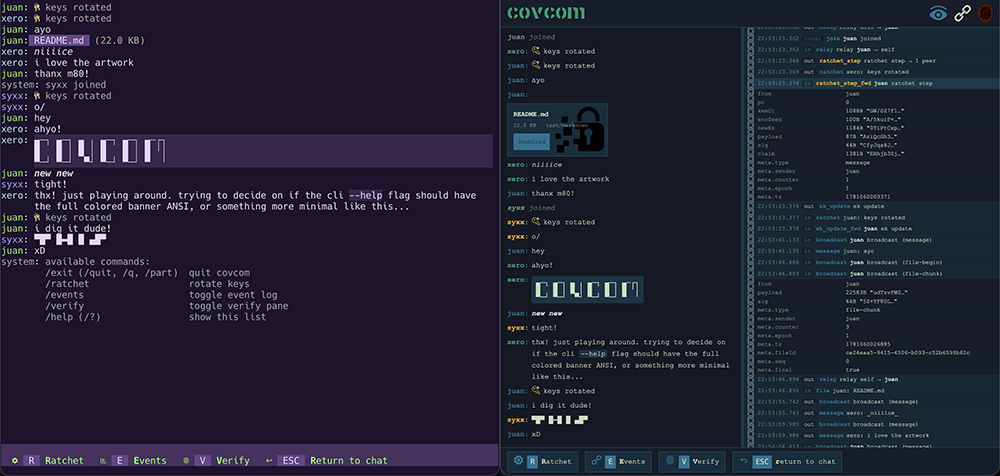
Type a /-prefixed command in the chat input and press Enter. Anything after
the command word is ignored, and unknown commands print a hint. These mirror the
CLI's commands; the actions also have buttons in the header and next to the
input.
| Command | Action |
|---|---|
/exit /quit /q /part |
Leave the room, back to landing |
/ratchet |
Rotate encryption keys |
/events |
Toggle the event-log panel |
/verify |
Toggle the verify panel |
/help /? |
List the commands |
The web client has no Ctrl-key hotkeys for rotate, events, and verify
(Ctrl+R/E/V are taken by the browser). Use the commands, the buttons, or the
keys-display: press Esc while the message box is focused to swap it for a row
of R ratchet / E events / V verify / Esc return units, then press the
key (shift does not matter). Any action closes the display and returns to the
message box; Esc returns without doing anything.
The web client has no config file and writes nothing to the browser. Your messages, peers, fingerprints, event log, sidebar width, and the hide-system toggle all live in memory and are wiped when you reload or close the tab. There is no theme, no settings panel, and no persisted history.
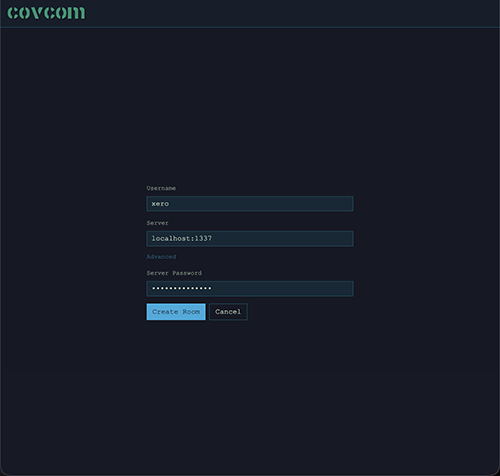
You set your username on the landing screen, then the server address and an optional server password on the create screen, each time. The server field defaults to the host serving the page, which is the relay in the single-container deployment; edit it to target a separate relay. The CLI can persist these and more in an optional config file; the web client always starts fresh.
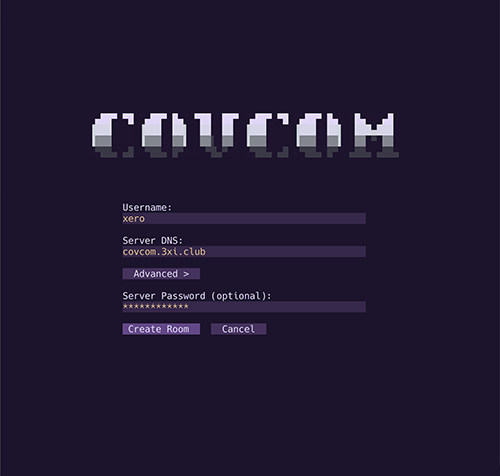
Create a room:
- Enter a username and select Create Room.
- On the create screen, enter a server address and select Create Room. The web client prefills the server field with the host serving the page, which is the relay in the single-container deployment; edit it to target a separate relay. An Advanced toggle reveals an optional server password.
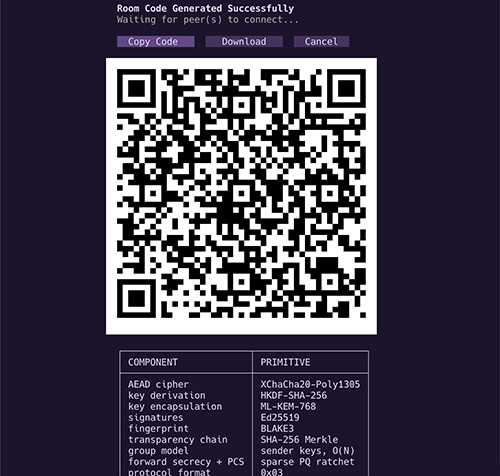
- The lobby screen shows an armored invite block, a QR code of the same bytes, and Copy, Download, and Cancel buttons. Share it via any channel; Cancel tears down the room and returns to Landing.
- The screen waits until a peer joins.
Join a room:
- Enter a username and select Join Room.
- On the join screen, paste the armored invite text, drag-drop the
.roomfile (web), or enter the file path and select Browse (CLI). - Select Join Room. It parses the invite and connects.
Once both sides complete the handshake, the chat opens. The server has relayed a sequence of encrypted blobs and learned nothing about the content. The full join ceremony is specified in PROTOCOL § joining a room and § session lifecycle.
Clients and the server negotiate a wire-protocol version at create and join time (PROTOCOL § versioning). If they disagree, the server refuses the connection up front and reports its own version, so a mismatched client sees "This server is running a different version" instead of a cryptic handshake failure. This is a compatibility gate, not a security boundary.
Late joiners receive current epoch seeds from all present members and enter the session at whatever epoch each sender is at. Messages sent before you joined are not recoverable. This is forward secrecy working as intended.
The connection survives drops. On network loss the client shows "connection lost; reconnecting…" and retries with exponential backoff, then shows "connection restored" once it reconnects; the chat stays mounted the whole time. Peers joining, leaving, and reconnecting appear as system messages. A peer who reconnects with a changed fingerprint is flagged "reconnected (fp changed)" so you can re-verify them.
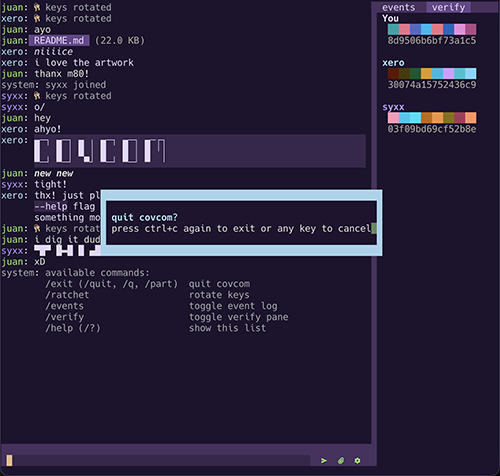
Both clients render a small markdown subset in message bodies. The web client draws it as styled DOM; the CLI draws it with terminal colors and bold/italic.
-
Bold. Wrap text in
*asterisks*. -
Italic. Wrap text in
_underscores_. -
Bold and italic. Combine the markers as
_*both*_or*_both_*. -
Inline code. Wrap text in
`backticks`. The contents render verbatim, so markers inside code stay literal. -
Code block. Fence a span of lines with
```on their own lines. The block preserves whitespace and newlines.
Formatting is applied at display time only. The wire still carries your exact plaintext, and the markers travel with it as ordinary characters. Untrusted text from peers is sanitized before rendering, so a crafted message cannot inject HTML in the browser or escape sequences in the terminal.
musl binary fails to start on alpine. The musl builds link the C++
support libraries dynamically. Run apk add libstdc++ libgcc first; the
glibc builds run on mainstream distros as-is.
Container exits immediately. DOMAIN is required. Pass it with
-e DOMAIN=chat.example.com; without it the entrypoint exits before Caddy
starts.
Certificate errors or Let's Encrypt rate limits. Mount the
covcom_caddy_data and covcom_caddy_config volumes shown in
docker. Without them Caddy re-provisions a certificate on every
container start and will exhaust the rate limit.
"This server is running a different version." The client and server
disagree on the wire-protocol byte. Check both sides with --version and
upgrade the older one; see upgrading and
PROTOCOL § versioning.
"Room is full." The room hit the server's MAX_ROOM_SIZE cap (default
20). The operator can raise it or set 0 for unlimited; see
environment variables.
An old invite no longer connects. Empty rooms are pruned after
ROOM_TTL hours of inactivity (default 24). Create a new room and share a
fresh invite.
The server picked up settings you never passed. A .env file in the
launch directory configures the server silently, in binary mode too. Audit
the working directory, or pass explicit flags, which always win; see the
caution in command-line flags.
Admin token visible to other users. --admin-token shows up in ps
output and shell history. Pass ADMIN_TOKEN as an environment variable
instead.
Running without the Docker image means TLS and security headers are your reverse proxy's job; see Deployment Hardening.
The release binaries and npm packages embed the runtime they were compiled with, so runtime security fixes ship as new COVCOM releases. See SECURITY-POLICY § Supported Versions for the patch policy.
Docker. Pin X.Y.Z in production and bump it deliberately; latest
silently upgrades you on the next pull. A version withdrawn after a
vulnerability disclosure is replaced by a tombstone image that exits
nonzero and names the safe replacement, so a pinned deployment fails
loudly instead of running a known-bad build.
npm. npm update -g covcom covcom-server pulls the newest meta
packages, which resolve the matching platform binaries.
Release binaries. Download the next release's asset, verify it against
SHA256SUMS and the attestation as in
release binaries, and replace the file.
covcom.html. Re-download the page from the release; there is nothing else to update. Hosted deployments get the new page when the Docker image is upgraded.
Everything below needs Bun v1.3.14 or later (the
packageManager pin). End users never need any of it.
git clone https://github.com/xero/covcom
cd covcom
bun iBoth at once:
bun devStarts the relay and the web client together. PORT (default 1337) drives the
relay and is handed to the web client as the prefilled server address, so the
create screen targets the right relay with no edit. Ctrl+C, or either process
exiting, shuts both down.
Relay only:
bun dev:serverThe server starts on 127.0.0.1:1337 in watch mode and reloads on source
changes; clients connect over ws://.
Web client only:
bun dev:webOpen http://localhost:5173. In dev the create screen prefills the server with
Vite's own host, not the relay, so edit it to localhost:1337 or use bun dev.
CLI client:
bun dev:cliCLI flags pass straight through, e.g.
bun dev:cli --clean --join /path/to/invite.room.
Web client:
bun build:webProduces web/dist/: a single inlined index.html, no sidecar files. This is
the same page that ships as covcom.html on releases and gets baked into the
Docker image. Note that build:web compiles with esbuild and does not
typecheck; see lint and typecheck. Smoke-test the
bundled output locally with:
bun run --cwd web previewCLI binary for the current platform:
bun build:cliThe binary lands in cli/dist/.
CLI binary for a specific target:
bun run --cwd cli build:darwin-arm64     # macOS Apple Silicon → cli/dist/covcom-macos-arm64
bun run --cwd cli build:darwin-x64       # macOS Intel         → cli/dist/covcom-macos-x64
bun run --cwd cli build:linux-x64        # Linux x86_64, glibc → cli/dist/covcom-linux-x64
bun run --cwd cli build:linux-x64-musl   # Linux x86_64, musl  → cli/dist/covcom-linux-x64-musl
bun run --cwd cli build:linux-arm64      # Linux arm64, glibc  → cli/dist/covcom-linux-arm64
bun run --cwd cli build:linux-arm64-musl # Linux arm64, musl   → cli/dist/covcom-linux-arm64-musl
bun run --cwd cli build:win32-x64        # Windows x86_64      → cli/dist/covcom-win-x64.exe
All CLI platforms at once:
bun build:cli:allServer binaries:
bun build:server      # host target → server/dist/covcom-server
bun build:server:all # all seven release targetsbun build:docker
DOMAIN=chat.example.com bun run:dockerbun build:docker always builds clean (--no-cache), so a rebuild never
serves a stale web client out of a cached image layer. DOMAIN is required;
pass it inline, or put it in docker/.env (copy docker/.env.example),
which docker/run loads automatically.
Both commands work without docker compose: docker/run detects the
missing compose plugin and falls back to plain docker build and
docker run automatically. On the fallback path it builds a local covcom
image and runs it, forwarding DOMAIN, PORT, ADMIN_TOKEN, ROOM_TTL,
and MAX_ROOM_SIZE from the environment or docker/.env, and mounting the
covcom_caddy_data and covcom_caddy_config volumes so Caddy's certificate
survives restarts.
Stop and logs (compose path):
docker compose -f docker/docker-compose.yml down
docker compose -f docker/docker-compose.yml logs -fThe full test architecture is documented in TESTING.md.
Run the unit suites:
bun run testThis fans out the four workspace unit suites (server, lib, web, cli)
in parallel and aggregates failures: one broken suite does not stop the
others, and each output line carries a @covcom/<app>:test | prefix. Note
the bun run prefix: a bare bun test invokes Bun's built-in runner with
the script name treated as a path filter, not the package script.
Run a single suite:
bun run test:server      # server WebSocket broker
bun run test:lib         # shared crypto session layer
bun run test:web         # web client (store, session, bridge, views) via happy-dom
bun run test:cli         # CLI widgets, key parsing, state machine, event log
bun run test:server:bin  # compile the host server binary, run the server suite against it
bun run test:cross       # web ↔ CLI interop over a real relay (compiles the CLI first)
Run the end-to-end suite (Playwright):
bunx playwright install --with-deps chromium firefox webkit  # one time
bun run test:e2e
test:e2e auto-starts the Bun broker and a static server hosting a fresh
production build of the single-file bundle, then drives real browser contexts
(Chromium, Firefox, and WebKit) through the full flow: a two-party encrypted
chat (create → invite → join → exchange messages → verify fingerprints), the
slash commands, and file-attachment round-trips and stress sweeps, which push
encrypted attachments up to 180 MiB through chunked streaming under the
production CSP.
Run everything:
bun run test:allChains the unit fanout, the cross-client interop test, and the Playwright e2e suite.
bun lint       # report issues
bun fix        # report and autofix
bun typecheck
bun typecheck runs tsc --noEmit across every workspace (root, lib,
server, web, and cli). bun build:web compiles with esbuild and does not
typecheck, so run this separately.
Build all release artifacts:
bun bakeOne invocation of the root orchestrator
(bun scripts/build.ts all --kind npm --targets all) builds the inlined
web bundle, every CLI and server binary target, and stages the
publish-ready npm package trees under dist/npm/.
Full pre-release check:
bun checkRuns codegen, lint, typecheck, bake, and test:all (the unit fanout,
cross-client interop, and e2e) in one pass. This is the single gate to
validate a release candidate. Codegen runs first so a fresh clone passes
with no manual step: the generated src/version.ts modules and the CLI
banner are gitignored, never committed.
server/    WebSocket broker
lib/       Shared crypto session layer
web/       Vanilla SPA web client
cli/       Custom zero-dependency TUI client
scripts/   Dev tooling: build orchestrator, release scripts
docker/    Dockerfile, Caddyfile template, entrypoint
docs/      Project documentation / Wiki sources
| Document | Description |
|---|---|
| index | Project Documentation index |
| PROTOCOL | Cipher, chains, ratchet, group model, session lifecycle, server role |
| CRYPTOGRAPHY | Primitives, KDF chains, wire format, invite encoding |
| THREAT-MODEL | Principals, adversary tiers, guarantees, non-goals |
| LIB-SPEC | Shared library API, session and identity surface, invites, file transfer, and protocol manifest |
| SERVER-SPEC | Server wire contract, message handlers, room lifecycle, and configuration |
| WEB-SPEC | Web client architecture, state and session model, views, rendering, and the single-file build |
| CLI-SPEC | CLI architecture, rendering, input, widgets, views, and color system |
| TESTING | Test layers, unit and end-to-end suites, cross-client interop, and CI |