



Jiraffe 🦒 - One stop place for Jira security reconnaissance and exploitation in your proximity
Installation | Usage | Demo | Documentation
Jiraffe is a modern Jira security reconnaissance & exploitation framework for identifying misconfigurations, exposed APIs, and vulnerable components in Atlassian Jira deployments.
Built for security professionals who care about correctness, signal quality, and clean architecture.
Jiraffe is a semi-automatic security assessment framework designed for real-world Jira deployments.
- Modular recon & exploit framework
- Passive reconnaissance modules (unauthenticated access checks, information disclosure, and misconfiguration detection)
- CVE validation with safe defaults and compatibility gating
- Interactive & automatic execution mode with AWS SSRF helpers (metadata, IAM, custom targets)
- Jira version & deployment detection
- Cloud vs Server/DC awareness to avoid invalid or misleading checks
- Structured JSON output for scripting and CI pipelines
Jiraffe follows a recon-first, exploit-second model with strict separation between discovery and exploitation, keeping assessments accurate and controlled.
A modular design and low-noise defaults ensure extensibility without automatic shell execution or intrusive behavior.
This makes Jiraffe suitable for:
- Bug bounty reconnaissance
- Internal security assessments
- Red team tooling
- Responsible vulnerability validation
Use pip to install Jiraffe. This is the recommended way of running Jiraffe.
$ pip install jiraffeor, installing from the source by running
# clone the repo
$ git clone https://github.com/0x48piraj/jiraffe.git

# change the working directory to jiraffe
$ cd jiraffe

# install the jiraffe python package
$ python3 setup.py install --user
# or, the modern way
$ python3 -m pip install .$ python3 -m jiraffe --help
usage: jiraffe [-h] [-t https://jira.company.com]
/)/)
( ..\
___ __ _______ __ _______ _______ _______ /'-._)
| || \ / \ / \ / | / | / | /#/ v2.2.0
|| ||| | |: | / \ (: ______)(: ______)(: ______) /#/ @03C0
|: ||: | |_____/ ) /' /\ \ \/ | \/ | \/ |
___| / |. | // / // __' \ // ___) // ___) // ___)_
/ :|_/ )/\ |\ |: __ \ / / \\ \(: ( (: ( (: |
(_______/(__\_|_)|__| \___)(___/ \___)\__/ \__/ \_______)
optional arguments:
-h, --help show this help message and exit
-t https://jira.company.com, --target https://jira.company.com
Target Jira instance URL
-a, --auto Automatic mode
--check-only, --dry-run
Only check for vulnerabilities, do not run exploits
--list-exploits
--cmd CMD Command for CVE-2019-11581
--ssrf SSRF SSRF target URL
--user-agent USER_AGENT
Custom User-Agent header
--severity {LOW,MEDIUM,HIGH,CRITICAL,INFO}
Run only exploits of this severity
--json Output results in JSON format (for automation / scripting)
--insecure Disable TLS certificate verification (allow self-signed HTTPS)
-v, --verbose Enable verbose output (debug information)
$ python3 -m jiraffe -t https://jira.example.com
$ python3 -m jiraffe -t https://jira.example.com --auto
$ python3 -m jiraffe --list-exploitsDetailed documentation is available over the wiki, including:
- Architecture & Execution Flow
- Recon Module Development
- Exploit Module Lifecycle
- Severity Handling & Filtering
- Machine-Readable Output & Automation
- Reporting & Usage
- Supported CVEs & Validation
- Threat Model
| Module | Severity | Summary |
|---|---|---|
| Jira Dev Mode Enabled | LOW | Detects whether Jira development mode is enabled, which may expose debug functionality |
| Query Component Field Disclosure | LOW | Identifies exposed Query Component fields accessible without authentication |
| Service Desk Signup Enabled | MEDIUM | Checks for publicly accessible Service Desk signup that may allow unauthorized account creation |
| Unauthenticated Admin Menu | INFO | Detects presence of the admin menu without authentication |
| Unauthenticated Dashboards | INFO | Enumerates dashboards accessible without authentication |
| Unauthenticated Gadget Configuration | LOW | Identifies exposed gadget configuration endpoints |
| Unauthenticated Group Picker | INFO | Checks for unauthenticated access to group picker functionality |
| Unauthenticated Popular Filters | INFO | Enumerates popular filters accessible without authentication |
| Unauthenticated Project Categories | LOW | Identifies exposed project categories via unauthenticated access |
| Unauthenticated Projects API | LOW | Enumerates projects using the unauthenticated Projects API |
| Unauthenticated Resolutions API | INFO | Detects unauthenticated access to issue resolutions |
| Unauthenticated Screens API | LOW | Identifies exposed Screens API endpoints |
| Unauthenticated User Picker | INFO | Checks for unauthenticated access to user picker functionality |
| User Registration Enabled | MEDIUM | Detects whether unauthenticated user self‑registration is enabled |
| CVE | Severity | Affected | Summary | References |
|---|---|---|---|---|
| CVE-2017-9506 | HIGH | < 7.3.5 | OAuth IconUriServlet SSRF leading to internal network access and XSS |
NVD · Atlassian |
| CVE-2018-20824 | HIGH | - | Wallboard dashboard XSS | NVD |
| CVE-2018-5230 | HIGH | - | Reflected XSS via Velocity template (.vm) |
NVD |
| CVE-2019-11581 | CRITICAL | < 7.6.14 | Velocity template injection leading to remote code execution (RCE) | NVD · Atlassian |
| CVE-2019-3396 | CRITICAL | - | Tinymce macro read-only path traversal | NVD |
| CVE-2019-3402 | HIGH | - | Labels gadget XSS | NVD |
| CVE-2019-3403 | LOW | - | Unauthenticated REST user enumeration | NVD |
| CVE-2019-8442 | LOW | - | Jira Maven POM.xml disclosure |
NVD |
| CVE-2019-8443 | LOW | - | Jira Maven POM.xml disclosure via alternate path |
NVD |
| CVE-2019-8449 | LOW | 2.1 - 8.3.4 | Unauthenticated username enumeration via GroupUserPicker API | NVD · Atlassian |
| CVE-2019-8451 | HIGH | >=7.6.0,<7.13.9 and >=8.0.0,<8.4.0 | Pre-authenticated SSRF via gadgets makeRequest |
NVD · Atlassian |
| CVE-2020-14178 | LOW | - | Unauthenticated project existence disclosure | NVD |
| CVE-2020-14179 | LOW | - | QueryComponent disclosure via QueryComponent!Default.jspa resource |
NVD |
| CVE-2020-14181 | LOW | - | User hover disclosure via ViewUserHover.jspa resource |
NVD |
| CVE-2020-36287 | LOW | - | Gadget preferences brute-force disclosure | NVD |
| CVE-2020-36289 | MEDIUM | - | QueryComponentRendererValue information disclosure |
NVD |
CVE-2019-11581: Server-side Template Injection (RCE)
POC
POC.mp4
Component(s)
- ContactAdministrators action
- SendBulkMail action
- Velocity template rendering pipeline
Vulnerability Class
- Server-Side Template Injection (SSTI)
Impact
- Remote Code Execution (RCE)
Attack Surface
- Unauthenticated (when Contact Administrators form is enabled)
- Authenticated (JIRA Administrators role required if form is disabled)
Exploitation Preconditions
At least one of the following must be true:
- An SMTP server is configured and the Contact Administrators form is enabled
- An SMTP server is configured and the attacker has JIRA Administrators privileges
Root Cause
- Unsafe evaluation of user-controlled input within Velocity templates
- Insufficient input sanitization prior to template execution
Affected Versions
- Jira Server / Data Center 4.4.0 ≤ version < 7.6.14
- Jira Server / Data Center 7.7.0 ≤ version < 7.13.5
- Jira Server / Data Center 8.0.0 ≤ version < 8.0.3
- Jira Server / Data Center 8.1.0 ≤ version < 8.1.2
- Jira Server / Data Center 8.2.0 ≤ version < 8.2.3
Fixed Versions
- 7.6.14 (LTS)
- 7.13.5 (LTS)
- 8.0.3
- 8.1.2
- 8.2.3
- 8.3.0+
Severity
- Critical (CVSS High)
Notes
Successful exploitation allows arbitrary code execution on the Jira application host, resulting in full system compromise.
Reference
- Atlassian Advisory: JRASERVER-69532
Majority of the bugs stated above poses Server-Side Request Forgery (SSRF) vulnerability, where attacker can abuse a specific functionality on the server to read or update internal resources. The attacker can supply or a modify a URL which the code running on the server will read or submit data to, and by carefully selecting the URLs, the attacker may be able to read server configuration such as AWS metadata, connect to internal services like HTTP enabled databases or perform post requests towards internal services which are not intended to be exposed.
Currently, some of the common Amazon AWS credentials leak attacks are present with an additional Custom Payload Option for sending crafted payloads for any cloud platform (Amazon AWS, Google Cloud, etc.). For sending custom payloads, take help from PayloadsAllTheThings — SSRF URL for Cloud Instances. Feel free to implement more post exploitation modules for vendor specifc deployments. For looking under the hood, read wiki.
In addition to exploits, Jiraffe includes a modular reconnaissance (auxiliary) framework for structured information gathering and weak-signal detection.
Recon modules are non-exploit checks designed to identify conditions that may enable or influence exploitation, without actively attacking the target.
Recon modules typically fall into one of the following categories:
-
Unauthenticated access checks:
Endpoints or resources accessible without authentication. -
Information disclosure:
Version leaks, configuration exposure, banners, metadata, or other passive signals. -
Misconfiguration / weak settings:
Insecure defaults, exposed services, or deployment weaknesses.
Recon modules live under:
jiraffe/recons/
Each module is implemented as a subclass of ReconModule, providing a consistent interface and lifecycle similar to exploit modules, while remaining strictly separated from exploitation logic.
This auxiliary-style design allows reconnaissance to scale independently, reusing the same modular discovery model as exploits without coupling reconnaissance to exploitation.
Adding a new recon module is simple:
- Create a new Python file under
jiraffe/recons/ - Implement a subclass of
ReconModule - Define metadata (
name,severity,description) - Implement the
run()method
No changes to core logic or registries are required — modules are discovered dynamically at runtime.
This makes it easy to contribute new reconnaissance checks without impacting existing exploits or execution flow.
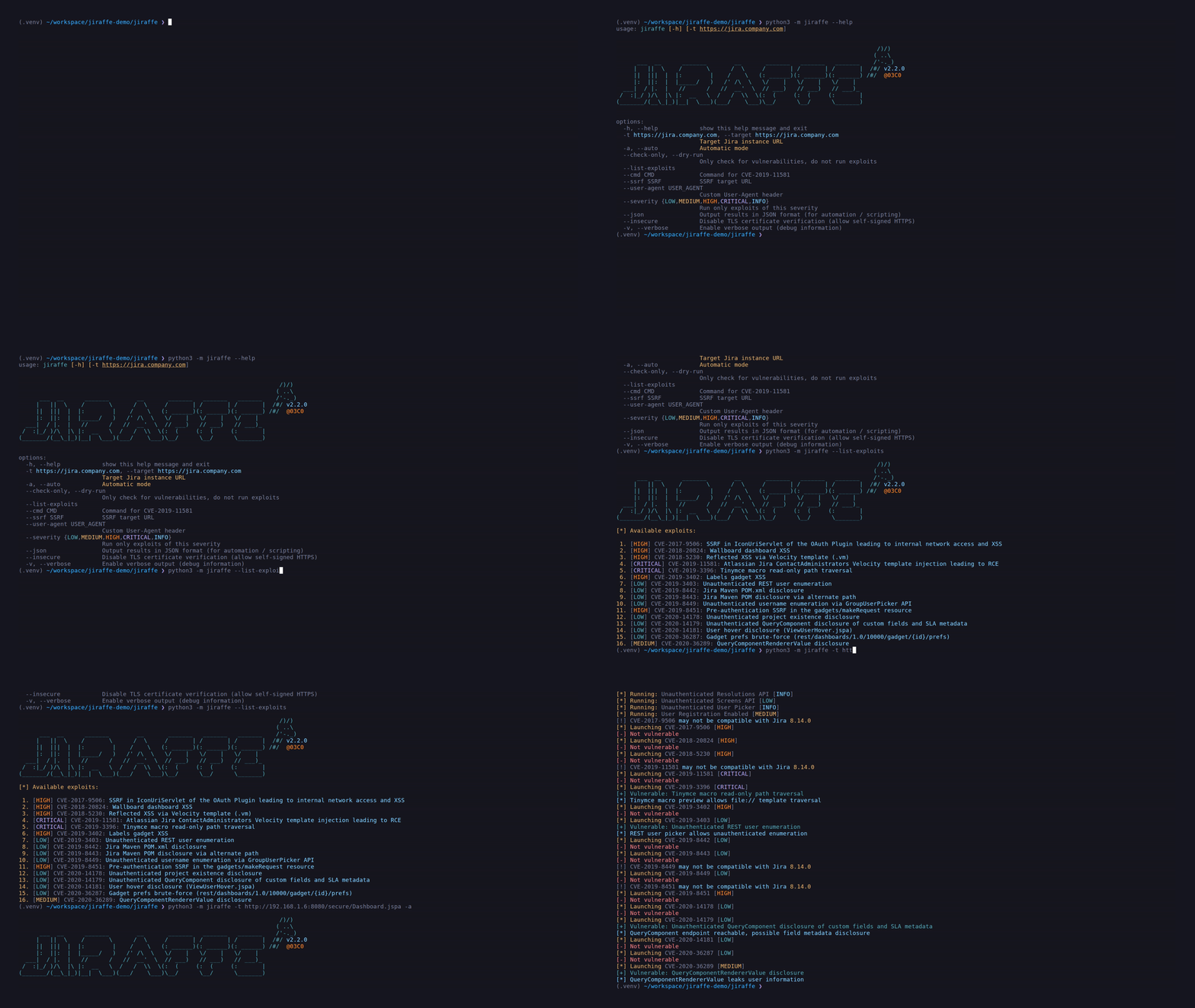
Below is a typical Jiraffe workflow showing target detection, reconnaissance, and controlled exploit validation.
The tests are next to the package i.e. tests are not part of the package, only of the repository. The reason is simply to keep the package small.
Running the unit tests
$ python3 -m unittest --verbose # Python 3 and upJiraffe is intended for authorized security testing and defensive research. Only assess systems you own or have explicit permission to test. The project follows responsible disclosure principles and aims to improve the overall security posture of Jira deployments.
This project is a personal development. Please respect it's philosophy and don't use it for evil purposes. By using Jiraffe, you agree to the MIT license included in the repository. For more details at The MIT License — OpenSource.
Using Jiraffe for attacking targets without prior mutual consent is illegal. It is the end user's responsibility to obey all applicable local, state and federal laws. Developers assume no liability and are not responsible for any misuse or damage caused by this program.
This project is licensed under the MIT license.
