Server
- Key model for chatbots that generate answers to users' chats
Baseline code : Korean Language Model for Wellness Conversation
Dataset : 주제별 텍스트 일상 대화 데이터
- Data Preparation
- Data Preprocessing
- Using pretrained weight
- Train the model
- Validate the model
-
Download the
dataset -
This project used only
Kakaodata in thesource data compression(원천데이터 압축파일)in the Training/Validation folder in dataset.
If you proceed in the same environment as the project, you only need to useKakaodata. -
If necessary, you can proceed with the learning by using additional refining.
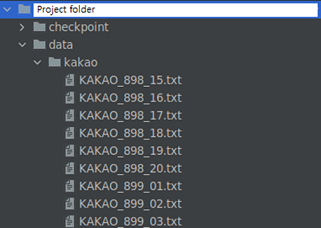
(Project folder)/data/kakao - Place the prepared KAKAO.txt files (Collect all the txt files in the /data/kakao/)
-
In
(Project folder)/preprocess/split_new.pycode, Check thepaththat exists at the top, set it correctly, and run it.
It preprocesses data, Kogpt2 can be fine-tuned to AIFriend. -
At this time,
exceptionsare processed so thatcertain wordssuch aspolitics/ideologiesare not learned for a document, but you can also modify the project file directly to make better exceptions.
-
Use the
Word2Vec pretrained modelfor extracting interest categories(download link)
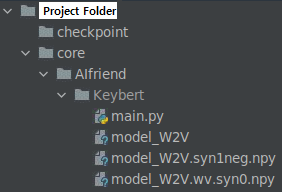
Place the files to(Project folder)/core/AIfriend/Keybert/ -
Use the
kogpt2 pre-trained modelprovided by SKT (provided bytransformerslibrary) -
The
pretrained weight of the AIfriendthat we used in the project(download link)
(Please note that themodel weightmay have learned thebias or incorrect knowledgeof the data)
-
In
(Project folder)/train/run_auto_regressive.pycode, Check thepaththat exists at the top, set it correctly, and run it.
Automatically load theskt pre-trained kogpt2 modeland training with preprocessed data. -
Hyperparameterssuch aslearning rateandepochcan be adjusted as you want.
-
You can test directly on the code before testing on the server and client.
-
In
(Project folder)/example/kogpt2-text-generation.pycode, AIfriend can be tested usingtrained kogpt2before it is used on the server.
- Connect between the server and the client by
network socketand usingthreadto make multiple connections - Manage
conversations with chatbotsandexpansion of interests channel, the one of the core of the AIfriend project
#model loading
root_path = '../..'
...
model_W2V = word2vec.Word2Vec.load('./Keybert/model_W2V')- Load the pretrained model that contains
KoGPT2,Word2Vec,Tokenizer,SentenceTransformer. - Please write the correct path
# Adding category in here.
category = ['여행', '음악', '게임', '동물', '옷', '음식', '운동', '독서', '요리']- Modify the category that you want.
If you change the category, you should make a newfav,Board(Reference)
try:
    while True:
        print('>> Waiting for a new connection')
        client_socket, addr = server_socket.accept()
        user_sockets.append(client_socket)
        print("Current user : ", len(user_sockets))
        start_new_thread(threaded, (client_socket, addr))
except ...
finally ...- Generate a thread by receiving user information from the network socket
def threaded(client_socket, addr):- When a new user accesses the server, it is managed through a new thread.
...
data = client_socket.recv(2048)
...
original_data = data.decode('utf-8')
...
if original_data[:6] == 'AIchat':
                    uid = original_data[6:]
                    KoGPT(uid, db, model, tokenizer, push_service, model_ST, model_W2V, category)
...- The client sends a prefix
AIchatto have a conversation with chatbot.
Additionally, receive auidto access firestore.
- Called by network socket prefix
AIchat, Create AIfriend answers and make judgments about adding interests.
def KoGPT(...):
...
# Document search
    document_name = db.collection(u'AIChat').where('uid', 'array_contains', uid).get()[0].id
AIchat_ref = db.collection(u'AIChat').document(document_name).collection('Chats')- Chatting log document is loaded by Document search
def KoGPT(...):
...
    tokenized_indexs = tokenizer.encode(user_chat_list[0])
    input_ids = torch.tensor([tokenizer.bos_token_id, ] + tokenized_indexs + [tokenizer.eos_token_id]).unsqueeze(0)
    sample_output = model.generate(input_ids=input_ids)
answer = tokenizer.decode(sample_output[0].tolist()[len(tokenized_indexs) + 1:], skip_special_tokens=True)- Use
tokenizerandtrained KoGPT2to generate answers to user chat
def KoGPT(...):
...
    # In each 'fav_max_count', server starts extracting interests
    if keybert_check != -1:
        keybert_check = keybert_check % fav_max_count
    if keybert_check == 0:
        # Category connecting each 'fav_max_count' user chatting
category_connect(uid, db, model_ST, model_W2V, category)- In each 'fav_max_count', call
category_connect(...)to connect the user and interestboard
def category_connect(...):
bert_keyword = key_bert(uid, db, model_ST, model_W2V, category)- Call
key_bert(...)to get keyword in user chatting.
def category_connect(...):
...
    if bert_keyword in category:
        email = db.collection(u'user').where('uid', '==', uid).get()[0].id
        check = db.collection("fav").document(bert_keyword).get().to_dict()['users']
...
            db.collection("fav").document(bert_keyword).update({"users": firestore.ArrayUnion([email])})
AIchat_ref.add({'message': bert_keyword + '에 관심있구나! 내가 비슷한 취향을 가진 친구들을 소개시켜줄게! 내 관심사 탭에 가볼래?', 'time': firestore.SERVER_TIMESTAMP, 'uid': 'AIfriend'})- If a user's interest
keywordis in acategory, then add the user to the interestboard.
def getToken(...):- Function used to acquire
tokenof client.
def sendMessage(...):- Use the
tokenof the client to raise the push alarm.
def chatting_delay(...):- Delay function to make AIfriend feel like a person
def key_bert(...):- Checking the reference.