To preview documentation changes locally, first install dependencies and then start the development server:
npm i
npm run dev
To sync translations after editing English docs, see Automated translation below (npm run translate).
Create a PR. Once it is accepted Vercel will deploy the change to https://docs.comfy.org/
Can either use an OpenAPI file or URL containing the file:
cd registry/api-reference # Keep API files separated by products.
npx @mintlify/scraping@latest openapi-file <path-to-openapi-file>
This will only generate the MDX files for each endpoint. You need to add a link to these files in docs.json, and the up-to-date API spec will be shown on that doc page.
- Renaming files can cause some external links to become inaccessible, as they are already used in numerous articles and templates.
- Since we can manage the sidebar navigation can be reorganized via the docs.json file, we generally do not change the original document's file location unless absolutely necessary.
- If you renamed any files and caused the file path to be changed, please update the
redirectslist in thedocs.json
A GitHub Action will check for redirects and fail the PR if they are missing. Redirects should follow this format:
"redirects": [
  {
    "source": "/path/to/old-file",
    "destination": "/path/to/new-file"
  }
]
Don't forget to include the corresponding translation files under
zh/,ja/,ko/, etc.!
You can also refer to the Mintlify doc to learn how to add and match a wildcard path.
ComfyUI now has a built-in node help menu for both built-in nodes and custom nodes. All built-in node documentation will now be maintained in this repo.
We will regularly sync updated documentation from the corresponding repository to docs.comfy.org weekly to ensure content synchronization and updates. If you would like to contribute to the documentation, please submit PRs and updates to this repo.
For node documentation, we will use a single-level directory structure under the built-in-node folder for the following reasons:
- ComfyUI may adjust node categories and directories during updates, using multi-level directory hierarchies means frequent adjustments to node documentation
- These frequent adjustments mean we need to frequently add redirects and checks
- Mintlify supports setting document hierarchy in the
docs.jsonfile, so we can make unified changes in that file
Due to historical updates, some existing documents use different folder hierarchies. We will no longer adjust these files, but new files will use a single-level directory
Please just create a PR and we will review it within a few days.
Or talk to us on our discord
The documentation is built with Mintlify, please refer to Mintlify documentation to learn how to use it.
English MDX at the repo root is the source of truth. Translations mirror the same relative paths under language directories (for example zh/get_started/introduction.mdx, ja/get_started/introduction.mdx, ko/get_started/introduction.mdx). Reusable fragments live in snippets/ with per-language copies under snippets/zh/, snippets/ja/, snippets/ko/, and so on.
Contributing guides in other languages: readme/ (中文, 日本語, 한국어).
Translation policy
Supported locales are maintained through automated translation from English. When English docs change, translations are updated in batch via npm run translate — contributors do not need to hand-translate every page.
Request a new language
Want docs in another language? Open an issue with the locale you need (for example French, German, or Brazilian Portuguese). A maintainer will add the language to translation-config.json and docs.json, then run a full batch translation of all content. You only need to submit the request; no translated MDX PR is required to get started.
Specifications for editing MDX can be found in the Writing Content section of the Mintlify document.
Note:
built-in-nodes/is maintained in embedded-docs and is skipped by the translation script. Do not run bulk translation against that folder.
This repo includes a hash-based translation script. It compares each English file against translationSourceHash stored in the translated file; when the English source changes, the file is fully re-translated.
Prerequisites
- Install Bun
- Copy the env template and add your API key:
cp .env.local.example .env.local
# Set TRANSLATE_API_KEY (OpenAI-compatible: DashScope Qwen-MT, OpenRouter, DeepSeek, etc.)
npm scripts
| Command | Description |
|---|---|
npm run translate |
Translate all languages listed in translation-config.json |
npm run translate:dry-run |
List pending files without calling the API |
npm run translate:force |
Re-translate everything, ignoring stored hashes |
npm run translate:snippets |
Translate snippets/ only |
npm run translate:snippets:dry-run |
Preview pending snippet translations |
npm run translate:check-truncation |
Scan for likely truncated translations |
npm run translate:repair-truncated |
Re-translate files listed in the truncation log |
Pass extra flags after --:
npm run translate -- --lang zh,ja
npm run translate:dry-run -- --lang ja
npm run translate -- installation/manual_install.mdx
npm run translate:check-truncation -- --lang ko
npm run translate:repair-truncated -- --lang ko
Truncated translations
Long files can occasionally be cut off mid-translation (e.g. unclosed code fences). After a batch run, the script scans newly translated files and writes a repair list to .github/i18n-logs/translate/truncation-issues.json and truncation-issues.txt (gitignored). To scan everything for a language, or to repair:
npm run translate:check-truncation -- --lang ko
npm run translate:repair-truncated -- --lang ko
repair-truncated reads the JSON log and force re-translates only the flagged files.
How it works
- Input: English MDX (primary) + existing target-language file as context (if present)
- Output: Updated files under
zh/,ja/,ko/, etc., with refreshedtranslationSourceHashin frontmatter (snippets use an HTML comment for the hash) - Review notes (mismatch): When the model reports semantic issues via
=== MISMATCHES ===, they go to.github/i18n-logs/translate/mismatches.jsonandmismatches.txt(gitignored), not into MDX. Only produced duringnpm run translate, not by the truncation scanner. - Truncation log: Structural issues (unclosed code fences, short body) go to
.github/i18n-logs/translate/truncation-issues.json— see Truncated translations above. - Skipped paths:
built-in-nodes/(configured intranslation-config.json→skip_paths) - Chunked files:
changelog/index.mdxis handled by<Update label="v0.x.x">version labels. The script compares EN vs target labels, translates only missing versions, and inserts them in EN order. Old blocks are never re-translated unless you use--force. - Directories: Subdirectories are created automatically when files are written; you do not need to
mkdirby hand
Script location: .github/scripts/i18n/ (see translate-i18n.ts, translation-config.json)
See Request a new language above — please open an issue rather than adding a language in a PR yourself.
Maintainers: add one entry under languages in .github/scripts/i18n/translation-config.json (code, name, dir, snippets_dir). Path exclusion, link localization, and English-file scanning are derived automatically by i18n-config.mjs in the same folder — no per-language edits in translate scripts when adding a locale. Then add navigation in docs.json (see Mintlify Localization), and batch-translate:
npm run translate:dry-run -- --lang fr
npm run translate -- --lang fr
npm run translate:snippets -- --lang frYou can still translate by hand instead of using the script:
- Create a file under the language directory with the same filename and path as the English original.
- Localize
importpaths (/snippets/...→/snippets/zh/...) and internal links (/path→/zh/path). - Add the page path to the correct language group in
docs.json.
When English MDX changes, the i18n-sync-check workflow warns if matching translation files were not updated in the same PR, and posts a reminder comment tagging @comfyui-wiki. Update translations manually or re-run npm run translate.
When adding workflow examples to the documentation, please:
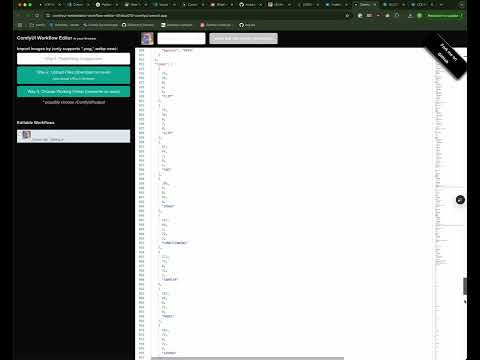
- Take your output from ComfyUI (PNG, WebP), and add the models urls to the workflow so a user will have them when they drag in the workflow. You can use this tool to edit the metadata of the PNG or WebP file.

-
Upload your workflow JSON and preview image to the example_workflows repository
-
Use the raw GitHub content URL in your documentation. To convert a GitHub file URL to a raw content URL:
- Start with your GitHub file URL:
https://github.com/Comfy-Org/example_workflows/blob/main/your-workflow.json - Change it to raw.githubusercontent.com and remove '/blob':
https://raw.githubusercontent.com/Comfy-Org/example_workflows/main/your-workflow.json
You can also click the "Raw" button on the GitHub file page and copy the URL directly.
- Start with your GitHub file URL:
This ensures the workflow metadata is preserved in the docs site when dragging it into ComfyUI.