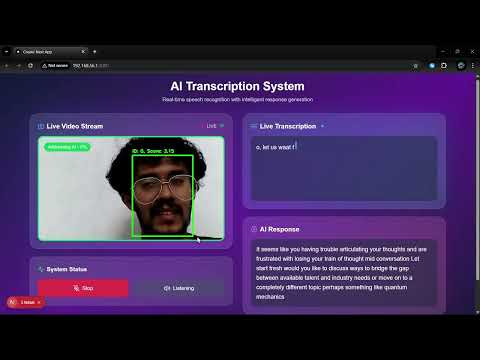
The replacement for wakeword tech for robots, using multimodal AI to understand when people are addressing them. Basically ElevenLabs turn taking mechanism for robots but on steroids, cause it also uses visual cues like gaze and body language to determine if someone is talking to the robot or just nearby. Ideal for robots that need to be always listening but not always responding, like home assistants, social robots, and more.
See it in action ⬇️

SpeakSense/
├── backend/                    # Python backend services
│   ├── src/
│   │   ├── models/            # ML models (ASD, audio classification)
│   │   ├── services/          # Core services (LLM, transcription)
│   │   ├── api/               # FastAPI endpoints and WebSocket
│   │   └── utils/             # Utility functions
│   ├── tests/                 # Backend tests
│   ├── requirements.txt       # Python dependencies
│   └── setup.py              # Backend setup script
├── frontend/                  # Next.js React frontend
│   ├── app/                   # Next.js app directory
│   ├── public/                # Static assets
│   └── package.json           # Node.js dependencies
├── models/                    # Trained model files and weights
│   ├── trained/               # Trained model checkpoints
│   └── weights/               # Model weight files
├── data/                      # Data files and datasets
│   ├── raw/                   # Raw audio/video data
│   ├── processed/             # Processed features and outputs
│   └── assets/                # Project assets (demos, diagrams)
├── scripts/                   # Utility scripts and tools
├── notebooks/                 # Jupyter notebooks for experiments
├── docs/                      # Documentation and research papers
└── config/                    # Configuration files
# Set up both backend and frontend
python manage.py --setup

# Start backend server
python manage.py --start-backend

# Start frontend server (in another terminal)
python manage.py --start-frontend# Build and run with Docker Compose
python manage.py --docker- Navigate to the backend directory:
cd backend- Run the setup script:
python setup.py- Start the backend server:
python src/api/fastapi_websocket_server.py- Navigate to the frontend directory:
cd frontend- Install dependencies:
npm install- Start the development server:
npm run dev- Frontend: http://localhost:3000
- Backend API: http://localhost:8000
- API Documentation: http://localhost:8000/docs
SpeakSense uses a multimodal approach combining:
- Active Speaker Detection (ASD): Identifies who is speaking in video
- Audio Classification: Determines if speech is directed at the assistant
- Visual Analysis: Analyzes gaze direction and body language
- Natural Language Processing: Understands speech intent and context
- Record video, audio, and transcripts of people talking to and around the robot
- Include diverse scenarios (directly addressing robot, talking nearby but not to robot)
- Label data with "addressing robot" vs "not addressing robot" classifications
- Implement the active speaker detection model (Liao et al.)
- Set up basic visual feature extraction (gaze, orientation)
- Configure audio preprocessing pipeline
- Establish transcription service integration
- Implement a simple Bidirectional LSTM architecture
- Create input pipelines for each modality
- Design feature fusion mechanism
- Develop training and evaluation scripts
- Train on clear-cut examples first
- Implement cross-validation strategy
- Establish baseline metrics for accuracy, latency, and resource usage
- Refine visual features (add sustained gaze detection, orientation angles)
- Enhance audio features (directivity, voice characteristics)
- Develop linguistic feature extraction (pronoun detection, imperative forms)
- Add attention mechanisms
- Implement hierarchical structure for modality processing
- Optimize layer configurations
- Implement curriculum learning
- Add data augmentation for edge cases
- Fine-tune hyperparameters
- Create efficient preprocessing modules
- Implement sliding window for contextual memory
- Design adaptive thresholding system
- Quantize model weights
- Implement model pruning
- Profile and optimize critical paths
- Develop always-on lightweight monitoring
- Build trigger mechanism for full model activation
- Implement power management strategies
- Measure accuracy metrics in controlled settings
- Benchmark latency and resource usage
- Identify common failure cases
- Deploy prototype in various environments
- Collect user feedback on naturalism and responsiveness
- Log false positives and false negatives
- Retrain with additional edge cases
- Fine-tune confidence thresholds
- Optimize for specific deployment environments
- Integrate with robot's main systems
- Implement logging for continuous improvement
- Develop update mechanism
- Add capability to learn from successful interactions
- Implement personalization for specific users
- Create feedback mechanism for misinterpretations