Good thing we live in the future, and better still that there is Open Source software. jantic has created the awesome tool DeOldify that is colorizing images based on Deep Learning, and this is an attempt to apply his colorizing software to videos, frame by frame.
Good news: Video colorization has found it's way to the Deoldify project, including models trained for exactly this purpose and astonishing result.
I'll discontinue my work on this side project and try to upstream changes to the other repository.
- This software has been tested on Ubuntu Mate 18.04, other Linux distributions might be able to run it with minor or no adjustments.
- Converting a video using machine learning requires some heavy lifting, which means in this case that your machine needs a CUDA-supporting GPU. A very eary version of this script supported CPU-execution, but the speed loss is somewhere near factor 10.
- The amount of GPU RAM you have limits the quality of the result.
-
Clone this repository including the "DeOldify" submodule:
git clone --recursive git@github.com:Ichaelus/video-colorization.git -
Follow the installation instructions of DeOldify. You should at least have a conda environment set up to run the colorization stuff and downloaded the pretrained weights.
conda activate deoldify -
Colorize your own video! The script will tell you about further missing dependencies.
./colorize_video.sh
These commands are using a sample video from YouTube, the historical milestone "Dickson Experimental Sound Film (1894)".
./colorize_video.sh <YOUTUBE_VIDEO_URL> <FRAMERATE>
| Fragment | Explanation |
|---|---|
| ./colorize_video.sh | The main program executable. To be called for any video conversion. |
| YOUTUBE_VIDEO_URL | Required parameter. The full URL to a YouTube video, e.g. "https://www.youtube.com/watch?v=SwIcRSvQ_TY". |
| FRAMERATE | Optional parameter. The framerate of the original and resulting video. Can be inspected in YouTube by activating "Statistics for nerds". Default value: 25. |
You can view the colorized video in the results directory.
For the above example of the "Dickson Experimental Sound Film", you can see the results at 30fps with a render factor of 30 here: https://www.youtube.com/watch?v=kU3-m4Gc1Q8&feature=youtu.be
This example was created using a very early version of both the machine learning model and this tool.
Some more examples:
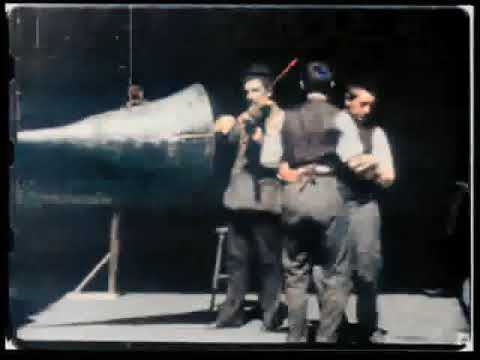
Dickson Experimental Sound Film
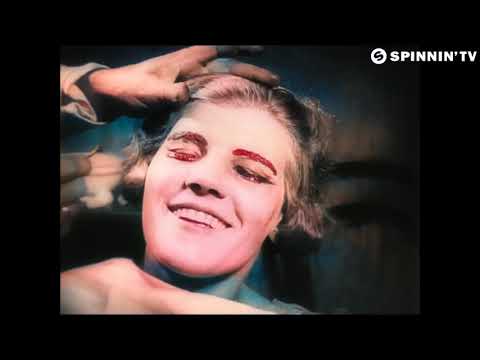
Oliver Heldens feat. RUMORS - Ghost
- Adding an optional parameter that controls DeOldify's
render_factor - Guessing the best value for DeOldify's parameter
render_factor. It depends on the users GPU-RAM, and will vary for each hardware. Higher is better. - Guessing the input format (Youtube or local mp4 video) and allowing both.
- Guessing the
render_factorbased on a "ternary search". I.e. comparing the grayscale histogram of each frame with the original histogram, and thus evaluating if the result is feasible or not. (This will definitely increase the runtime of this tool, and should not be default)
Status code: 403 - Failed to download video.. You might be using an old version ofytdlthat is now incompatible with the current YouTube API. Update it, e.g. withsudo npm -g update ytdl.