- 현장실습 기간 (Field Training Period) : 2020-12-28 ~ 2021-02-26
| tools | version |
|---|---|
| Python | 3.7.1 |
| openpyxl | 2.5.12 |
| user-agents | 2.2.0 |
| elasticsearch | 7.10.1 |
| google-api-core | 1.24.1 |
| google-api-python-client | 1.12.8 |
| google-auth | 1.24.0 |
| google-auth-httplib2 | 0.0.4 |
| google-auth-oauthlib | 0.4.2 |
| googleapis-common-protos | 1.52.0 |
프로젝트 설명
- Extract Data From Elastic
- User Retention
- Users Without Login
- Get Rid Of Duplication
- Users Per Id And Ids Per User
- 현재 설정 : client.geo.ip, django.url.full, django.request.headers.User-Agent가 있는 로그들의 timestamp, django.user.username, client.geo.ip, django.url.full, django.request.headers.User-Agent를 저장
- 설정 변경 방법 : body 변수를 원하는 조건으로 변경
- Log 저장 시작 날짜 변경 방법
: 원하는 날짜가 year-month-date,hour-minutes-seconds일 경우
start = 'year-month-(date-1)T(hour-9):minutes:seconds'
end = 'year-month-dateT(hour-9):minutes:seconds'
위와 같이 start,end의 값을 변경한다.
시차를 고려해야 하기 때문에 hour-9를 해야한다.
- Extract Data From Elastic을 통해 생성한 json 파일과 사전에 제공받은 가입 관련 엑셀파일을 사용
- 한 주 단위로 로그인 유저들의 retention을 계산
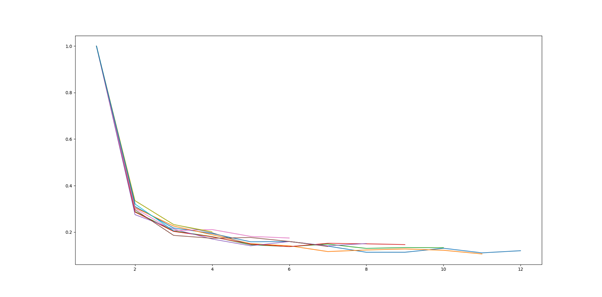
- User Retention과 동일하게 Extract Data From Elastic을 통해 생성한 json 파일과 사전에 제공받은 가입 관련 엑셀 파일을 사용
- 한 주 단위로 가입 유저들의 비로그인 사용 retention 계산
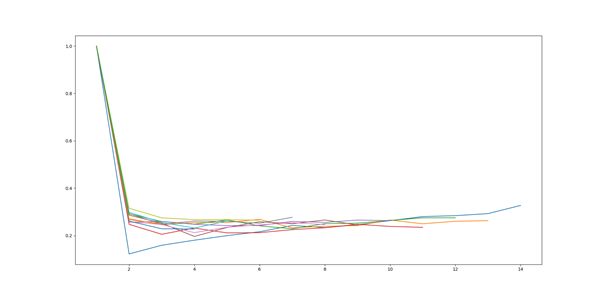
- User Retention와 Users Without Login을 통해 측정한 결과의 중복을 없애기 위한 코드
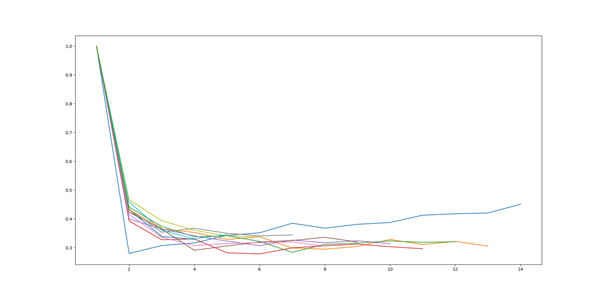
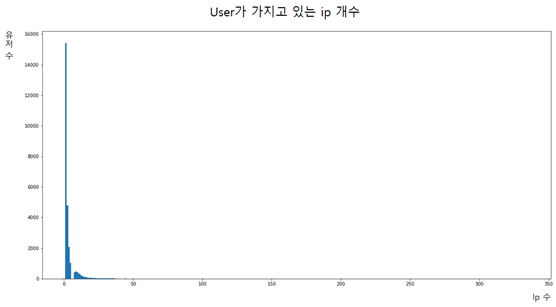
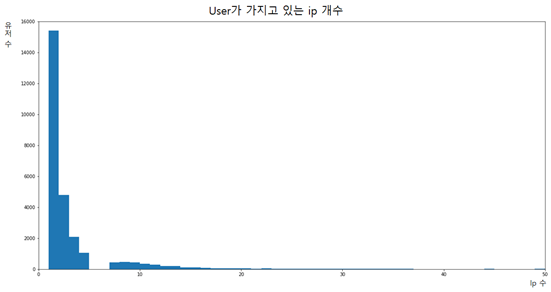
- 같은 ip를 몇 명의 유저들이 공유하는지, 한 유저가 몇 개의 ip를 가지고 있는지를 측정하기 위해 ip별 유저들, 유저 별 ip를 google sheet에 업로드 하는 코드
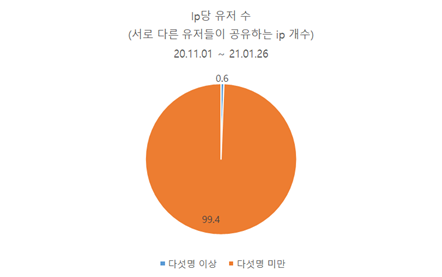
Details of Projects
- Extract Data From Elastic
- User Retention
- Users Without Login
- Get Rid Of Duplication
- Users Per Id And Ids Per User
- Current settings : Store the logs' timestamp, django.user.username, client.geo.ip, django.url.full, django.request.headers.User-Agent that have client.geo.ip, django.url.full, django.request.headers.User-Agent
- How to change the setting: Change the body variable to the desired condition
- How to Change Log Save Start Date
: If you want year-month-date,hour-minutes-seconds
start = 'year-month-(date-1)T(hour-9):minutes:seconds'
end = 'year-month-dateT(hour-9):minutes:seconds'
Change the values of start and end as above.
Hour-9 should be done because the time difference should be considered.
Code that keeps users logged in during the week and keeps track of how much they access the website on a weekly basis
- Use the json file generated by 'Extract Data From Elastic' and the pre-provided Excel file.
- Calculate the retention of logged-in users on a weekly basis.
- Use the json file generated by 'Extract Data From Elastic' and the pre-provided Excel file.
- Calculation of Non-Login Retention for Registered Users on a weekly basis
Code for calculating the retention of registered users to access the website while logged in or non-logged in.
- Code to eliminate duplication of measurement results through User Retention and Users Without Login
- To measure how many users share the same ip and how many ips a user has, the code to upload the ip per ip and the ip per user to the Google sheet.