


This plugin enables Unreal Engine to stream video content using VLC Media Player functionality. Designed for Blueprint-only projects, it includes everything you need to drop in and start playing streaming .m3u8 sources with no source compilation required.
- Stream
.m3u8and live video URLs in UE 5.4+ - Auto-play support via included
BP_TVBlueprint - Packaged plugin — no C++ compilation needed
- Integrates MediaPlayer, Texture, and Material setup automatically
✅ Supported Platforms & Requirements
The VlcMedia (libVLC) Plugin for Unreal Engine is currently focused on stable Windows x64 support. Additional platforms may be added in the future.
🖥️ Supported Operating Systems Platform Status Notes Windows 10 / Windows 11 (64-bit) ✅ Officially Supported Fully tested in Editor + Packaged builds. Recommended.
macOS ❌ Not Supported No prebuilt libVLC binaries provided; untested.
Linux
Android ❌ Not Supported Requires separate libVLC integration (not yet implemented).
iOS ❌ Not Supported Unreal + libVLC on iOS requires significant additional work.
🧩 Supported Unreal Engine Versions Unreal Version Status Notes 5.4.4 ✅ Primary Target Latest precompiled release is built for 5.4.4.
5.2.1
Other UE versions ❌ Unsupported No active builds or testing outside 5.4.4. 🎥 VLC / libVLC Requirements
A 64-bit VLC installation is required on Windows The plugin dynamically loads:
libvlc.dll
libvlccore.dll
If VLC is not installed (or the 32-bit version is installed), Unreal will not be able to initialize the media player.
📦 Distribution Type
Precompiled Plugin (Recommended) Download from Releases → drop into YourProject/Plugins/VlcMedia/.
Source Version (5.2.1 Only) Provided for historical/compatibility reasons; not maintained.
📝 Summary
The current official target configuration is:
Unreal Engine 5.4.4 + Windows 10/11 64-bit + VLC x64 installed
All other platforms are considered untested or unsupported for now.
- Download or clone the plugin into your project's
Plugins/folder:
YourProject/
└── Plugins/
└── VlcMedia/
- The directory should look like this after packaging:
Plugins/ └── VlcMedia/
├── Binaries/
├── Config/
├── Content/
│ ├── BP_TV.uasset
│ ├── YourMediaAssets...
├── Resources/
├── VlcMedia.uplugin
└── README.md
- Open or restart your Unreal project.
- Enable the plugin if it is not already auto-loaded.
- Done! Ready to drag and drop the TV Blueprint into the world.
✅ Note: No need to build or compile C++ modules. This is a precompiled, packaged plugin.
This setup follows this tutorial from Timo Helmers for Blueprint-based media playback using streaming URLs.
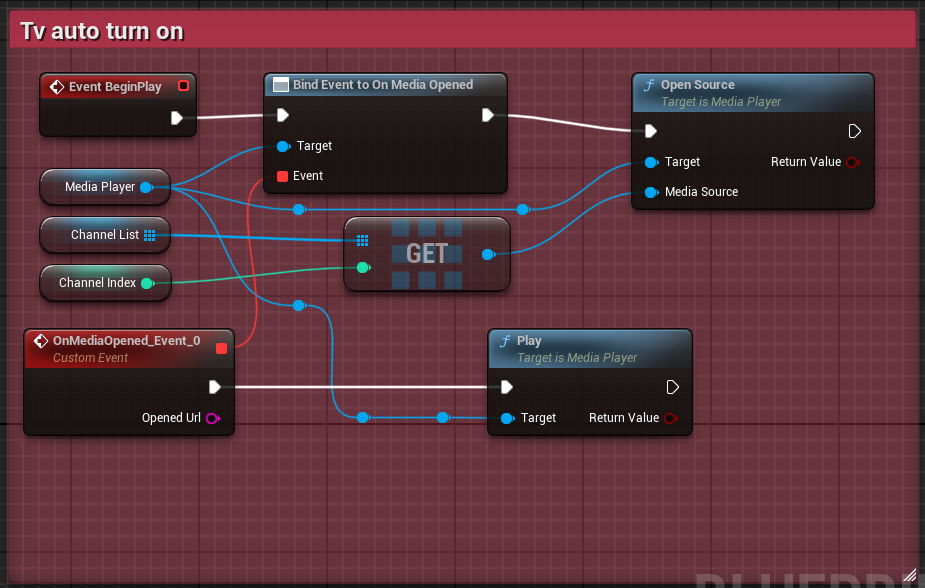
Drag the BP_TV Blueprint into your level. It auto-plays video on BeginPlay using an index from a predefined Media Source array.
- Open
BP_TV - Replace the default entries in the
ChannelListarray with your ownStream Media Sourceassets. - Adjust the
ChannelIndexinteger variable to select which one auto-plays.
The following Blueprint handles media loading and playback:
-
If playback fails, check that:
-
Your
.m3u8or stream URL is public and working -
VLC is installed and supported (used under-the-hood)
-
Media Source is properly assigned
-
StreamMediaSources used in Blueprints must be stored in the main
Content/folder (not inside the plugin) unless manually linked.
Use any of these publicly accessible streams:
⚠️ Some streams may block cross-origin requests. Use trusted sources for production.
- For issues, please open an issue on the plugin's GitHub page or contact the author.
- Check the Wiki documentation
- Check the VideoLAN documentation for supported formats.
-
Developed by Jon Edwards
-
Special thanks to Charles (age 9) for testing + feature ideas 🎮
-
Uses VLC backend via VideoLAN / libVLC
-
