


Automatically detect, split, and rotate multiple photos from scanned images.
Drop a scan containing multiple photos and get individual, correctly-oriented images back.
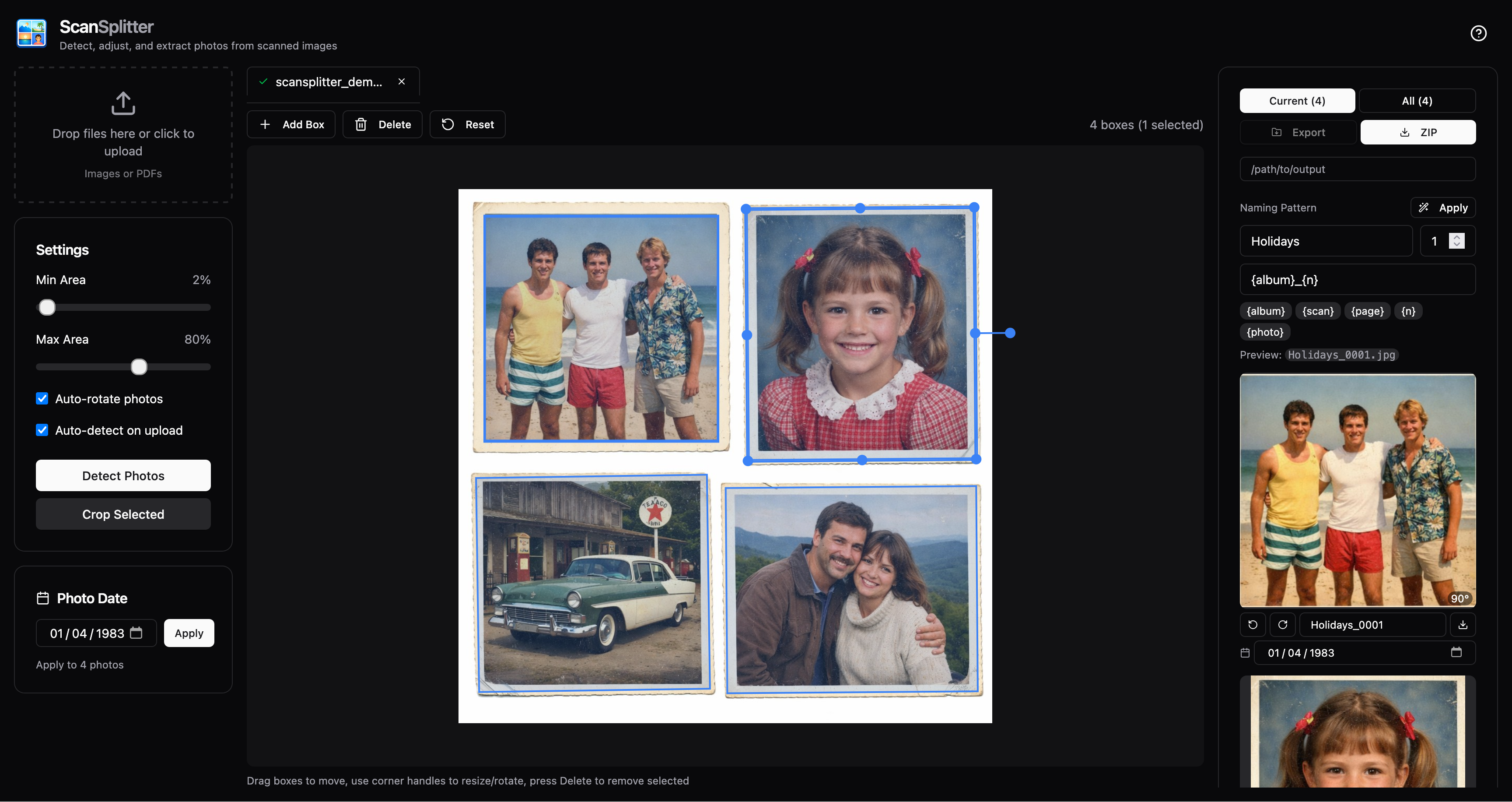
One-time setup - Install uv:
curl -LsSf https://astral.sh/uv/install.sh | shRun ScanSplitter (no clone needed):
uvx scansplitter apiOpens at http://localhost:8000 - drag & drop your scans and export cropped photos. If port 8000 is already in use, pick another:
uvx scansplitter api --port 8001- Multiple detection modes - Choose between ScanSplitterv1, ScanSplitterv2 (default), and AI (U2-Net)
- Interactive editing - Adjust, rotate, and resize bounding boxes before cropping
- Auto-rotation - Detects and corrects 90°/180°/270° rotations
- PDF support - Extract and process pages from PDF files
- Web UI - Modern React interface with Fabric.js canvas editor
- CLI - Batch process files from the command line
- ScanSplitterv2 (default): An improved contour-based detector. It applies contrast enhancement (CLAHE), adaptive thresholding, adaptive morphology (kernel scales with resolution), and contour quality filtering (solidity/aspect/extent). It can also use convex-hull borders for irregular edges.
- ScanSplitterv1: The first contour-based detector used with adaptive threshold + fixed morphology +
minAreaRectfiltering. It’s simpler and can be useful as a fallback if v2 behaves unexpectedly on a specific scan. - AI (U2-Net): A deep-learning salient-object model (ONNX) that produces a mask; ScanSplitter then extracts regions from that mask. It’s best for difficult scans (busy backgrounds, low contrast), but requires downloading a model on first use. Might be less accurate for multiple photos at once.
- Orientation model: An EfficientNetV2-based ONNX classifier that predicts the correct 0°/90°/180°/270° rotation for each cropped photo. ScanSplitter may fall back to classic heuristics if the model can’t be loaded.
Some modes require downloading models on first use (U2-Net (5Mb / 176MB) and the orientation model (80MB)). The web UI shows download progress while this is happening.
No installation needed - just run:
uvx scansplitter apipipx install scansplitter
scansplitter apigit clone https://github.com/janklan/scansplitter
cd scansplitter
uv sync
uv run scansplitter apiscansplitter api
# or: uvx scansplitter apiOpens at http://localhost:8000 with:
- Drag & drop file upload (images and PDFs)
- Interactive bounding box editor (drag, resize, rotate)
- Multi-file support with tabs
- PDF page navigation
- ZIP export
# Process a scanned image
uv run scansplitter process scan.jpg -o ./output/

# Process a PDF
uv run scansplitter process document.pdf -o ./output/

# Multiple files
uv run scansplitter process scan1.jpg scan2.png -o ./output/

# Options
uv run scansplitter process scan.jpg \
  --no-rotate \
  --min-area 5 \
  --max-area 70 \
  --detection-mode scansplitterv2 \
  --format jpg \
  -o ./output/
CLI Options:
| Option | Description |
|---|---|
-o, --output |
Output directory (default: ./output) |
--no-rotate |
Disable auto-rotation |
--min-area |
Minimum photo size as % of scan (default: 2) |
--max-area |
Maximum photo size as % of scan (default: 80) |
--detection-mode |
scansplitterv2 (default), scansplitterv1 (legacy), or u2net (deep learning); classic is an alias for scansplitterv2 |
--u2net-full |
Use full U2-Net model instead of lite (slower, more accurate) |
--format |
Output format: png or jpg (default: png) |
- Photo detection - Runs the selected detection mode (ScanSplitterv1 / ScanSplitterv2 / AI (U2-Net)) to produce rotatable bounding boxes.
- Interactive adjustment - You can refine boxes in the web UI before cropping.
- Cropping - Extracts rotated regions using the adjusted boxes.
- Auto-rotation (optional) - Uses the orientation model (with fallbacks) to fix 90°/180°/270° rotations.
ScanSplitter depends on excellent open models and upstream work:
- U²-Net (salient object detection) by Xuebin Qin et al. — paper: https://arxiv.org/abs/2005.09007, code: https://github.com/xuebinqin/U-2-Net
- U2-Net ONNX weights are downloaded from
rembgreleases by Daniel Gatis (with a ScanSplitter backup mirror) — https://github.com/danielgatis/rembg - Orientation model (EfficientNetV2) is downloaded from Duarte Barbosa’s deep image orientation detection project (with a ScanSplitter backup mirror) — https://github.com/duartebarbosadev/deep-image-orientation-detection
# Start API server
uv run scansplitter api --reload

# In another terminal, start frontend dev server
cd frontend
npm install
npm run dev
Frontend runs on http://localhost:5173 with hot reload, proxying API requests to :8000.
cd frontend
npm run build
Builds to src/scansplitter/static/, which FastAPI serves automatically.