PLEASE NOTE: This app has been archived. We have released the new Proxidize Android for free at https://proxidize.com/android. This repo will be updated soon.
Proxidize Android Legacy is an app that allows anyone to create mobile proxy farms. You can use 4G or 5G with your Android phone. You only need to download the app, press connect, and your mobile proxy will be ready.
Proxidize made Proxidize Android to show what Proxidize MPM (Mobile Proxy Maker) could do. The app worked well, but it was removed from the Google Play Store for the reasons below.
Proxidize Android Legacy is the old version of the Proxidize Portable app. The new app will be a big improvement over this one.


- Proxidize Android - Create 5G/4G Mobile Proxies on Android Phones
- What Is Proxidize?
- Features of Proxidize Android Legacy
- How It Works & Architecture
- Proxidize Android Legacy vs Proxidize Mobile Proxy Maker
- How to create a 5G/4G mobile proxy on android phones: (Turn your phone into a mobile proxy)
- Using the Proxy
- Rotation/Changing the IP (How to Change Mobile Proxy Android IP Address Using Airplane Mode)
- Supported Android Versions & Devices
- Deploying Your Own Server
- Using the App Without Connecting to the Tunneling Server First
- Reporting Issues
- Updates
- FAQ:
- Proxidize Portable
Proxidize creates tools and software that make web data, automation, and high-quality mobile proxies available to everyone.
Read the full manifesto here: https://proxidize.com/manifesto/


- Create A Mobile or Residential HTTP(S) or SOCKS5 proxy on Android, MacOS or Windows devices.
- Use manual or automatic IP rotation with intervals or one-tap controls.
- API for rotating/changing the IP which can be used as a link/URL.
- Connect to mobile data while using the app to generate a mobile proxy.
- Connect to Wi-Fi while using the app to generate a residential proxy.
- Super quick load balancing managed by global servers.
- Add your own custom tunneling server for higher security and speeds.
- Experimental feature: Change OS fingerprint for improved opsec.
- Experimental feature: Split connection to WIFI backend to get better speeds.
Proxidize Android Legacy connects to a tunneling server using reverse proxies. It then starts a local HTTP proxy server. This makes the proxy accessible from anywhere on the web. The tunneling server handles the port forwarding and routing.

The workflow is:
- The app picks a random port between
10000and60000. - It sets up the local proxy server using this port.
- It generates a unique username and password.
- The tunneling server exposes the proxy to the public internet via port forwarding.
This design makes the proxy reachable from anywhere and doesn't require you to manually expose your device.
This app is not a replacement for Proxidize Mobile Proxy Maker. It is a proof of concept. You can use this app for small personal projects. However, for a commercial-grade solution, you will need Proxidize MPM for these reasons:
- These apps are often unreliable. They are built mainly for IoT devices, not proxies.
- Both incoming and outgoing connections use the same network interface so that affects the speed. This means you will get only a fifth of the mobile speed.
- It is hard to manage at scale. Setting up a 20-modem kit from Proxidize takes about 10 minutes. In contrast, setting up 20 phones can take a full day or more.

- Download the Proxidize Android Legacy APK file.
- Install it on your phone
- Open the app and press "Connect"
- Copy the generated proxy credentials
And now you have created your very own 5G/4G mobile proxy.
- Download any Android emulator such as BlueStacks
- Download the Proxidize Android Legacy APK file in the emulator. Open this page in the emulator to download the APK
- Install the APK on your device
- Open the app and press "Connect".
- Copy the proxy, now you can use it anywhere.
Format:
IP:Port:Username:Password
Example:
1.1.1.1:1565:abc:xyz
Explained:
IP or Hostanme: 1.1.1.1
Port: 1565
Userrname: abc
Password: xyz
Proxidize Android Legacy has built-in rotation. To set it up, you need to set the app as the default assistant in your settings.
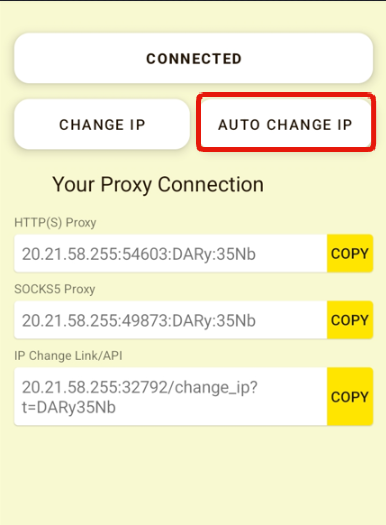
Proxidize Android Legacy allows you to set a rotation/IP change interval. To use it, you need to:
- Press "AUTO CHANGE IP" button on the home page.
- Select the rotation interval you wish to use.
- Select a time in minutes. Anything less than 30 minutes will harm your phone.
- Press "SET" and your settings will be applied.
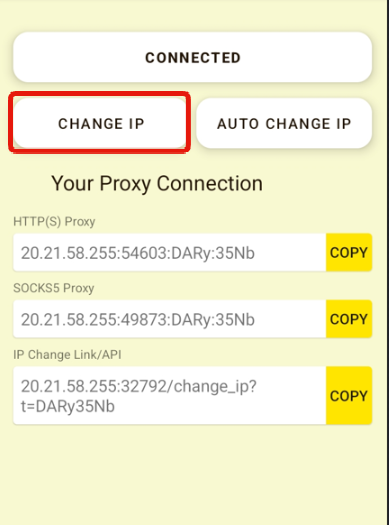
To change the IP address manually, you simply need to press the change IP button.
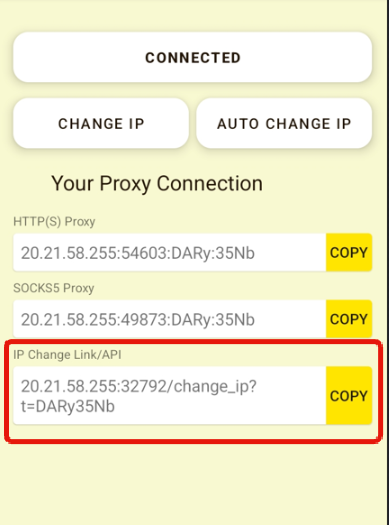
Proxidize Android Legacy generates an IP change link/URL/API that you can use anywhere to change the IP.
To change the IP using the rotation link, you need to:
- Copy the change IP URL under "IP Change Link/API" by pressing the "COPY" button.
- Use the link anywhere or send a GET request to it.
A success response is:
{"response":"success"}
Proxidize Android Legacy supports all armeabi-v7a running Android 6.0 to Android 12
Supported Android API from API 23 to API 31.
Tested devices:
All Android 6.0+ phones
Samsung A Series
Samsung S Series
Samsung M Series
Samsung Note Series
Google Pixel
OnePlus
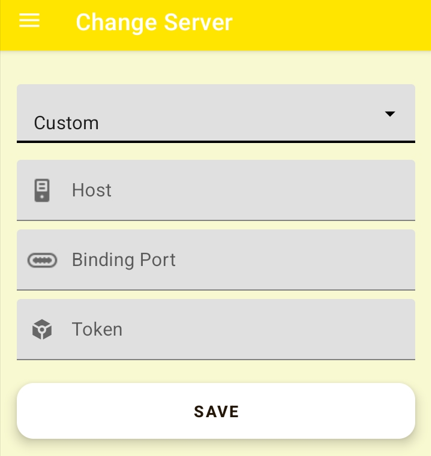
Proxidize Android Legacy allows you to deploy your own tunneling server to avoid using shared/congested servers. To do that, you need to:
- Create a new server on any host. Make sure you're on a public network with all the ports publicly accessible.
- Edit configuration file to add your server information.
- Edit
CUSTOM SERVERfields to add your new server.
-
Use a machine running Ubuntu 20.04 on x86-64 or AMD64 architecture.
-
Note your public server IP. Example:
5.5.5.5
Run the SSH command:
ssh username@5.5.5.5
Clone the repo:
git clone https://github.com/proxidize/proxidize-android.git
Enter the project folder:
cd proxidize-android
Open the configuration file using vi or nano:
nano ./server/server.ini
Add your custom values:
[common]
bind_port = PORT
authentication_method = token
token = TOKEN
Notes: - Keep PORT = 2000 unless you have a reason to change it. -
TOKEN can be any random string. Example: 12345678.
Run the server in the background:
setsid ./server/server -c ./server/server.ini &
setsid keeps the process alive even after you close the terminal.
Inside the Proxidize Android Legacy app:
-
Go to Menu → Change Server → Custom
-
Enter: HOST = Your server IP
5.5.5.5Binding Port = The port you set (default:
2000)Token = The authentication token you created
Save and restart the app. Tap Connect to start using your custom tunneling server.
In some cases, you can connect directly to the phone without using the tunneling server. This is better because it can give you 5-10% higher speeds.
- Check if your carrier can provide a dedicated v4 IP. This is rare, so confirm with them.
- Call your carrier and ask them to forward the ports for you.
- Find your public IP address by searching for "what's my IP address."
- The app listens on 0.0.0.0. After you forward the proxy port, connect using your public IP.
- You can do this if you're on WiFi, but you must forward the ports on your router.
- App keeps crashing on a specific device/Android version.
- Bypass battery optimization not working on a specific device/Android version.
- App stops working after a while on any
- Proxy Refusing Connection web error, even though the port and host are correct.
- If you see any of the following errors: 12020, 12033, or 12165.
When reporting issues, you must provide the following details:
- Full description of the issue including screenshots and any error codes
- Full device manufacturer & model name. E.g. Samsung SM-A105L
- Include a screenshot of the "Software information" page
- Full instructions to replicate the issue.
- "I sent 1,000 threads to scrape Amazon and now the IP is banned".
- "I'm using vanilla puppeteer or Chrome and I keep getting blocked" or "my proxy is detected".
- Any form of
407/authentication error. This means you're not using the right credentials. Refer to format section. 502or504if you're using rotation. This happens when you're connecting in the middle of a rotation.- Any situation where you're using your own server. (Unless you can replicate the issue when using the default servers as well.)
This app is no longer maintained by Proxidize, but I (Abed) will be working on it in my free time.
Edit: I ended up finishing most of the planned features before schedule. So chances are I won't be making any updates to this app for a while.
Things I'll be adding:
- Supporting Android 12
- Add Android wake lock to keep the proxy alive.
- Custom server from application.
- Save ports between sessions.
- In-app IP rotation button.
- Automated IP rotation.
- IP rotation API
- Supporting more devices such as Asus, Alcatel, etc.
- Auto-detect nearest tunneling server.
- SOCKS proxies.
- Prevent duplicate ports on server.
- Showing the public IP on the app interface.
- Change proxy format.
If you're updating to v2.0.0 from v1.0.0 make sure to delete v1.0.0 first.
A few months after publishing the app, Google marked it as harmful/PUP/malware app. I suspect it's because there's some Google watchdog that sniffed the traffic and found something harmful that was being transmitted by some of the users. Or it's possible that the behavior of the traffic being unencrypted and routed to a single server was similar to typical harmful app behavior that come across Google in the Play Store.
There are also a few AVs that have marked the tunneling client fast revers proxy, as a PUP, and it's possible Google Play Store did the same.
I've made some mitigations against this by changing the binaries to change the hash, but I suspect Google will still mark it as harmful by reading the strings, so you will need to disable Play Protect, otherwise, the app will likely get automatically deleted.
Make sure you're using the correct port value, then exit the app and start it again. There's a very small chance you used an already used port.
Exit the app and start it again. If it still doesn't work, make sure the app is still running on your device. Then please tweet @Proxidizehq and we'll take a look.
The app uses reverse proxies created via websockets route to forwarding facing proxies. This technology is slow, unreliable and there's nothing I can do about it with the limited time that I have to work on this project. Apps based on this specific tunneling technology were created for simple IoT use cases, and not for pushing full bandwidth or proxies.
The Proxidize team is working on an entirely new app called Proxidize Portable, which will address all the short comings of this app using proprietary technology.
Another thing is such apps send both incoming and outgoing traffic from the same device, which means you will always get half the speed that you would normally get when testing the speed directly on your phone. If speed is important, you should use the full Proxidize MPM-OP: https://proxidize.com/
This app will work everywhere, unless:
- You are in countries that have ISP-level firewalls that block any proxied connections via DPI.
- You are behind a corporate firewall that blocks unknown ports.
Make sure you're not mixing the small l with a capital I.
We are currently working on a new application called "Proxidize MPM-Cloud Portable" or Proxidize Portable for short. The new app will address all the deficiencies of this one and will have the following features:
- 5-10x higher speeds than Proxidize Android Legacy
- Custom OS Fingerprint
- Send & Receive SMS via interface/API
- Manage all devices from web interface
- Manage unlimited phones via grouping, categories and more.
- Use any server from dozens of countries.
- Custom DNS
- Get 99.99% uptime
- Dual-stacking IPV4/IPV6 support
- Load-balancing between multiple phones.
- Setting multi-phone IP rotation/load balancing pools.
- And much more!