




Local-first MCP Apps framework.
Quickstart, build, test, and ship your Claude or ChatGPT App!
Demo (Hosted) ~ Demo (Video) ~ Discord ~ Documentation ~ GitHub
Requirements: Node (20+), pnpm (10+)
pnpm add -g sunpeak
sunpeak newsunpeak is an npm package that helps you build MCP Apps (interactive UI resources) while keeping your MCP server client-agnostic. Built on the MCP Apps SDK (@modelcontextprotocol/ext-apps). sunpeak consists of:
- Runtime APIs: Strongly typed React hooks for interacting with the host runtime (
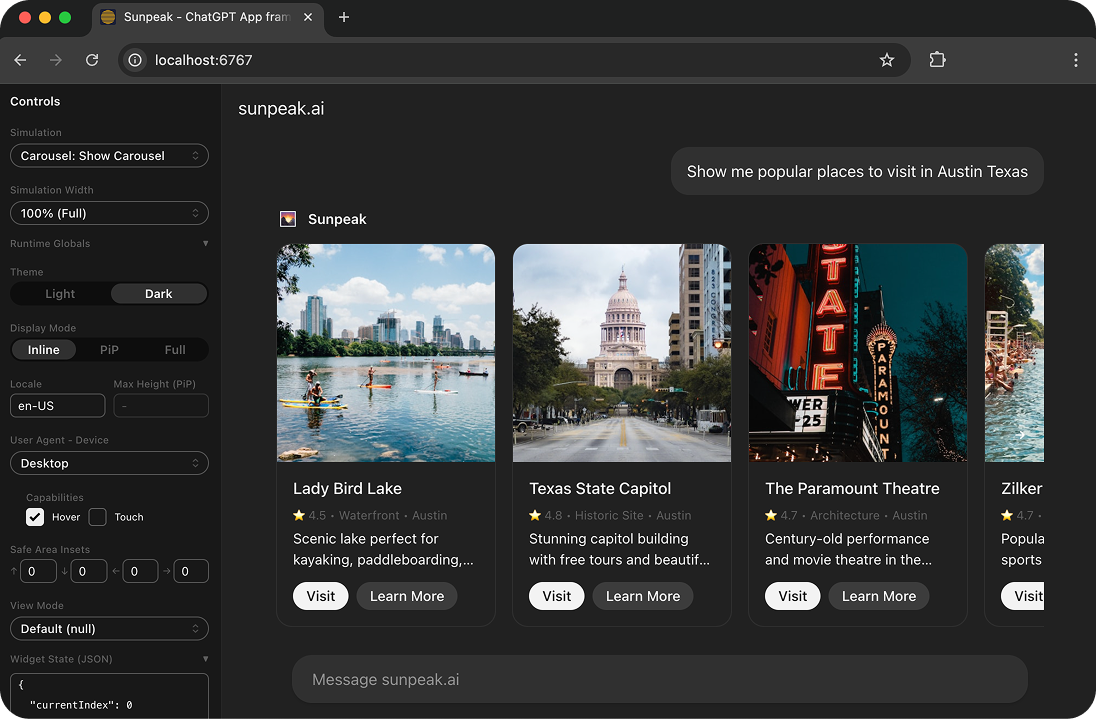
useApp,useToolData,useAppState,useHostContext,useUpdateModelContext,useAppTools), architected to support generic and platform-specific features (ChatGPT, Claude, etc.). Platform-specific hooks likeuseUploadFile,useRequestModal, anduseRequestCheckoutare available viasunpeak/platform/chatgpt, withisChatGPT()/isClaude()platform detection viasunpeak/platform. - Multi-host simulator: React component replicating host runtimes (ChatGPT, Claude) to test Apps locally and automatically via UI, props, or URL parameters.
- MCP server: Serve Resources with mock data to hosts like ChatGPT and Claude with HMR (no more cache issues or 5-click manual refreshes).
Next.js for MCP Apps. Using an example App my-app with a Review UI (MCP resource), sunpeak projects look like:
my-app/
├── src/
│   ├── resources/
│   │   └── review/
│   │       └── review.tsx            # Review UI component + resource metadata.
│   ├── tools/
│   │   ├── review-diff.ts            # Tool with handler, schema, and optional resource link.
│   │   ├── review-post.ts            # Multiple tools can share one resource.
│   │   └── review.ts                 # Backend-only tool (no resource, no UI).
│   └── server.ts                     # Optional: auth, server config.
├── tests/simulations/
│   ├── review-diff.json              # Mock state for testing (includes serverTools).
│   ├── review-post.json              # Mock state for testing (includes serverTools).
│   └── review-purchase.json          # Mock state for testing (includes serverTools).
└── package.json- Project scaffold: Complete development setup with the
sunpeaklibrary. - UI components: Production-ready components following MCP App design guidelines.
- Convention over configuration:
- Create a UI by creating a
.tsxfile insrc/resources/{name}/that exports aResourceConfigand a React component (example below). - Create a tool by creating a
.tsfile insrc/tools/that exportstool(metadata with optional resource link),schema(Zod), and adefaulthandler (example below). Tools without aresourcefield are registered as plain MCP tools (no UI). - Create test state (
Simulations) by creating a.jsonfile intests/simulations/(example below).
- Create a UI by creating a
Commands for managing MCP Apps:
sunpeak new [name] [resources]- Create a new projectsunpeak dev- Start dev server with MCP endpoint and live simulatorsunpeak build- Build resources and compile tools for productionsunpeak start- Start the production MCP server (real handlers, auth, Zod validation)sunpeak upgrade- Upgrade sunpeak to latest version
Example Resource, Simulation, and testing file (using the Simulator) for an MCP resource called "Review".
Each resource .tsx file exports both the React component and the MCP resource metadata:
// src/resources/review/review.tsx

import { useToolData } from 'sunpeak';
import type { ResourceConfig } from 'sunpeak';

export const resource: ResourceConfig = {
  description: 'Visualize and review a code change',
  _meta: { ui: { csp: { resourceDomains: ['https://cdn.example.com'] } } },
};

export function ReviewResource() {
  const { output: data } = useToolData<unknown, { title: string }>();

  return <h1>Review: {data?.title}</h1>;
}Each tool .ts file exports metadata (with an optional resource link for UI tools), a Zod schema, and a handler:
// src/tools/review-diff.ts

import { z } from 'zod';
import type { AppToolConfig, ToolHandlerExtra } from 'sunpeak/mcp';

export const tool: AppToolConfig = {
  resource: 'review',
  title: 'Diff Review',
  description: 'Show a review dialog for a proposed code diff',
  annotations: { readOnlyHint: false },
  _meta: { ui: { visibility: ['model', 'app'] } },
};

export const schema = {
  changesetId: z.string().describe('Unique identifier for the changeset'),
  title: z.string().describe('Title describing the changes'),
};

type Args = z.infer<z.ZodObject<typeof schema>>;

export default async function (args: Args, extra: ToolHandlerExtra) {
  return { structuredContent: { title: args.title, sections: [] } };
}
Simulation files provide fixture data for testing. Each references a tool by filename and contains the mock input/output:
├── tests/e2e/
│   └── review.spec.ts # This! (not pictured above for simplicity)
└── package.json
The Simulator allows you to set host state (like host platform, light/dark mode) via URL params, which can be rendered alongside your Simulations and tested via pre-configured Playwright end-to-end tests (.spec.ts).
Using the Simulator and Simulations, you can test all possible App states locally and automatically across hosts (ChatGPT, Claude)!
// tests/e2e/review.spec.ts

import { test, expect } from '@playwright/test';
import { createSimulatorUrl } from 'sunpeak/simulator';

const hosts = ['chatgpt', 'claude'] as const;

for (const host of hosts) {
  test.describe(`Review Resource [${host}]`, () => {
    test.describe('Light Mode', () => {
      test('should render review title with correct styles', async ({ page }) => {
        const params = { simulation: 'review-diff', theme: 'light', host }; // Set sim & host state.
        await page.goto(createSimulatorUrl(params));

        // Resource content renders inside an iframe
        const iframe = page.frameLocator('iframe');
        const title = iframe.locator('h1:has-text("Refactor Authentication Module")');
        await expect(title).toBeVisible();

        const color = await title.evaluate((el) => window.getComputedStyle(el).color);

        // Light mode should render dark text.
        expect(color).toBe('rgb(13, 13, 13)');
      });
    });
  });
}Install the create-sunpeak-app skill to give your coding agent (Claude Code, Cursor, etc.) built-in knowledge of sunpeak patterns, hooks, simulation files, and testing conventions:
npx skills add Sunpeak-AI/sunpeak@create-sunpeak-app