Highlight code the way you think about it.
CodeGlow is a VS Code extension that lets you manually highlight code regions with persistent colors.
Unlike syntax highlighting, CodeGlow highlights are created by you and remain available across editor sessions.
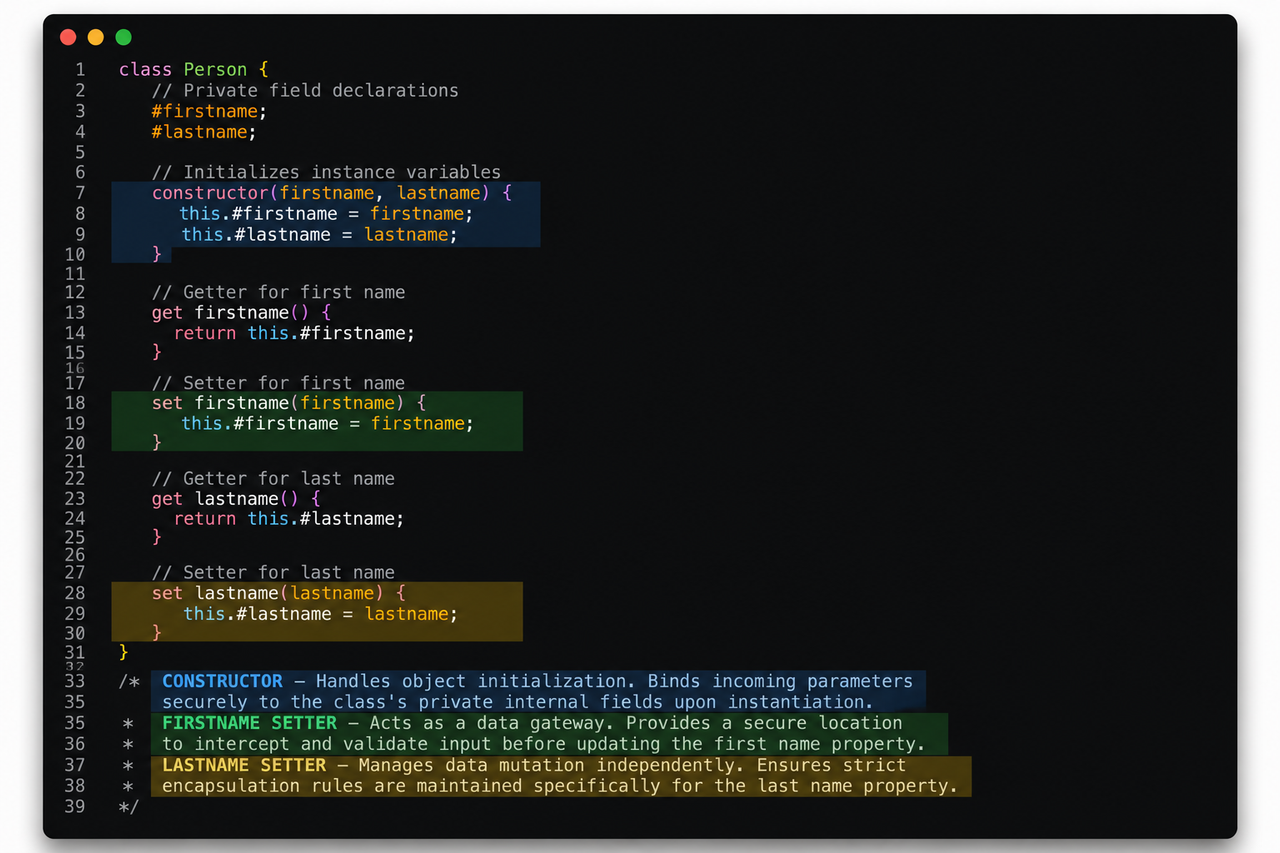
- 🎨 Highlight any code selection
- 💾 Automatic persistence
- 🔄 Restore highlights on restart
- 📍 Highlight tracking during code edits
- 🟨 Yellow, 🟥 Red, 🟩 Green, 🟦 Blue highlights
- ♾️ Multiple highlights per file
- 🗑️ Remove highlights
- 🔁 Change highlight colors
| Command | Description |
|---|---|
| CodeGlow: Highlight Selection | Highlight selected code |
| CodeGlow: Remove Highlight | Remove highlight at cursor |
| CodeGlow: Change Highlight Color | Change highlight color |
Commands are available through:
- Right-click Context Menu
- Command Palette (
Ctrl+Shift+P)
Search for:
CodeGlow
in the VS Code Extensions Marketplace.
code --install-extension codeglow-x.x.x.vsix- Select code.
- Right-click.
- Choose CodeGlow: Highlight Selection.
- Pick a color.
That's it.
Highlights are saved automatically.
- TypeScript
- VS Code Extension API
- Workspace State Persistence
MIT