- Introduction
- Documentation
- Postman Collection
- Installation Guide
- Sample
.envFile - System Architecture
- Project Directory Structure
- Key Features
- API Endpoints
- Langfuse Observability
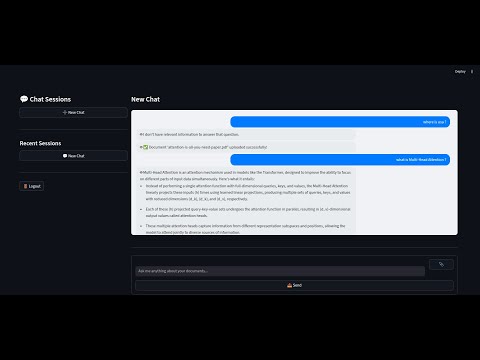
Note: Watch the demo video at 2x speed
A Retrieval-Augmented Generation (RAG) chatbot that allows users to upload documents (PDF, DOC, DOCX, TXT), processes them, and enables interactive Q&A over the uploaded content. The project features user authentication, document upload, and a conversational interface powered by Streamlit and FastAPI.
For a detailed guide on this project, refer to the guide:
Detailed Guide: Data Processing and Visualization RAG Chatbot
To test the API endpoints, use the Postman collection:
Postman Collection: Data Processing and Visualization RAG Chatbot
git clone <repo-url>
cd Data-Processing-and-Visualization-RAG-chatbotpython3 -m venv venv
source venv/bin/activatepip install -r requirements.txtpython init_db.pyuvicorn main:app --reload- The backend will be available at
http://localhost:8000
streamlit run app.py- The frontend will be available at the URL shown in your terminal (usually
http://localhost:8501).
Below is a sample .env file to configure the environment variables required for the project. Replace the placeholder values with your actual credentials and settings.
# Sample .env file
PINECONE_API_KEY=your-pinecone-api-key
PINECONE_ENV=your-pinecone-environment
VECTOR_DIM=1536
INDEX_NAME=your-index-name
PINECONE_CLOUD=aws
PINECONE_REGION=your-region
PINECONE_INDEX=your-index-name
ULTRASAFE_API_KEY=your-ultrasafe-api-key
ULTRASAFE_API_EMBEDDINGS_BASE=https://api.your-domain.com/embed/embeddings
ULTRASAFE_MODEL=your-model-name
LANGFUSE_SECRET_KEY=your-langfuse-secret-key
LANGFUSE_PUBLIC_KEY=your-langfuse-public-key
LANGFUSE_HOST=https://your-langfuse-host.comThe following diagram illustrates the architecture of the system, including the interaction between the frontend, backend, vector database, and external APIs:
.
├── app.py                  # Streamlit frontend app
├── main.py                 # FastAPI backend entrypoint
├── requirements.txt        # Python dependencies
├── init_db.py              # Script to initialize the database
├── database.db             # SQLite database (auto-generated)
├── src/
│   ├── api/
│   │   ├── auth.py         # Auth endpoints (login, signup)
│   │   └── routes.py       # Upload and chatbot endpoints
│   ├── config/
│   │   ├── embedding.py    # Embedding configuration for UltraSafeAI
│   │   ├── pinecone.py     # Pinecone vector store configuration
│   │   ├── reranker.py     # Reranker configuration for UltraSafeAI
│   │   └── langfuse.py     # Langfuse configuration for observability
│   ├── db/
│   │   └── session.py      # Database session management
│   ├── middleware/
│   │   └── session_middleware.py # Middleware for session handling
│   ├── models/
│   │   └── user.py         # User model for authentication
│   ├── schemas/
│   │   ├── auth.py         # Request schemas for authentication
│   │   └── query.py        # Request schema for chatbot queries
│   ├── dependencies.py     # Dependency injection for FastAPI routes
│   └── vectorstore/
│       ├── generator.py         # Answer generation using UltraSafeAI
│       ├── ingestion_pipeline.py # Document ingestion and processing pipeline
│       ├── loader.py            # Document loader for various file types
│       ├── pinecone_client.py   # Pinecone client setup
│       ├── retriver.py          # Document retrieval logic
│       ├── ultrasafe_embeddings.py # Embedding generation using UltraSafeAI
│       ├── ultrasafe_reranker.py   # Reranking logic using UltraSafeAI
│       └── utils.py             # Utility functions for text processing
└── .gitignore                   # Git ignore rules
- Users can upload documents in various formats, including PDF, DOC, DOCX, and TXT.
- During the upload process, Parallel processing techniques such as text cleaning and chunking are applied to prepare the document for storage in the vector database.
- The project uses Pinecone as the vector database to store document embeddings.
- Uploaded documents are split into smaller chunks, embedded using a custom embedding class, and stored in the vector database for efficient retrieval.
- Custom classes were created to interact with the UltraSafeAI API for embedding generation and reranking.
- The
UltraSafeAIEmbeddingsclass handles the generation of embeddings for document chunks and queries. - The
UltraSafeAIRerankerclass is used to rerank retrieved results based on their relevance to the user query.
- During the retrieval process, the system applies reranking to ensure the most relevant document chunks are prioritized.
- This is achieved by leveraging the UltraSafeAI reranking API, which sorts the retrieved chunks based on their relevance scores.
- Users can ask questions about their uploaded documents, and the chatbot provides context-aware answers.
- The chatbot strictly adheres to the provided document context, ensuring accurate and reliable responses.
- Secure user authentication is implemented using hashed passwords and session cookies.
- Each user's documents and chat sessions are isolated, ensuring privacy and security.
- The project integrates Langfuse for observability, providing detailed logs and tracing for chatbot interactions and performance monitoring.
- POST
/auth/signup - Body:
{ "email": "[email protected]", "password": "yourpassword" } - Response:
{ "message": "User created", "user_id": <id> }
- POST
/auth/login - Body:
{ "email": "[email protected]", "password": "yourpassword" } - Response:
{ "message": "Logged in", "session_id": <session_id> } - Note: Sets a
session_idcookie for authentication.
- POST
/auth/logout - Headers:
- Cookie:
session_id=<session_id>
- Cookie:
- Response:
{
  "message": "Logged out successfully"
}
- POST
/upload - Form Data:
file(PDF, DOC, DOCX, or TXT) - Headers: Cookie with
session_id - Response:
{ "message": "Document processed and stored successfully" }
- POST
/query - Body:
{ "query": "Your question here" } - Headers: Cookie with
session_id - Response:
{ "query": "...", "answer": "..." }
Langfuse provides observability for the chatbot's interactions and performance. Below are two screenshots showcasing its functionality:
- Each user’s documents and chat sessions are private and isolated.
- Only supported file types can be uploaded (Pdf,docs,text).
- Make sure both backend and frontend are running for full functionality.