Home
DBADashExt is an alerting extension to the DBADash SQL Monitoring tool. It relies on the data collected by DBADash and in some cases, reuses the thresholds set there.
Before anything, it's important to know few things about DBADashExt:
- it's not an automatic tool: you define few things and presto! you have your alert - no, it doesn't work like that. There's a bit of a work required.
- as with any pieces of software, there may be bugs and / or there may be things that were not done the way you probably would - for this, we have the Issues button above (once I figure out how I enable the Discussions button, I will do it :) )
- I am not familiar with GitHub, this is my first project I am taking it out in the open at this scale - so I may not use GitHub as you might or not following any best practices that may be there. I am only human and one that managed to screw up few GitHub repos in the past. So please be gentle...
This being said, a bit of a history...
The need for an alerting system started when I was monitoring a bunch of AWS RDSs. At the time, AWS did not offered support for Database Mail on RDSs and the SQL instances were really locked down. So I started working on a framework that would allow me to:
- collect some metrics locally and do some analysis on them
- if any of these metrics were breaching some defined thresholds, then some metadata about the alert was sent to a central server for relaying (and building the actual message)
- the central server relayed the message via the defined channels (email or Slack webhooks) and then logged the details for a weekly summary reporting
In the meantime, I was also testing some monitoring tools from various vendors, but none was selected. Then DBADash came in thru the door. It wasn't love at first sight, but it had a certain appeal. I started working with the tool, discovering its features and hidden gems and ... rest is history. There was only one thing: it was lacking alerting. I was still using two things for the same purpose.
So I decided to start looking if I can somehow marry the two: DBADash with my alerting framework. And this is the result.
The End.
Credits rolling....
And now some food for the nerds in us. The goodies, the technical stuff
I will not go into technical details on how DBADash works. Simply because I don't know :) The little that I know is that all this framework has to sit outside the DBADash repository database, at least for now, due to how upgrades are working: anything extra gets dumped. And this is why the alerting framework sits in its own database, called DBADashExt. If and when the DBADash upgrade process will change and allow other objects to co-exist, I will reconsider this, but for now it's like this.
The whole framework revolves around few tables. Few of these tables are used to define the environment, while others are used to define de alerts for each of the environments.
This table holds an enum list of all available environments. A wild card "*" is provided in case there the environment is not relevant. However, the recommendation is to avoid using it as it provides more flexibility in defining / testing the alerts.
This table stores a list (enumeration) of all the accepted alert levels. The description of the predefined alert levels can be customized, but the associated IDs cannot.
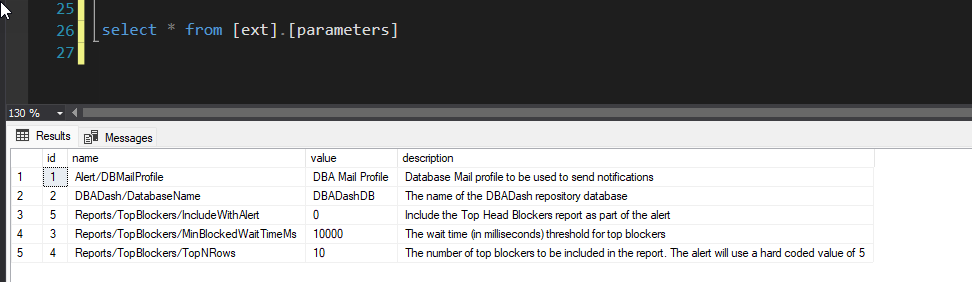
This table stores all the runtime parameters used within the framework. The following section shows the accepted parameters, their meaning and accepted values. Some of these parameters have default values, some do not. Default values usually means what the framework will use when the corresponding parameter is missing.
- Alert/DBMailProfile: Database Mail profile to be used to send notifications (no default value)
- DBADash/DatabaseName: The name of the DBADash repository database (if missing, it defaults to DBADashDB)
- Reports/TopBlockers/MinBlockedWaitTimeMs: The wait time (in milliseconds) threshold for top blockers (it defaults to 10000ms)
- Reports/TopBlockers/TopNRows: The number of top blockers to be included in the report (it defaults to 5)
This is the main table and stores all the definitions for all the alerts:
- name of the alert
- email body to be sent
- default recipients
- the delay between alerts
- the default threshold(s)
- etc
This table stores all the overrides that are needed for any special situations:
- alternative recipients
- targeted thresholds (we'll talk about these a bit later)
- alternate email and / or webhook message template
- etc
This table stores the default webhooks for each environment. For example:
- you may have dedicated Slack channels for production, test and stage
- you may have a dedicated Teams webhook to test your alerts before going with it into any of the environments
This table stores a combination of history and state of certain alerts:
- some alerts have a delay interval between 2 consecutive notifications - this table helps with this by storing when it was last triggered
- some alerts need to have an ON/OFF state - this table helps storing that state together with the last value for the monitored metric (for example the CPU alert)
more to come