‼️ DISCONTINUED — This project has been discontinued and is no longer actively maintained. As I have decided to move away from Directus for future projects, no further development, feature requests, bug fixes, or compatibility updates are planned. The repository will remain available readonly for reference and for existing users, at least for some time. Feel free to clone it, fork it, or build upon it.
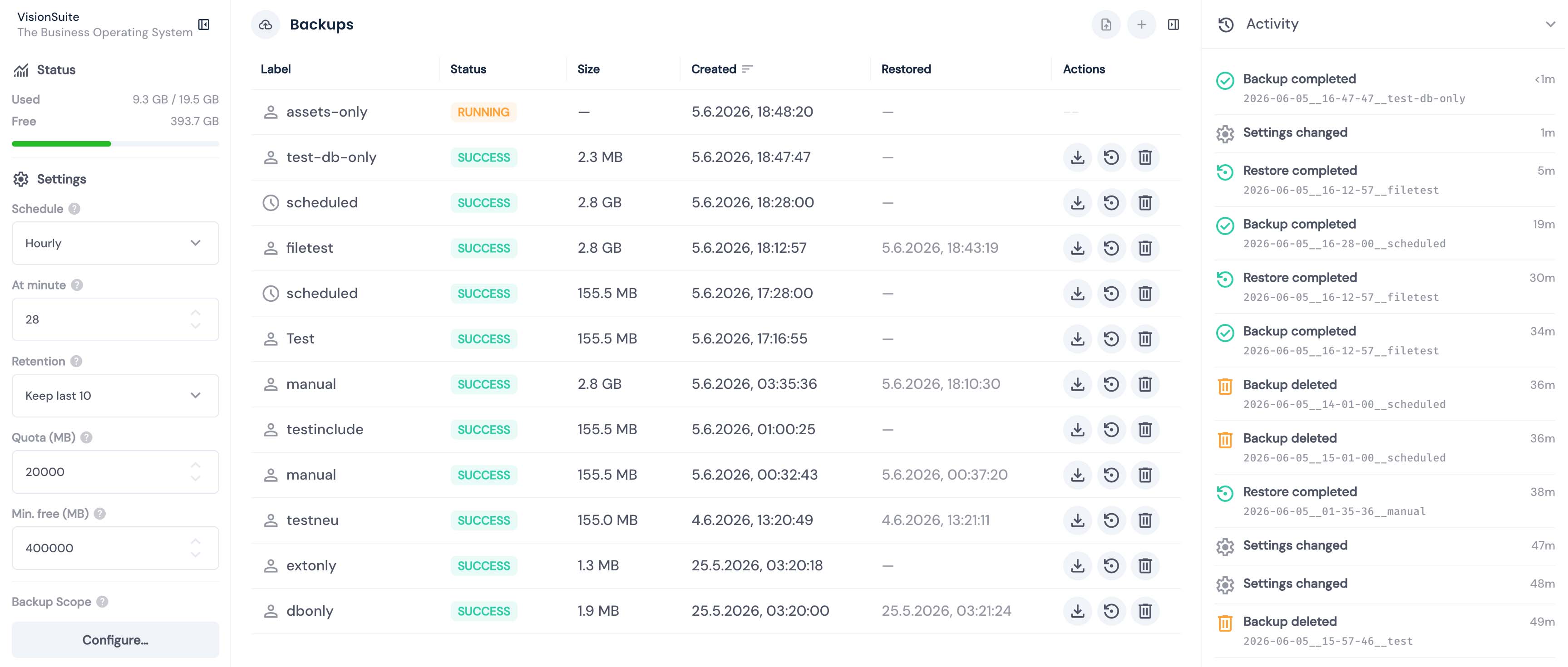
Full backup and restore system for Directus. Create, schedule, download, upload, and restore backups through a UI module in Directus Studio — running entirely inside Directus, with no sidecar container and no Docker socket access.
- No sidecar, no Docker socket — installs as a single Directus extension; restore is driven by a container restart instead of a privileged Docker connection
- Complete Directus backups — database, uploads, and extensions in a single archive
- Full & partial restore — restore the entire system or individual collections directly from the UI
- Selective scope — choose which components to include, exclude specific collections
- Scheduled backups — configurable intervals (hourly to weekly) with automatic retention
- Import & Export backups — download and upload backups (must be enabled manually)
- Localized UI — full-featured backup module built into Directus Studio, currently available in English and German
- Integrity verification — SHA-256 checksums + row-count comparison on every restore
- Crash-safe restore — multi-stage validation before the destructive step; the restore runs on a clean container boot while the database is idle
- Disaster recovery — the host CLI (
scripts/recover.sh) can arm a restore without Directus Studio, even when Directus will not boot (e.g. a corrupt or destroyed database) - Storage management — quota limits, free-space checks, automatic rotation
- PostgreSQL support — PostgreSQL is the supported database adapter in this release; the runner keeps an internal adapter boundary for future engines
- Activity logs — keep track of all operations
- Admin notifications — in-app alerts on scheduled backup failures
The extension runs inside the Directus container as a bundle of two parts: a Vue UI module and an API endpoint mounted at /backup-api/. There is no separate service and no Docker socket.
- Backups run as a child process (
backup.sh) spawned by the endpoint. Because the heavy work happens in its own process, Directus itself stays responsive. The backup process shares the container's CPU/RAM limits with Directus — size them accordingly. - Restores cannot run while Directus holds open database connections, so the destructive work is moved out of the running process entirely:
- The endpoint validates the backup while Directus is still up (status, checksums,
pg_restore --list, DB reachability) — before the point of no return. - It writes a restore flag to the backup volume and sends
SIGTERMto PID 1. - The container's
restart: unless-stoppedpolicy restarts the container. A small entrypoint stub runs the restore on the clean boot — while the database has zero application connections — before Directus starts. - On the next boot the endpoint reconciles the manifest from the restore result and releases the locks.
- The endpoint validates the backup while Directus is still up (status, checksums,
This restart-based mechanism is why the deployment needs a custom entrypoint and a restart policy (see Quick Start).
‼️ WARNING - Beta Software — This project is not under active development anymore and has not been tested across all possible configurations and environments. It is not recommended to run this directly in a production environment without prior testing in a staging setup. Feedback, bug reports, and contributions are very welcome and greatly appreciated.
‼️ IMPORTANT - The API endpoint uses direct database access for authorization and spawns a child process for backups, so it is not sandboxed. A Marketplace install therefore requiresMARKETPLACE_TRUST=allon self-hosted instances; Directus Cloud does not allow this and is not supported.BACKUP_IMPORT_ENABLEDandBACKUP_EXPORT_ENABLEDhave security implications and are disabled by default for a reason — see Security.
⚠️ Upgrading from an earlier version? The architecture has changed fundamentally — the separate backup sidecar container is gone and everything now runs inside the Directus container. The npm package and Marketplace entry are unchanged, but the deployment is not: a custom image, a restart policy, and a backup volume are now required. If you are coming from the sidecar-based release, read the Migration Guide before upgrading.
Unlike the sidecar deployment, everything runs in the Directus container. Setup is: update the Directus service in Compose, add the Dockerfile it builds from, install the extension.
Open the docker-compose.yml (or compose.yaml) that starts Directus and find your existing directus: service. Replace the stock image: directus/directus:... line with build: ., then add the restart policy (required — it is what brings the container back after a restore) and mount a backup volume.
build: . means Compose will build a Dockerfile from the same folder as your Compose file. You will add that Dockerfile in step 2; do not start the stack until both steps are done. The extension reuses Directus's own database and cache settings, so no extra DB credentials are needed.
directus:
  build: .                 # builds the Dockerfile from step 2
  restart: unless-stopped  # REQUIRED — the restore restarts the container
  volumes:
    - ./uploads:/directus/uploads
    - ./extensions:/directus/extensions
    - backups:/directus/backups   # backup storage (BACKUP_DIR)
  environment:
    # Reused by the extension — typically already present on your Directus service:
    DB_CLIENT: pg
    DB_HOST: database
    DB_DATABASE: ${DB_DATABASE}
    DB_USER: ${DB_USER}
    DB_PASSWORD: ${DB_PASSWORD}
    # Optional — enable upload/download of backup archives (off by default):
    BACKUP_IMPORT_ENABLED: "true"
    BACKUP_EXPORT_ENABLED: "true"

volumes:
  backups:
⚠️ NOTE Thebackups:named volume shown above does not require a host directory. If you use a bind mount instead (for example./backups:/directus/backups), the host directory must be writable by uid 1000.
⚠️ NOTE Backups run inside the Directus container and share its CPU/RAM limits. If yourdirectus:service has explicit CPU or memory limits in Compose, remember that backups share those limits. In this case, as a practical starting point, give the Directus service about one additional CPU if backups run during normal traffic. If scheduled for quiet hours, less may be enough. Run one representative backup in staging and adjust CPU/RAM or the schedule if Directus latency becomes noticeable.
The stock Directus image has no Dockerfile and does not ship pg_dump/pg_restore, and the restore must run on a clean boot before Directus starts (see Architecture). Therefore, first check whether there is already a Dockerfile next to the Compose file from step 1.
- No existing Dockerfile: copy
[examples/Dockerfile](https://github.com/alphanull/directus-backup/blob/main/examples/Dockerfile)into that folder. If your Compose file used a different Directus image tag, update theFROM directus/directus:...line to the same Directus version. - Existing Dockerfile: do not replace it blindly. Merge the required parts instead: install the PostgreSQL client as
root, add the restore entrypoint logic before Directus starts, create/directus/backupswithnodeownership, and preserve any existingENTRYPOINT/CMDbehavior. See the detailed Installation guide.
- Marketplace: in Settings → Marketplace, search for
backup(or@alphanull/directus-extension-backup) and install. RequiresMARKETPLACE_TRUST=all(see Before You Start). - Manual: copy the package contents — the
dist/directory,scripts/, andpackage.json— into your Directus extensions folder asextensions/directus-extension-backup/. Thescripts/directory (which containsbackup.sh,restore.sh,recover.sh, and the adapters) must be included; the entrypoint from step 2 looks it up there.
docker compose up -d --buildIn Directus Studio, go to Settings → Modules, enable Backup, and save. The Backup module then appears for admin users and users with the Backup Access policy.
Restores can be triggered without the Directus Studio UI — and even when Directus will not boot at all (e.g. a corrupt or destroyed database) — with the scripts/recover.sh host CLI. It writes the restore flag into the backup volume via a throwaway helper container and restarts the Directus container; scripts/restore.sh then runs on the next boot before Directus starts.
# Interactive picker — lists available backups:
CONTAINER=<your-directus-container> ./scripts/recover.sh

# Or restore a specific backup directly:
CONTAINER=<your-directus-container> ./scripts/recover.sh 2026-02-20__14-30-00__manual
See Security for the security implications.
Admin users always have access. Non-admins are granted access via a Directus access policy named exactly Backup Access. The extension does not create this policy — create it manually and assign it to roles and/or users. The policy needs no permissions of its own; the endpoint only checks that it is assigned.
The full documentation set lives in the main repository:
- Installation — custom image, entrypoint, restart policy, backup volume, enabling the module
- Configuration — schedule, retention, quota, scope
- Architecture — API, data flow, restore lifecycle, locking model, manifest schema
- Security — trust model, authentication, import/export risks
- Development — building, testing, publishing
- DB Adapter — PostgreSQL support and the internal adapter boundary
- Migration — upgrading from the sidecar-based release
Copyright (c) 2026 Frank Kudermann / alphanull
Licensed under the GNU Affero General Public License v3.0 only (AGPL-3.0-only). See the LICENSE file for details.
Commercial licensing is available for use cases not covered by the AGPL (e.g. integration into a closed-source product or a hosted/managed service). Contact: kudermann@alphanull.de.