

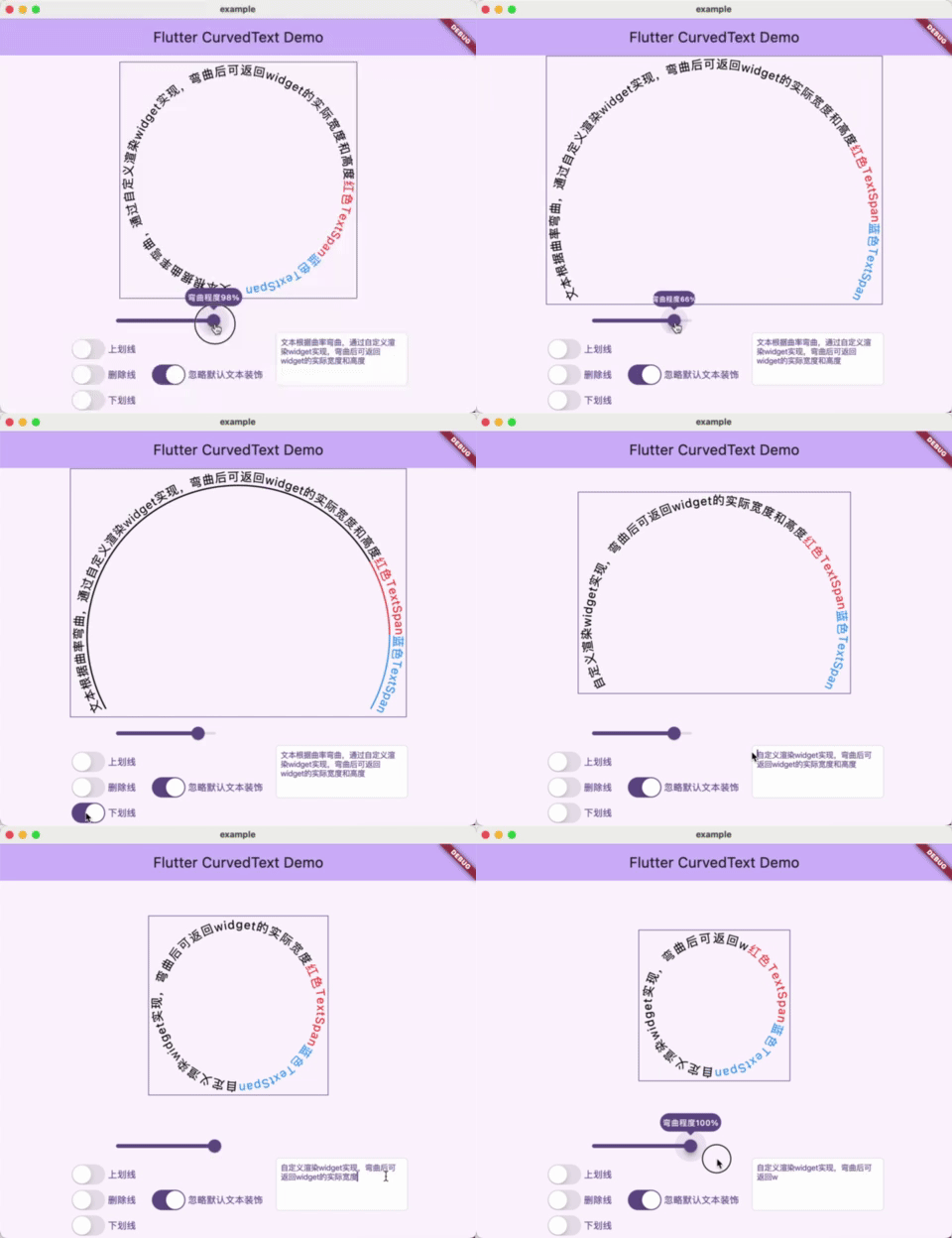
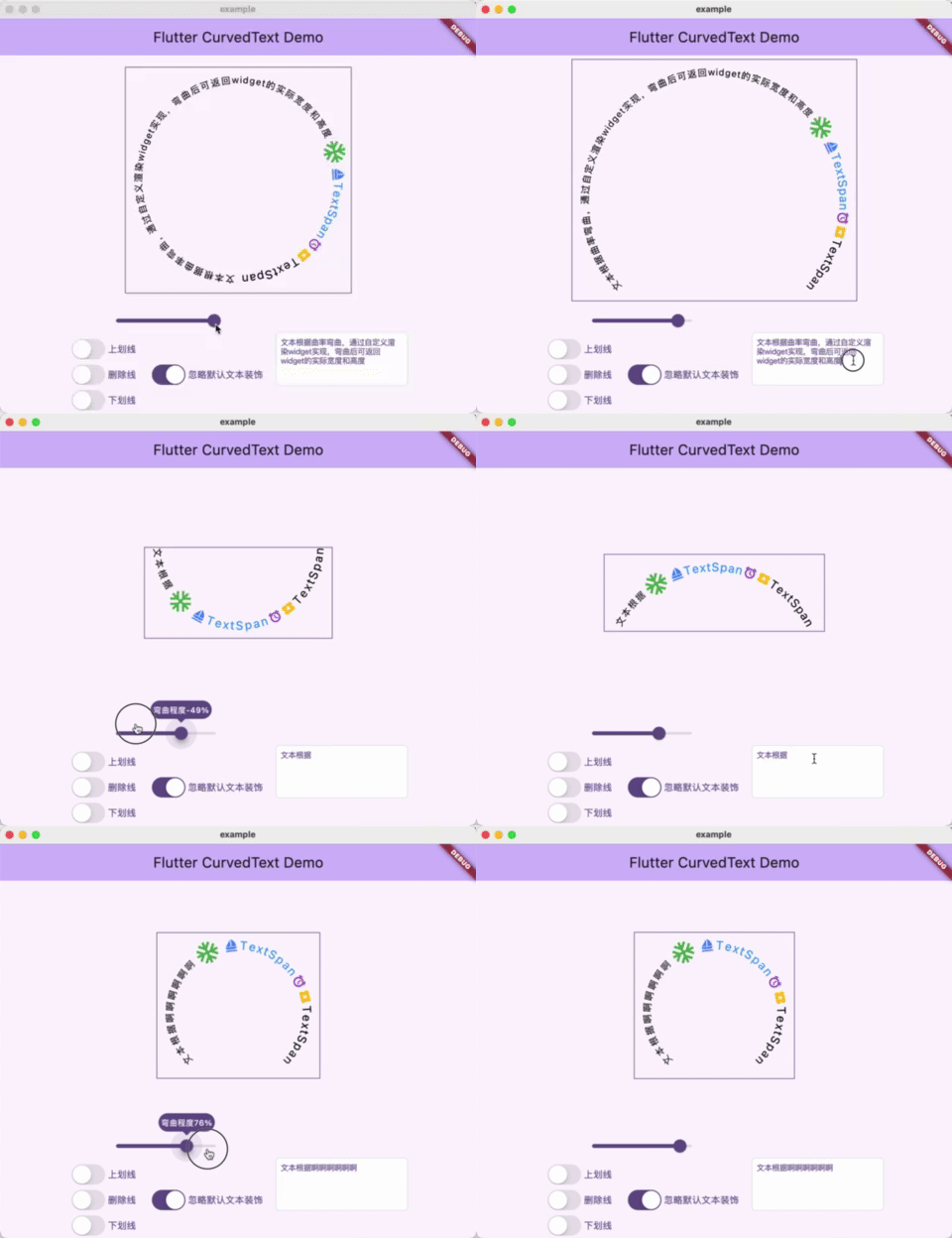
用来将文本根据曲率进行弯曲,通过自定义渲染Widget实现,通过计算弯曲后的文本实际宽高来重新赋值Widget的Size.
使用场景:弯曲文本后需要测量实际的文本显示部分的宽高,用以给其添加跟随文本长度以及曲率变化的边框
支持TextSpan以及WidgetSpan渲染,支持拓展绘制前和绘制后的方法,允许使用者自定义绘制文本装饰线,如:文本上划线、删除线、下划线,绘制时建议启用忽略文本装饰等。
该插件在flutter_arc_text的基础上大幅修改的,删除了
许多原有功能及属性。
执行 flutter pub add curved_render_text,
或者将 curved_render_text 手动添加至 pubspec.yaml 引用。
dependencies:
curved_render_text: ^latest_version建议看demo示例代码
import 'package:curved_render_text/curved_render_text.dart';
...
CurvedText(
  text: '文本根据曲率设置弯曲并返回size',
  textStyle: const TextStyle(fontSize: 18, color: Colors.black),
  textSpan: TextSpan(...),//传入TextSpan
  curvature: 0.5,//曲率范围-1到1
  beforeDrawing: ...,//文本绘制前绘制
  afterDrawing: ...,//文本绘制后绘制
  ignoreDecoration: true,//是否忽略TextStyle的decoration属性
)
...
PainterDelegate回调参数
typedef PainterDelegate = void Function(
    PaintingContext context,
    Offset offset,
    Size size,
    double radius,//圆半径
    double startAngle,//绘制开始角度
    double sweepAngle,//绘制弧度范围
    double finalAngle,//绘制结束角度
    Offset centerOffset,//圆中心点偏移
    double curvature,//曲率
    double letterHeight,//参与计算的字体高度
    List<TextRun> textRuns,//文本的绘制信息
);完整示例代码如下
import 'package:curved_render_text/curved_render_text.dart';
import 'package:flutter/cupertino.dart';
import 'package:flutter/material.dart';

void main() {
  runApp(const MyApp());
}

class MyApp extends StatelessWidget {
  const MyApp({super.key});

  @override
  Widget build(BuildContext context) {
    return MaterialApp(
      title: 'Flutter Demo',
      theme: ThemeData(
        colorScheme: ColorScheme.fromSeed(seedColor: Colors.deepPurple),
        // useMaterial3: true,
      ),
      home: const MyHomePage(title: 'Flutter CurvedText Demo'),
    );
  }
}

class MyHomePage extends StatefulWidget {
  const MyHomePage({super.key, required this.title});
  final String title;

  @override
  State<MyHomePage> createState() => _MyHomePageState();
}

class _MyHomePageState extends State<MyHomePage> {
  double curvature = 100;
  final TextStyle _textStyle = const TextStyle(fontSize: 18, color: Colors.black);
  final TextEditingController _textEditingController = TextEditingController
    (text: '文本根据曲率弯曲,通过自定义渲染widget实现,弯曲后可返回widget的实际宽度和高度');
  bool ignoreDecoration = true;
  TextDecoration textDecoration = TextDecoration.none;

  @override
  Widget build(BuildContext context) {
    return Scaffold(
      appBar: AppBar(
        backgroundColor: Theme.of(context).colorScheme.inversePrimary,
        title: Text(widget.title),
      ),
      body: SizedBox(
        width: double.infinity,
        height: double.infinity,
        child: Column(
          children: [
            Expanded(child: Stack(
              alignment: Alignment.center,
              clipBehavior: Clip.none,
              children: [
                OverflowBox(
                  maxWidth: double.infinity,
                  maxHeight: double.infinity,
                  child: DecoratedBox(
                    decoration: BoxDecoration(
                      border: Border.all(
                        color: Theme.of(context).primaryColor,
                        width: 1,
                      ),
                    ),
                    child: CurvedText(
                      ignoreDecoration: ignoreDecoration,
                      text: _textEditingController.text,
                      textStyle: _textStyle.copyWith(
                        fontSize: 14,
                        decoration: textDecoration,
                        decorationColor: _textStyle.color,
                        decorationThickness: 2,
                      ),
                      textSpan: TextSpan(
                        children: [
                          WidgetSpan(child: Icon(Icons.ac_unit,size: 40,color: Colors.green,),alignment: PlaceholderAlignment.middle),
                          WidgetSpan(child: Icon(Icons.sailing_sharp,size: 20,color: Colors.blueAccent,),alignment: PlaceholderAlignment.middle),
                          TextSpan(
                            text: 'TextSpan',
                            style: _textStyle.copyWith(
                              color: Colors.blue,
                              decoration: textDecoration,
                              decorationColor: Colors.blue,
                              decorationThickness: 2,
                            ),
                          ),
                          WidgetSpan(child: Icon(Icons.access_alarm,size: 20,color: Colors.purple,),alignment: PlaceholderAlignment.middle),
                          WidgetSpan(child: Icon(Icons.local_activity,size: 20,color: Colors.amber,),alignment: PlaceholderAlignment.middle),
                          TextSpan(
                            text: 'TextSpan',
                            style: _textStyle.copyWith(
                              decoration: textDecoration,
                              decorationColor: _textStyle.color,
                              decorationThickness: 2,
                            ),
                          ),
                        ],
                      ),
                      curvature: curvature/100.0,
                      afterDrawing: _makeDelegate(),
                    ),
                  ),
                )
              ],
            ),),
            Row(
              mainAxisAlignment: MainAxisAlignment.center,
              children: [
                Column(
                  mainAxisAlignment: MainAxisAlignment.end,
                  children: [
                    SizedBox(
                      width: 200,
                      child:Slider(
                        value: curvature,
                        divisions: 200,
                        label: '弯曲程度${curvature.toInt()}%',
                        min: -100,
                        max: 100,
                        onChanged: (value){
                          setState(() {
                            curvature = value.floorToDouble();
                          });
                        },
                      ),
                    ),
                    Row(
                      children: [
                        Column(
                          children: [
                            Row(
                              children: [
                                CupertinoSwitch(value: textDecoration==TextDecoration.overline,
                                  activeColor: Theme.of(context).primaryColor,
                                  onChanged: (value){
                                    setState(() {
                                      textDecoration = value?TextDecoration.overline:TextDecoration.none;
                                    });
                                  },),
                                Text('上划线',style: TextStyle(fontSize: 14,color: Theme.of(context).primaryColor),),
                              ],
                            ),
                            Row(
                              children: [
                                CupertinoSwitch(value: textDecoration==TextDecoration.lineThrough,
                                  activeColor: Theme.of(context).primaryColor,
                                  onChanged: (value){
                                    setState(() {
                                      textDecoration = value?TextDecoration.lineThrough:TextDecoration.none;
                                    });
                                  },),
                                Text('删除线',style: TextStyle(fontSize: 14,color: Theme.of(context).primaryColor),),
                              ],
                            ),
                            Row(
                              children: [
                                CupertinoSwitch(value: textDecoration==TextDecoration.underline,
                                  activeColor: Theme.of(context).primaryColor,
                                  onChanged: (value){
                                    setState(() {
                                      textDecoration = value?TextDecoration.underline:TextDecoration.none;
                                    });
                                  },),
                                Text('下划线',style: TextStyle(fontSize: 14,color: Theme.of(context).primaryColor),),
                              ],
                            ),
                          ],
                        ),
                        SizedBox(width: 20,),
                        Column(
                          children: [
                            Row(
                              children: [
                                CupertinoSwitch(value: ignoreDecoration,
                                  activeColor: Theme.of(context).primaryColor,
                                  onChanged: (value){
                                    setState(() {
                                      ignoreDecoration = !ignoreDecoration;
                                    });
                                  },),
                                Text('忽略默认文本装饰',style: TextStyle(fontSize: 14,color: Theme.of(context).primaryColor),),
                              ],
                            ),
                          ],
                        ),
                      ],
                    ),
                  ],
                ),
                SizedBox(width: 20,),
                SizedBox(width: 200,height: 80,child: CupertinoTextField(
                  showCursor: true,
                  controller: _textEditingController,
                  style: TextStyle(
                    fontSize: 12,
                    color: Theme.of(context).primaryColor,
                  ),
                  maxLines: null,
                  onChanged: (value){
                    setState(() {});
                  },
                )),
              ],
            ),
          ],
        ),
      ),
    );
  }

  PainterDelegate _makeDelegate() =>
          (PaintingContext context,
          Offset offset,
          Size size,
          double radius,
          double startAngle,
          double sweepAngle,
          double finalAngle,
          Offset centerOffset,
          double curvature,
          double letterHeight,
          List<TextRun> textRuns,) {
        for (var textRun in textRuns) {
          Rect? rect;
          if(textRun.style?.decoration == TextDecoration.overline){
            rect = Rect.fromCircle(
              center: centerOffset,
              radius: radius+(curvature>=0?1:-1)*letterHeight/2,
            );
          } else if(textRun.style?.decoration == TextDecoration.lineThrough){
            rect = Rect.fromCircle(
              center: centerOffset,
              radius: radius,
            );
          } else if(textRun.style?.decoration == TextDecoration.underline){
            rect = Rect.fromCircle(
              center: centerOffset,
              radius: radius+(curvature>=0?-1:1)*letterHeight/2,
            );
          }
          if (rect!=null) {
            context.canvas.drawArc(
              rect,
              textRun.startAngle,
              textRun.sweepAngle,
              false,
              Paint()
                ..style = PaintingStyle.stroke
                ..strokeCap = StrokeCap.round
                ..strokeWidth = textRun.textSpan.style?.decorationThickness??1
                ..color = textRun.textSpan.style?.decorationColor??textRun.textSpan.style?.color??Colors.black,
            );
          }
        }
      };
}