


Syntax highlighting within YAML block-scalars for 50+ built-in languages and the ability to add highlighting for any other language with the yaml-embedded-languages.include configuration setting.
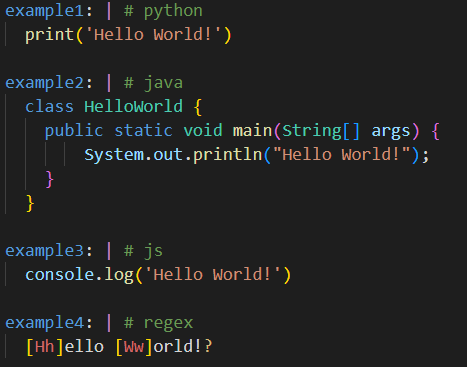
To highlight a single block, place a comment with the language identifier next to the block identifier.
example: | # <language-identifier>
  highlighted
To highlight all blocks from a point onwards, place a comment with the extension name followed by the language identifier.
# yaml-embedded-languages: <language-identifier>
example: |
  highlighted
To stop highlighting blocks place a comment with the extension name.
# yaml-embedded-languages
example: |
not highlightedThe following list shows all valid identifiers for the built-in languages:
| Language | Identifier |
|---|---|
| bat | bat |
| bibtex | bibtex |
| c | c |
| clojure | clojure |
| coffeescript | coffee |
| cpp | cpp, c++ |
| csharp | csharp, c# |
| css | css |
| cuda-cpp | cuda |
| dart | dart |
| diff | diff |
| dockercompose | dockercompose |
| dockerfile | dockerfile |
| fsharp | fsharp, f# |
| go | go |
| groovy | groovy |
| handlebars | handlebars |
| hlsl | hlsl |
| html | html |
| ini | ini |
| jade | jade |
| java | java |
| javascript | js, javascript |
| javascriptreact | jsx |
| json | json |
| jsonc | jsonc |
| jsonl | jsonl |
| julia | julia |
| latex | latex |
| less | less |
| log | log |
| lua | lua |
| makefile | make, makefile |
| markdown | markdown |
| markdown-math | math |
| objective-c | objc |
| objective-cpp | objcpp |
| perl | perl |
| php | php |
| pip-requirements | pip, requirements |
| powerfx* | powerfx |
| powershell | powershell |
| properties | properties |
| python | py, python |
| r | r |
| raku | raku |
| razor | razor |
| regex* | regex |
| restructuredtext | rst |
| ruby | ruby |
| rust | rust |
| scss | scss |
| shaderlab | shaderlab |
| shellscript | shell |
| sql | sql |
| swift | swift |
| tex | tex |
| typescript | ts, typescript |
| typescriptreact | tsx |
| vb | vb |
| xml | xml |
| xsl | xsl |
| yaml | yaml |
*Not a valid VS Code language
None
| Name | Description |
|---|---|
yaml-embedded-languages.include |
An object where the key defines the language identifier with regex and the value specifies the language TextMate scope name. By default the language identifier will be used as the language name. To change this, the value can be specified as an object with properties including name, scopeName (required), and stripIndent. Hover over these in VS Code to find out more. |
You can find the TextMate scope name for a given language by following the VS Code Docs here
Basic Example:
Suppose you have a plugin that provides nginx as an editor language, it's TextMate scope name would be source.nginx. If you wanted that language to be used when a the first line of a language block is #nginx your settings would look like this.
  "yaml-embedded-languages.include": {
    "nginx": "source.nginx"
},See Issues
See CONTRIBUTING
See CHANGELOG