Link to App: https://supersmash-directory.herokuapp.com/
A directory consisting of available SuperSmash characters in SuperSmash 4 that you can add to your account and allows you to post messages/comments to the message board for other users to see.
- Bootstrap
- Node.js
- Postgres SQL
- Express
- EJS
- SuperSmash API
- As a user, I should be able to see a home page with SuperSmash champions, a link to see more info on specific champion and an Add to Favorites button with the title of the website and the option to log in or sign up.
- As a user, I should be able to log in or sign up to access the add to favorites button.
- As a user, as soon as I am logged in, I should see a message saying that I am logged in with a change in the hyperlinks under the title of the webpage to say Log Out, Profile, Favorites, Messages
- As a user, I am able to access my profile page and update my username with the provided field if I choose to do so
- As a user, I am able to see my added champions' name and associated image
- As a user, I am able to submit comments on the message board and other user's comments and an associated Remove button.
- As a user, I am only able to delete my own comments on the message board
-
fork and clone
-
install dependencies
npm i
- create a
config.jsonwith the following code:
{
  "development": {
    "database": "<insert development db name here>",
    "host": "127.0.0.1",
    "dialect": "postgres"
  },
  "test": {
    "database": "<insert test name here>",
    "host": "127.0.0.1",
    "dialect": "postgres"
  },
  "production": {
    "database": "<insert production name here>",
    "host": "127.0.0.1",
    "dialect": "postgres"
  }
}
Note: If your database requires a username and password, you'll need to include these as well.
- create database
sequelize db:create <insert db name here>
- migrate the
usermodel to database
sequelize db:migrate
-
Add
SESSION_SECRETandPORTenvironment variables in a.envfile(can be any string) -
Run
nodemonto start up app
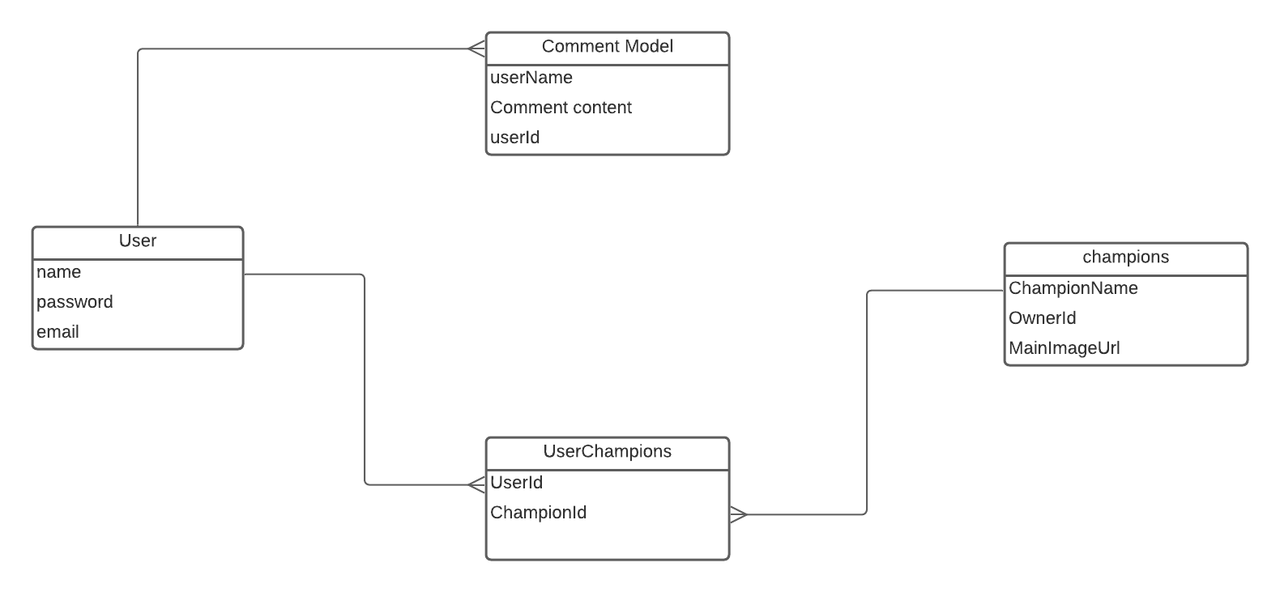
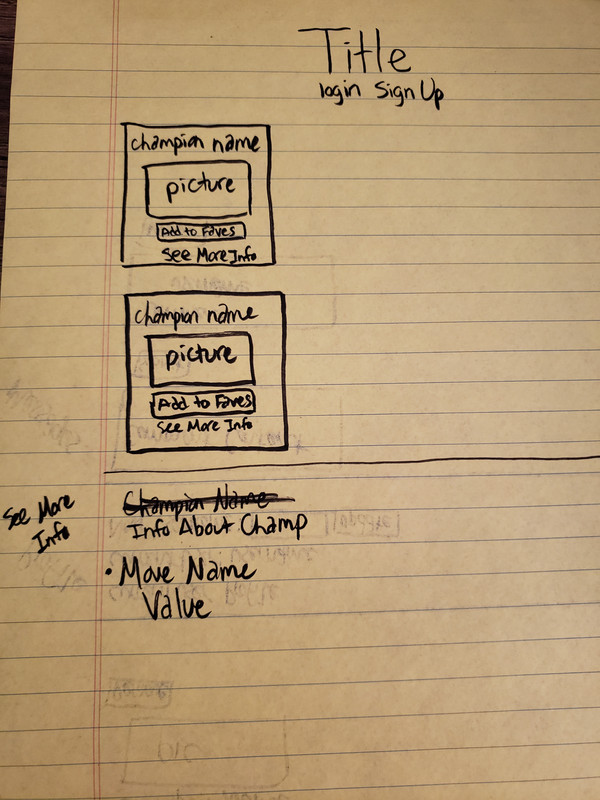
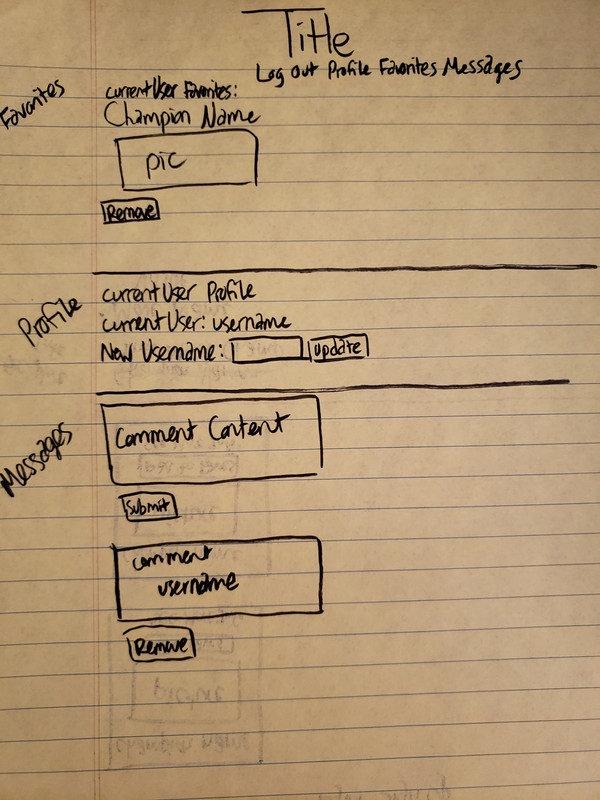
This is the link to the API I chose to use for this project. https://api.kuroganehammer.com/api/characters
| URL | Crud | Route | Explanation |
|---|---|---|---|
| "/" | READ | GET | Renders home page |
| "/" | CREATE | POST | creates user's favorites |
| "/smash" | READ | GET | Grabs the user's favorites |
| "/smash" | DELETE | DELETE | Delete's user's favorite |
| "/profile" | READ | GET | Grabs user's current name |
| "/profile" | UPDATE | POST | Update user's username |
| "/details/:ownerid | READ | GET | Grabs the champion data |
| "/comments" | READ | GET | Grabs all comments made |
| "/comments" | DELETE | DELETE | Deletes user's comment |
- Figuring out how to use the API to get information on a specific champion
- Figuring out how to store the userId of the comment made into the comment table
- Figuring out how to correctly use bootstrap
- let users update passwords and their comments and letting them get a link of all the comments they made
- making the remove button on the message board only show up for the current user's comments
- understanding bootstrap more so the styling is better
- allowing users to respond to other comments they see in the message board