
A Rust Load Testing framework with real-time TUI support.




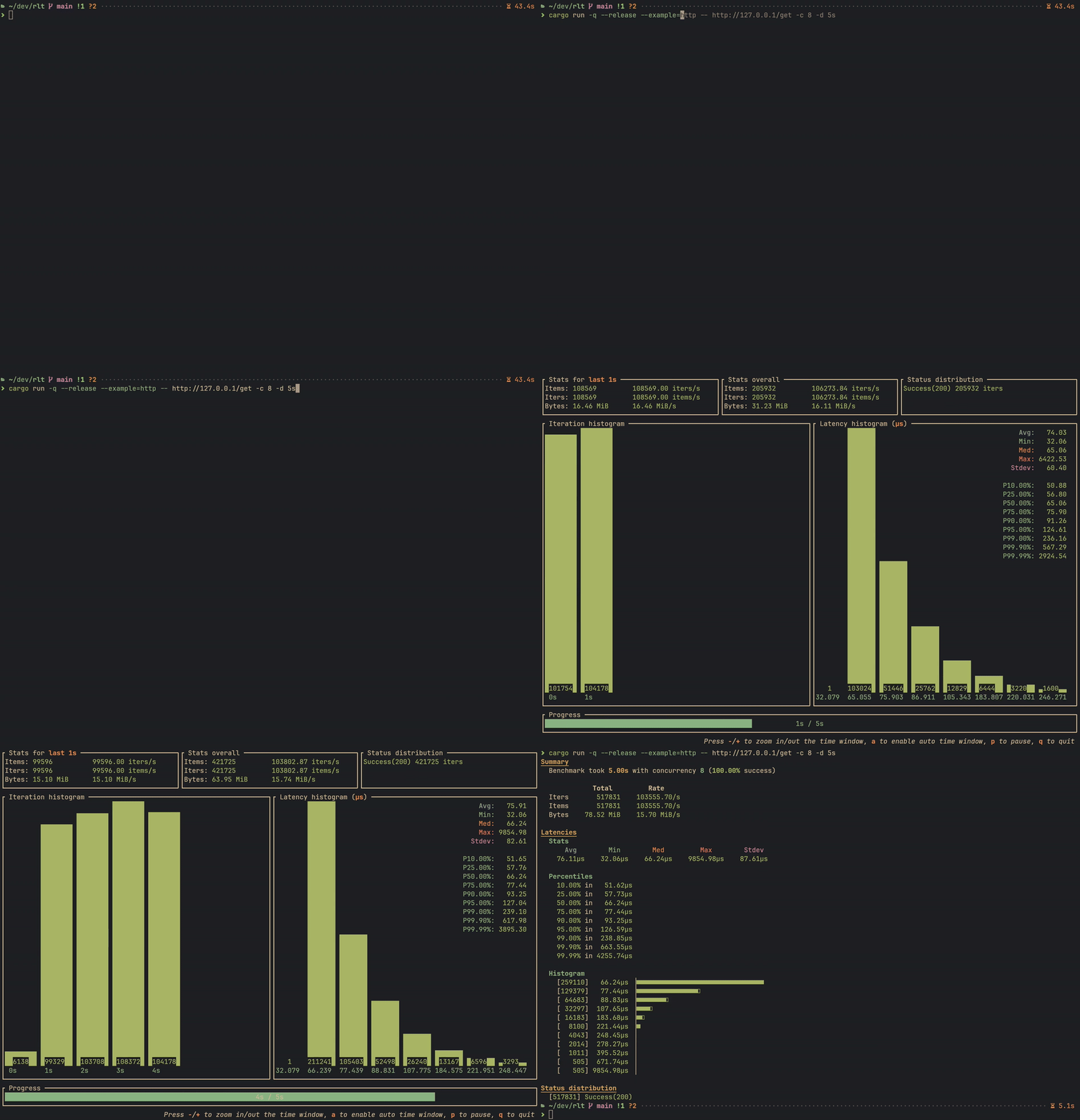
rlt provides a simple way to create load test tools in Rust. It is designed to be a universal load test framework, which means you can use rlt for various services, such as HTTP, gRPC, Thrift, Database, or other customized services.
- Flexible: Customize the workload with your own logic.
- Easy to use: Little boilerplate code, just focus on testing.
- Rich Statistics: Collect and display rich statistics.
- High Performance: Optimized for performance and resource usage.
- Real-time TUI: Monitor testing progress with a powerful real-time TUI.
- Baseline Comparison: Save and compare results to track performance changes.
Run cargo add rlt to add rlt as a dependency to your Cargo.toml:
[dependencies]
rlt = "0.3"For simple benchmarks without per-worker state, implement the StatelessBenchSuite trait:
use clap::Parser;
use rlt::{cli::BenchCli, BenchResult, IterInfo, IterReport, StatelessBenchSuite, Status};
use tokio::time::Instant;

#[derive(Clone)]
struct SimpleBench;

impl StatelessBenchSuite for SimpleBench {
    async fn bench(&mut self, _: &IterInfo) -> BenchResult<IterReport> {
        let t = Instant::now();
        // Your benchmark logic here
        Ok(IterReport { duration: t.elapsed(), status: Status::success(0), bytes: 0, items: 1 })
    }
}

#[tokio::main]
async fn main() -> rlt::Result<()> {
    rlt::cli::run(BenchCli::parse(), SimpleBench).await
}For benchmarks requiring per-worker state (e.g., HTTP clients, DB connections), implement BenchSuite.
The bench_cli! macro helps define CLI options:
bench_cli!(HttpBench, {
    /// Target URL.
    #[clap(long)]
    pub url: Url,
});

impl BenchSuite for HttpBench {
    type WorkerState = Client;

    async fn setup(&mut self, _worker_id: u32) -> BenchResult<Self::WorkerState> {
        Ok(Client::new())
    }

    async fn bench(&mut self, client: &mut Self::WorkerState, _: &IterInfo) -> BenchResult<IterReport> {
        let t = Instant::now();
        let resp = client.get(self.url.clone()).send().await?;
        let status = resp.status().into();
        let bytes = resp.bytes().await?.len() as u64;
        let duration = t.elapsed();
        Ok(IterReport { duration, status, bytes, items: 1 })
    }
}
You can also create a separate struct to hold the CLI options for more flexibility. There is an example in examples/http_hyper.rs.
Finally, create the main function to run the load test using the bench_cli_run! macro:
#[tokio::main]
async fn main() -> rlt::Result<()> {
    bench_cli_run!(HttpBench).await
}All benchmarks built with rlt include these CLI options:
| Option | Short | Description |
|---|---|---|
--concurrency |
-c |
Number of concurrent workers |
--iterations |
-n |
Stop after N iterations |
--duration |
-d |
Stop after duration (e.g., 10s, 5m, 1h) |
--warmup |
-w |
Warmup iterations (excluded from results) |
--rate |
-r |
Rate limit in iterations per second |
--load-model |
closed (default) or open — see Load models |
|
--quiet |
-q |
Quiet mode (implies --collector silent) |
| Option | Short | Description |
|---|---|---|
--output |
-o |
Output format: text, json or bencher |
--output-file |
-O |
Write report to file instead of stdout |
--bencher-prefix |
Namespace bencher metrics (--output bencher only) |
|
--collector |
Collector type: tui or silent |
|
--fps |
TUI refresh rate (frames per second) | |
--quit-manually |
Require manual quit (TUI only) |
| Option | Description |
|---|---|
--save-baseline <NAME> |
Save results as named baseline |
--baseline <NAME> |
Compare against named baseline |
--baseline-file <PATH> |
Compare against baseline JSON file |
--baseline-dir <PATH> |
Baseline storage directory |
--noise-threshold |
Noise threshold percentage |
--fail-on-regression |
Exit with error on regression (CI mode) |
--regression-metrics |
Metrics for regression detection |
| Feature | Default | Description |
|---|---|---|
tui |
Yes | Real-time terminal UI via ratatui. Off, runs are headless and reported through the text, JSON or bencher reporters |
text |
Yes | The plain-text report, rendered with tabled. Off, the crate reports through the JSON or bencher reporters only, and the table stack leaves the dependency tree |
tracing |
Yes | Logging support via tui-logger (implies tui) |
rate_limit |
Yes | Rate limiting via governor |
http |
Yes | HTTP status code conversion |
To disable default features:
[dependencies]
rlt = { version = "0.3", default-features = false }| Example | Description | Command |
|---|---|---|
simple_stateless |
Basic stateless benchmark | cargo run --example simple_stateless -- -c 4 -d 10s |
http_reqwest |
HTTP with reqwest | cargo run --example http_reqwest -- --url http://example.com -c 10 |
http_hyper |
HTTP with hyper | cargo run --example http_hyper -- --url http://example.com -c 10 |
postgres |
PostgreSQL benchmark | cargo run --example postgres -- --host localhost -c 10 -b 100 |
warmup |
Warmup phase demo | cargo run --example warmup -- -w 10 -n 50 |
baseline |
Baseline comparison demo | cargo run --example baseline -- -c 4 -d 5s --save-baseline v0 |
logging |
Tracing integration | cargo run --example logging -- -c 2 -d 5s |
open_loop |
Both load models against one saturated target | cargo run --release --example open_loop |
multi_phase |
Two BenchSession phases sharing state |
cargo run --example multi_phase |
--load-model decides who sets the pace.
In the closed model (the default, and rlt's original behaviour) each worker starts its
next iteration when the previous one returns, and --rate only caps how fast a free
worker may start again. When the target slows down, fewer iterations start and the
benchmark settles at whatever the target can serve.
In the open model --rate is a schedule rather than a cap. A dispatcher releases
iterations when they come due — elapsed x rate, derived from the clock so a late tick
cannot accumulate drift — and an iteration that finds no free worker is dropped and
counted instead of delayed. The report gains Offered and Dropped rows, and the JSON
output a summary.schedule object.
The difference is what an overloaded target looks like. Against a target that can serve
80/s while 200/s is requested (cargo run --release --example open_loop):
Closed: served 785 (78/s), offered 0,    dropped 0
Open:   served 784 (78/s), offered 2001, dropped 1089
Both served the same work. Only the open model reports that more than half of what was asked for never happened — which is the difference between "the target is running at 78/s" and "the target is saturated at 78/s".
The open model requires --rate and the rate_limit feature. Warm-up iterations are not
scheduled; they run closed-loop in both models.
--output bencher writes libtest benchmark lines, which
github-action-benchmark
ingests with its cargo tool setting:
test latency/mean ... bench: 1029226 ns/iter (+/- 77286)
test latency/p50 ... bench: 1027583 ns/iter (+/- 0)
test latency/p90 ... bench: 1042943 ns/iter (+/- 0)
test latency/p99 ... bench: 1068031 ns/iter (+/- 0)
test latency/max ... bench: 2043903 ns/iter (+/- 0)
test throughput ... bench: 257837 ns/iter (+/- 0)
Everything is nanoseconds per iteration — the only unit the format carries — so
throughput appears as its reciprocal and lower is better throughout. Several phases can
share one tracked history by giving each a --bencher-prefix.
In the open load model the throughput line is omitted: the rate there is an input, so
tracking it would record a change every time --rate moves. Latency is reported in both
models, and for the same reason the rate metrics are dropped from --fail-on-regression
comparisons of an open-loop run.
rlt supports saving benchmark results as baselines and comparing future runs against them:
mybench --url http://localhost:8080 -c 10 -d 30s --save-baseline v1.0Baselines are stored in target/rlt/baselines/ by default.
Customize with --baseline-dir or the RLT_BASELINE_DIR environment variable.
mybench --url http://localhost:8080 -c 10 -d 30s --baseline v1.0The comparison displays color-coded deltas:
- Green: Performance improved
- Red: Performance regressed
- Yellow: Within noise threshold (unchanged)
# Fail the pipeline if performance regresses
mybench --baseline main --fail-on-regression

# Customize regression detection metrics
mybench --baseline main --fail-on-regression \
--regression-metrics latency-p99,success-ratio# Compare against v1, then save as v2
mybench --baseline v1 --save-baseline v2The TUI layout in rlt is inspired by oha.
rlt is distributed under the terms of both the MIT License and the Apache License 2.0.
See the LICENSE-APACHE and LICENSE-MIT files for license details.