A real-time audio processing library built to provide efficient, implementations of popular audio analysis streaming algorithms, including real-time pitch tracking and pitch shifting optimized for live processing.


GitHub: https://github.com/gabiteodoru/liveaudio
Medium Article: Real-Time Pitch Shifting with the Phase Vocoder: A Complete Implementation Guide
LiveAudio is a Python package designed for real-time audio signal processing applications. It offers optimized implementations of streaming algorithms that traditionally require full audio files, making them suitable for live audio processing. The library is built with performance in mind, using Numba for JIT compilation and optimized algorithms suitable for real-time applications.
Currently, LiveAudio implements:
- LivePyin: A real-time implementation of the probabilistic YIN (pYIN) algorithm for pitch detection
- PitchShiftVocoder: A real-time pitch shifting vocoder
- LinearVolumeNormalizer: A real-time volume normalizer that adjusts volume smoothly, as vocoder output may exceed input range
- Real-time HMM: Optimized Viterbi algorithm implementations for Hidden Markov Models for use with streaming algorithms
- CircularBuffer: A high-performance circular buffer for managing audio frames in real-time as input to Pyin and the Vocoder
- OACBuffer: A high-performance Overlap-Add Circular buffer for managing the output of the vocoder
You can install LiveAudio directly from PyPI:
pip install liveaudioAlternatively, you can install from the source:
git clone https://github.com/gabiteodoru/liveaudio.git
cd liveaudio
pip install -e .- numpy
- numba
- scipy
- librosa (>= 0.11.0)
from liveaudio.LivePyin import LivePyin
from liveaudio.buffers import CircularBuffer
from liveaudio.utils import formatTimit, get_interactive_input_device
import time, librosa, numpy as np, sounddevice as sd

input_device, sample_rate, input_channels = get_interactive_input_device()
fmin, fmax = librosa.note_to_hz('C2'), librosa.note_to_hz('C5')
frame_length, hop = 4096, 1024
dtype = np.float64 # I'm not seeing a speed hit by using 64-bit when audio stream input is 32-bit (you can also tell the stream the type you'd like, but it doesn't support 64bit)

t0 = time.perf_counter()
lpyin = LivePyin(fmin, fmax, sr=sample_rate, frame_length=frame_length,
             hop_length=hop, dtype=dtype,
             n_bins_per_semitone=20, max_semitones_per_frame=12,
             )
print('Class instantiated and code compiled in:', formatTimit(time.perf_counter()-t0))
print('Callback needs to run in: ',formatTimit(hop/sample_rate))

def audioCallback(indata, frames, timeInput, status):
    t0 = time.perf_counter()
    if status: print(status)
    x = indata if indata.ndim==1 else indata.mean(1)
    cb.push(x)
    if cb.full:
        y = cb.get()
        f0,voiced_flag,voiced_prob = lpyin.step(y.astype(dtype))
        print(f'Amplitude: {np.std(y):.3f}, {f0:.2f}Hz, {voiced_flag=}, {voiced_prob=:.2f}, cpu_time: ',formatTimit(time.perf_counter() - t0))

cb = CircularBuffer(frame_length, hop)
for i in range(3): lpyin.warmup_and_reset() # warmup
time.sleep(0.1)

try:
    with sd.InputStream(device=input_device,
                  samplerate=sample_rate,
                  blocksize=hop,
                  channels=input_channels,
                  callback=audioCallback,
                  latency = .015,
                  ):
        print("Audio routing started. Start singing now! Press Ctrl+C to stop")
        print("* Please remember that it won't work if your mic is off! (look at amplitude!, press mic-off key)")
        while True: time.sleep(0.1) # Keep the stream running
except KeyboardInterrupt:
    print("* Stopped by user")
except Exception as e:
    print(f"Error: {e}")
This demo is available in the repository.
from liveaudio.PitchShiftVocoder import PitchShiftVocoder
from liveaudio.LinearVolumeNormalizer import LinearVolumeNormalizer
from liveaudio.utils import get_interactive_output_device, formatTimit
import numpy as np
import librosa
import matplotlib.pyplot as plt
import sounddevice as sd
import time

# Parameters
sr = 44100  # Sample rate
frSz = 4096  # Frame size
hop = 1024    # Hop size
duration = 2.0  # Duration in seconds
f0 = 440.0  # Frequency of the sine wave
output_device, sample_rate, input_channels = get_interactive_output_device()
play = lambda x: sd.play(x, sr, device=output_device)
def plot(x):
    plt.plot(x);plt.show()

# Generate sine wave
t = np.arange(0, duration, 1.0/sr)
input_signal = np.sin(2 * np.pi * f0 * t).astype(np.float64)
# The first frame will be all zeros, but that can be initialized like that when running realtime as well
frames = librosa.util.frame(np.concatenate((np.zeros(hop),input_signal)), frame_length=frSz+hop, hop_length=hop).T

st = 2**(1/12)
ratios = st**np.concatenate((np.linspace(0, -3, 30), np.linspace(-3, 3, 60)))
audioOut = np.array([])
voc = PitchShiftVocoder(sr, frSz, hop); voc.step(frames[1], .9); voc.step(frames[2], 1.1); # warmup
voc = PitchShiftVocoder(sr, frSz, hop)
lvn = LinearVolumeNormalizer()
for r, f in zip(ratios, frames):
    t0 = time.perf_counter()
    audio = lvn.normalize(voc.step(f, r))
    print(formatTimit(time.perf_counter()-t0))
    audioOut = np.concatenate((audioOut,audio))
plt.plot(audioOut);plt.show()
play(audioOut)
This demo is available in the repository.
These two components can be put together to build a basic auto-tuner
from liveaudio.LivePyin import LivePyin
from liveaudio.buffers import CircularBuffer
from liveaudio.utils import formatTimit, get_interactive_input_device, get_interactive_output_device, findClosestNote, findClosestCMajorNote
from liveaudio.PitchShiftVocoder import PitchShiftVocoder
from liveaudio.LinearVolumeNormalizer import LinearVolumeNormalizer
import numpy as np
import librosa, time
import matplotlib.pyplot as plt
import sounddevice as sd

st = 2**(1/12)
input_device, sample_rate, input_channels = get_interactive_input_device()
output_device, _, output_channels = get_interactive_output_device()
play = lambda x: sd.play(x, sample_rate, device=output_device)
fmin, fmax = librosa.note_to_hz('C2'), librosa.note_to_hz('C6')
frame_length, hop = 4096, 1024
dtype = np.float64 # I'm not seeing a speed hit by using 64-bit when audio stream input is 32-bit (you can also tell the stream the type you'd like, but it doesn't support 64bit)

t0 = time.perf_counter()
lpyin = LivePyin(fmin, fmax, sr=sample_rate, frame_length=frame_length,
             hop_length=hop, dtype=dtype,
             n_bins_per_semitone=20, max_semitones_per_frame=12,
             )
voc = PitchShiftVocoder(sample_rate, frame_length, hop, dtype = dtype)

print('Class instantiated and code compiled in:', formatTimit(time.perf_counter()-t0))
print('Callback needs to run in: ',formatTimit(hop/sample_rate))

lvn = LinearVolumeNormalizer()
cbPyin = CircularBuffer(frame_length, hop, dtype = dtype)
cbVoc = CircularBuffer(frame_length+hop, hop, dtype = dtype); cbVoc.push(np.zeros(hop))

# Also save the input and output streams
inData, outData = [], []

def audioCallback(indata, outdata, frames, timeInput, status):
    t0 = time.perf_counter()
    if status: print(status)
    x = (indata if indata.ndim==1 else indata.mean(1)).astype(dtype)
    multiple = np.minimum(20,.95 / np.abs(x).max()) # my mic is a bit quiet, so this is a quick hack to up its volume
    x *= multiple # I could've used a separate LinearVolumeNormalizer object for the input as well
    inData.append(x)
    cbPyin.push(x)
    cbVoc.push(x)
    if cbPyin.full:
        y = cbPyin.get()
        f0,voiced_flag,voiced_prob = lpyin.step(y)
        if voiced_flag and np.isfinite(f0):
            r = findClosestCMajorNote(f0)/f0 # or findClosestNote
        else:
            r = 1.
        o = voc.step(cbVoc.get(), r) # you could use st instead of r to real-time pitch shift by some fixed amount
        result = lvn.normalize(o)
        print(f'Amplitude: {np.std(y):.3f}, {f0:.2f}Hz, {voiced_flag=}, {voiced_prob=:.2f}, cpu_time: ',formatTimit(time.perf_counter() - t0))
        outdata[:,0] = result
        outData.append(result)
    else: # until buffers fill, output the input
        outdata[:,0] = x
        outData.append(x)
for i in range(3): lpyin.warmup_and_reset() # warmup
time.sleep(0.1)

try:
    with sd.Stream(device=(input_device, output_device),
                  samplerate=sample_rate,
                  blocksize=hop,
                  channels=(input_channels, 1), # output in mono
                  callback=audioCallback,
                  latency = 15e-3, # 15ms; the audioCallback takes less than 2ms, but my audio drivers can't handle lower latency
                  ):
        print("Audio routing started. Start singing now! Press Ctrl+C to stop")
        print("* Please remember that it won't work if your mic is off! (look at amplitude!, press mic-off key)")
        while True: time.sleep(0.1) # Keep the stream running
except KeyboardInterrupt:
    print("* Stopped by user")
except Exception as e:
    print(f"Error: {e}")

inData, outData = map(np.concatenate, (inData, outData))
plt.plot(inData); plt.show(); plt.plot(outData); plt.show()
# rng =range(80000,299999)
# play(inData[rng])
# play(outData[rng])
This demo is available in the repository.
from liveaudio.LinearVolumeNormalizer import LinearVolumeNormalizer
import numpy as np
import matplotlib.pyplot as plt

# Parameters
sr = 44100  # Sample rate
duration = 0.5  # Duration in seconds
f0 = 440.0  # Frequency of the sine wave

# Generate sine wave with increasing amplitude from 0.5 to 2.0
t = np.arange(0, duration, 1.0/sr)
amplitude = np.linspace(0.5, 2.0, len(t))  # Increasing amplitude
audio = amplitude * np.sin(2 * np.pi * f0 * t)

# Create a normalizer and process audio
normalizer = LinearVolumeNormalizer(limit=0.95)
normalized_audio = normalizer.normalize(audio)

# Plot original and normalized audio
plt.figure(figsize=(10, 6))

plt.subplot(2, 1, 1)
plt.title("Original Audio (Amplitude: 0.5 to 2.0)")
plt.plot(t, audio)
plt.ylabel("Amplitude")
plt.grid(True)

plt.subplot(2, 1, 2)
plt.title("Normalized Audio (Limit: 0.95)")
plt.plot(t, normalized_audio)
plt.xlabel("Time (s)")
plt.ylabel("Amplitude")
plt.grid(True)

plt.tight_layout()
plt.show() # plt.savefig('normalizer_demo.png', dpi=150)

# Print max amplitudes
print(f"Original audio max amplitude: {np.max(np.abs(audio)):.2f}")
print(f"Normalized audio max amplitude: {np.max(np.abs(normalized_audio)):.2f}")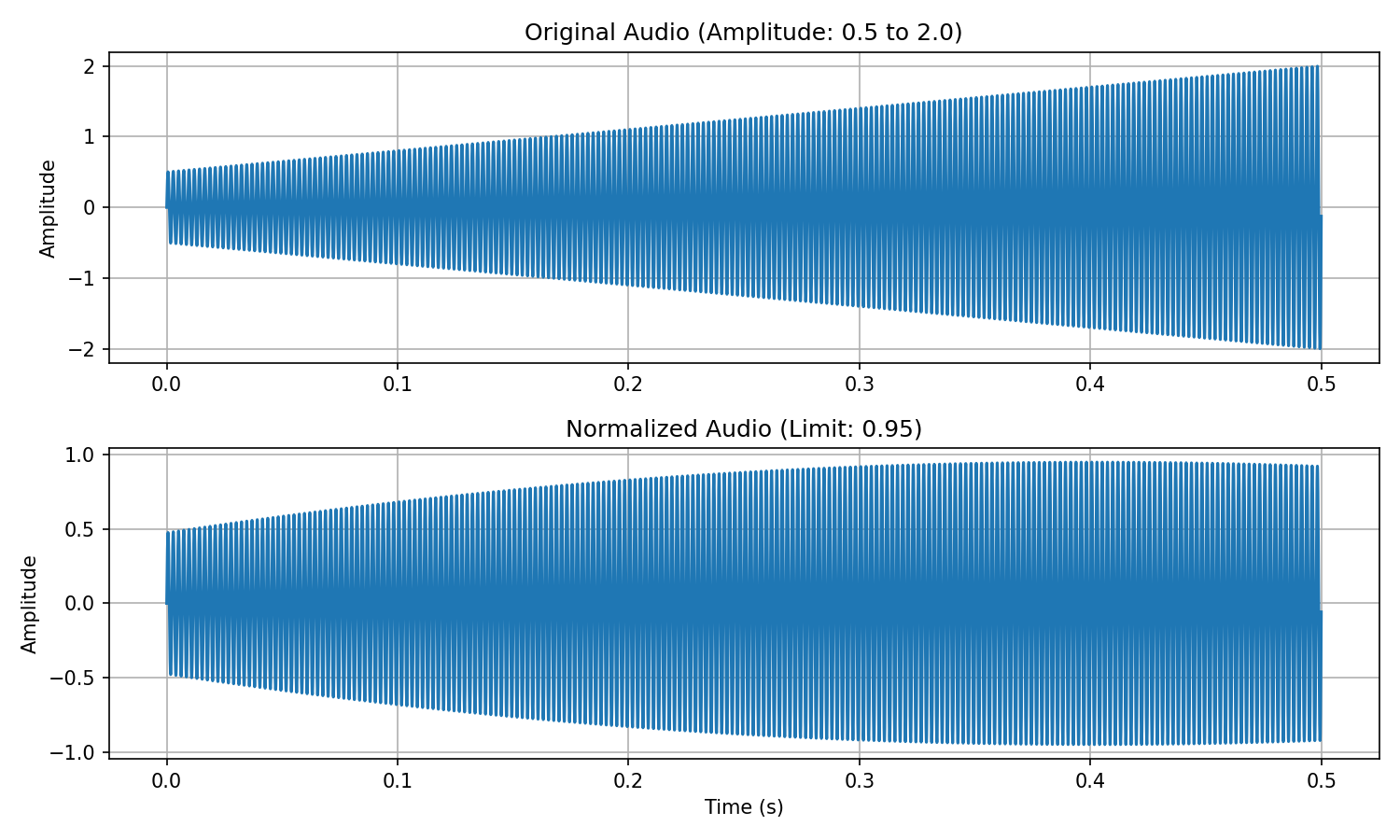
A high-performance circular buffer implementation for managing audio frames efficiently in real-time processing contexts.
from liveaudio import CircularBuffer

# Create a circular buffer (size must be a multiple of hop size)
buffer = CircularBuffer(
    sz=8192,        # Total buffer size
    hopSize=512,    # Size of data chunks for updates
    threadSafe=True # Whether to use thread-safe operations
)

# Push new audio frames
buffer.push(new_audio_frame)  # Must be a 1D numpy array of size hopSize

# Once the buffer is full (in this case, after 16 pushes), get the most recent frames
if buffer.full:
frame = buffer.get() # returns the full frameA high-performance Overlap-Add Circular buffer for managing the output of the vocoder
from liveaudio.buffers import OACBuffer
import numpy as np
import scipy.signal

# Create an OACBuffer (size must be a multiple of hop size)
frameSz, hopSz = 2048, 512
window = scipy.signal.windows.hann(frameSz) * (2/3) ** .5 # Energy preserving Hann window at 75% overlap
oac_buffer = OACBuffer(
    size=frameSz,    # Frame size
    hop=hopSz,       # Hop size
    window=window    # Optional window function
)

# Create sample frames (in real usage, these would come from audio processing)
frames = [np.random.rand(frameSz) for _ in range(5)]

# Process frames through the OACBuffer
for frame in frames:
    output_hop = oac_buffer.pushGet(frame)  # Returns a hop-sized chunk
    # Each output_hop contains the overlapped sum of windowed frame segments
print(f"Output hop shape: {output_hop.shape}") # Should be (hopSz,)Efficient implementations of the Viterbi algorithm optimized for real-time processing with Hidden Markov Models. The module provides several variants, some of which are still under development:
onlineViterbiState: Basic online Viterbi algorithmonlineViterbiStateOpt: Optimized Viterbi for sparse transition matricesblockViterbiStateOpt: Block-structured Viterbi algorithm for specialized transition matricessumProductViterbi: Sum-product variant of the Viterbi algorithm
These implementations are particularly useful for pitch tracking and other sequential estimation problems in audio processing.
- Live AutoTune algorithm: LivePyin + PitchShiftVocoder: Thorough testing and tweaking
- Always happy for contributors if you wanna build something new
MIT License
This package builds upon concepts and algorithms from the librosa library, providing real-time compatible implementations. Special thanks to the librosa team for their excellent work in audio signal processing. A lot of documentation and some code witten by Claude.AI (sadly we can't vibecode vocoders yet).