

Homebridge custom plugin for controlling Powered by Tuya (PBT) devices in HomeKit, it's based on Tuya Open API. The plugin is officially maintained by the Tuya Developer Team.
https://www.npmjs.com/package/homebridge-tuya-platform
The following Tuya Device types are currently supported by this plugin:
Please check Tuya IoT Platform Configuration Guide to register an account on the Tuya IoT Platform, and get the required information. You need to create a Cloud project and complete the configuration of asset, user, and application. Then, you will get the username, password, Access ID, and Access Secret.
| Hardware | Description |
|---|---|
| A Mac/PC, Raspberry Pi, or server | Install plugins and start Homebridge service. This demonstration runs on macOS. |
| Smart devices | Demonstrate device integration and control. |
| An iOS device with the Home app installed | Control HomeKit-enabled devices. |
| Software | Description |
|---|---|
| Command line interface | Use the one you like. We use the built-in Terminal on macOS. |
| Pairing tool | Tuya Device Manager App or WeChat Mini Program (mainland China only). |
1. Open the Terminal.
2. Check the Homebridge and install Homebridge in your system.
3. Install Tuya Homebridge plugin.
Note: If you encounter any problems with the installation, you may need to preface this command with
sudoto make it run as an administrator.
- Install plugins.
npm install homebridge-tuya-platform - Wait for the plugin to install and check whether the installation is successful. For more information, see the video below.

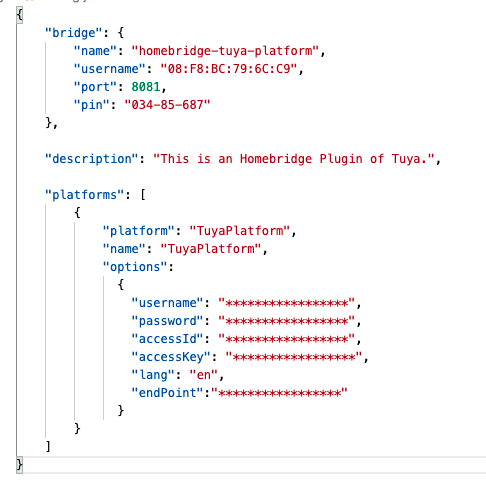
You need to configure the config.json file in the Homebridge plugin.
-
Go to the directory
homebridge-tuya-platform.cd ./node_modules/homebridge-tuya-platform -
Go to the directory
config.cd ./config -
Edit the
config.jsonfile.vim config.json -
In the
optionspart, enter theusername,password,accessId, andaccessKey, which you can follow the Configure Cloud Development Project part in Tuya IoT Platform Configuration Guide to get.The
langvalue can setenas default and theendPointis the domain name of the currently used Tuya Open API.Choose endPoint
- America:
https://openapi.tuyaus.com- China:
https://openapi.tuyacn.com- Europe:
https://openapi.tuyaeu.com- India:
https://openapi.tuyain.com- EasternAmerica:
https://openapi-ueaz.tuyaus.com- WesternEurope:
https://openapi-weaz.tuyaeu.com -
Save and close the file.
-
Go back to the directory
homebridge-tuya-platform.cd .. -
Start the plugin.
homebridge -D -U ./config/ -P ./

Open the Home app on your Apple device. Pair with Homebridge by scanning the QR code printed in the step of starting the plugin, or entering the 8-digit PIN code. You can find the PIN code in the config.json file.
Fork Tuya's Homebridge repo in GitHub and follow the step-by-step tutorial to start the plugin service.
—-VSCode
—-engines
    "node": “>=0.12.0”
    "homebridge": ">=0.2.0"
—-dependencies
    "axios": “^0.21.1",
    "crypto-js": “^4.0.0”,
    "mqtt": “^4.2.6",
    "uuid": "^8.3.2"
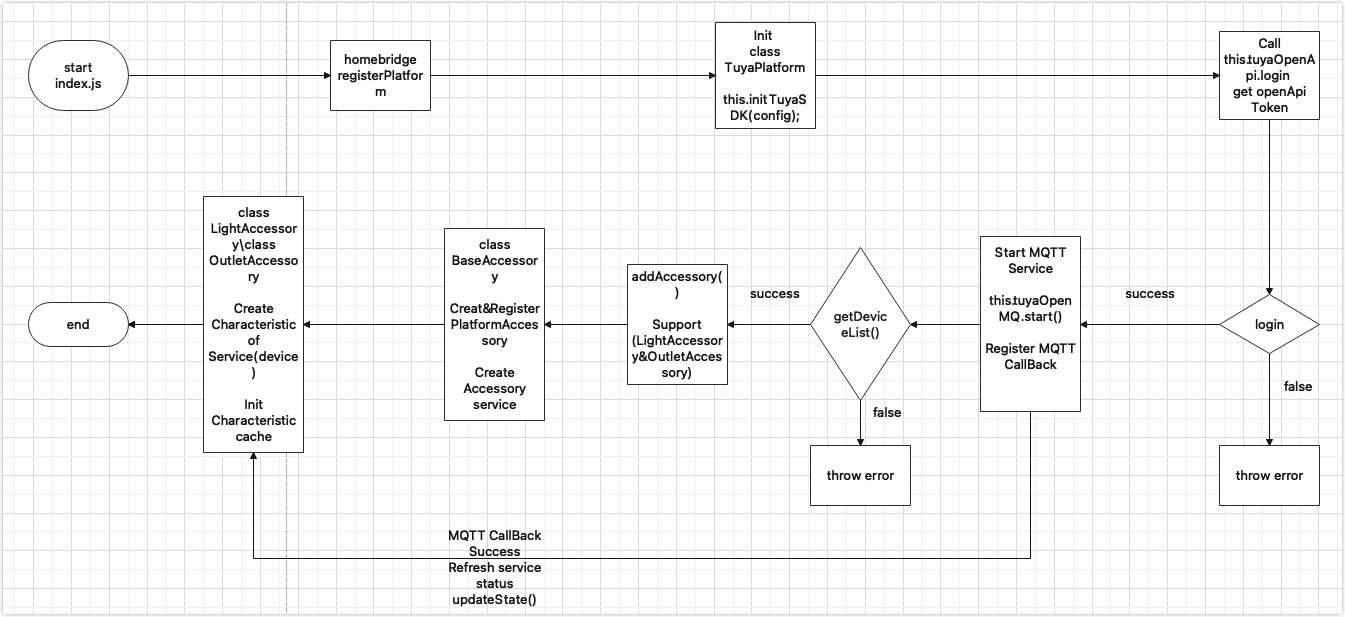
- The entry file
index.js. Add your desired accessory type to theaddAccessory()function and create thexx_accessy.jsfile.
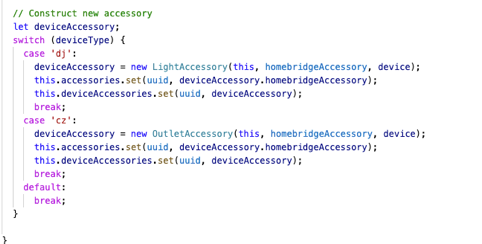
- The
xx_accessory.jsfile. In this file, traverse your newly created function inrefreshAccessoryServiceIfNeed()and get theCharacteristiccorresponding to a service.
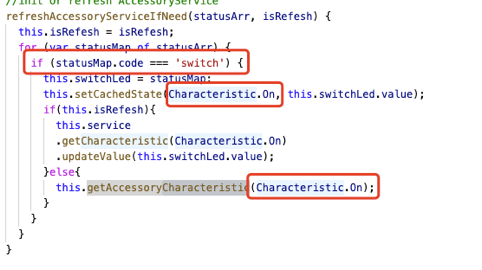
- The
tuyaopenapi.jsfile contains device related APIs. - The
tuyamqttapi.jsfile supports the MQTT service.
For more information about Homebridge installation, see the Common Issues in the Homebridge repo.
login(username, password): Login to the Tuya IoT Platform.getDeviceList(): Gets all the devices under an account's asset. (Devices correspond to accessories)get_assets(): Gets the available assets.getDeviceIDList(assetID): Queries the list of device IDs under an asset.getDeviceFunctions(deviceID): Gets the instruction set.getDeviceInfo(deviceID): Gets the information of single device.getDeviceListInfo(devIds = []): Gets the information of multiple devices.getDeviceStatus(deviceID): Gets the status of single device.getDeviceListStatus(devIds = []): Gets the status of multiple devices.sendCommand(deviceID, params): Sends commands to a device.
For more info, please check the Tuya Open API docs.
start(): Starts MQTT.stop(): Stops MQTT.addMessageListener(listener): Adds callbacks.removeMessageListener(listener): Removes callbacks.
HomeKit is Apple's smart home platform introduced in 2014. It allows users of Apple devices to securely and easily control any devices with a 'Works with Apple HomeKit' badge, such as lights, door locks, thermostats, outlets, and many more.
Homebridge is a lightweight NodeJS server you can run on your home network that emulates the iOS HomeKit API. It supports plugins that provide a basic bridge from HomeKit to various third-party APIs provided by manufacturers of smart home devices. We recommend you check the Homebridge before getting started with Homebridge plugins.
If you are a smart home geek and have a bundle of devices from different platforms, this step-by-step tutorial will help you make devices HomeKit-enabled and then develop Tuya Homebridge plugins.
You can use the GitHub Issue or tickets to provide feedback on any problems you encounter.
For more information, see the LICENSE file.