Companion repo for the blog post: Just-In-Time Access for AI Agents: Building a ZSP Gateway in Azure
A serverless gateway that grants time-bounded Azure permissions to AI agents, automation workflows, and service principals. Implements the Zero Standing Privilege pattern - identities start with zero permissions and receive temporary access on demand.
The hardened July 25, 2026 revision passed offline Python unit/contract tests, PowerShell parsing, Bicep compilation, and static safety review. It was not freshly deployed to an Azure/Entra tenant, and no live role grant, group membership, Durable Functions lifecycle, audit ingestion, or cleanup was run for this revision. Treat the smoke test and API responses as runtime checks that must pass in your own tenant.
Modern Azure environments can accumulate many non-human identities (NHIs), often with standing access they use only briefly:
- A backup service principal with 24/7 Key Vault access for a 5-minute nightly job
- A CI/CD pipeline with permanent Contributor rights for occasional deployments
- An AI coding assistant with broad permissions "just in case"
Standing privileges create unnecessary attack surface. If a service principal is compromised, attackers inherit all its permissions immediately.
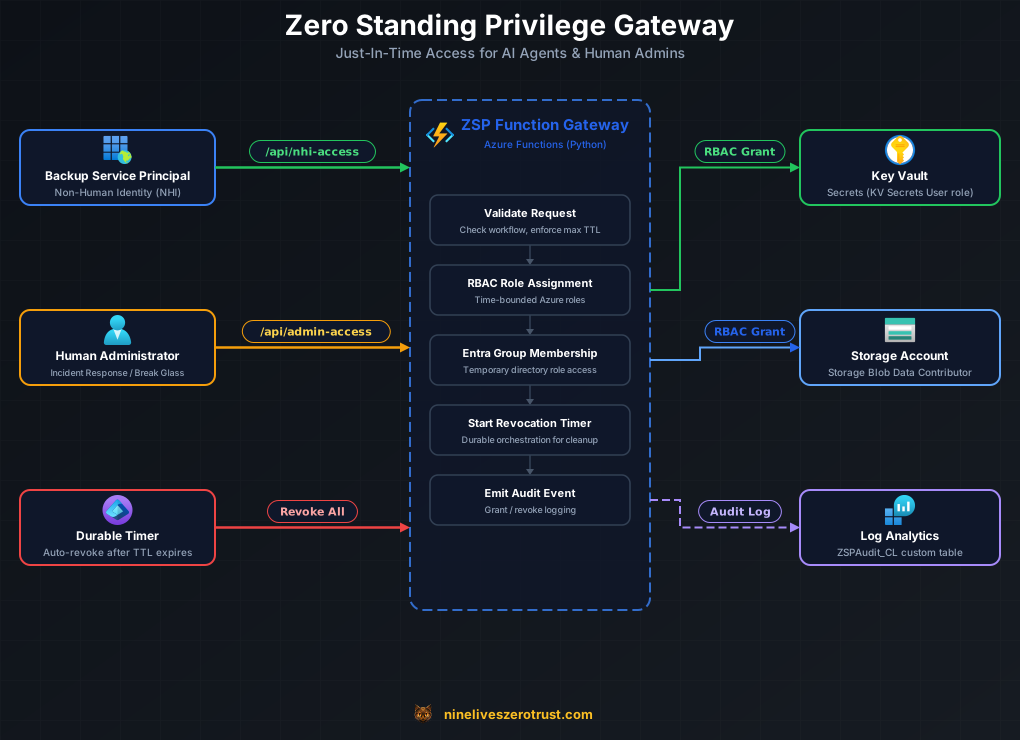
A centralized gateway that grants temporary, scoped access:
Access Request → ZSP Gateway → RBAC Assignment (time-bounded)
                     │
                     ├── Durable Functions (scheduled revocation)
                     └── Log Analytics (audit trail)
The gateway:
- Validates requests and creates scoped Azure RBAC role assignments
- Schedules automatic revocation via Durable Functions timers
- Logs all grants/revocations to Log Analytics with workflow IDs
The gateway itself holds standing, tenant-wide RoleManagement.ReadWrite.Directory.
That is not an oversight, and it is worth being direct about it in a lab whose whole
subject is removing standing privilege.
Why it cannot be removed. Microsoft Graph requires RoleManagement.ReadWrite.Directory
to change the membership of a role-assignable group. The narrower
GroupMember.ReadWrite.All is not sufficient for those groups. Since group-based
elevation is how the gateway grants Entra roles, the permission is a hard requirement.
What it actually confers. This permission can assign any directory role, including Global Administrator. It is not scoped to the roles this lab manages.
So what the lab really does. It moves standing privilege off people and into one audited workload. That is a genuine improvement — a single identity with logging, alerting, and a controlled deployment surface is easier to monitor than a dozen humans with permanent role assignments — but it is a relocation, not an elimination. Treat the Function App as a Tier 0 asset. Anyone who can deploy code to it, or steal its managed identity token, holds Global Administrator.
Production alternatives. PIM for Groups and Entra Entitlement Management deliver the same just-in-time group membership without granting this permission to a workload you operate yourself. If you are solving this problem for real rather than learning how it works, start there.
| Identity Type | Example | Access Pattern |
|---|---|---|
| AI Coding Agent | Coding assistant | 30-min Reader access to an approved lab scope |
| Backup Automation | Nightly backup SP | 10-min Key Vault Secrets User during backup window |
| Security Scanner | Scheduled vulnerability scan | 60-min Reader access every 6 hours |
| Human Admin | IT administrator | 15-min Intune Admin via Entra group membership |
| CI/CD Pipeline | GitHub Actions | Scoped Storage Blob Data Contributor access during a backup workflow |
- Azure subscription with Owner access
- Azure CLI configured (
az login) - PowerShell 7+ (
pwsh) - Entra ID P1 or P2 license (for group-based role assignment)
- Privileged Role Administrator directory role (required to create role-assignable security groups)
- Permission to create applications/service principals, grant the documented Microsoft Graph application permissions with admin consent, activate/assign the two directory roles, and create Azure role assignments
- Log Analytics Contributor and Monitoring Contributor capabilities used for the custom table/DCR, whether supplied directly or through a broader lab role
Use a dedicated lab tenant/subscription. The deployment creates privileged role-assignable groups, an app/service principal, directory-role assignments, Graph app-role grants for the Function managed identity, Azure RBAC assignments, a Key Vault, Storage, Function resources, and Log Analytics resources. These are tenant/shared security and billing changes, not an isolated local simulation.
git clone https://github.com/j-dahl7/zsp-azure-lab.git
cd zsp-azure-lab./scripts/Deploy-Lab.ps1 -ProjectName "zsp-lab" -Location "eastus" -MaxAccessDurationMinutes 480Or with custom settings:
./scripts/Deploy-Lab.ps1 -ProjectName "my-zsp" -Location "westus2"The script:
- Deploys Azure resources via Bicep (Resource Group, Key Vault, Storage, Function App, Log Analytics, DCE)
- Creates Entra ID objects (ZSP groups, directory role assignments, backup SP)
- Creates the
ZSPAudit_CLcustom table and Data Collection Rule - Grants Graph API permissions and RBAC roles to the Function App managed identity
- Deploys Function code
- Runs an exact-ID smoke test and waits for the temporary role assignment to
reach the Durable
revokedstate and disappear from Azure RBAC
Deploy-Lab.ps1 has no -WhatIf mode. Running it performs live Azure,
Microsoft Graph, Entra directory-role, RBAC, Function deployment, and test
operations. Inspect the active subscription/tenant and every parameter before
execution.
Current deployment parameters are -ProjectName, -Location,
-MaxAccessDurationMinutes (5–1440; default 480),
-SkipFunctionDeploy, -SkipTest, -ManifestPath, and the four optional
explicit identity assertions:
-ExpectedIntuneAdminGroupId, -ExpectedSecurityReaderGroupId,
-ExpectedBackupAppObjectId, and -ExpectedBackupSpObjectId.
-SkipTest is an explicit acceptance of an unvalidated deployment. That path
records manifest state deployed_unvalidated and prints **Deployment Finished
- Smoke Test Skipped**, never Deployment Complete. A missing Function key,
failed Function publish, failed health check, wrong/missing role assignment,
Durable failure, revocation timeout, or failed exact-ID RBAC lookup terminates
deployment without recording
validatedor printing a completion banner.
Before its first Azure mutation, deployment writes a version-2
.zsp-deployment.json at the repository root in planned state. The manifest
binds the active tenant and subscription, project, location, exact expected
resource-group ID, stable Azure owner marker, and a unique deployment UUID. The
Bicep deployment writes the same owner marker and UUID to exact nlzt-owner
and nlzt-deployment resource-group tags. Caller-provided tags cannot override
them, and deployment reads them back before continuing. External tag drift is
detected and refused.
An existing resource group is never adopted by name. Rerun succeeds only when the manifest, exact live resource-group ID, active tenant/subscription, owner tag, and deployment tag all agree. A same-named resource group without that exact manifest and tags is refused before Bicep runs. Version-1 manifests and older untagged resource groups are intentionally not auto-migrated.
Always enter through scripts/Deploy-Lab.ps1 or scripts/Deploy-Azure.ps1.
Directly invoking bicep/main.bicep or main.bicepparam is unsupported because
an ARM resource-group upsert cannot perform the wrapper's local-manifest and
live-tag ownership preflight.
The manifest advances conservatively through planned, azure_deployed,
identities_configured, and either deployed_unvalidated or validated. An
interrupted Bicep deployment retains planned state and the same UUID so an
exact retry can finish without adopting foreign infrastructure. Later failures
do not claim a validated deployment.
After resolving Entra objects, the manifest also records immutable group, application-object, service-principal, and application/client IDs plus their tenant/project provenance marker. It contains no credentials and is gitignored. Preserve it because exact-ID cleanup and safe reruns depend on it.
If any same-named Entra object already exists, the deployer refuses to adopt it by display name. On a normal rerun, a manifest with the full identity set automatically supplies all four immutable object IDs. You may also provide them explicitly; any supplied value must match the manifest exactly. For a deliberate first deployment that reuses already-owned, provenance-marked Entra objects, supply all four IDs:
./scripts/Deploy-Lab.ps1 -ProjectName "zsp-lab" `
  -ExpectedIntuneAdminGroupId "<group-object-id>" `
  -ExpectedSecurityReaderGroupId "<group-object-id>" `
  -ExpectedBackupAppObjectId "<application-object-id-not-client-id>" `
  -ExpectedBackupSpObjectId "<service-principal-object-id>"
The scripts verify provenance, exact names/IDs, application-to-service- principal linkage, and that privileged groups have no active direct members before reuse. Older unmarked objects are not auto-adopted.
Azure Functions remote build reads function/requirements.txt, which enables
pip hash-checking and includes function/pins.txt. The pins file locks all 55
resolved Python 3.11 packages and their distribution hashes. CI installs the
same manifest with --require-hashes before tests. Edit direct requirements
only in function/requirements.in, then regenerate the pins with:
uv pip compile --python-version 3.11 --universal --generate-hashes \
  function/requirements.in -o function/pins.txt
The .txt extension lets Dependabot follow the nested pins file, while
function/.python-version keeps its resolver on the same Python 3.11 line as
Azure Functions and CI.
Function publishing excludes local.settings.json, virtual environments,
tests, caches, private-key files, and arbitrary working-directory content.
Core Tools follows function/.funcignore; the zip fallback builds an explicit
allowlist containing only reviewed runtime modules, host.json, and the two
dependency manifest files.
Request temporary Key Vault access for a service principal:
curl -X POST "$FUNCTION_URL/api/nhi-access" \
  -H "Content-Type: application/json" \
  -H "x-functions-key: $FUNCTION_KEY" \
  -d '{
    "sp_object_id": "BACKUP_SP_OBJECT_ID",
    "scope": "/subscriptions/.../providers/Microsoft.KeyVault/vaults/zsp-lab-kv-XXXXXX",
    "role": "Key Vault Secrets User",
    "duration_minutes": 10,
    "workflow_id": "manual-test"
  }'
The request is asynchronous. A successful admission returns HTTP 202 with a
Durable Functions management payload, not proof that access already exists:
{
  "id": "<orchestration-instance-id>",
  "statusQueryGetUri": "https://.../runtime/webhooks/durabletask/instances/..."
}
Poll statusQueryGetUri until customStatus.status is active and inspect the
returned grants/assignment IDs before using the access. Pending or Running
without that custom status is not a grant. Failed, Terminated,
Canceled, a timeout, or a missing assignment ID means the request did not
establish usable access. Continue polling/monitoring until revocation is
confirmed; do not assume that elapsed wall-clock time alone proves removal.
Both HTTP endpoints use a Function key, so the gateway authenticates possession of that key rather than an individual requester identity. Protect and rotate the key and do not expose the endpoints publicly as a production authorization service without a stronger caller-identity layer.
Components:
- ZSP Function Gateway - Azure Function App with two endpoints:
/api/nhi-access- Grants RBAC role assignments to service principals/api/admin-access- Grants Entra group membership to human admins
- Durable Functions - Schedules and executes automatic revocation
- Log Analytics - Custom
ZSPAudit_CLtable for audit trail - Data Collection Endpoint/Rule - Ingests audit events from the Function
Every new grant, revoke, and ownership-guard failure includes two exact correlation fields:
LifecycleIdis the Durable orchestration instance ID.EntitlementIdis the deterministic admin membership ownership key or the full deterministic Azure role-assignment resource ID.
/api/health is also a readiness signal for this audit dependency. Missing or
malformed DCR_ENDPOINT/DCR_RULE_ID settings return HTTP 503 with
status: degraded. Both request admission and each grant activity check the
same configuration before any privilege side effect, so a stale Durable
instance cannot bypass the gate after an app-setting change.
zsp-azure-lab/
├── README.md
├── bicep/
│   ├── main.bicep            # Main orchestrator
│   ├── main.bicepparam       # Parameter template
│   └── modules/
│       ├── core.bicep        # RG, Key Vault, Storage
│       ├── function.bicep    # Function App, Plan, Insights
│       └── monitoring.bicep  # Log Analytics, DCE
├── scripts/
│   ├── Deploy-Lab.ps1        # Main deployment script
│   ├── Deploy-Azure.ps1      # Bicep deployment
│   ├── Setup-EntraID.ps1     # Entra ID objects
│   ├── Grant-Permissions.ps1 # Graph API permissions
│   ├── Configure-Function.ps1# Function settings
│   ├── Test-Lab.ps1          # Smoke tests
│   └── Cleanup-Lab.ps1       # Exact-ID, provenance-checked cleanup
├── function/
│   ├── .funcignore           # Excludes local secrets and development files
│   ├── function_app.py       # Main function handlers
│   ├── nhi_access.py         # NHI ZSP logic
│   ├── admin_access.py       # Human ZSP logic
│   ├── audit.py              # Logging utilities
│   ├── .python-version       # Dependabot/pyenv Python 3.11 selection
│   ├── requirements.in       # Direct dependency constraints
│   ├── pins.txt              # Python 3.11 transitive pins + hashes
│   ├── requirements.txt      # Remote-build hash-lock entry point
│   └── host.json
└── .github/workflows/
    └── validate.yml         # SHA-pinned offline validation
| Role | Use Case |
|---|---|
| Key Vault Secrets User | Read secrets during backup |
| Key Vault Reader | Read vault metadata |
| Storage Blob Data Reader | Read backup data |
| Storage Blob Data Contributor | Write backup data |
| Reader | Read-only access to resources |
These are the bundled defaults. Runtime configuration can further restrict the allowed role names, service-principal IDs, scopes, workflows, and admin-group IDs. Requests outside those allowlists are rejected.
A Durable Entity serializes ownership of each user/group membership. Only the lifecycle that claimed that entity may revoke the membership it created.
If the entity confirms a different owner, the orchestrator sets
customStatus.status to ownership_lost. If the ownership lookup itself throws,
it sets customStatus.status to ownership_unverified. Both paths attempt a
correlated Result == "Failed" AccessRevoke row in ZSPAudit_CL, retain the
owner lock, and fail without deleting the membership. That refusal is
deliberate: Graph membership edges carry no owner token, so a blind delete could
remove a newer or independently managed entitlement. The cost is that temporary
privilege can remain live, so either state requires manual recovery.
Recovery runbook:
- Stop issuing new requests for that user/group pair.
- Correlate the Durable instance history, Entra ID audit logs, and current group membership to establish which lifecycle actually created the membership.
- Remove the user manually only after that attribution is confirmed.
- Once the entitlement is confirmed absent, repair or purge that owner entity. A task-hub reset or redeployment is the fallback in this disposable lab.
- Verify the membership is gone, then resume normal operation.
Never clear the owner lock first, and never change privileged ZSP group memberships manually while a lifecycle is active.
build_kql_query_unrevoked_expired_grants() in function/audit.py returns the
hunt for the failure this design can produce: a grant that is past its expiry
with no successful AccessRevoke for that exact LifecycleId and
EntitlementId. It never guesses using principal and target, because repeated
admin lifecycles and multiple NHI roles on one scope make that heuristic both
false-positive and false-negative prone.
let grace = 15m;
let exact_grants =
    ZSPAudit_CL
    | where EventType == "AccessGrant" and Result == "Success"
    | where isnotempty(ExpiresAt)
    | extend Expiry = todatetime(ExpiresAt)
    | where Expiry < ago(grace)
    | where isnotempty(LifecycleId) and isnotempty(EntitlementId)
    | summarize
        GrantTime = min(TimeGenerated),
        LastExpiry = max(Expiry),
        PrincipalId = take_any(PrincipalId),
        Target = take_any(Target),
        Role = take_any(Role),
        IdentityType = take_any(IdentityType)
      by LifecycleId, EntitlementId;
let exact_revokes =
    ZSPAudit_CL
    | where EventType == "AccessRevoke" and Result == "Success"
    | where isnotempty(LifecycleId) and isnotempty(EntitlementId)
    | summarize RevokeTime = max(TimeGenerated) by LifecycleId, EntitlementId;
let exact_findings =
    exact_grants
    | join kind=leftanti exact_revokes on LifecycleId, EntitlementId
    | extend
        MinutesOverdue = datetime_diff('minute', now(), LastExpiry),
        CorrelationStatus = "Exact",
        Finding = "Expired lifecycle entitlement with no successful revoke";
let legacy_findings =
    ZSPAudit_CL
    | where EventType == "AccessGrant" and Result == "Success"
    | where isnotempty(ExpiresAt)
    | extend LastExpiry = todatetime(ExpiresAt)
    | where LastExpiry < ago(grace)
    | where isempty(LifecycleId) or isempty(EntitlementId)
    | project GrantTime = TimeGenerated, LastExpiry, PrincipalId, Target, Role,
              IdentityType, LifecycleId, EntitlementId
    | extend
        MinutesOverdue = datetime_diff('minute', now(), LastExpiry),
        CorrelationStatus = "LegacyUncorrelated",
        Finding = "Legacy expired grant lacks exact lifecycle correlation; review manually";
union exact_findings, legacy_findings
| order by MinutesOverdue desc
Recommended alert: a Sentinel scheduled analytics rule running this query every
15 minutes, severity High, with CorrelationStatus == "Exact" creating an
incident. Route LegacyUncorrelated rows to a separate manual-review queue; they
are intentionally not labeled as confirmed unrevoked grants because old rows do
not contain a safe join key. Pair this with alerts on
customStatus.status in ("ownership_lost", "ownership_unverified") and failed
audit rows whose ErrorMessage begins with either state name.
Before cleanup, stop new requests, poll all Durable instances, revoke/verify every active group membership and RBAC grant, and confirm the two privileged groups have no direct members. Deleting the Function while revocation timers are outstanding can strand privilege.
Preview exact-ID cleanup using the deployment-generated manifest:
./scripts/Cleanup-Lab.ps1 -ConfirmProject "zsp-lab" -WhatIfThat preview performs read-only Azure/Graph lookups. Before the first possible delete, it verifies the current tenant/subscription, exact project confirmation, manifest state and consistency, the exact live resource-group ID and both ownership tags, Entra provenance markers, exact display names and IDs, group emptiness, and application/service-principal linkage. It does not delete anything and never falls back to display-name discovery. If the recorded resource group exists with missing or changed ownership tags, cleanup fails before any Entra or Azure delete.
Remove the manifest-recorded Entra groups, application, and service principal:
./scripts/Cleanup-Lab.ps1 -ConfirmProject "zsp-lab"For full lab cleanup, also request deletion of the exact manifest-recorded Azure resource group:
./scripts/Cleanup-Lab.ps1 -ConfirmProject "zsp-lab" -DestroyAzureResources -WhatIf
./scripts/Cleanup-Lab.ps1 -ConfirmProject "zsp-lab" -DestroyAzureResources
-DestroyAzureResources is optional; without it, the exact owner-tagged Azure
resource group, Function managed identity, its Graph permissions, Azure RBAC
assignments, and manifest remain. With it, cleanup first verifies and deletes
only present exact-ID Entra objects, confirms those exact IDs are absent, and
then requests asynchronous deletion of the exact owner-tagged resource group.
Azure or Graph failures are not suppressed.
The manifest is never removed in the same run that starts asynchronous resource-group deletion. Rerun cleanup after Azure reports the resource group absent; already-absent exact Entra IDs are handled safely. Only when every recorded object and the resource group are confirmed absent does cleanup remove the manifest. This also makes a partial cleanup failure safely retryable.
Cleanup parameters are mandatory -ConfirmProject, optional -ManifestPath,
-DestroyAzureResources, and PowerShell's common -WhatIf. Never replace this
workflow with group/application deletion by display name.
- Blog: Just-In-Time Access for AI Agents
- Lab Guide with KQL Queries
- Microsoft Graph PIM APIs
- Azure Durable Functions
MIT License - See LICENSE for details.