
BoxingVidProd is a software suite designed to streamline the production process of videos by automating tasks such as camera angle selection, highlights extraction, and overlay application. Utilizing the output of the Jabbr.ai DeepStrike model, you can achieve studio-quality production without manual intervention.
- Camera Angle Selection: Automatically chooses the best camera angle based on the region of interest (ROI) for each frame.
- Highlights Extraction: Identifies and extracts highlights from the video footage for concise and engaging summaries.
- Region of Interest (ROI) Tracking: Smooth tracking of ROIs.
- Overlay Application: Dynamically adds overlays during specified segments of the video.
- Customizable Configuration: Adjust settings and parameters to tailor the production process to specific needs.
- Multi-Camera Support: Seamlessly switch between multiple camera feeds to get the best view.
-
Clone the repository:
git clone https://github.com/javAlborz/BoxingVidProd
-
Navigate to the project directory: cd BoxingVidProd
-
Install the required Python packages: pip install -r requirements.txt
- Set your desired video path in the
constants.pyfile.
Before running BoxingVidProd, ensure you have the necessary configuration files set up:
time_stamps.json
This file provides crucial timestamp information for your video:
- Rounds: Specifies the start and end frames for each round, along with unexpected break intervals within the round.
- Sync: Contains frame offsets essential for synchronizing multiple camera views.
- Win-Declaration: Denotes the frame where the winner is declared.
To generate the rounds and sync parameters, refer to:
- MultiVidSynch - For synchronizing multi-camera views.
- RoundBreakDetector - For deriving round timestamps.
config.yaml
This YAML file lets you tailor the video production parameters to your preferences
- Run the main script:
python viz/main.py --frame_index [your-desired-frame-index]
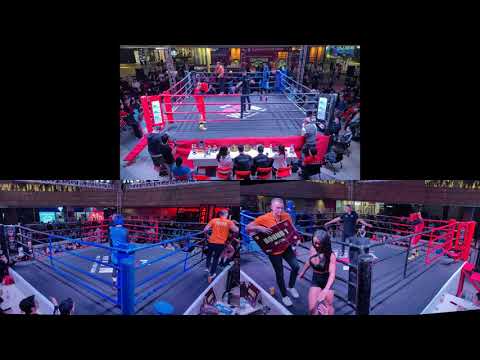
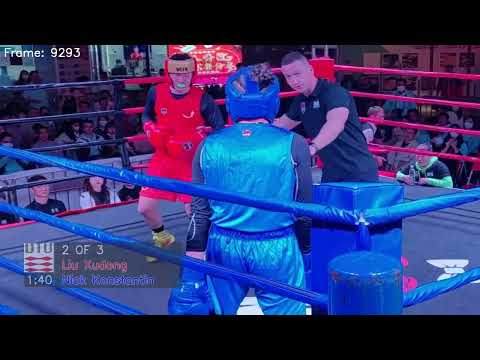
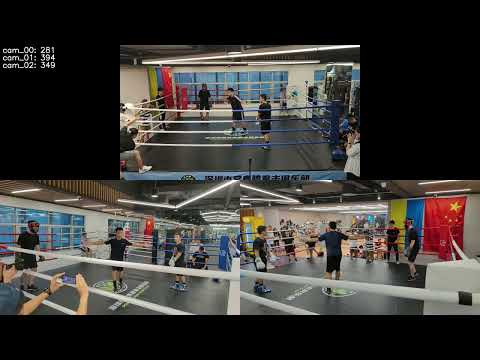
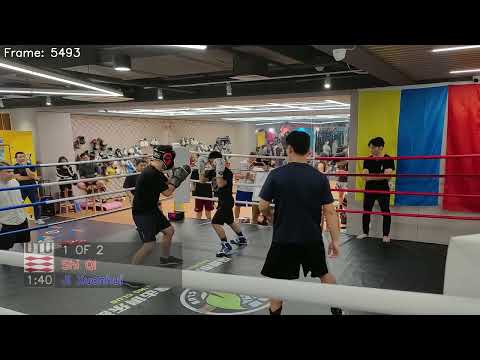
Showcasing a side-by-side comparison between the raw camera streams and the enhanced output from BoxingVidProd.
| Original Camera Streams | BoxingVidProd Output |
|---|---|
 |
 |
 |
 |
This project is licensed under the MIT License. See the LICENSE file for details.