




This bash script installs Photoshop CC 2018 on your Linux machine using wine behind the scenes and sets up some necessary components up for the best performance AND IT ACTUALLY WORKS!
- Downloads necessary components and installs them (
vcrun,atmlib,msxml...) - Downloads WORKING
photoshop.exeinstaller - Creates photoshop command and a desktop entry
- Wine dark mode
- Supports graphic cards like (
intel,Nvidia) - Saves the downloaded files in your cache directory
- It's free and you will not need any license key
- Works on any Linux distribution
-
A 64bit Operating System
-
The following packages packages
winewine64(non arch users)winetricksmd5sum
You can install them using your package manager, i.e. in Arch Linux:
sudo pacman -S wine winetricksOr for Ubuntu:
sudo dpkg --add-architecture i386 && sudo mkdir -p /etc/apt/keyrings && sudo wget -O /etc/apt/keyrings/winehq-archive.key https://dl.winehq.org/wine-builds/winehq.key && sudo wget -NP /etc/apt/sources.list.d/ https://dl.winehq.org/wine-builds/ubuntu/dists/$(lsb_release -sc)/winehq-$(lsb_release -sc).sources && sudo apt update && sudo apt install -y --install-recommends winehq-stable winetricks- Enough storage in your
/homepartition for the install:5G
1G will be freed after installation
The installer scripts uses a virtual drive in wine and makes a new wineprefix for photoshop
- For Arch users only, symlink wine64 to new wine
sudo ln -sf /usr/bin/wine /usr/bin/wine64
- Clone the repository with this command:
git clone https://github.com/kc01-8/photoshopCClinux.git
cd photoshopCClinux- Run
setup.shscript
chmod +x setup.sh
./setup.sh- (optional) Use
-dto specify the installation path, and-cfor the cache directory for example:
./PhotoshopSetup.sh -d /mnt/myfiles/photoshopor
./PhotoshopSetup.sh -d /mnt/myfiles/photoshop -c /mnt/cacheIf no options are given the installer script will use the default path

During installation pay attention to the script messages.
NOTE : Arch users do not need the wine64 package. Do not change OS version in wine from windows 7.
To configure the wineprefix of photoshop you can use winecfg.sh script:
chmod +x winecfg.sh
./winecfg.sh✨ Liquify Tools
As you know photoshop has many useful tools like `Liquify Tools`.If you get some errors while working with these tools,
It may because of the graphics card.
Photoshop uses the GPU to process these tools so before using these tools make sure that your graphics card (Nvidia, AMD) is configured correctly in your Linux machine.
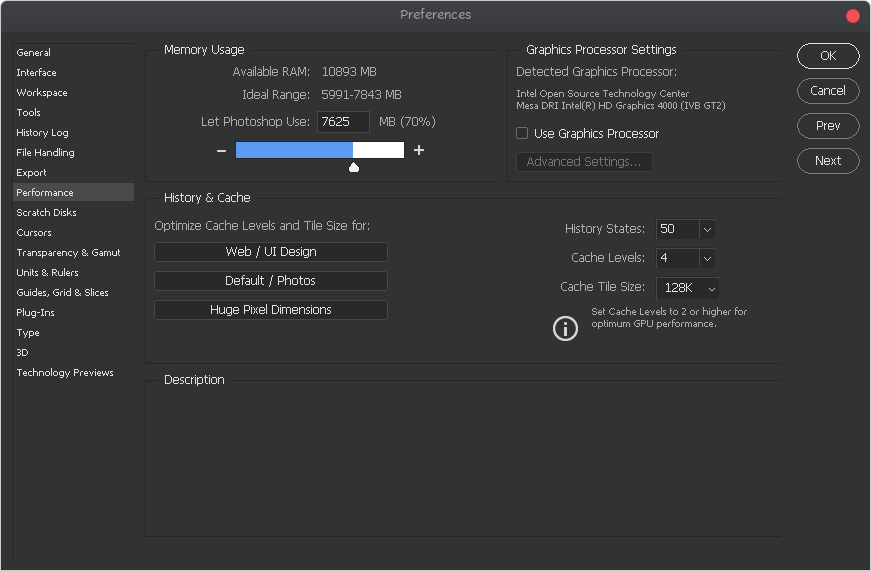
The other solution is you can configure photoshop to use your CPU for image processing. to do that, follow the steps below:
- Go to edit tab and open
preferencesor[ctrl+K] - Then go to the
performancetab - In the graphics processor settings section, uncheck
Use graphics processor
📷 Adobe Camera Raw
camera raw install:
chmod +x cameraRawInstaller.sh
./cameraRawInstaller.sh
Restart photoshop and open it from:
Edit >>Preferences >> Camera Raw
NOTE1: The size of camera raw installation file is about 400M
NOTE2: Camera raw performance depends on your graphic card driver and its configuration
To uninstall photoshop you can use the uninstaller script with commands below
chmod +x uninstaller.sh
./uninstaller.sh
Forked from the abandoned Gictorbit/photoshopCClinux
