


一个可以和对象一起同步看视频的播放器,可用于异地同步观影、观剧,支持多人同时观看。
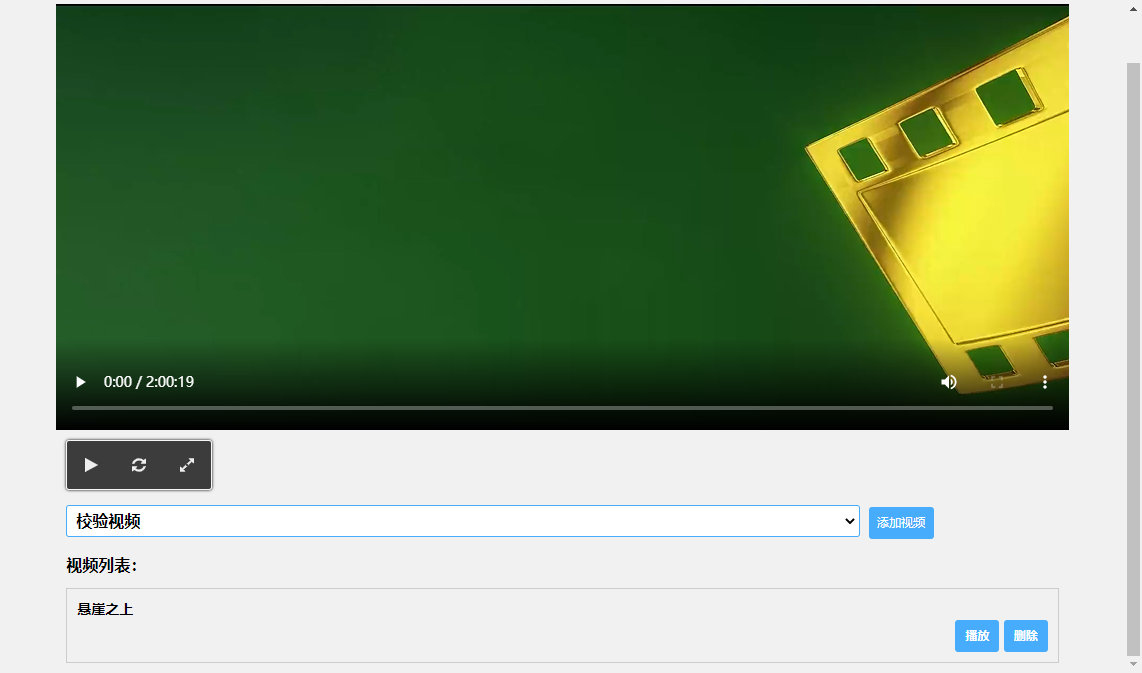
基于websocket实现,与一些用websocket实现的聊天室类似,只不过这个聊天室里的消息换成了播放暂停的动作和时间信息,客户端收到消息后执行相应的动作:播放、暂停、快进,以达到同时播放的效果。
- node.js
- socket.io
- HTML5 video API
- vue.js
# 进入服务端文件目录
cd sync-player/server/

# 安装项目依赖包
npm install

# 安装node进程管理工具
npm install forever -g

# 启动websocket服务
forever start index.js-
使用Nginx将服务器的80端口映射到sync-player/client/目录下的index.html文件
-
其次就是在sync-player/client/script/下修改main.js的三处配置即可,一个是下拉框里的视频地址和视频名,以及默认的视频播放地址,最后就是我们的websocket服务端配置
const { Realtime, TextMessage } = AV

const App = new Vue({
    el: '#app',
    template: '#template',
    data: {
        list: [
            { url: "http://视频播放地址.mp4", name: "视频名称" }
        ],
        socket: null,
        player: null,
        hls: null,
        goEasyConnect: null,
        videoList: [],
        videoSrc: 'http://默认视频播放地址.mp4',
        videoSrcs: '',
        playing: false,
        controlParam: {
            user: '',
            action: '',
            time: '',
        },
        userId: '',
        // goEasy 添加以下变量
        channel: 'channel1', // GoEasy channel
        appkey: '******', // GoEasy应用appkey,替换成你的appkey

        // leancloud-realtime 添加以下变量,appId、appKey、server这几个值去leancloud控制台>设置>应用凭证里面找
        chatRoom: null,
        appId: '*******************',
        appKey: '*******************',
        server: 'https://*******************.***.com', // REST API 服务器地址
    },
    methods: {
        randomString(length) {
            let str = ''
            for (let i = 0; i < length; i++) {
                str += Math.random().toString(36).substr(2)
            }
            return str.substr(0, length)
        },
        willVideo(event) {
            if (event.target.value) {
                this.videoSrc = event.target.value
            } else {
                this.videoSrc = '校验视频'
            }
        },
        addVideo() {
            if (this.videoSrc.includes('http')) {
                this.videoSrc = '校验视频'
            }
            var urlTemp = ''
            this.list.forEach(element => {
                if (element.name == this.videoSrc) {
                    urlTemp = element.url
                }
            });
            var flagTemp = true
            this.videoList.forEach(element => {
                if (element.name == this.videoSrc) {
                    flagTemp = false
                }
            });
            if (flagTemp) {
                if (this.videoSrc) {
                    this.videoList.push({ 'name': this.videoSrc, url: decodeURI(urlTemp) })
                }
                localStorage.setItem('videoList', JSON.stringify(this.videoList))
            }
        },
        playVideoItem(src) {
            if (src.includes('.m3u8')) {
                this.hls.loadSource(src);
                this.hls.attachMedia(this.player);
            } else {
                this.$refs.video.src = src
            }
            localStorage.setItem('currentPlayVideo', src)

        },
        deleteVideoItem(index) {
            this.videoList.splice(index, 1)
            localStorage.setItem('videoList', JSON.stringify(this.videoList))
        },
        toggleFullScreen() {
            if (this.player.requestFullscreen) {
                this.player.requestFullscreen()
            } else if (this.player.mozRequestFullScreen) {
                this.player.mozRequestFullScreen()
            } else if (this.player.webkitRequestFullscreen) {
                this.player.webkitRequestFullscreen()
            } else if (this.player.msRequestFullscreen) {
                this.player.msRequestFullscreen()
            }
        },
        playVideo() {
            if (this.playing) {
                this.player.pause()
                this.controlParam.action = 'pause'
                this.controlParam.time = this.player.currentTime
                this.sendMessage(this.controlParam)
            } else {
                this.player.play()
                this.controlParam.action = 'play'
                this.controlParam.time = this.player.currentTime
                this.sendMessage(this.controlParam)
            }
        },
        seekVideo() {
            this.player.pause()
            this.controlParam.action = 'seek'
            this.controlParam.time = this.player.currentTime
            this.sendMessage(this.controlParam)
        },
        sendMessage(controlParam) {
            const params = JSON.stringify(controlParam)

            // 使用socket-io
            this.socket.emit('video-control', params)

            // 使用GoEasy
            // this.goEasyConnect.publish({
            //   channel: this.channel,
            //   message: params
            // })

            // 使用leancloud-realtime
            // this.chatRoom.send(new TextMessage(params))
        },
        resultHandler(result) {
            switch (result.action) {
                case "play":
                    this.player.currentTime = (result.time + 0.2) //播放时+0.2秒,抵消网络延迟
                    this.player.play();
                    break
                case "pause":
                    this.player.currentTime = (result.time)
                    this.player.pause();
                    break
                case "seek":
                    this.player.currentTime = (result.time);
                    break
            }
        },
        // 获取 url 参数
        getParam(variable) {
            var query = window.location.search.substring(1);
            var vars = query.split("&");
            for (var i = 0; i < vars.length; i++) {
                var pair = vars[i].split("=");
                if (pair[0] == variable) {
                    return pair[1];
                }
            }
            return false;
        },
        // 设置 url 参数
        setParam(param, val) {
            var stateObject = 0;
            var title = "0"
            var oUrl = window.location.href.toString();
            var nUrl = "";
            var pattern = param + '=([^&]*)';
            var replaceText = param + '=' + val;
            if (oUrl.match(pattern)) {
                var tmp = '/(' + param + '=)([^&]*)/gi';
                tmp = oUrl.replace(eval(tmp), replaceText);
                nUrl = tmp;
            } else {
                if (oUrl.match('[\?]')) {
                    nUrl = oUrl + '&' + replaceText;
                } else {
                    nUrl = oUrl + '?' + replaceText;
                }
            }
            history.replaceState(stateObject, title, nUrl);
        }
    },
    created() {

        /* 读取本地视频列表和上一次播放的视频*/

        const localList = JSON.parse(localStorage.getItem('videoList'))

        this.videoList = localList ? localList : []

        const currentPlayVideo = localStorage.getItem('currentPlayVideo')

        if (currentPlayVideo) {
            this.videoSrc = currentPlayVideo
        }

        if (this.getParam("url")) {
            this.videoSrc = decodeURIComponent(this.getParam("url"))
        }

        this.userId = this.randomString(10)

        this.controlParam.user = this.userId
    },
    mounted() {

        this.player = this.$refs.video

        if (Hls.isSupported()) {
            this.hls = new Hls();
            this.hls.loadSource(this.videoSrc);
            this.hls.attachMedia(this.player);
        }

        /*使用socket-io*/
        this.socket = io('http://xxx.xxx.xxx.xxx:2233'); // 替换成你的websocket服务地址,即运行服务端的那个服务器ip
        this.socket.on('video-control', (res) => {
            const result = JSON.parse(res);
            if (result.user !== this.userId) {
                this.resultHandler(result)
            }
        });

        /* 使用GoEasy*/

        // /* 创建GoEasy连接*/
        // this.goEasyConnect = new GoEasy({
        //   host: "hangzhou.goeasy.io", // 应用所在的区域地址,杭州:hangzhou.goeasy.io,新加坡:singapore.goeasy.io
        //   appkey: this.appkey,
        //   onConnected: function () {
        //     console.log('连接成功!')
        //   },
        //   onDisconnected: function () {
        //     console.log('连接断开!')
        //   },
        //   onConnectFailed: function (error) {
        //     console.log(error, '连接失败或错误!')
        //   }
        // })
        //
        const that = this
            //
            // /* 监听GoEasy连接*/
            // this.goEasyConnect.subscribe({
            //   channel: this.channel,
            //   onMessage: function (message) {
            //     const result = JSON.parse(message.content)
            //     if (result.user !== that.userId) {
            //       that.resultHandler(result)
            //     }
            //   }
            // })

        const realtime = new Realtime({
            appId: this.appId,
            appKey: this.appKey,
            server: this.server,
        })

        //换成你自己的一个房间的 conversation id(这是服务器端生成的),第一次执行代码就会生成,在leancloud控制台>即时通讯>对话下面,复制一个过来即可

        var roomId = this.getParam("id") ? this.getParam("id") : '***********'

        // 每个客户端自定义的 id

        var client, room

        realtime.createIMClient(this.userId).then(function(c) {
                console.log('连接成功')
                client = c
                client.on('disconnect', function() {
                    console.log('[disconnect] 服务器连接已断开')
                })
                client.on('offline', function() {
                    console.log('[offline] 离线(网络连接已断开)')
                })
                client.on('online', function() {
                    console.log('[online] 已恢复在线')
                })
                client.on('schedule', function(attempt, time) {
                    console.log(
                        '[schedule] ' +
                        time / 1000 +
                        's 后进行第 ' +
                        (attempt + 1) +
                        ' 次重连'
                    )
                })
                client.on('retry', function(attempt) {
                    console.log('[retry] 正在进行第 ' + (attempt + 1) + ' 次重连')
                })
                client.on('reconnect', function() {
                    console.log('[reconnect] 重连成功')
                })
                client.on('reconnecterror', function() {
                        console.log('[reconnecterror] 重连失败')
                    })
                    // 获取对话
                return c.getConversation(roomId)
            })
            .then(function(conversation) {
                if (conversation) {
                    return conversation
                } else {
                    // 如果服务器端不存在这个 conversation
                    console.log('不存在这个 conversation,创建一个。')
                    return client
                        .createConversation({
                            name: 'LeanCloud-Conversation',
                            // 创建暂态的聊天室(暂态聊天室支持无限人员聊天)
                            transient: true,
                        })
                        .then(function(conversation) {
                            roomId = conversation.id
                            console.log('创建新 Room 成功,id 是:', roomId)
                            that.setParam("id", roomId)
                            return conversation
                        })
                }
            })
            .then(function(conversation) {
                return conversation.join()
            })
            .then(function(conversation) {
                // 获取聊天历史
                room = conversation;
                that.chatRoom = conversation
                    // 房间接受消息
                room.on('message', function(message) {
                    const result = JSON.parse(message._lctext)
                    that.resultHandler(result)
                });
            })
            .catch(function(err) {
                console.error(err);
                console.log('错误:' + err.message);
            });

        this.player.addEventListener('play', () => {
            this.playing = true
        })
        this.player.addEventListener('pause', () => {
            this.playing = false
        })
    }
})