Repository navigation
Menu bar: stop animating the countdown digits - #111
Conversation


A session held the app at about 46% of one core for as long as it ran.
`sample` of the shipped build shows where the time goes: every content
change in the status item makes AppKit take a fresh snapshot of the SwiftUI
host (`NSStatusItem _updateReplicants`), which lays it out again and blurs
it (`RenderBox`, `vImageSepConvolve`), about 23 ms of main thread each. The
countdown's `contentTransition(.numericText)` on the 0.18 s `Motion.tick`
spring is a content change on every frame, so it ran about twenty of them a
second.

The digits now change in one step, as the menu bar clock's do: no content
transition and no animation (`Motion.countdownTick` is nil). Measured on an
M3 Pro, macOS 27.0.1, with a 40 minute session and the mean of 40 samples of
`ps -o %cpu=` taken 0.5 s apart: 46.1% before, 2.3% after. One render a
second is affordable; twenty are not.

Alternatives measured and rejected: freezing the text while keeping every
other modifier reads 0.2%, so the digit roll is the whole cost; a
fixed-duration ease instead of the spring still reads about 50%; slowing the
redraw to 4 s reads 2.0%, no better than 2.3%, so there is nothing to win by
redrawing less often than the countdown needs. `drawingGroup()` and an empty
`NSHostingView.sizingOptions` changed nothing (52.2% and 50.8%).

The countdown still changes every second; only its transition is gone.
![greptile-apps[bot]](https://avatars.githubusercontent.com/in/867647?s=60&v=4)
Greptile's review of krishhgg#111 was right: `testTheCountdownDoesNotAnimateItsDigits`
asserts `Motion.countdownTick` is nil, which is the constant the view is
supposed to read, not the view. Putting
`.contentTransition(.numericText(countsDown: true))` back in `StatusRootView`
with any animation at all restores the per-frame status item re-render the
change removed, and that test would stay green.

The new test renders the view the controller installs. It lays the host out
at its fitting size, rasterises it offscreen (`bitmapImageRepForCachingDisplay`
and `cacheDisplay`, no window and no run loop), then advances the session by
a second on the same host and rasterises the very next frame. With no
transition that frame already reads the new digits, so it is byte-identical
to a countdown rendered fresh with the new value. Under the removed
`.numericText` transition the frame is still rolling from the old digits and
does not match, which fails the test.

Verified against the regression: with the transition and a 0.18 s spring put
back in the view, the changed frame is 5941 bytes against the fresh 6120 and
the test fails with "the changed frame must already read the new digits, not
roll to them". The raster is deterministic: three consecutive runs of the
suite produce the same 5934/6120/6120.

`swift test`: 1236 tests, 0 failures. `swift build -c release -Xswiftc
-warnings-as-errors`: clean.

|
Real-Mac report for
I am happy to re-run the CPU sample live on this head if you would rather see it from the head's own build; it is the same sources, so I expected no difference and did not repeat a 40 minute session for it. |

|
Just a reminder :) |

End-to-end test in two VMsThis PR works in both VMs, macOS 26.6.2 and 27.0. The countdown now changes once a second with no frames in between, and the app's CPU use during a session drops below half a percent. I also found an older bug: now and then the countdown skips a second and then shows the next value for about 2 s. Main does it too, and this PR doesn't touch the code behind it. SetupTwo Tart VMs on the maintainer's Mac mini, main (b6a7499) against this PR's head (9325f63):
A script started each session from the menu bar with a mouse click and Enter, waited for the "session started until" log line, then took screenshots of a 300x30 area around the countdown about 115 times a second (ScreenCaptureKit). Results
"Different images" counts every time any pixel in the area changed. With this PR that's once per second, 8 changes plus the first image. On main the digit roll keeps redrawing for most of each second, about 50 times a second. What it looks likeEach GIF is 8 s of one session at 3x, with the real time between frames (GIFs top out at 50 frames a second). macOS 27.0, main:
macOS 27.0, this PR:
macOS 26.6.2, main:
macOS 26.6.2, this PR:
The skipped second (older than this PR)With this PR, each tile is one value the countdown showed, with how long it stayed. Red marks a value that stayed about 2 s. The second before it never appeared.
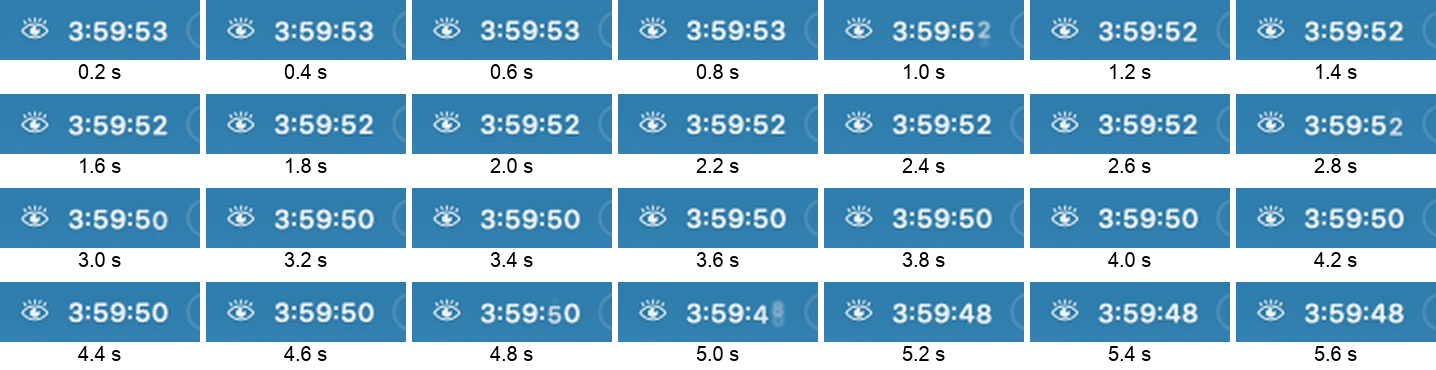
Main does the same. Here main is sampled every 0.2 s on macOS 26.6.2: 3:59:52 stays until about 2.8 s and rolls straight to 3:59:50, which stays until about 4.8 s and rolls straight to 3:59:48. 3:59:51 and 3:59:49 never show.
The likely cause, from reading the code but not proven: Rerun on macOS 27.0.1The macOS 27 VM was updated to 27.0.1 (26A434), the newest release, and these runs were repeated with the same commits and scripts. The results match 27.0. The macOS 26 VM stays on 26.6.2, the version GitHub's hosted macOS 26 runner uses.
macOS 27.0.1, main:
macOS 27.0.1, this PR:
The sessions are in Not covered
Everything is in 🤖 Generated with Claude Code |







 krishhgg
added
the
accepted
krishhgg
added
the
accepted
2 participants


What changes
A session held the app at about 46% of one core for as long as it ran, with
the lid open.
The countdown text carried
.contentTransition(.numericText(countsDown: true))on a 0.18 s spring. An animated text change is a content change on every
frame, and AppKit re-renders the whole status item on each one:
NSStatusItem _updateReplicantstakes a fresh snapshot of the SwiftUI host,lays it out again and blurs it (
RenderBox,vImageSepConvolve).sampleputs one content change at about 23 ms of main thread, so the spring was
running about twenty of them a second, for the whole session.
The digits now change in one step, as the menu bar clock's do. Same session,
same Mac: about 46% before, about 2% after. They still change every second,
they just don't roll.
Motion.tickhad no other caller and is gone, along with itsreduceMotionaccessor.
How it was tested
swift test: 1235 tests, 0 failures.swift build -c release -Xswiftc -warnings-as-errors: clean.UIStatusTests.testTheCountdownDoesNotAnimateItsDigitspinsMotion.countdownTick == nil, so a re-added tick fails a test. The oldtestTickAnimationIsShorterThanBaseAndHoldIsSubSecondasserted thespring's shape, so it becomes
testHoldToEndIsSubSecondand keeps thehold-duration half.
testCountdownTextTicksInHoursShapeAndPausesWithLidstill passes. The1 Hz redraw and the lid pause/resume are untouched.
I also measured the alternatives, so nobody has to ask:
drawingGroup()52%,
NSHostingView.sizingOptions = []51%,contentTransition(.opacity)with the animation 8%, redraw slowed to 4 s 2%. The cost is AppKit's
snapshot of the item, not anything in the view, and redrawing less often
than the countdown needs buys nothing.
Real-Mac evidence
CPU screenshots attached: ~46% with the countdown animating, ~2% without,
same 40 minute session, same machine.
I built with
./scripts/build-app.sh --output /tmp/insomnia-laband ran thebundle from
/tmprather than runninginstall.sh, which would havereplaced the v0.1.0 install in my
~/Applications. Same bundle either way,different path.
Not run: a real or simulated lid close. It would
SIGSTOPthe Telegram andWhatsApp I have open and pause Docker. The countdown's lid pause is
SessionManager.pauseCountdown, which this does not touch, and the testabove covers it.

The PR appears safe to merge; no blocking issue remains.Summary
The countdown now changes its digits without animation, avoiding repeated menu bar redraws.
Reviews (2) · Last reviewed commit: "Menu bar: test that the rendered countdo..." · Reviewed by Greptile