UltraGrasp is a real-time hand-tracking teleoperation pipeline for a Franka robot arm and Weiss WSG-50 gripper.
It uses:
- Ultraleap for hand tracking
- UMI-style hardware controllers with a Polymetis backend
- ServoBox for RT VM / Polymetis host setup
The main entrypoint is a live dashboard that visualizes hand motion and can stream commands to the robot:
python ultragrasp.py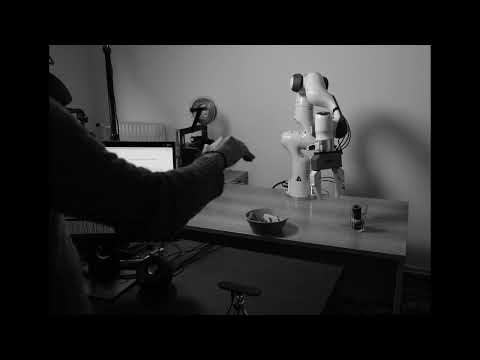
Tested on Ubuntu 24.04.
git clone --recurse-submodules <repo-url>
cd ultragrasp
If you already cloned the repo:
git submodule update --init --recursivesudo apt update
sudo apt install -y build-essential python3-dev python3-venv python3-tkpython3-tk is needed for the dashboard GUI on many Ubuntu installs.
wget -qO - https://repo.ultraleap.com/keys/apt/gpg | gpg --dearmor | sudo tee /etc/apt/trusted.gpg.d/ultraleap.gpg >/dev/null
echo 'deb [arch=amd64] https://repo.ultraleap.com/apt stable main' | sudo tee /etc/apt/sources.list.d/ultragrasp-ultraleap.list >/dev/null
sudo apt update
sudo apt install -y ultraleap-hand-tracking
leapctl eula
Sanity check:
ultraleap-hand-tracking-control-panelMake sure the control panel sees your hands before continuing.
python3 -m venv .venv
source .venv/bin/activate
python -m pip install --upgrade pip buildpython -m pip install -r requirements.txt
python -m pip install -r dependencies/leapc-python-bindings/requirements.txt
python -m build dependencies/leapc-python-bindings/leapc-cffi
python -m pip install dependencies/leapc-python-bindings/leapc-cffi/dist/leapc_cffi-*.whl
python -m pip install -e dependencies/leapc-python-bindings/leapc-python-apiIf you want to launch the dashboard without a live robot / gripper, edit config/ultragrasp.yaml and use:
robot_control:
  enabled: false

wsg_control:
  enabled: false
That gives you a tracking-only dashboard that should start cleanly on a laptop with an Ultraleap sensor.
source .venv/bin/activate
python ultragrasp.py
Optional:
python ultragrasp.py --config config/ultragrasp.yamlSpace: toggle zeroed hand-pose previewr: toggle robot live modeh: send robot to configured home poseq: quit
When you are ready to drive hardware:
- Set up the Polymetis host, optionally with ServoBox:
servobox init
servobox pkg-install polymetis
servobox run polymetis- On the machine connected to the Franka, start the UMI / Polymetis bridge:
python dependencies/universal_manipulation_interface/scripts_real/launch_franka_interface_server.py- Update
config/ultragrasp.yaml:
- Set
robot_control.enabled: true - Set
robot_control.robot_ipandrobot_control.robot_port - Set
robot_control.debug: falsefor live motion - Set
wsg_control.enabled: trueand its hostname/port if using the WSG-50
If the stock UMI Franka scripts do not work in your setup, use the patched files in src/umi-franka-patches/ before starting the bridge:
cp src/umi-franka-patches/franka_interpolation_controller.py \
  dependencies/universal_manipulation_interface/umi/real_world/franka_interpolation_controller.py

cp src/umi-franka-patches/launch_franka_interface_server.py \
  dependencies/universal_manipulation_interface/scripts_real/launch_franka_interface_server.py
Without these replacements, the Franka bridge may fail even if the rest of the setup looks correct.
- If
import leapfails with a missingleapc_cffimodule, rebuild and reinstallleapc-cffi. - If Ultraleap is installed in a non-default location, set
LEAPSDK_INSTALL_LOCATION. - If the dashboard says
No bridge, the Franka interface server is not reachable yet.
UltraGrasp builds on third-party components with their own licenses and terms:
dependencies/universal_manipulation_interfacefrom the UMI project, licensed under MITdependencies/leapc-python-bindingsfrom Ultraleap, licensed under Apache-2.0- The Ultraleap Linux runtime installed via
ultraleap-hand-tracking, which is distributed separately under Ultraleap's own terms
The local files in src/umi-franka-patches/ are modified adaptations of upstream UMI files.
See THIRD_PARTY_NOTICES.md for a concise summary.