Fork of go-gost/gost v3.2.6 with SSH relay fallback enhancements. Implementation module: lovitus/gust-x (fork of go-gost/x v0.8.1)
- Porty Stealth Port Forwarding - Disguises TCP port forwarding as normal HTTPS/WebSocket traffic with AEAD authentication, smux session caching, multi-port mixed-role sessions, optional P2P direct mode, dynamic
bindpathWS bridge for Mihomo/iOS, and the standaloneportydserver. - SSH Relay Fallback - When SSH server disables TCP forwarding (
AllowTcpForwarding=no), automatically falls back through multiplexed relay, embedded relay binary, or exec-based tools (nc/socat/perl/python/bash). Original direct-tcpip is always prioritized. - Multiplexed Relay - Single SSH exec session handles unlimited TCP connections via mux protocol, bypassing
MaxSessionslimits. - Smart Relay Upload - Embedded relay binary auto-uploaded to remote server, hash-cached (only transferred once per binary version).
- Escape-Based Passwords - Supports backslash escapes and quotes in inline passwords (backward compatible with URL encoding).
- Cross-Platform Builds - Pre-built binaries for 23 platform/arch combinations with UPX compression.
See FORK_CHANGES.md for detailed technical documentation and upstream merge notes. Full Porty documentation lives in gust-x docs/porty.md.


- 多端口监听
- 多级转发链
- 多协议支持
- TCP/UDP端口转发
- 反向代理和隧道
- TCP/UDP透明代理
- DNS解析和代理
- TUN/TAP设备与TUN2SOCKS
- 负载均衡
- 路由控制
- 准入控制
- 限速限流
- 插件系统
- Prometheus监控指标
- 动态配置
- Web API
- GUI/WebUI

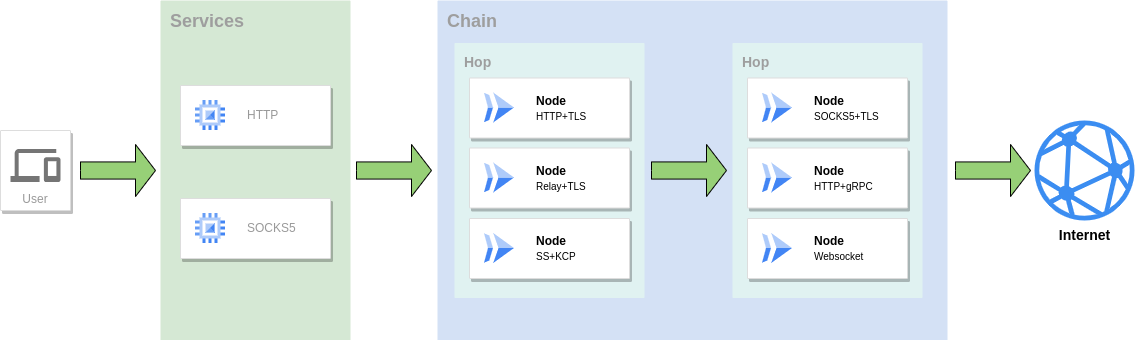
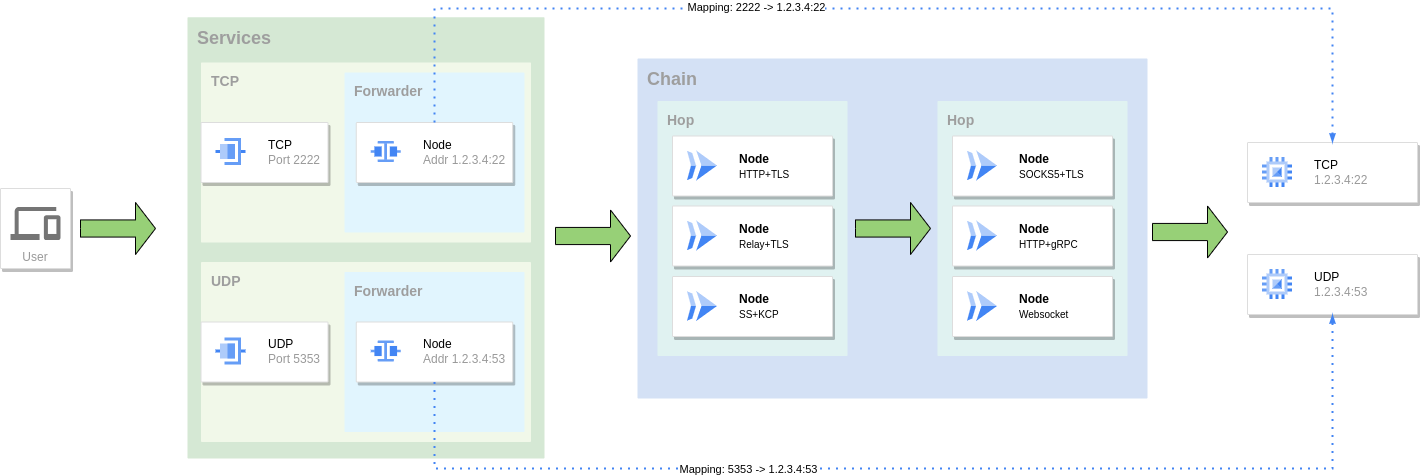
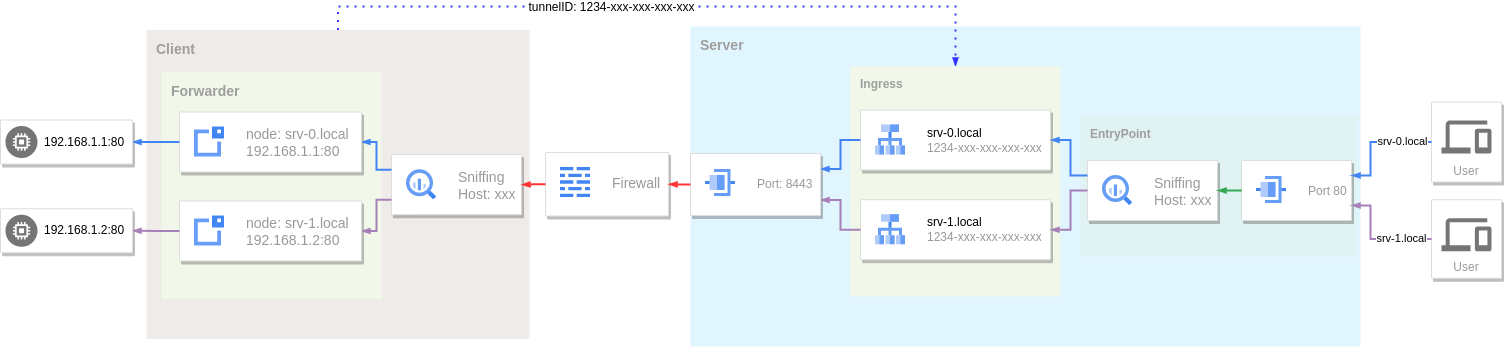
GOST作为隧道有三种主要使用方式。
作为代理服务访问网络,可以组合使用多种协议组成转发链进行转发。
将一个服务的端口映射到另外一个服务的端口,同样可以组合使用多种协议组成转发链进行转发。
利用隧道和内网穿透将内网服务暴露到公网访问。
包管理器入口会在下一个稳定 tag 发布后自动生成和更新;维护者发布流程见 RELEASE.md。
brew tap lovitus/gust https://github.com/lovitus/gust
brew install gust
gost -Vscoop bucket add gust https://github.com/lovitus/gust
scoop install gust
gost -Varch="$(dpkg --print-architecture)"
case "$arch" in amd64|arm64) ;; *) echo "unsupported APT arch: $arch" >&2; exit 1;; esac
sudo install -d -m 0755 /etc/apt/keyrings
curl -fsSL https://lovitus.github.io/gust/apt/gust-archive-keyring.gpg \
| sudo tee /etc/apt/keyrings/gust-archive-keyring.gpg >/dev/null
echo "deb [arch=$arch signed-by=/etc/apt/keyrings/gust-archive-keyring.gpg] https://lovitus.github.io/gust/apt stable main" \
| sudo tee /etc/apt/sources.list.d/gust.list >/dev/null
sudo apt update
sudo apt install gustsudo tee /etc/yum.repos.d/gust.repo >/dev/null <<'EOF'
[gust]
name=gust stable repository
baseurl=https://lovitus.github.io/gust/rpm/$basearch
enabled=1
repo_gpgcheck=1
gpgcheck=0
gpgkey=https://lovitus.github.io/gust/rpm/RPM-GPG-KEY-gust
EOF
sudo dnf install gust
# 或: sudo yum install gustRPM 源当前签名的是仓库 metadata,暂不对单个 RPM 包签名,因此 repo 配置中使用 repo_gpgcheck=1 和 gpgcheck=0。
https://github.com/lovitus/gust/releases
# 安装最新版本
bash <(curl -fsSL https://raw.githubusercontent.com/lovitus/gust/master/install.sh) --install
# 选择要安装的版本
bash <(curl -fsSL https://raw.githubusercontent.com/lovitus/gust/master/install.sh)git clone https://github.com/lovitus/gust.git
cd gust/cmd/gost
go build
docker run --rm gogost/gost -V
hamid-nazari/ShadowsocksGostPlugin
Wiki站点:https://gost.run
YouTube: https://www.youtube.com/@gost-tunnel
Telegram:https://t.me/gogost
Google讨论组:https://groups.google.com/d/forum/go-gost
旧版入口:v2.gost.run