
I recommend using uv to install this project.
Then, all you need to do is run uvx pinocchiout and it'll handle the rest.
reqs.yaml/json is a simple file describing the requirements of your project.
chip: STM32G431C6
package: UFQFPN48
requirements:
  - name: position-sensor
    kind: spi
    signals:
      - MOSI
      - MISO
      - SCK

reserved_pins:
 - PB8  # boot select pin
This one, for example, says you're trying to find a pinout for the STM32G431C6 microcontroller, in the UFQFPN48 package, with a SPI peripheral. It also reserves the boot select pin, PB8.
YAML is preferred, because it allows for comments, but JSON is also supported:
{
    "chip": "STM32G431C6",
    "package": "UFQFPN48",
    "requirements": [
        {
            "name": "spi",
            "peripheral": "spi",
            "kind": "spi",
            "signals": ["MOSI", "MISO", "SCK"]
        }
    ]
}
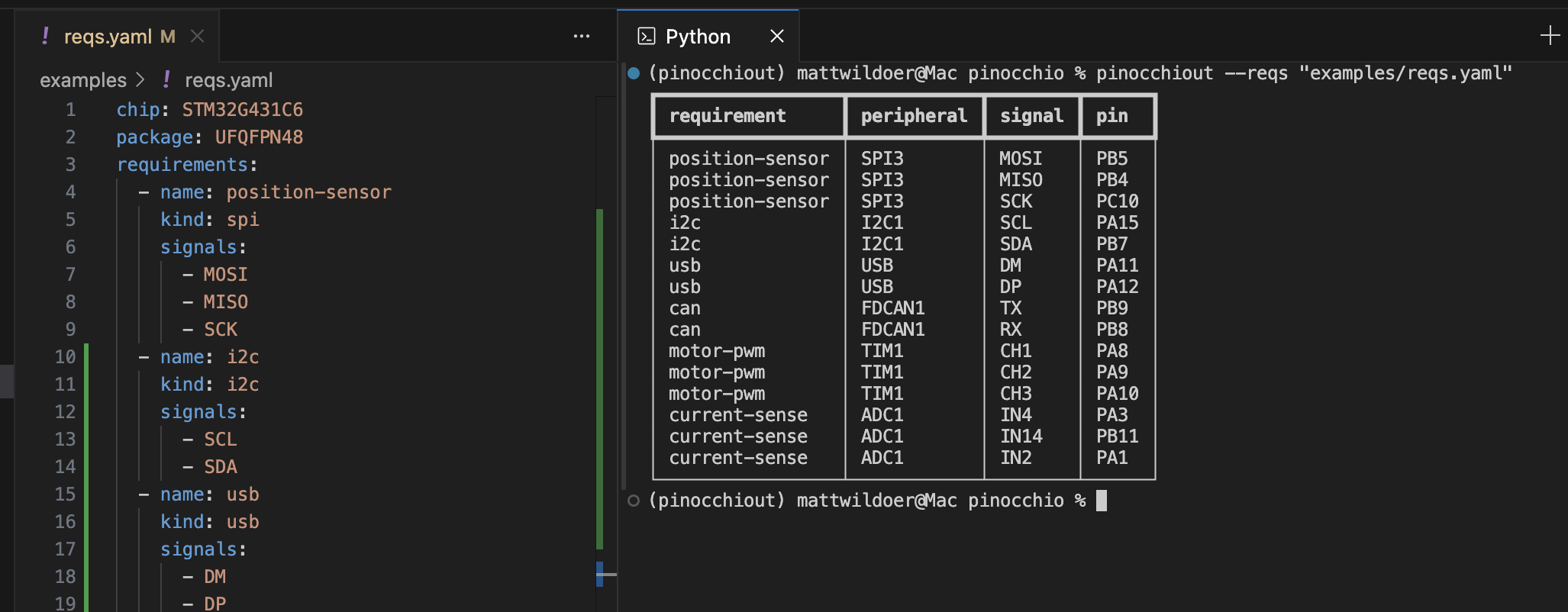
You can print out a table of the pinout like so:
uvx pinocchiout solve --reqs "examples/reqs.yaml"You can also list all available peripherals for a chip/package:
uvx pinocchiout list --reqs "examples/reqs.yaml"
# or specify chip and package directly
uvx pinocchiout list --chip STM32G431C6 --package UFQFPN48
Peripheral names ("peripheral") and signal names ("signals") are treated as regular expressions, so you can use them to match multiple.
Honestly, it could be better, but see example.py for a simple example of how to use it as a library.