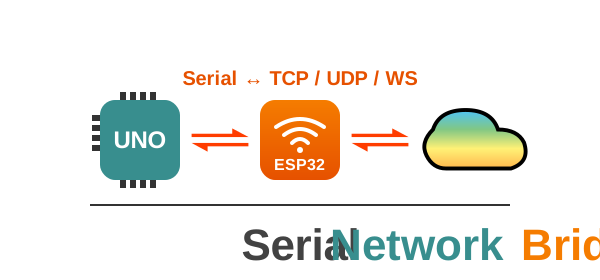



The Arduino Serial bridge for TCP, UDP, and WebSocket Clients
Enable advanced network functionality on non-networked boards by bridging them to a WiFi‑capable device (ESP32/ESP8266) or a PC via USB.
It is designed for Arduino boards such as AVR, STM32, and Teensy that lack built‑in WiFi or Ethernet. By bridging communication through modules like ESP32, Raspberry Pi Pico W, or even a PC running a Python script, the library makes network access broadly available. With support for SSL/TLS, WebSockets, and UDP, SerialNetworkBridge enables secure communication without requiring firmware‑level certificate management.
You can deploy this library in two ways depending on your hardware:
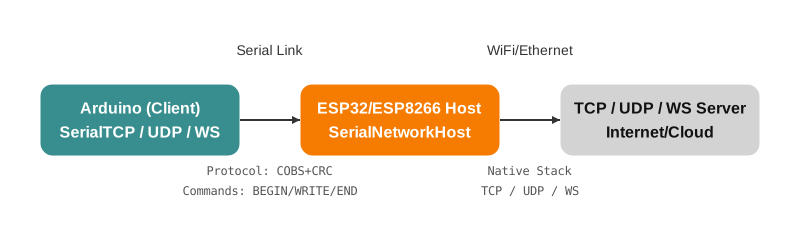
Use a WiFi-capable microcontroller as a dedicated network co-processor.
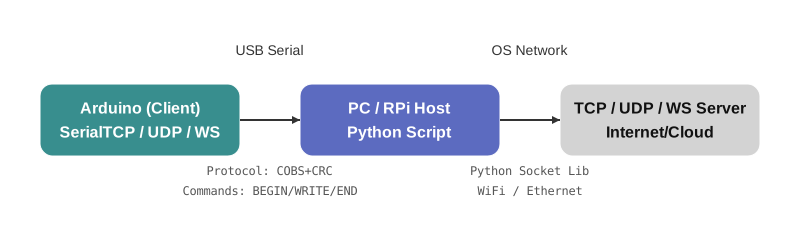
Use your computer (Windows, Linux, macOS) or Raspberry Pi as the gateway via the USB cable.
- Multi-Protocol Support: Bridge TCP, UDP, and WebSocket clients via serial.
- Universal Compatibility: Works with any interface implementing the
Streamclass (HardwareSerial,SoftwareSerial,USBSerial, etc.). - PC Host Mode (v1.0.4): Connect directly to a PC/Raspberry Pi via USB. The Python bridge now supports:
- Real WiFi Control: Connect/Disconnect PC Wi-Fi from the Arduino client.
- System Control: Reboot the bridge or the host machine via serial command.
- Robust SSL: Supports HTTPS, WSS, and STARTTLS with custom root certificates.
- Secure: Support for SSL/TLS (HTTPS/WSS) and STARTTLS upgrades handled by the host.
- Performance: Supports
NeoHWSerialfor high-performance interrupt-driven communication on AVR boards. - Event-Driven: WebSocket implementation supports async events and callbacks.
- Open Arduino IDE.
- Go to Sketch → Include Library → Manage Libraries…
- Search for SerialNetworkBridge.
- Click Install.
- Open your project’s
platformio.ini. - Add the library under
lib_deps:
lib_deps =
mobizt/SerialNetworkBridgeClients (Non-Networked Boards):
- Arduino AVR (Uno, Mega2560, Nano)
- STM32 series
- Teensy boards
- Any board with a
Streaminterface.
Hosts (Network Bridges):
- Microcontrollers: ESP32, ESP8266, Raspberry Pi Pico W, MKR WiFi 1010.
- PC / Linux (USB): - Windows (requires Admin for WiFi control).
- Linux / Raspberry Pi (requires Sudo/NetworkManager).
- macOS (requires Sudo).
These sketches run on your non-networked board. They connect to the "Host" (ESP32 or PC) to access the internet.
If you are using the PC USB Bridge, you must follow these rules in your client sketch:
- Disable Debugging: Comment out
#define ENABLE_SERIALTCP_DEBUG. - Use Main Serial: Pass
Serial(USB) to the client constructor. - Flush Bootloader: Add
Serial.write(0x00); delay(500);insetup(). - Explicit SSL: Pass
trueas the 3rd argument toconnect()for HTTPS (e.g.,client.connect("site.com", 443, true)).
// [PC Host] Comment out debug to prevent protocol corruption
// #define ENABLE_SERIALTCP_DEBUG
#include <SerialNetworkBridge.h>

// Use Serial for PC Host, Serial2 for ESP32 Host
SerialTCPClient client(Serial, 0);

void setup() {
  Serial.begin(115200);
  while(!Serial);

  // [PC Host] Flush bootloader garbage
  Serial.write(0x00);
  delay(500);

  if (client.pingHost(500)) {
    // 3rd param 'true' enables SSL/TLS (Required for PC Host HTTPS)
    if (client.connect("httpbin.org", 443, true)) {
      client.println("GET /get HTTP/1.1");
      client.println("Host: httpbin.org");
      client.println("Connection: close");
      client.println();
      // Read response...
    }
  }
}

void loop() {}#include <SerialNetworkBridge.h>
SerialWebsocketClient ws(Serial, 0);
void onWsEvent(WSMessageType type, const uint8_t* payload, size_t len) {
if(type == WS_EVENT_CONNECTED) {
// Connection Success
}
}
void setup() {
Serial.begin(115200);
while(!Serial);
Serial.write(0x00); delay(500); // Flush
ws.onEvent(onWsEvent);
ws.connect("echo.websocket.org", 443, "/", true);
}
void loop() {
ws.loop(); // Essential for events
}Upload the Host sketch to an ESP32/ESP8266. It bridges Serial traffic to WiFi.
- Example:
examples/Basics/Host/Host.ino
Use your computer as the bridge via USB! Supports real system network management.
- Install Dependencies:
Navigate to
examples/Features/PC_USB_Hostand run:- Windows:
install_libs.bat - Linux/Mac:
./install_libs.sh
- Windows:
- Configure:
Edit
serial_bridge.py: SetSERIAL_PORT(e.g.,COM3,/dev/ttyUSB0) andBAUD_RATE. - Run:
- Windows:
run.bat(Run as Administrator for WiFi/Reboot features). - Linux/Mac:
./run.sh(Run withsudofor WiFi/Reboot features).
- Windows:
| Folder | Description |
|---|---|
| Basics/ | Standard examples for ESP32/ESP8266 Bridge. |
| Features/PC_USB_Host/ | Full suite of examples for PC/Python Bridge. |
├─ serial_bridge.py |
The Python Bridge Script (v1.0.3+). |
├─ HTTP_GET / POST |
Basic HTTP/HTTPS examples. |
├─ WebSocket |
Connect to echo server with SSL. |
├─ MQTT |
Secure MQTT (Port 8883) example. |
├─ HostManagement |
Control PC WiFi & Reboot from Arduino. |
└─ HTTP_Streaming |
SSE Client with local Python Server. |
connect(host, port, [ssl]): Connect to a TCP server. Passtruefor SSL on PC Host.setCACert(filename): Load a custom Root CA file (relative path on PC).startTLS(): Upgrade connection to SSL (e.g., for SMTP).
pingHost(): Check if bridge is running.setWiFi(ssid, pass): Set Wi-Fi credentials on Host (PC or ESP32).connectNetwork(): Trigger Wi-Fi connection on Host (OS-level on PC).disconnectNetwork(): Disconnect Host Wi-Fi.rebootHost(): Reboot the Host (Restarts script on PC, reboots ESP32).
This library is released under the MIT License.
See LICENSE for details.
Developed and maintained by mobizt.