

A minimalist Python library for (Contrast Limited) (Adaptive) Histogram Equalization, combining the expressiveness of a user-friendly Python interface with the raw power of a low-level implementation.
ahe is currently in alpha. Fundational features are available, and expected to be
stable, but the software as a whole may not be feature complete yet.
$ python -m pip install ahe
We'll start by defining an image composed of noise.
import ahe
import numpy as np

image_shape = (128, 128)
prng = np.random.default_rng(0)
image = np.clip(
    prng.normal(
        loc=0.5,
        scale=0.25,
        size=np.prod(image_shape),
    ).reshape(image_shape),
    a_min=0.0,
    a_max=1.0,
)
Non-adaptive histogram equalization is performed as follow
image_eq = ahe.equalize_histogram(image)This method is least expensive in terms of strain put on hardware resources. However, as a single histogram is computed and adjusted over the entire image, this technique is known to amplify noise in near-uniform regions.
Adaptive Histogram Equalization (AHE) was designed to overcome this limitation by instead computing more localized (and numerous) histograms, improving the local contrast in all regions, at the cost of a reduced efficiency. As illustrated in the following, there are two main variants of AHE, sliding-tile and tile-interpolation. As the names suggest, both methods rely on the use of of tiles, also known as contextual regions, that define sub-domains in which different histograms are computed and applied.
True AHE is intrinsically an expensive operation to perform, as it requires computing
a different histogram per pixel. One efficient (although still costly) way to
accomplish this, originally proposed by Pizer et al. (1987), reduces the
redundancy in intermediate computations and is known as the sliding-tile variant of AHE.
Here's how to use it in ahe
image_eq = ahe.equalize_histogram(
    image,
    adaptive_strategy={
        'kind': 'sliding-tile',
        'tile-size': 15,
    },
)
Note
This strategy requires odd-sized tile shapes, but supports image shapes with any parity.
While an exact implementation of AHE, this option remains resource-demanding and is not recommended for production.
Alternatively, very similar results can be obtained at a fraction of the cost using an approximative method known as the tile-interpolation variant of AHE, also introduced by Pizer et al. (1987). In this method, an image is split into equal-sized sub domains (tiles), which may be specified either from a tile size
image_eq = ahe.equalize_histogram(
    image,
    adaptive_strategy={
        'kind': 'tile-interpolation',
        'tile-size': 16,
    },
)
or as a number of tiles to split the domain into (in each direction)
image_eq = equalize_histogram(
    image,
    adaptive_strategy={
        'kind': 'tile-interpolation',
        'tile-into': 8,
    },
)
Note
This strategy requires even-sized tile and image shapes.
In all AHE strategies, all tiles created will be the exact same size, regardless of the
pixel's relative position in the image. The whole domain is generally padded internally
in order to respect this rule. The exact method used for padding is controlled by the
boundaries keyword argument.
Both 'tile-size' and 'tile-into' will accept either a shape as a pair of integers
(n, m), or a single integer n, which is a shorthand for (n, n), as illustrated
above.
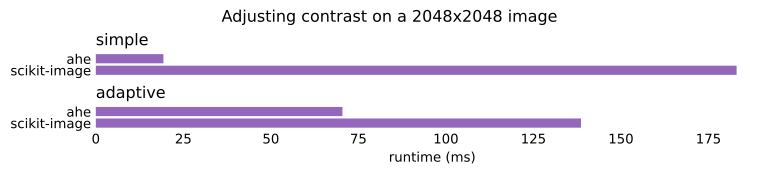
Put simply, if all your project needs from scikit-image is
skimage.exposure.equalize_(adapt)hist, ahe provides a faster, more lightweight and
portable replacement. The following contains a much more detailed explanation of the
differences. You can also jump to the final Migration Guide.
The following features from skimage.exposure.equalize_(adapt)hist are currently
missing from ahe:
- masking
- multi-channel images objects (from
PIL) or arrays. The expectation is that this should be easy to re-implement on the user side. - higher dimensionality:
ahecurrently only supports 2D input and outputs. The algorithms can be generalized to work in any dimensionality. Please open an issue
Some, though not all of the above are already planned. Don't hesitate to request the others (or anything else that could be in scope) by opening an issue.
ahe has no runtime dependencies beyond numpy. Additionally, its binaries are
orders of magnitude lighter than scikit-image's, as well as future-compatible
with yet-unreleased versions of Python.

(*: numpy itself, as the common dependency to ahe and scikit-image, is
excluded from this graph)
scikit-image's implementation of histogram equalization methods are exposed as two
different functions: skimage.exposure.equalize_hist and
skimage.exposure.equalize_adapthist. Only the former supports masking, and only the
latter supports clipping. ahe.equalize_histogram provides a consistent feature set,
independent of the adaptive strategy (or lack thereof) selected.
Furthermore, implicit, default behavior can be hard to reproduce explicitly. For
instance, equalize_adapthist will, by default, create tiles by dividing the image in 8
along each direction, but only exposes a tile_size argument to override this; as a
result, one needs to re-implement division logic if they need something very similar to
the default, but with any other value than 8. In stark contrast,
ahe.equalize_histogram's adaptive_strategy argument supports all these applications:
adaptive_strategy=Nonecorresponds toskimage.exposure.equalize_histadaptive_strategy={'kind': 'tile-interpolation', 'tile-into': 8}corresponds toskimage.exposure.equalize_adapthist's default, but the exact divisor(s) used can easily be adjustedadaptive_strategy={'kind': 'tile-interpolation', 'tile-size': 64}is akin to usingskimage.exposure.equalize_adapthist'stile_sizeargument.
Last but not least, equalize_hist does not support contrast limitation, while
equalize_adapthist enables it by default (clip_limit defaults to 0.01), and
things get messy when you actually want to disable it:
-
clip_limit's name is not descriptive and only makes sense if you already know what it does under the hood.ahe's equivalent parameter is namedmax_normalized_bincount, which is more verbose, but also more explicit about what the number represents. -
clip_limit(a.k.amax_normalized_bincount) is effectively a fraction; only values within the open interval]0.0, 1.0]are meaningful, butclip_limit=0.0is allowed, and effectivaly disable all clipping, which means it's equivalent to1.0, further mystifying the underlying behavior and meaning of the parameter. Another way to phrase this is that the results change discontinuously at0.0, which is very close to the default value and should be easy to reason about. -
results for
clip_limit=1.0(or0.0, as we just saw), are actually incorrect at a level that is visible to the naked eye (aliasing may be prominent). In comparison,ahedoes not enable contrast limitation by default: such flagrant defects would be immediately visible in tests.
ahe.equalize_histogram also provides stricter guarantees regarding the
transformation's geometric invariants.
Outputs are guaranteed to be invariant (to machine precision) to left/right and top/
bottom symmetries. In contrast, skimage.exposure.equalize_adapthist's outputs are
subject to biases on, because it does not enforce symmetry in its internal tiling scheme
(as of scikit-image v0.26.0). This improved tiling scheme comes at the cost of
stricter requirements in ahe.equalize_histogram: the tile-interpolation strategy only
supports tiles and images with even sizes in both directions.
ahe.equalize_histogram supports more tiling scheme than
skimage.exposure.equalize_hist and skimage.exposure.equalize_adapthist combined,
within a consistent interface and a unified feature set.
In particular, it offers an exact implementation of Adaptive Histogram Equalization
implemented as a sliding-tile, while skimage.exposure.equalize_adapthist only
supports tile-interpolation (also available in ahe), which is generally faster,
but also a less accurate approximation of a true AHE.
ahe.equalize_histogram also supports periodic boundary conditions, which can be
specified as boundaries='periodic'.
This section provides some practical examples of scikit-image applications and their
equivalent in ahe.
Notes
- in
ahe, the defaultnbinsis generally aligned withscikit-image's (256), except for kernels (or tiles) spanning less than 256 pixels. For maximu compatibility, specifying an explicit value is recommended. ahe.equalize_histogram'smax_normalized_bincountrepresents the same parameter asskimage.exposure.equalize_adapthist'sclip_limit, but their default values differ:max_normalized_bincountdefaults to1.0(no contrast limitation), whilescikit-image'sclip_limitdefault to0.01- "kernel", "tile" and "contextual region" are different names for the same concept.
from skimage.exposure import equalize_hist

result = equalize_hist(array)

# becomes
import ahe

result = ahe.equalize_histogram(array, nbins=256)from skimage.exposure import equalize_adapthist
result = equalize_adapthist(array, clip_limit=1.0)
# becomes
import ahe
result = ahe.equalize_histogram(
array,
nbins=256,
adaptive_strategy={
"kind": "tile-interpolation",
"tile-into": 8, # or (8, 8)
},
)from skimage.exposure import equalize_adapthist
result = equalize_adapthist(array, kernel_size=64)
# becomes
import ahe
result = ahe.equalize_histogram(
array,
nbins=256,
adaptive_strategy={
"kind": "tile-interpolation",
"tile-size": 64, # or (64, 64)
},
max_normalized_bincount=0.01,
)- Pizer, Stephen M. et al. (1987). Adaptive Histogram Equalization and Its Variations. Compute Vizion, Graphics, and Image Processing, 39, 355-368