

╔═══════════════════════════════════════════════════════════╗
║   ██████╗ ███████╗███╗   ███╗██╗   ██╗██╗  ██╗            ║
║   ██╔══██╗██╔════╝████╗ ████║██║   ██║╚██╗██╔╝            ║
║   ██████╔╝███████╗██╔████╔██║██║   ██║ ╚███╔╝             ║
║   ██╔═══╝ ╚════██║██║╚██╔╝██║██║   ██║ ██╔██╗             ║
║   ██║     ███████║██║ ╚═╝ ██║╚██████╔╝██╔╝ ██╗            ║
║   ╚═╝     ╚══════╝╚═╝     ╚═╝ ╚═════╝ ╚═╝  ╚═╝            ║
║     Born in PowerShell. Made in Rust. 🦀                 ║
║          Terminal Multiplexer for Windows                 ║
╚═══════════════════════════════════════════════════════════╝
The native Windows tmux. Born in PowerShell, made in Rust.
Full mouse support · tmux themes · tmux config · 92 commands · blazing fast
Install · Usage · Claude Code · Features · Compatibility · Performance · Plugins · Keys · Scripting · Config · Mouse/SSH · FAQ · Related Projects
The real tmux for Windows. Not a port, not a wrapper, not a workaround.
psmux is a native Windows terminal multiplexer built from the ground up in Rust. It uses Windows ConPTY directly, speaks the tmux command language, reads your .tmux.conf, and supports tmux themes. All without WSL, Cygwin, or MSYS2.
💡 Tip: psmux ships with
tmuxandpmuxaliases. Just typetmuxand it works!
👀 On Windows 👇

winget install psmuxcargo install psmuxThis installs psmux, pmux, and tmux binaries to your Cargo bin directory.
scoop bucket add psmux https://github.com/psmux/scoop-psmux
scoop install psmuxchoco install psmuxDownload the latest .zip from GitHub Releases and add to your PATH.
git clone https://github.com/psmux/psmux.git
cd psmux
cargo build --release
Built binaries:
target\release\psmux.exe
target\release\pmux.exe
target\release\tmux.exe
A ready-made Windows container with Rust + MSVC + SSH for building psmux:
cd docker
docker build -t psmux-dev .
docker run -d --name psmux-dev -p 127.0.0.1:2222:22 -e ADMIN_PASSWORD=YourPass123! psmux-dev
ssh ContainerAdministrator@localhost -p 2222
See docker/README.md for full details.
- Windows 10 or Windows 11
- PowerShell 7+ (recommended) or cmd.exe
- Download PowerShell:
winget install --id Microsoft.PowerShell - Or visit: https://aka.ms/powershell
- Download PowerShell:
If you've used tmux on Linux/macOS and wished you had something like it on Windows, this is it. Split panes, multiple windows, session persistence, full mouse support, tmux themes, 92 commands, 126+ format variables, 53 vim copy-mode keys. Your existing .tmux.conf works. Full details: docs/features.md · docs/compatibility.md
Use psmux, pmux, or tmux — they're identical:
psmux                        # Start a new session
psmux new-session -s work    # Named session
psmux ls                     # List sessions
psmux attach -t work         # Attach to a session
psmux --help # Show helppsmux has first-class support for Claude Code agent teams. When Claude Code runs inside a psmux session, teammate agents automatically spawn in separate tmux panes instead of running in-process.
psmux new-session -s work    # Start a psmux session
claude                       # Run Claude Code — agent teams just work
No extra configuration needed. Full guide: docs/claude-code.md
Wire psmux into Claude Code's lifecycle with hooks for automatic notifications and output capture.
Add to ~/.claude/settings.json:
{
  "hooks": {
    "Notification": [
      {
        "matcher": "",
        "command": "bash /path/to/psmux/scripts/hooks/on-notification.sh"
      }
    ],
    "Stop": [
      {
        "matcher": "",
        "command": "bash /path/to/psmux/scripts/hooks/on-agent-stop.sh"
      }
    ]
  }
}
What each hook does:
| Hook | Script | Behavior |
|---|---|---|
Notification |
on-notification.sh |
Routes Claude Code notifications to the psmux status bar instead of the system tray |
Stop |
on-agent-stop.sh |
Auto-captures pane scrollback to ~/.psmux/agent-logs/ when an agent finishes |
| (optional) | on-agent-spawn.sh |
Tags panes with @agent metadata on TeammateTool spawn |
Agent logs are saved as ~/.psmux/agent-logs/YYYYMMDD-HHMMSS_<session>_<pane>.log for post-mortem analysis.
| Feature | Keybinding | Description |
|---|---|---|
| Hints mode | Ctrl+b f |
Scan pane for URLs, file paths, git hashes — type a label to copy |
| Session resurrection | auto | Snapshots saved on structural changes, psmux resurrect <name> to restore |
| Declarative layouts | --layout file.json |
Define multi-pane workspaces in JSON, apply with source-file |
| Zoxide picker | Ctrl+b z |
Frecency-ranked directory popup via zoxide + fzf |
See docs/power-pack-tools.md for the full tool stack guide. scripts/install.ps1 bundles 13 tools: the core 7 (ripgrep, fd, bat, zoxide, fzf, starship, fastfetch) plus 6 extras (atuin, eza, jq, ast-grep, tokei, gh).
ohboy-buildsbranch adds production-grade agent orchestration on top ofmaster:Agent Backend (Protocol v2):
- CustomPaneBackend — JSON-RPC 2.0 server over Windows named pipes for Claude Code's TeammateTool agent spawning
- Spawn with readiness —
spawn_agentwaits until the pane shell is ready before returning (no more swallowed commands)- Capture with freshness —
capturecan wait for new output viadata_versiontracking (no more stale reads)run_shell— Execute commands server-side and get stdout + exit codes directly. Bypasses send-keys entirely--shellflag — Requestbash,pwsh, orcmdper pane onnew-window/split-window/spawn_agent. Reported via#{pane_shell}--bareaware spawning — Automatically injects--barefor Claude Code agents to skip hooks/LSP overhead- Structured errors — Machine-readable error codes (
PANE_NOT_FOUND,SPAWN_TIMEOUT,COMMAND_TIMEOUT, etc.)Remote & Transport:
- Remote tmux control mode —
attach-remote,new-session-remote,list-sessions-remoteconnect to remote Linux tmux sessions over SSH using-CCcontrol mode- DCS passthrough —
set -g allow-passthrough onforwards DCS sequences to the host terminalNeovim / TUI App Support:
- Focus event passthrough — VT parser tracks DECSET
?1004h, server injects\x1b[I/\x1b[Oon pane switch for neovim:checktime/autoread- Cursor style tracking — DECSCUSR (CSI Ps SP q) tracked per-pane, cursor shape (block/bar/underline) restored on pane switch for neovim mode indicators
- Encoding-aware mouse — SGR format for apps requesting
?1006h, X10 normal for legacy apps, with coordinate clamping- Pane title bars —
set -g pane-border-status top|bottomwithpane-border-formatfor per-pane title display- Status desaturation — Auto-dims status bar on window unfocus, configurable via
status-unfocused-style- Bracketed paste — VT parser tracks
?2004h, passthrough preserved across pane switchesAgent Compatibility:
- Claude Code
TeammateTool— Auto-detected via$TMUX. Tested with 5-8 concurrent agents- Pi coding agent (
PsmuxAdapter) — Detected via$PSMUX=1. Env vars:PI_PANE_BACKEND_SOCKET,PSMUX_SESSION(real session name),PSMUX_PANE_ID. JSON-RPClistreturnsalive,cwd,title,shell_nameper pane- Warm pool lifecycle — Version-stamped warm panes, orphan cleanup on session exit
send-keys --wait-ready— Server-side pane readiness polling before key delivery-e KEY=VAL— Per-pane environment variables onnew-window/split-window- Launcher script:
scripts/Start-ClaudeTeams.ps1— one-command agent teams setupProgrammatic Execution (v3.3.0):
exec—psmux exec -t %N -- command args...runs a process in the pane's cwd/env and returns JSON{"exit_code", "stdout", "stderr"}. Replaces fragilesend-keysfor programmatic usenew-window -- command— Launch a command directly as the pane's initial process (like tmux). Supportssplit-window --toonew-window --raw --— Bypass the default-shell wrapper and spawnargv[0]directly with the rest as arguments. Avoids pwsh intercepting>/|/&&before cmd/bash sees them. Used by orchestrate for every worker#{pane_exit_code}— Format variable exposing the exit code of dead panes. Also available as#{pane_dead_status}capture-pane --plain— Strips all ANSI/VT escape sequences for clean programmatic consumptioncapture-pane -S/-Enegative-index clamp — Negative scrollback offsets clamp to row 0 instead of panickingkill-panefix — Immediately removes the window when the last pane is killed (no more dead pane lingering)- Target error handling —
list-panes -t %nonexistentandlist-windows -treturn non-zero exit codesServer-Side Wait:
wait-for --exit PID— Block until a process exits viaWaitForSingleObject, returns exit codewait-for --file PATH— Block until a file appears (server-side polling). Eliminates client-side sentinel loopswait-for --output REGEX— Block until a regex matches the pane's live screen buffer (50ms polling)wait-for --ready— Block until the pane reaches an idle prompt (reusescontext_readysignal)--timeout <ms>— Milliseconds on bothwait-forandwait-pane. CLI socket read-timeout sizes from it plus headroom; exit codes0success,1timeout,2error--jsonoutput — All wait-for modes return structuredWaitOutcomeJSON for machine consumption- JSON-RPC
wait_for— Same conditions available via the CustomPaneBackend named pipeMycel Event Bus:
- 7
psmux/*topics —pane/created,pane/ready,pane/exited,exec/completed,session/created,session/renamed,session/killed- Fire-and-forget — Non-blocking publish to mycel server when built with
--features mycel- Deprecation shim —
psmux/pane/diedstill published alongsidepsmux/pane/exitedfor one releaseDAG Orchestration:
psmux orchestrate plan.json— Reads a worker DAG, provisions git worktrees, launches panes in topological order vianew-window --raw(no shell wrapping — plans can use["cmd","/c","echo A > path"]safely)- Dependency resolution — Workers with
depends_onwait for predecessors to exit successfully before starting- Failure propagation — Non-zero exit skips all transitive dependents; independent workers continue
- Exit-code recovery — Sets
remain-on-exit onat session level before spawning so dead panes survive the 500ms poll tick; explicitly kills them after exit code is observed. Real exit codes land instate.jsoninstead of the oldEXIT_PANE_GONE (-1)fallback- State persistence —
<plan_dir>/.orchestration/<session>/state.json(next to the plan, not CWD) survives crashes; resume with re-invoke--timeout <ms>— Hard wall-clock ceiling. Still-running workers getexit_code = -2; CLI exits with code3(distinct from1for real worker failure)--cleanup— Removes worktrees and orchestration state after completion--json— Machine-readable final state with per-worker status, exit codes, and crash dump paths- Guide: docs/orchestrate.md — full plan.json schema, worker lifecycle, recovery
Crash Diagnostics:
- Panic hook — Writes crash reports with full backtrace to
%LOCALAPPDATA%/psmux/crashes/psmux debug crashes list— List crash dumps newest-firstpsmux debug crashes show <file>— Print crash report contents- Auto-prune — Keeps only the 20 newest crash files on server start
- Orchestrate integration —
crash_dump_pathrecorded in worker state when pane dies without clean exitThese features are on the
ohboyftw/psmuxfork and not yet merged to upstreammaster.
Critical fixes for production use with Claude Code and agent swarms:
| Fix | Problem | Solution |
|---|---|---|
| DCS buffer cap | Malformed DCS sequences grew unboundedly (28GB+ observed) | 10MB hard cap with overflow guard in VT parser |
| Non-blocking pane writes | write_all() to ConPTY blocked the event loop for 5-10 min when child was busy |
AsyncPaneWriter: bounded channel + background drain thread per pane |
| Server poll debounce | Continuous PTY output locked server at 1ms polling (58% CPU idle) | 5-tick debounce ramp — responsive during bursts, relaxes when idle |
| Async snapshot saves | save_snapshot() did synchronous disk I/O on the event loop (50ms antivirus retry) |
Background writer thread with 100ms debounce |
| Passthrough entry limit | DCS passthrough queue entries had no size limit | 1MB per-entry cap, oversized entries dropped |
| Env var echo fix | SetEnvironment wrote PowerShell commands to warm pane PTY, echoing visibly |
Kill+respawn warm pane with process-level env vars |
| ConPTY error 87 retry | ConPTY spawn with passthrough mode fails on some Windows builds | Auto-retry without PSEUDOCONSOLE_PASSTHROUGH_MODE flag |
| Env shim always-active | Agent teams env vars (CLAUDE_PANE_BACKEND_SOCKET) not propagating when native env.exe exists |
Shim installs unconditionally; handles POSIX escapes from shell-quote |
| bg=default color | bg=default in styles rendered as black instead of terminal default |
parse_tmux_color("default") returns Color::Reset |
| manual_rename flag | new-window -n NAME auto-rename overwrites explicit name |
Sets manual_rename = true when -n flag is used |
Stale .port files (#204) |
Ghost sessions lingered in psmux ls when the initial pane command failed to spawn |
create_window() error path removes .port/.key/.version/.pipe + kills warm pane before returning |
Window name pwsh flash (#229) |
Window title briefly flashed to pwsh before settling on the real command (agent/TUI flicker) |
get_foreground_process_name() returns None instead of shell-name fallback; auto-rename continues to preserve the current name |
| switch-client routing (#202) | switch-client -t other was routed to the destination server, which replied "already on that session" |
main.rs skips setting PSMUX_TARGET_SESSION for switch-client/switchc; TMUX env var resolves the current (source) session for routing |
These fixes compound: the DCS buffer growth caused memory pressure, which slowed child processes, which filled ConPTY input buffers, which blocked the event loop, which buffered all keybindings for minutes.
Upstream sync (sync-2026-04-18-finch): the last three rows above were ported from upstream psmux/psmux as part of the automated /upstream-pulse workflow.
psmux ships with a cable channel pack for television (tv) — a fast Rust fuzzy finder. Fuzzy-search your sessions, windows, and panes with live capture-pane preview.
# Install channels
pwsh cable/install.ps1

# Usage
tv psmux-panes       # Fuzzy pane picker with live content preview
tv psmux-agents      # Browse running agent swarm (@agent, @role metadata)
tv psmux-sessions    # Switch sessions
tv psmux-windows     # Switch windows
tv psmux-keys # Browse key bindings| Channel | Preview | Actions |
|---|---|---|
psmux-panes |
Live capture-pane output |
Enter=focus, Ctrl+K=kill, Ctrl+C=clipboard |
psmux-agents |
Clean agent output | Enter=focus, Ctrl+K=kill, Ctrl+S=send-keys |
psmux-sessions |
Pane list per session | Enter=attach, Ctrl+K=kill |
psmux-windows |
Pane list per window | Enter=select, Ctrl+K=kill |
psmux-keys |
— | Enter=copy command |
| Topic | Description |
|---|---|
| Features | Full feature list — mouse, copy mode, layouts, format engine |
| Compatibility | tmux command/config compatibility matrix |
| Performance | Benchmarks and optimization details |
| Key Bindings | Default keys and customization |
| Scripting | 92 commands, hooks, targets, pipe-pane, exec, wait-for, wait-pane |
| Orchestrate | DAG worker runner — plan.json schema, exit codes, state.json, recovery |
| Configuration | Config files, options, environment variables |
| Plugins & Themes | Plugin ecosystem — Catppuccin, Dracula, Nord, and more |
| Mouse Over SSH | SSH mouse support and Windows version requirements |
| Claude Code | Agent teams integration guide |
| CustomPaneBackend | JSON-RPC protocol reference — methods, schemas, push events |
| Remote tmux | Connect to remote tmux sessions over SSH |
| FAQ | Common questions, answers, and crash diagnostics |
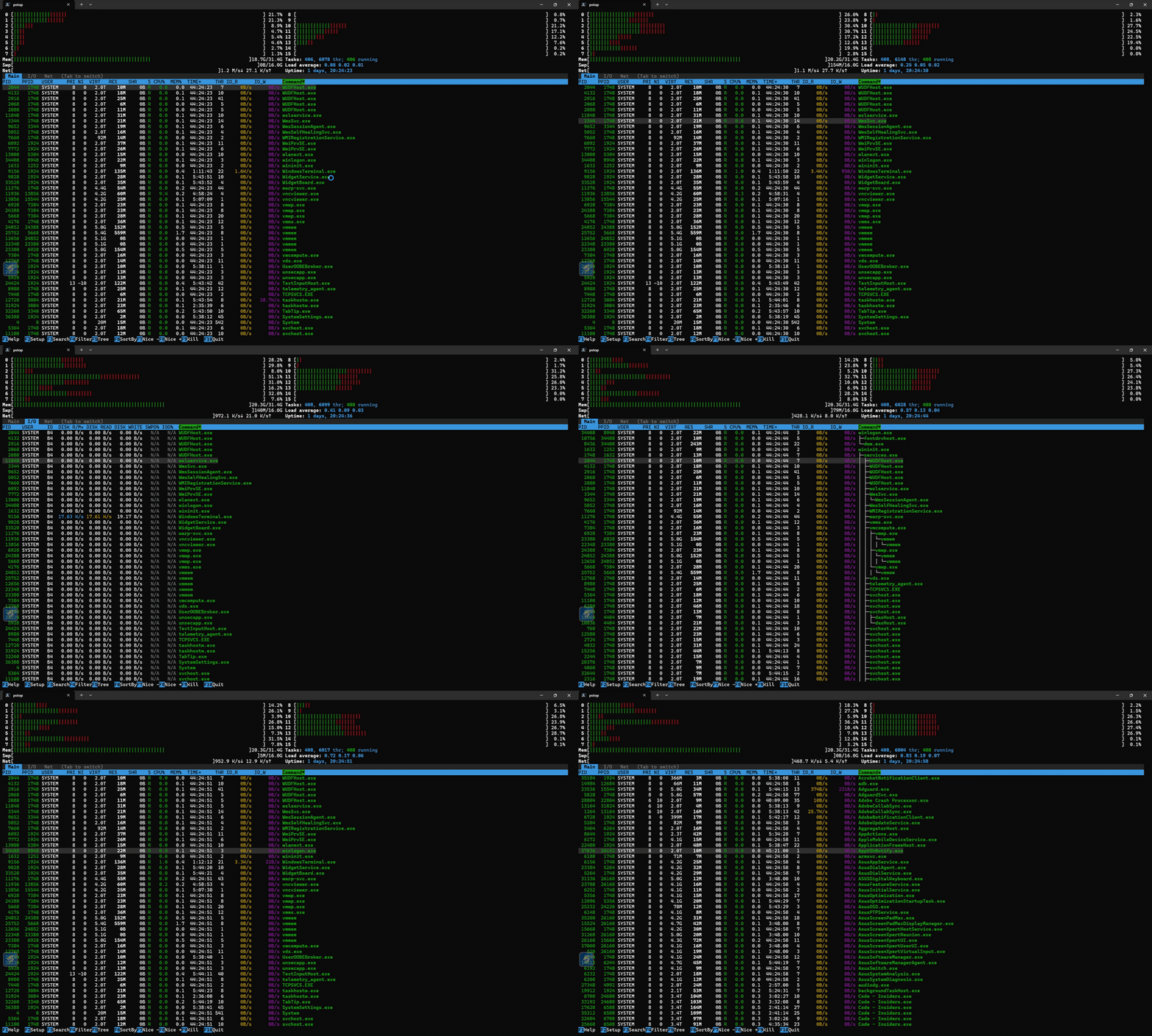 pstop htop for Windows — real-time system monitor with per-core CPU bars, tree view, 7 color schemes cargo install pstop
|
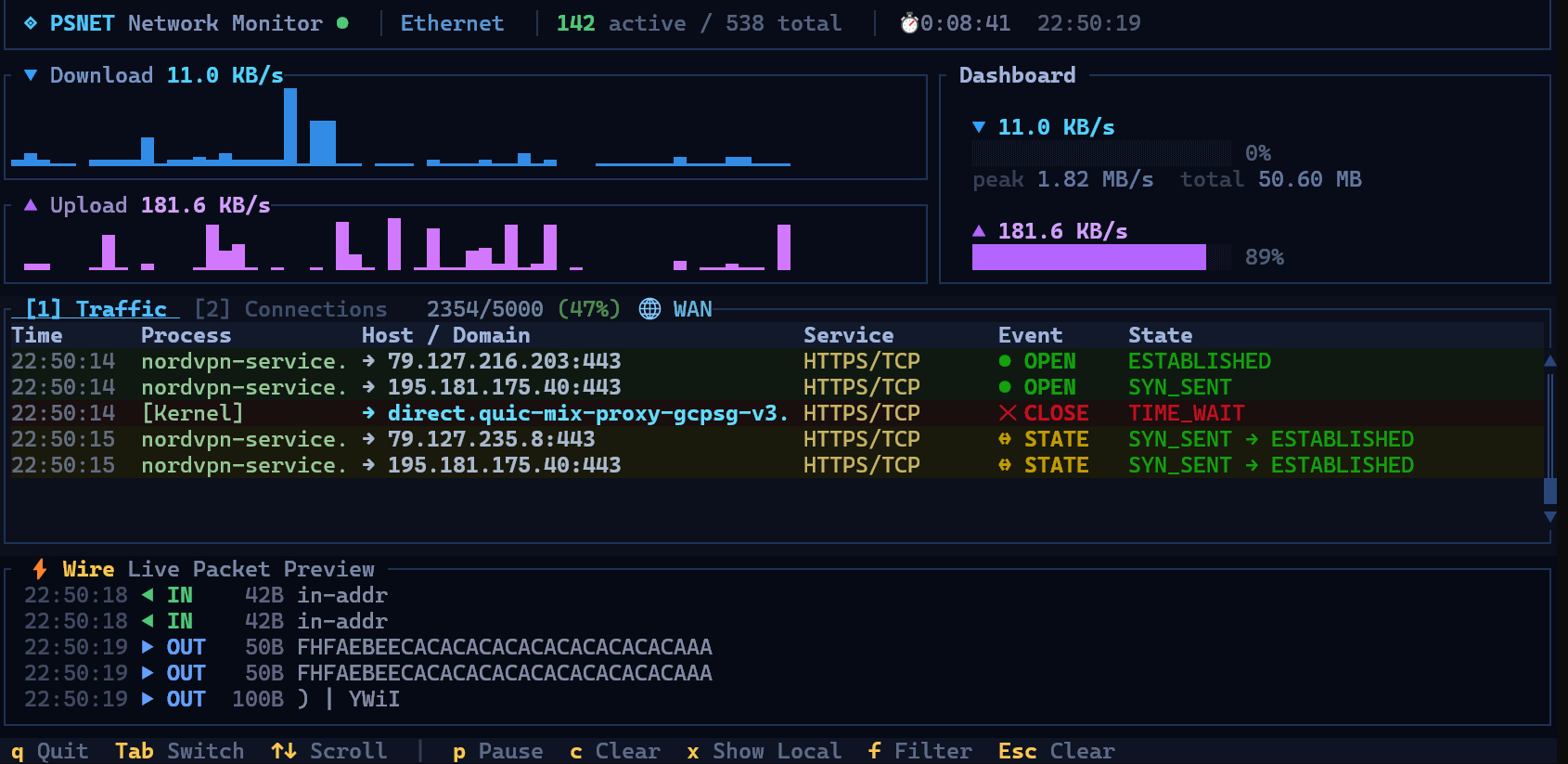 psnet Real-time TUI network monitor — live speed graphs, connections, traffic log, packet sniffer cargo install psnet
|
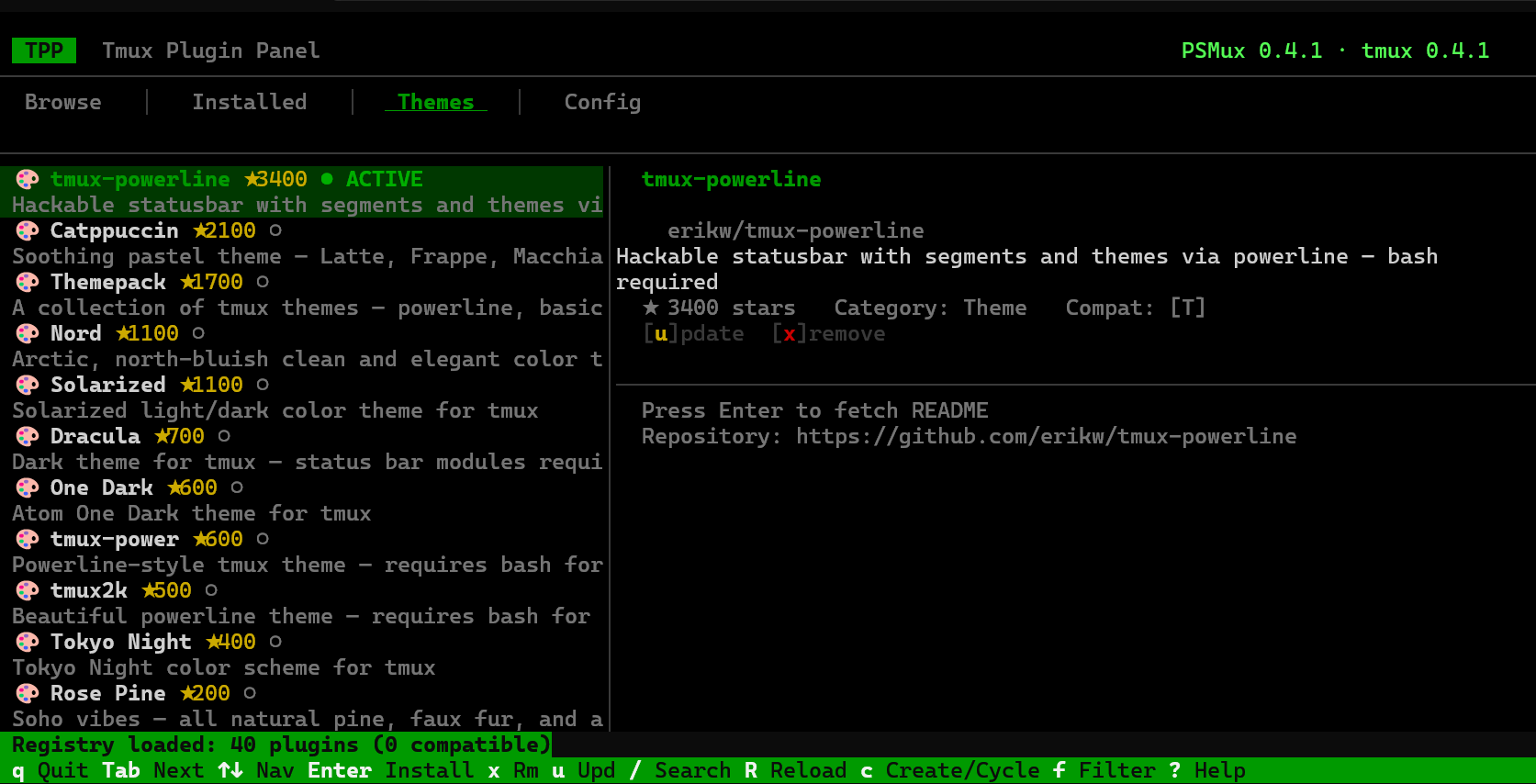 Tmux Plugin Panel TUI plugin & theme manager for tmux and psmux — browse, install, update from your terminal cargo install tmuxpanel
|
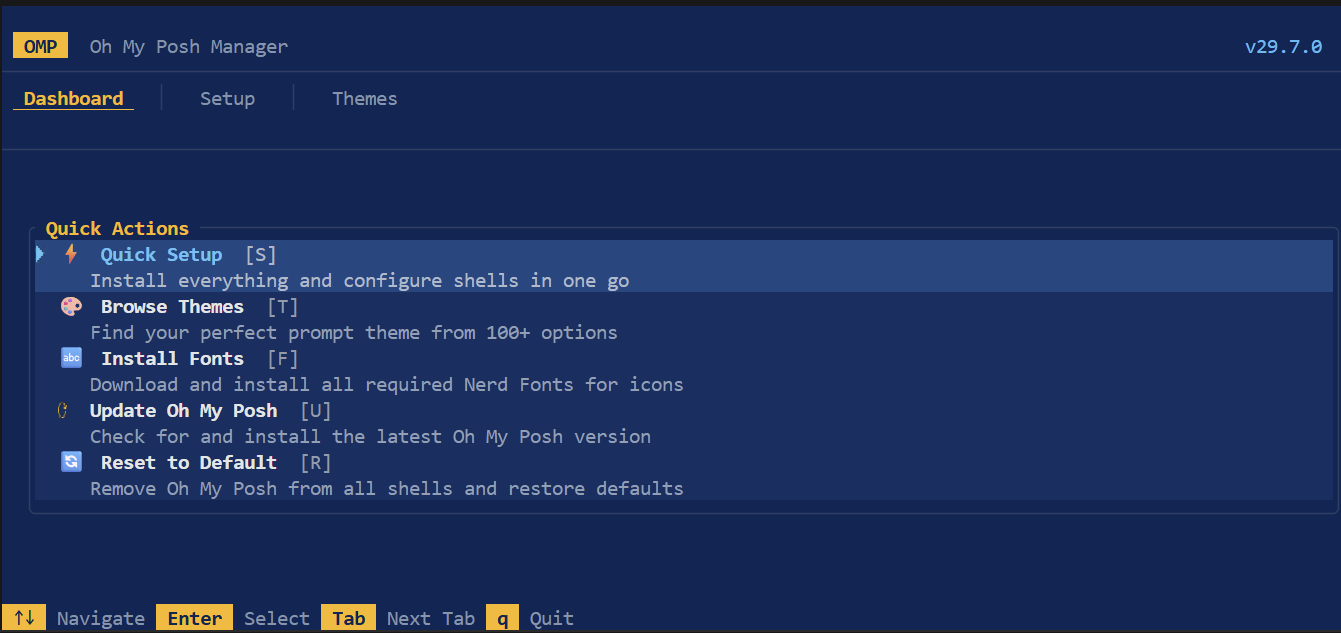 OMP Manager Oh My Posh setup wizard — browse 100+ themes, install fonts, configure shells automatically cargo install omp-manager
|
MIT
Contributions welcome — bug reports, PRs, docs, and test scripts via GitHub Issues.
If psmux helps your Windows workflow, consider giving it a ⭐ on GitHub!
Made with ❤️ for PowerShell using Rust 🦀