A modern Lua port of vivify.vim - connects Neovim to the Vivify live markdown preview tool.
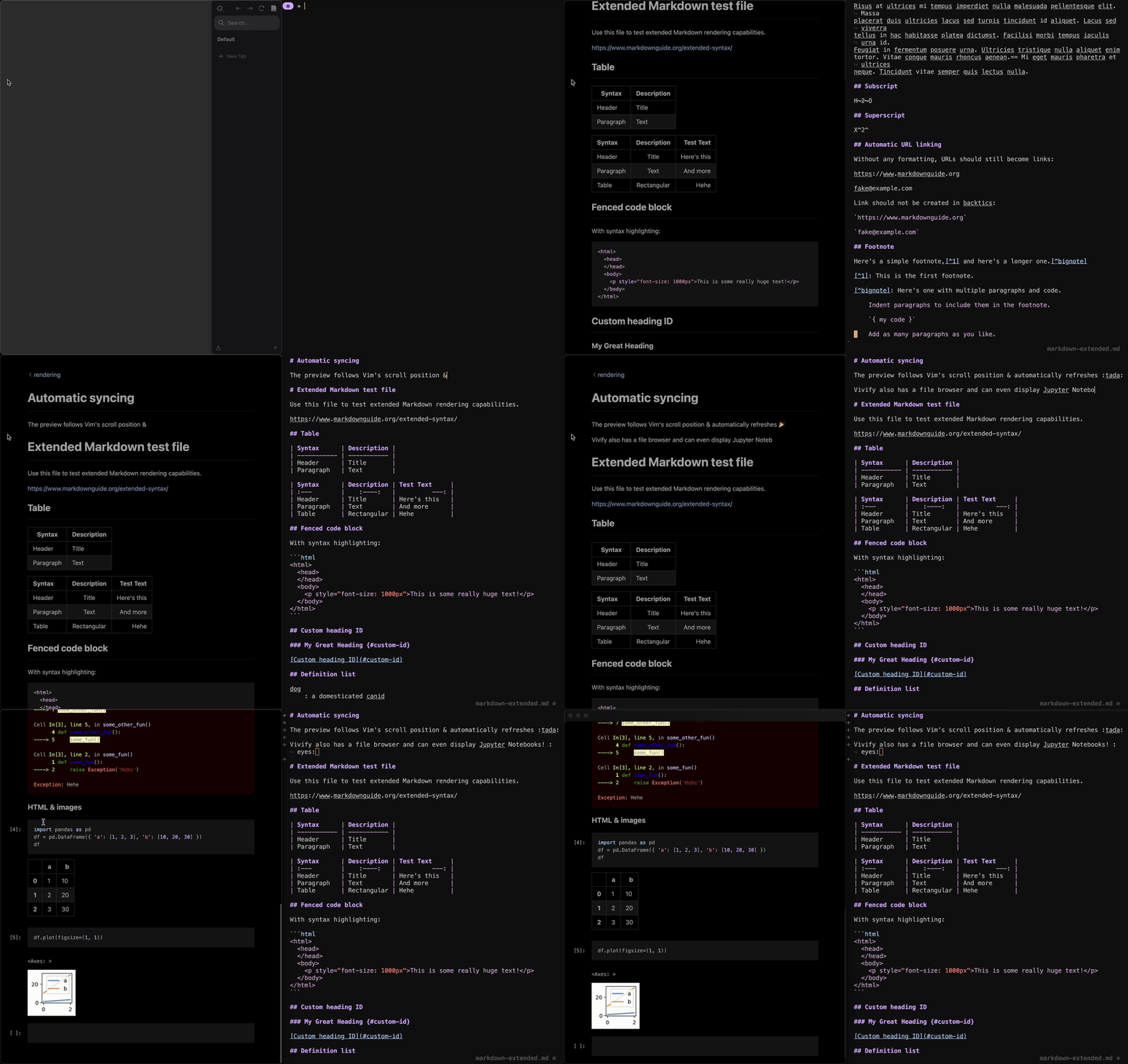
- 📄 Open the current buffer's contents in Vivify with
:Vivify - 🔄 All open viewers automatically update their content as you edit
- 📍 All open viewers automatically scroll to keep in sync with your cursor
- 🏥 Health check support (
:checkhealth vivify) - 🔧 Modern Lua API with full type annotations
- 🖥️ Cross-platform support (Windows, macOS, Linux)
- Neovim 0.9.0 or later
- plenary.nvim (for HTTP requests)
- Vivify installed with
vivcommand in PATH
{
  "pidgeon777/vivify.nvim",
  dependencies = { "nvim-lua/plenary.nvim" },
  cmd = { "Vivify", "VivifyToggle", "VivifyStatus" },
  ft = { "markdown" },
  keys = {
    { "<leader>mv", "<cmd>Vivify<cr>", ft = "markdown", desc = "Open Vivify" },
  },
  opts = {
    -- your configuration here
  },
}use {
"pidgeon777/vivify.nvim",
requires = { "nvim-lua/plenary.nvim" },
config = function()
require("vivify").setup()
end,
}Clone this repository to your Neovim packages directory:
git clone https://github.com/pidgeon777/vivify.nvim \
~/.local/share/nvim/site/pack/plugins/start/vivify.nvimrequire("vivify").setup({
-- Port for Vivify server (uses $VIV_PORT or 31622 if not set)
port = nil,
-- Custom path to viv executable (uses "viv" from PATH if not set)
viv_binary = nil,
-- Refresh content on TextChanged (true) or CursorHold (false)
instant_refresh = true,
-- Enable auto-scroll on cursor movement
auto_scroll = true,
-- Filetypes to treat as markdown
filetypes = { "markdown", "md" },
-- Enable debug logging
debug = false,
})| Option | Type | Default | Description |
|---|---|---|---|
port |
number|nil |
nil |
Port for Vivify server. Uses $VIV_PORT env var or 31622 |
viv_binary |
string|nil |
nil |
Custom path to viv executable. Defaults to "viv" from PATH |
instant_refresh |
boolean |
true |
Sync on every text change vs. on cursor hold |
auto_scroll |
boolean |
true |
Scroll viewer with cursor movement |
filetypes |
string[] |
{"markdown", "md"} |
Filetypes to treat as markdown |
debug |
boolean |
false |
Enable debug logging |
If viv is not in your PATH or you want to use a specific version, set the full path:
require("vivify").setup({
  -- Windows example
  viv_binary = "C:/Program Files/Vivify/viv.exe",

  -- Linux/macOS example
  -- viv_binary = "/usr/local/bin/viv",
  -- viv_binary = vim.fn.expand("~/.local/bin/viv"),
})| Command | Description |
|---|---|
:Vivify |
Open current buffer in Vivify viewer |
:VivifySync |
Manually sync buffer content |
:VivifyToggle |
Toggle auto-sync on/off |
:VivifyStart |
Enable auto-sync |
:VivifyStop |
Disable auto-sync |
:VivifyStatus |
Show plugin status |
Add a keybinding in your config:
vim.keymap.set("n", "<leader>mv", "<cmd>Vivify<cr>", { desc = "Open Vivify" })Or for markdown files only (using lazy.nvim):
{
  "pidgeon777/vivify.nvim",
  keys = {
    { "<leader>mv", "<cmd>Vivify<cr>", ft = "markdown", desc = "Open Vivify" },
  },
}local vivify = require("vivify")
-- Setup with options
vivify.setup(opts)
-- Open current buffer in Vivify
vivify.open()
vivify.open(bufnr) -- specific buffer
-- Sync content/cursor manually
vivify.sync_content()
vivify.sync_cursor()
-- Enable/disable/toggle auto-sync
vivify.enable()
vivify.disable()
local enabled = vivify.toggle()
-- Check status
local is_active = vivify.is_active()
local config = vivify.get_config()
-- Check dependencies
local ok, error = vivify.check_dependencies()Run :checkhealth vivify to verify your installation:
vivify.nvim
- OK Neovim version: 0.10.0
- OK vim.system() available (Neovim 0.10+)
- OK 'viv' command found in PATH
- OK 'curl' command found in PATH
- OK Configuration loaded successfully
If you're migrating from the original Vimscript plugin:
| vivify.vim | vivify.nvim |
|---|---|
g:vivify_instant_refresh |
opts.instant_refresh |
g:vivify_auto_scroll |
opts.auto_scroll |
g:vivify_filetypes |
opts.filetypes |
:Vivify |
:Vivify (same) |
Good news! The legacy g: variables are still supported for backwards compatibility.
If you have existing configuration using the old Vimscript variables, they will automatically
be respected. The priority order is: defaults < g: variables < setup() opts.
-- These legacy variables still work (but modern setup() is preferred)
vim.g.vivify_instant_refresh = 1
vim.g.vivify_auto_scroll = 1
vim.g.vivify_filetypes = { "vimwiki" }

-- Modern approach (recommended)
require("vivify").setup({
  instant_refresh = true,
  auto_scroll = true,
  filetypes = { "markdown", "md", "vimwiki" },
})Contributions are welcome! Please feel free to submit issues and pull requests.
MIT License - see LICENSE for details.
- vivify.vim - Original Vimscript plugin
- Vivify - The markdown preview tool