
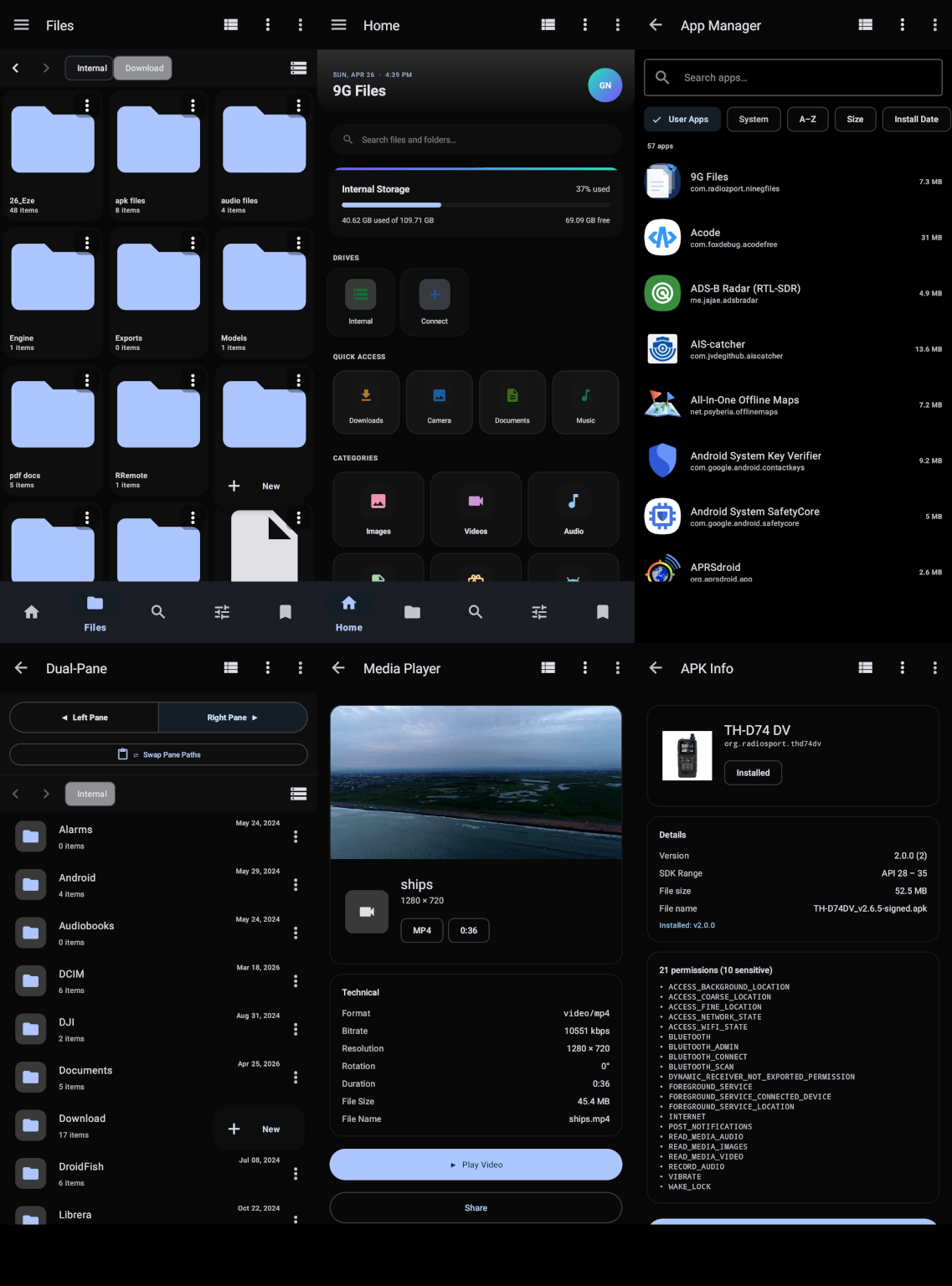




A powerful file manager that gives you complete control over everything on your phone — without the clutter, limits, or compromises of stock apps.
| 9G Files | Samsung My Files | |
|---|---|---|
| Total features | 60+ | 22 |
| Exclusive features | 38+ | 0 |
| Built-in document viewers | ✅ | ❌ |
| Built-in media player | ✅ | ❌ |
| File encryption (AES-256-GCM) | ✅ | ❌ |
| Device-to-device secure transfer | ✅ | ❌ |
| Recycle bin | ✅ | ❌ |
| FTP server (phone → PC) | ✅ | ❌ |
| Chromecast / Cast to TV | ✅ | ❌ |
| ePub reader + builder | ✅ | ❌ |
| Regex & content search | ✅ | ❌ |
| Spreadsheet viewer (xlsx/csv/ods) | ✅ | ❌ |
Full feature comparison → 9G Files vs Other popular file managers
- File Management
- Navigation
- Search
- Viewers, Players & Editors
- Security & Privacy
- Network & Cloud
- Storage Tools
- Customisation
- Detailed Comparison
- Requirements & Permissions
- Privacy
- Build Information
Everything you'd expect, and a lot you probably haven't seen in a file manager before.
- Copy, move, delete, and rename files and folders, including across SD cards and USB drives
- Select multiple files at once and act on all of them — move, share, compress, delete — in one tap
- Batch rename a whole folder of files at once: add a prefix, a number counter, or use a pattern to rename dozens of files in seconds
- Drag and drop files between the two side-by-side panels
- Long-press any file for a quick peek — see a photo thumbnail, a text excerpt, or media info without opening it
- Recycle bin catches deleted files so you can restore them any time within 30 days
- File shredder permanently wipes files with a 3-pass overwrite — nothing can be recovered afterwards
- Split large files into smaller parts for easy transfer, then reassemble them when you're ready
- Edit a file's date — change when it was last modified, useful for organising photos or documents
- Pin any folder to your home screen as a shortcut for instant access
- Two panels side by side — open two folders at once and drag files between them
- Tap any part of the path bar to jump straight to that folder
- Back and forward buttons for folder navigation, separate from your phone's system back gesture
- Each folder remembers its own sort order — sort your Music folder by name and your Downloads folder by date
- Recently visited folders appear on the home screen so your most-used locations are always one tap away
- Bookmarks let you save any path as a permanent favourite
- File tags — attach coloured labels to files for your own custom grouping and filtering
- Three view densities: compact, normal, or comfortable
- USB drives and SD cards are detected the moment you plug them in, no refresh needed
- Search inside files — not just file names, but the actual text content of documents, code files, and more
- Regex search — full pattern matching to find files by name
- Filter by file type — show only images, videos, audio, documents, archives, APKs, or code files
- Filter by size — find tiny files, large files, or anything in between
- Filter by date — narrow results to files modified or created within a specific date range
- Search history — recent searches appear as suggestions
- Category tiles on the home screen — tap Images, Videos, Audio, or Documents to instantly browse every file of that type
No need to install five separate apps. 9G Files handles all of these natively:
| File type | What you can do |
|---|---|
| Photos & images | Pinch-to-zoom, swipe between images, share, set as wallpaper, full EXIF metadata (GPS, aperture, ISO, shutter), convert JPEG/PNG/WebP |
| SVG graphics | Rendered natively — no browser hand-off |
| Videos & audio | Full built-in player with play, pause, seek, and track info |
| PDFs | Page-by-page viewer with pinch-zoom, print to any wireless printer |
| Word documents (.docx) | In-app viewer — parses OOXML and renders headings, bold, italic, underline, tables, and lists |
| Spreadsheets (.xlsx / .xls / .ods / .csv) | Native table viewer with frozen row/column headers, alternating row stripes, and adjustable text size |
| Presentations (.pptx) | Slide viewer rendered fully offline — no internet or cloud service needed |
| Rich Text (.rtf) | Full RTF parser with bold, italic, underline, colours, font sizes, headings, tables, and alignment; switch to edit mode to modify and save |
| eBooks (.epub) | Chapter-by-chapter reader; plus an ePub Builder to assemble your own ePub from text, images, and other chapters |
| Text & code files | Monospace editor with syntax highlighting for Kotlin, Java, Python, JavaScript, JSON, XML, and Markdown; find & replace, Go to Line, adjustable font size, word wrap toggle |
| HTML files | Preview local .html files in a full web view |
| MP3 files | Read and write title, artist, album, year, track, genre, and album art tags directly |
| APK files | See the app name, package ID, version, permissions, and icon — without installing |
| ZIP / TAR / GZ | Browse inside archives without extracting, or extract in place |
┌─────────────────────────────────────────────────────────┐
│                  9G Files Encryption                     │
├──────────────────────────┬──────────────────────────────┤
│   Password encryption    │   Device-key encryption      │
│   (.9genc, format 9GEF)  │   (.9genc, format 9GEK)      │
│                          │                              │
│  PBKDF2-HMAC-SHA256      │  RSA-2048 OAEP/SHA-256       │
│  120,000 iterations      │  wraps an AES-256-GCM        │
│  AES-256-GCM payload     │  session key                 │
│  16-byte salt + 12b IV   │                              │
│  96-bit GCM auth tag     │  Encrypt on one device,      │
│                          │  only readable on another    │
└──────────────────────────┴──────────────────────────────┘
- Encrypt any file with AES-256-GCM — the same standard used by banks. Set a password and the file is unreadable to anyone without it
- Device-to-device encryption — use the Publisher Tool to encrypt files with the recipient's RSA-2048 public key; only their specific device can decrypt them. No shared passwords, no key exchange risk
- Secure Vault — a biometric-locked hidden folder; files moved into the vault are invisible to every other app
- App lock — require fingerprint or PIN before 9G Files even opens
- Password-protected ZIP archives — AES-256 encrypted archives
- Checksum verifier — confirm a downloaded file hasn't been corrupted or tampered with: MD5, SHA-1, or SHA-256
- File shredder — 3-pass overwrite that makes deleted files forensically unrecoverable
- File permissions viewer — see read/write/execute permissions in
rwxr-xr-xformat
           Your Phone
               │
       ┌───────┼───────────────────┐
       │       │                   │
  Wi-Fi     FTP Server          Wi-Fi Direct
  Direct    (phone→PC)          (device→device)
       │                           │
  ┌────▼────┐                 Other Android
  │ NAS/SMB │                    device
  │ FTP/SFTP│
  │ WebDAV  │          Cloud Storage
  │ Google  │       (Drive, OneDrive,
  │ Drive   │        Dropbox, Box)
  └─────────┘
                   Chromecast / Smart TV
                   (stream video & audio)
- SMB/Samba — connect to your home NAS or Windows shares
- FTP and SFTP client — transfer files to and from any remote server
- WebDAV client — works with Nextcloud and similar
- Google Drive, OneDrive, Dropbox, and Box — browse cloud storage directly (uses Android's built-in Storage Access Framework — no extra logins)
- FTP server — turn your phone into a file server; a QR code is generated automatically for the address
- Wi-Fi Direct — transfer files directly between two Android devices, no router or internet needed
- Cast to TV — stream video or audio to a Chromecast or compatible smart TV
- Storage treemap — a visual colour-coded map of what's using your space; tap to drill down
- Duplicate finder — scans and groups identical files so you can review and delete them
- Large files finder — lists everything sorted by size
- Empty folder cleaner — removes leftover empty folders
- App manager — see every installed app, back up its APK, jump to its settings, or uninstall
- Storage breakdown — category-by-category view of internal and external storage usage
- Print — send any image or PDF to a wireless printer
- QR code sharing — generate a QR code for your FTP server address or any file path
- Light, Dark, and AMOLED themes — true black for OLED screens saves battery
- Custom accent colour — choose any colour and it applies across the whole app
- Material You dynamic colour support on Android 12+
Samsung My Files covers the basics reliably but is kept deliberately simple — it hands most tasks off to other Samsung apps. 9G Files is built to replace your entire collection of file-related apps.
| Feature | 9G Files | Samsung |
|---|---|---|
| Copy / Move / Delete / Rename | ✅ | ✅ |
| Compress & Extract (ZIP / TAR / GZ) | ✅ | ✅ ZIP only |
| Password-protected ZIP | ✅ | ✅ |
| Multi-select batch operations | ✅ | ✅ |
| Batch rename with patterns | ✅ | ❌ |
| Recycle bin with restore | ✅ | ❌ |
| File shredder (3-pass) | ✅ | ❌ |
| File split & combine | ✅ | ❌ |
| File timestamp editor | ✅ | ❌ |
| Quick peek (long-press preview) | ✅ | ❌ |
| Feature | 9G Files | Samsung |
|---|---|---|
| Grid & list view | ✅ | ✅ |
| Sort options | ✅ | ✅ |
| Favourites / Bookmarks | ✅ | ✅ |
| Dual-pane split view | ✅ | ❌ |
| Tappable breadcrumb path bar | ✅ | ❌ |
| Navigation history (back/forward) | ✅ | ❌ |
| Per-folder sort memory | ✅ | ❌ |
| Recent folders on home screen | ✅ | ❌ |
| List density setting | ✅ | ❌ |
| OTG / SD card hotplug detection | ✅ | ✅ |
| Feature | 9G Files | Samsung |
|---|---|---|
| Filename search | ✅ | ✅ |
| Search filters (size, type, date) | ✅ | Type only |
| Full-text / content search | ✅ | ❌ |
| Regex filename matching | ✅ | ❌ |
| Search history suggestions | ✅ | ❌ |
| Category browsing | ✅ | ✅ |
| Feature | 9G Files | Samsung |
|---|---|---|
| Image viewer (zoom, swipe) | ✅ | ✅ via Gallery |
| SVG viewer | ✅ | ❌ |
| Built-in media player | ✅ | Via Samsung apps |
| PDF viewer with zoom + print | ✅ | ✅ via system viewer |
| Word (.docx) viewer | ✅ | ❌ |
| Spreadsheet viewer (.xlsx/.xls/.ods/.csv) | ✅ | ❌ |
| Presentation (.pptx) viewer | ✅ | ❌ |
| RTF viewer + editor | ✅ | ❌ |
| Text editor + syntax highlighting | ✅ | Plain text only |
| Find & replace in editor | ✅ | ❌ |
| Image format converter | ✅ | ❌ |
| EXIF metadata viewer | ✅ | ❌ |
| MP3 / ID3 tag editor | ✅ | ❌ |
| ePub reader | ✅ | ❌ |
| ePub builder | ✅ | ❌ |
| Markdown preview | ✅ | ❌ |
| HTML file preview | ✅ | ❌ |
| APK inspector | ✅ | ❌ |
| Feature | 9G Files | Samsung |
|---|---|---|
| File encryption (AES-256-GCM + PBKDF2) | ✅ | ❌ |
| Device-key encryption (RSA-2048 + AES-256-GCM) | ✅ | ❌ |
| Publisher Tool (send encrypted to specific device) | ✅ | ❌ |
| App lock (biometric / PIN) | ✅ | ✅ via Knox |
| Secure Vault (hidden folder) | ✅ | ✅ Secure Folder |
| Checksum verifier (MD5 / SHA-256) | ✅ | ❌ |
| File shredder | ✅ | ❌ |
| File permissions viewer | ✅ | ❌ |
| Feature | 9G Files | Samsung |
|---|---|---|
| SMB / Samba (NAS, Windows shares) | ✅ | ✅ |
| FTP client | ✅ | ✅ |
| SFTP client | ✅ | ✅ |
| Cloud storage (Drive, Dropbox…) | ✅ | ✅ |
| FTP server (phone → PC) | ✅ | ❌ |
| Wi-Fi Direct | ✅ | ❌ |
| Chromecast / Cast to TV | ✅ | ❌ |
| Feature | 9G Files | Samsung |
|---|---|---|
| Storage analyser (visual treemap) | ✅ | List view only |
| Duplicate file finder | ✅ | ✅ |
| Large files finder | ✅ | ✅ |
| Empty folders cleaner | ✅ | ❌ |
| App manager | ✅ | ❌ |
| QR code share | ✅ | Albums only |
| Print support (images & PDF) | ✅ | ❌ |
| Custom accent colour + theming | ✅ | ❌ |
| File tags with colour labels | ✅ | ❌ |
| Pin folder as home screen shortcut | ✅ | ❌ |
┌─────────────────────────────────────────┐
│           System Requirements           │
├─────────────────────────────────────────┤
│  Minimum   Android 10 (Q, API 29)    │
│  Target    Android 15 (API 35)          │
│  Form      Phone and tablet             │
│  Storage   SD card + USB OTG supported  │
└─────────────────────────────────────────┘
Works on any Android phone from 2019 onwards (Android 10 / Q or newer).
First launch — storage permission: When you open the app for the first time it will ask for storage access. On Android 11+ this opens a system settings page — tap "Allow" to grant access to all your files. Without it, the app can only see its own folder.
9G Files works entirely on your device. It does not:
- ❌ Send your files or file names anywhere
- ❌ Connect to any external server (only servers you configure, such as your own FTP or NAS)
- ❌ Collect analytics or usage data
- ❌ Display advertisements
9G Files by RadioZport
Copyright © R.N.K 9G5AR RadioZport
Version 1.28
Released under the MIT License
🛠 Developer / Build Information
Android Studio Meerkat (2024.3.x) or newer
JDK 17
compileSdk  35  (Android 15)
targetSdk   35
minSdk      29  (Android 10 Q)
File → Open → 9GFiles/in Android Studio- Let Gradle sync — all dependencies resolve from Maven Central, Google Maven, and JitPack
- Run on a physical device for full storage access testing (emulators have limited file system access)
| Permission | When required |
|---|---|
MANAGE_EXTERNAL_STORAGE |
Android 11+ — all-files access via Settings intent |
READ_EXTERNAL_STORAGE + WRITE_EXTERNAL_STORAGE |
Android 10 |
READ_MEDIA_IMAGES/VIDEO/AUDIO |
Android 13+ granular media permissions |
USE_BIOMETRIC + USE_FINGERPRINT |
App lock & Secure Vault |
ACCESS_FINE_LOCATION + NEARBY_WIFI_DEVICES |
Wi-Fi Direct peer discovery |
FOREGROUND_SERVICE + POST_NOTIFICATIONS |
File operations (copy/move/zip) run as foreground service |
QUERY_ALL_PACKAGES |
App Manager — list all installed apps |
REQUEST_INSTALL_PACKAGES |
Install APK from App Manager |
INTERNET + network state |
FTP/SFTP/SMB/WebDAV clients & server; Cast |
┌───────────────────────────────────────────────────────┐
│                  MVVM + Repository                    │
│           Single-Activity Navigation Component        │
├──────────────┬────────────────┬───────────────────────┤
│   UI Layer   │  Domain Layer  │     Data Layer        │
│              │                │                       │
│  Fragments   │  ViewModels    │  FileRepository       │
│  Adapters    │  StateFlow     │  Room DB              │
│  Dialogs     │  repeatOn      │  (bookmarks,          │
│              │  Lifecycle     │   recents, tags)      │
│              │                │  DataStore            │
│              │                │  (preferences)        │
└──────────────┴────────────────┴───────────────────────┘
         Heavy file I/O → FileOperationService
         (foreground Service, survives backgrounding)
All UI state is exposed as StateFlow from ViewModels and collected with repeatOnLifecycle. Heavy file operations (copy, move, zip, delete) run in a foreground Service to avoid ANR and survive the app being backgrounded.
| Library | Version | Purpose |
|---|---|---|
| Material Components | 1.11.0 | Material Design 3 |
| Navigation Component | 2.7.6 | Single-activity navigation |
| Room | 2.7.0 | Bookmarks, recents, tags |
| DataStore | 1.0.0 | User preferences |
| Glide | 4.16.0 | Image & video thumbnails |
| Markwon | 4.6.2 | Markdown rendering (core, tables, strikethrough, tasklist) |
| androidsvg | 1.4 | SVG rendering |
| TableView | 0.8.9.4 | Spreadsheet viewer grid (frozen headers) |
| DocViewer | 3.0.8 | PPTX / Office presentation viewer |
| Apache Commons Compress | 1.25.0 | ZIP / TAR / GZ |
| zip4j | 2.11.5 | AES-256 encrypted ZIP |
| Play Services Cast | 21.5.0 | Chromecast support |
| mp3agic | 0.9.1 | ID3 tag read/write |
| ZXing | 3.5.2 | QR code generation |
| jcifs-ng | 2.1.10 | SMB / Samba client |
| jsch | 0.2.17 | SFTP client |
| commons-net | 3.10.0 | FTP client |
| Biometric | 1.2.0-alpha05 | Biometric authentication |
| Security Crypto | 1.1.0-alpha06 | Encrypted SharedPreferences |
| ExifInterface | 1.3.7 | EXIF metadata read/write |
| SlidingPaneLayout | 1.2.0 | Dual-pane layout |
| Palette KTX | 1.0.0 | Dynamic colour extraction |
| Coroutines | 1.7.3 | Async I/O throughout |
| WorkManager | 2.9.0 | Background scheduling |
| Core Splashscreen | 1.0.1 | Android 12 splash screen API |
Password-based (format 9GEF)
[4B magic "9GEF"] [1B version=1] [16B salt] [12B IV]
[encrypted payload + 16B GCM authentication tag]

Key derivation: PBKDF2-HMAC-SHA256, 120 000 iterations, 256-bit key
Cipher:         AES-256-GCM, 96-bit nonce, 128-bit tag
Device-key (format 9GEK)
RSA-2048/OAEP/SHA-256 wraps a per-file AES-256-GCM session key.
Only the target device's private key (stored in Android Keystore)
can unwrap the session key and decrypt the payload.