Repository navigation
Global Settings
📖 Canonical version: read this page on the official docs site — https://www.redamon.org/docs/global-settings. The GitHub wiki is a mirror.
Global Settings is the personal configuration page for the current user. Settings configured here apply across all projects. It is accessible from the gear icon in the top navigation bar (far right).

The page is divided into eight sections: LLM Providers, Agent Skills, Chat Skills, Tradecraft, API Keys & Tunneling, MCP Tool Plugins, MCP Server, and System.

Configure the AI model providers that power the agent. All providers added here become available in the model selector of every project's settings.
Each provider card shows its icon, name, type, and — for OpenAI-Compatible entries — the model identifier. You can edit, delete, or test each provider from its card.
Click Add Provider to register a new provider. Choose the type (OpenAI, Anthropic, Google Gemini, DeepSeek, GLM, Kimi, Qwen, xAI, Mistral, OpenRouter, AWS Bedrock, or OpenAI-Compatible), enter your credentials, and test the connection before saving. Each form includes a "Get API key →" link to the provider's official console.
For full details on supported providers, model discovery, and setup guides, see AI Model Providers.
Below the providers list, the TypeSafe AI (Jev) section holds one token for TypeSafe Jev, a decision model that four recon AI hooks (FFuf extensions, Nuclei tags, WAF classification, takeover disambiguation) can use instead of the LLM, and that five Jev-only recon hooks run on (page-type labels, FFuf base-path ranking, Hakrawler seed order, tool health, serialized-object ranking). It is not a chat provider: it never appears in a model picker and does not count as a provider for any gate. Add token opens the key input with the model pinned to jev-1.13.0; one token per account.

Below the TypeSafe AI (Jev) section, Models by feature chooses the model for each AI feature other than the agent itself. Each feature runs on its own model, chosen once for your account and used in all your projects. A feature never borrows the project's agent model, another feature's model or a hidden default.

The section shows one tile per feature, four to a row (two on a narrow window, one on a phone). Each tile has the feature's description, a model picker listing your providers' models, a status chip, a hint on the size of model it needs, and Also in:, the other places that change the same setting. A pick is saved at once; the × next to the picker clears it. While one tile saves, the others wait, so a second pick is never lost.
| Chip | Meaning |
|---|---|
| Set | The feature runs on this model |
| Not set | The feature asks for a model the first time you use it. The Tradecraft section picker, which is optional, picks pages by text match instead |
| Provider removed | The saved model is not among your providers' models any more. The feature asks for a new one the next time it runs |
With no provider yet, the section shows Add an LLM provider above to choose models for these features. If the model list cannot be loaded, each tile shows its saved model read-only, with Retry.
| Feature | What it does | Hint on the tile | Asks for a model |
|---|---|---|---|
| Triage review | Checks each finding's evidence and words the fix list | A small or mid-size model is enough. Not needed when the review budget is 0 | When you start a triage run that reviews findings |
| CodeFix | The coding agent that writes the fix and opens the pull request | Needs a strong model that supports tool calls | When you start the CodeFix agent |
| Multi mute | Finds the findings like the one you mute and groups them | A small or mid-size model is enough | When you press Multi next to a Mute button |
| Report narratives | Writes the prose sections of the pentest report | A mid-size model that writes well | When you press Generate Report |
| RoE parsing | Reads a Rules of Engagement document and fills the project settings | A strong model with a long context (documents up to 50,000 characters) | When you press Upload & Parse Document |
| Recon preset generator | Turns a plain description into a recon preset | A mid-size model. AWS Bedrock isn't supported here | When you press Generate in the Generate with AI dialog |
| Command whisperer | Turns a plain-English request into a shell command in session terminals | A small model is enough | When you send a request from a session terminal |
| Tradecraft section picker | Picks which page of a Tradecraft resource the agent reads | The smallest model is enough: it answers with one number. Not set: pages are picked by text match | Never while the agent runs. Saving a Tradecraft resource offers to pick one |
A feature with no model asks for one before it does anything. The dialog Choose a model for <feature> lists only the models that feature can use, with the tile's hint. Save and continue saves the pick to your account and carries on with what you were doing; Cancel stops it. Multi mute asks inside its own dialog, with Save and run. Nothing is filled in for you, so each feature asks once, unless you set them all here first.
With no provider yet, the dialog says You have no LLM provider yet, with Add provider (it opens this tab in a new browser tab) and Check again for when you have added one. When none of your models suits the feature, for example only AWS Bedrock models for the Recon preset generator, it says None of your models can run <feature>.
Each feature also shows its model where it is used, with a link that opens the same picker:
| Where | What it shows |
|---|---|
| Project settings → Engagement Record, next to Upload & Parse Document | Model: X · Change (RoE parsing) |
| The Generate with AI dialog of the recon presets | Model: X · Change (Recon preset generator) |
| The Reports page, next to Generate Report | Narratives model: X · Change |
| Session terminals, under the Command Whisperer input | Model: X · Change |
| The Multi mute dialog | Model: X · Change |
| Project settings → CypherFix Settings | Two pickers, Triage review model and CodeFix model, marked Applies to all your projects · also in Global Settings → LLM Providers |
With no model saved, the line reads not set and the link reads Choose.
- Triage review is needed only when a run reviews findings, that is when Priority Board: findings the AI reviews is above 0 in the project's CypherFix settings. With a budget of 0 and no model, triage still ranks every finding and writes the fix list in its standard wording, and asks for nothing. With a model set, the model reviews the findings and also words the fix list. After you switch models, the next run reviews the findings again once, because a review is reused only by the model that made it. See Which model runs it.
- CodeFix does not start without its model. There is no per-project CypherFix model any more: a value saved on a project earlier is ignored.
- Tradecraft section picker is optional and has no default: with none set, the page is picked by text match. It never falls back to the agent's model. See Section picker.
Each feature runs on the providers and keys of the person it runs for: yours for what you start, and the project owner's for Triage review and CodeFix, which run for the project. An admin acting as a user runs on that user's models and keys. A model has to name a provider that still exists: a custom/… model whose provider was deleted is never swapped for another of your custom providers; the feature asks for a new model instead.
| Message | What it means | What to do |
|---|---|---|
| Your model X could not be used | The provider refused the model or the key, or the provider is gone. Its own error text goes to the agent log, with keys redacted, and is never shown | The model picker opens: choose another model, or fix the provider above |
| Couldn't load your LLM providers, try again | The agent could not read your provider list | Try again |
| The agent service isn't running | The webapp could not reach the agent | Start the stack (./redamon.sh up) |
| The model took too long, try again | The model did not answer in time | Try again, or choose a faster model |
| The agent is older than the webapp: rebuild it | The agent image was built before this feature | Rebuild the agent and the webapp together (./redamon.sh update) |
These keep their own settings:
- the agent's model (project settings → Agent Behaviour), which also answers plain-English graph queries;
- the recon AI pipeline model;
- the target guardrail;
- each Tradecraft resource's own model, used when the resource is verified;
- the models a new project starts with, and the AI Attack Surface judge.
Store API keys for external OSINT and reconnaissance services. These keys are saved per-user in the database and are used by both the AI agent's tools and the recon pipeline at runtime.
| Field | Used by | What it enables |
|---|---|---|
| Tavily API Key | AI Agent |
web_search tool — CVE research, exploit lookups, and general web queries |
| Shodan API Key | AI Agent, Recon Pipeline, Uncover |
shodan tool -- internet-wide OSINT (host info, reverse DNS, domain DNS, passive CVEs) |
| SerpAPI Key | AI Agent |
google_dork tool — Google dorking OSINT (site:, inurl:, filetype:). Free tier: 250 searches/month |
| PDCP API Key | AI Agent |
cve_intel tool — ProjectDiscovery vulnx CVE database (NVD + CISA KEV + EPSS + PoCs + Nuclei templates). Optional: works anonymously at 10 req/min; key lifts the rate limit. Free signup at cloud.projectdiscovery.io. The key is never written to docker-compose.yml, env vars, or build args — it lives only in your user settings and is silently injected per call. |
| NVD API Key | Recon Pipeline | NIST NVD API key — increases CVE lookup rate limit from 5 to 120 requests/30s |
| Vulners API Key | Recon Pipeline | Vulners CVE database — alternative to NVD for vulnerability lookups with richer exploit data |
| URLScan API Key | Recon Pipeline | URLScan.io OSINT enrichment — higher rate limits and access to private scans |
| GitHub Secret Hunt Token | GitHub Secret Hunt, Tradecraft Lookup | Personal Access Token (ghp_...) for the GitHub Secret Hunt module, which searches public GitHub for secrets mentioning your target, and for Tradecraft Lookup fetching a resource from GitHub. A read-only token is enough. Rendered in the GitHub & Supply Chain drawer. |
| Supply Chain GitHub Token | Supply Chain | A SEPARATE ghp_... token, used only when Supply-Chain Scanning audits a private github.com repository (public repos clone anonymously). Kept apart from the Secret Hunt token so the two can be scoped differently and either can be revoked without stopping the other. Requires repo scope, and read:org for organization scanning; a fine-grained token scoped to the repositories you are allowed to scan is safer. |
| Censys API Token | Recon Pipeline, Uncover | Censys Platform personal access token -- IP host data, open ports, TLS certs, ASN via Platform API v3. Free tier available at search.censys.io |
| Censys Organization ID | Recon Pipeline, Uncover | Paired with Censys API Token. Found on your Censys account page |
| FOFA API Key | Recon Pipeline, Uncover | FOFA internet asset search enrichment -- IP:port pairs, HTTP titles, server headers, geolocation. Supports legacy (email:key) and modern (key-only) auth formats. Supports key rotation |
| OTX API Key | Recon Pipeline | AlienVault Open Threat Exchange — threat reputation, malware families, passive DNS, MITRE ATT&CK. Optional: OTX enrichment is enabled by default and works anonymously (1,000 req/hr). Adding a key raises the limit to 10,000 req/hr. Supports key rotation |
| Netlas API Key | Recon Pipeline, Uncover | Netlas internet intelligence -- ports, HTTP response data, geolocation, TLS certs, DNS records, WHOIS. Supports key rotation |
| VirusTotal API Key | Recon Pipeline | VirusTotal reputation for domains and IPs — AV verdicts, reputation score, categories, JARM fingerprint. Free tier: 4 requests/minute (configurable). Supports key rotation |
| ZoomEye API Key | Recon Pipeline, Uncover | ZoomEye host search -- ports, service banners, device/OS fingerprints, geolocation, ASN, SSL info. Supports key rotation |
| CriminalIP API Key | Recon Pipeline, Uncover | Criminal IP threat intelligence -- risk score, threat tags (VPN/Tor/proxy/C2/scanner), geolocation, abuse history. Supports key rotation |
The Secret Multiscanner has its own key group, one key per source, rendered under the heading Secret Multiscanner on this page. They are deliberately separate from the github.com tokens above. A source whose key is mandatory cannot start until it is set, and the scan card names the missing one. Keys are stored per user and are never included in a project export.
| Field | Source | Mandatory? |
|---|---|---|
| Secret Multiscanner GitHub Token | github, github deleted commits | Always. Unauthenticated GitHub allows only 60 requests/hour, which the scan exhausts immediately |
| Secret Multiscanner GitLab Token | gitlab | Always |
| Secret Multiscanner Postman Token | postman | Always |
| Secret Multiscanner CircleCI Token | circleci | Always. The token defines the scan scope |
| Secret Multiscanner Travis CI Token | travisci | Always. The token defines the scan scope |
| Secret Multiscanner Docker Token | docker | Only for a namespace scan or private images. Docker Hub allows 10 anonymous pulls/hour per IP |
| Secret Multiscanner AWS Access Key ID / AWS Secret Key | s3 | Unless "Use cloud environment IAM" is on |
| Secret Multiscanner AWS Session Token | s3 | Optional, STS credentials only |
| Secret Multiscanner GCP Service Account (JSON) | gcs | Unless "Without auth" or cloud-environment ADC is on |
| Secret Multiscanner Hugging Face Token | huggingface | Optional. Needed for private or gated assets |
| Secret Multiscanner Jenkins Username / Password | jenkins | Optional. An exposed instance scans without them |
| Secret Multiscanner Elasticsearch Username / Password / API Key / Service Token | elasticsearch | Optional. If secured, set exactly one of the three styles |
| Secret Multiscanner Git Username / Git Token | git | Optional. Only for a private repository over HTTPS, or an ssh:// target |
These keys can also be set inline from each source card in project settings, without leaving the form.
These keys are used exclusively by the Uncover target expansion module (GROUP 2b). They are optional -- uncover also reuses any Shodan, Censys, FOFA, ZoomEye, Netlas, or CriminalIP key configured above.
| Field | Used by | What it enables |
|---|---|---|
| Quake API Key | Uncover | 360 Quake cyberspace search -- asset discovery by service, certificate, and banner. Supports key rotation |
| Hunter API Key | Uncover | Qianxin Hunter cyberspace search -- Chinese threat intelligence platform. Supports key rotation |
| PublicWWW API Key | Uncover | Source code search engine -- find websites using specific technologies, scripts, or snippets. Supports key rotation |
| HunterHow API Key | Uncover | hunter.how internet search -- asset discovery and reconnaissance. Supports key rotation |
| Google Custom Search API Key | Uncover | Google Custom Search JSON API (different from SerpAPI) |
| Google Custom Search CX | Uncover | Programmable Search Engine ID -- paired with Google API Key above |
| Onyphe API Key | Uncover | Cyber defense search engine for exposed assets, threat detection, and attack surface management. Supports key rotation |
| Driftnet API Key | Uncover | Fast internet-wide port and service discovery. Supports key rotation |
Each field is a secret input with an eye icon to toggle visibility. Signup links are provided next to each field to help you obtain a key. After entering or updating a key, click Save Settings to persist the change.
Note: All API keys are stored exclusively in the database via this page (user-scoped). They are not read from environment variables or project settings.
Each API key field has a Key Rotation button on the right side. This lets you configure multiple keys per tool for automatic round-robin rotation to avoid rate limits.
Click the button to open the rotation modal:
- Extra API Keys — paste additional keys, one per line. These keys plus the main key form the rotation pool. All keys are treated equally.
- Rotate Every N Calls — after this many API calls, the system switches to the next key in the pool (default: 10).
Once configured, a badge below the field shows the total key count and rotation interval (e.g., "3 keys total, rotate every 10 calls").
Tip: Key rotation is especially useful for NVD (rate-limited to 5 requests/30s without a key), Shodan (paid plans have per-key quotas), the 7 OSINT threat intelligence tools (Censys, FOFA, OTX, Netlas, VirusTotal, ZoomEye, CriminalIP), and the Uncover-specific engines (Quake, Hunter, PublicWWW, HunterHow, Onyphe, Driftnet). With multiple keys, you can multiply your effective rate limit and avoid scan interruptions from per-key quotas.
Check API usage (in the API Keys header, and on the LLM Providers tab) checks every saved credential in one click: the API keys, every rotation key on its own, the GitHub tokens, the Secret Multiscanner credentials and your LLM providers. Empty fields are skipped. For each key the report says what the provider told us: plan, used, limit, remaining and the next reset.
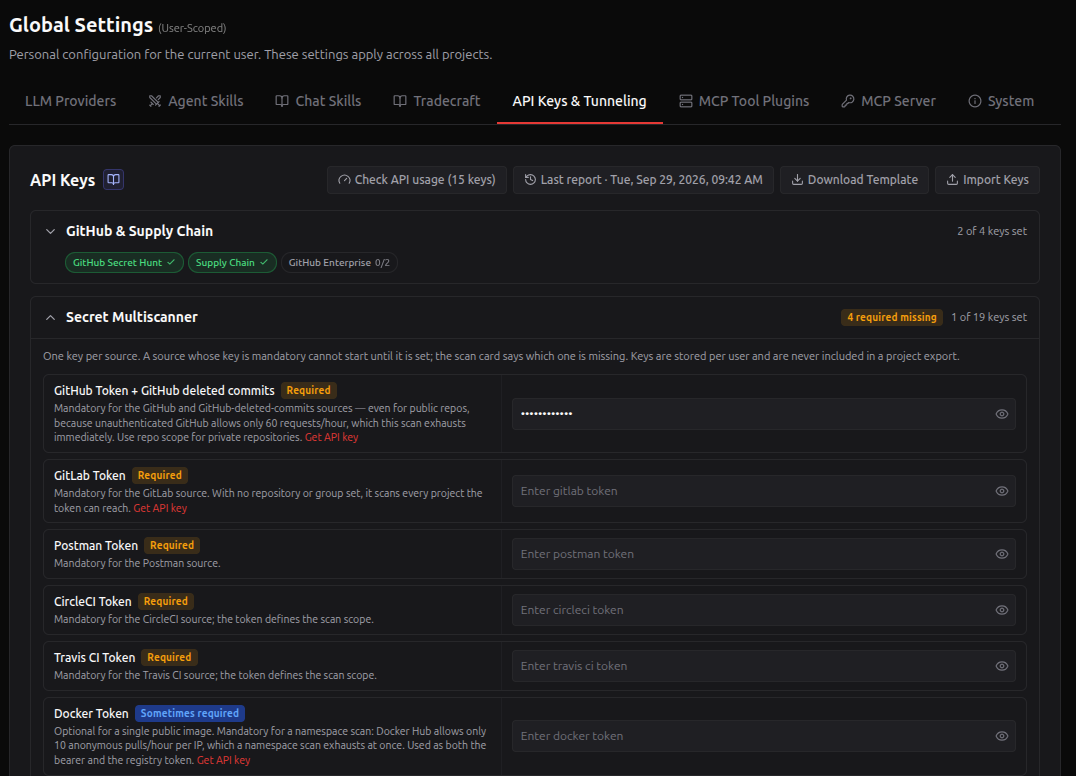
The button says how many keys a check would cover, rotation keys included (Check API usage (15 keys)). Once a report exists, Last report · <date> appears next to it. While a check runs the button reads Checking… since <time>; closing the report window does not stop the check, and the page picks up the result when it lands.
It calls only account and usage endpoints and never runs a search. The keys never reach your browser: the webapp makes the calls and returns numbers, plan names and the last 4 characters of each key.
The report groups the keys into:
| Section | Meaning |
|---|---|
| Errors | The check failed: key rejected, quota used up, rate limited, provider down, or an answer the parser did not recognise. Each row says what to do next. |
| Usage reported | The provider reported its numbers. A bar per quota, marked Low under 10% left and Exhausted at zero. |
| Valid, no usage API | The key works, but the provider exposes no quota to a normal key. |
| Not checked | No call was made, and the row says why: checking would spend credits, the key needs a paid plan to check, a companion value is missing, or there is no account API. |
The counters at the top of the report (errors, usage, valid, not checked) jump to their section.
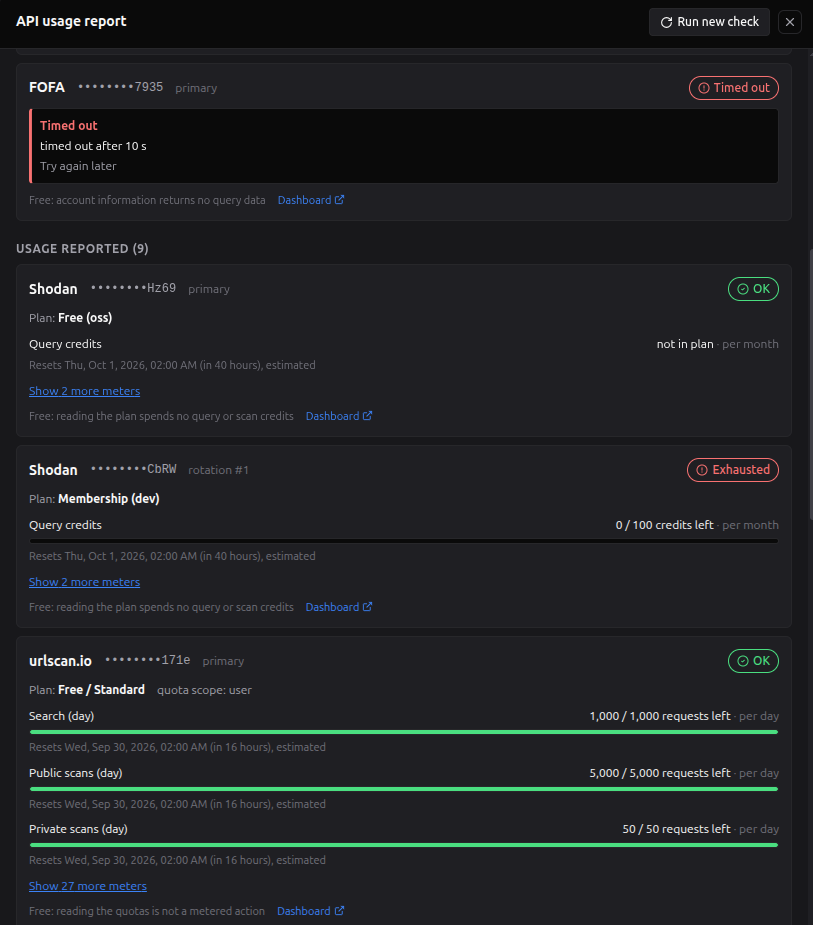
Each row is one key:
- Header: the service, the key's last 4 characters, which key it is (primary, or rotation #1, #2, ... for the Key Rotation list) and a status badge: OK, Low, Exhausted or Valid, the error in words, or why it was not checked.
- Plan: the plan or account type the provider reported.
- Meters: what is left out of the limit and its window (per hour, day, month, or a balance), with a bar, and when it resets. estimated means the reset date was computed from the provider's documented rule (for example the 1st of the month) because the answer did not include it. not in plan means the plan includes none of that quota: it never counts as exhausted. unlimited and not reported say what the provider did not give a number for.
- Show N more meters: secondary meters, such as short per-minute windows or quotas of other products on the same account. They never change the badge.
- Footer: what the check itself cost (almost always nothing) and a link to the provider's dashboard.
Error rows add the provider's own message (with the key and any email address removed), the HTTP status or provider code when there is one, and what to do next.
In the screenshot:
- FOFA did not answer within 10 s. The key may be fine: the row says to try again later.
- Shodan appears twice because a rotation key is configured. The primary key is on the free oss plan, which has no query credits (not in plan, so still OK). rotation #1 is a different account whose 100 monthly query credits are used up, so it is Exhausted. Rotation keys usually belong to separate accounts, each with its own quota, so each gets its own row: a healthy primary says nothing about the others.
- urlscan.io reports its daily quotas; the search, public scan and private scan limits are shown, and 27 more product quotas sit behind Show 27 more meters.
A few rules worth knowing:
- Top-ups. When a plan quota is used up but a top-up still pays for calls (SerpAPI extra credits, Tavily pay-as-you-go, ZoomEye-Points, ViewDNS prepaid queries), the row is Low, not Exhausted, and a note says the calls now spend the top-up.
- Censys Organization ID. A Starter or Enterprise token without its Organization ID, or with a wrong one, is reported as Not allowed for this key or plan: the token itself works, the Organization ID is what to fix.
- Secret Multiscanner GitHub token. It is checked against github.com. A token you use with a GitHub Enterprise endpoint set in a Multiscanner scan shows as rejected there, and the row says why.
- LLM Providers tab. Each provider card shows the last report's verdict for it, such as Balance $12.40 · 2 hours ago. After you change that provider's key, region or base URL, the card says Key changed since the last check instead.
- TypeSafe AI (Jev) spends a trace of credit. It is the one check that is not free. TypeSafe has no balance endpoint, so a key that works but has no credit looks fine until a billed call fails. The check lists models (free), then asks one tiny question, about 300 input tokens, roughly a hundredth of a cent. The row reads Valid when the account answered, Rejected for a bad key, and Quota used up when TypeSafe answers that there is no credit. The footer says what the check cost.
Saved report. The report is saved (one per user). Last report · <date> reopens it at any time. A new check replaces it after you confirm; the previous report cannot be recovered. A check runs at most once a minute. If your keys change after a report, it says so.
Running scans. If a scan or the agent is running on one of your projects, the check asks first: its calls can push the scan's Shodan, Censys, FOFA, Netlas or OTX requests into rate limits, and a rate-limited scan skips results.
Admins. An admin can read or run a user's check only while acting as that user. The report then says who ran it.
| Service | What the report shows |
|---|---|
| GitHub (all four tokens), Tavily, Shodan, SerpAPI, WPScan, urlscan.io, Censys, FOFA, VirusTotal, PublicWWW, Netlas, ZoomEye, 360 Quake, Onyphe, Driftnet, SecurityTrails, ViewDNS, Postman | Usage: plan, quotas and resets |
| Qianxin Hunter | Usage, from an undocumented endpoint (marked experimental). It often blocks servers outside mainland China |
| OpenRouter, DeepSeek, Kimi, Deepinfra (OpenAI-compatible preset) | Balance or key spending limit |
| ProjectDiscovery (PDCP), NVD, Vulners, AlienVault OTX, Criminal IP (it exposes no remaining credits), OpenAI, Anthropic, Gemini, Mistral, GLM, Qwen, xAI, Groq, Together AI, Fireworks AI, AWS Bedrock, GitLab.com, Hugging Face, AWS keys, GCP service account, CircleCI, Travis CI | Valid or not (plus the plan or identity where the provider gives it) |
| hunter.how, Google Custom Search | Not checked: every check would spend a query |
| Docker Hub | Not checked: verifying a token needs the account username |
| Jenkins, Elasticsearch, generic Git | Not checked: the host is chosen per scan |
| ngrok, chisel | Not checked: no account API |
| OpenAI-compatible providers on a custom base URL (Ollama, vLLM, LM Studio, ...) | Not checked: the report only calls the public preset hosts. Use the provider's Test button |
Small disclosed costs. A few checks use something, and the report says so on the row: NVD uses 1 of the 50 requests a key gets per rolling 30 s; ProjectDiscovery uses 1 request of its per-minute vulnx window; Postman counts 1 call toward the month's Postman API calls. For SecurityTrails, ViewDNS, Onyphe, OTX, Vulners and Qianxin Hunter the provider does not document the cost of its account endpoint (Netlas and ZoomEye do not either, but their counters were checked not to move).
Air-gapped hosts. Set API_USAGE_CHECK_ENABLED=false (or 0, no, off, in any case) in .env and restart the webapp to switch the check off (the webapp then makes no provider call). The last saved report stays readable.
Upload and manage custom attack workflow skills (.md files) that teach the agent exploitation techniques beyond the built-in CVE, brute-force, and phishing workflows.
Each skill card shows the skill name, description, and upload date, with actions to edit description, download, or delete.
- Upload Skill (.md) — select a Markdown file, enter a descriptive name and an optional short description (1-2 sentences used by the Intent Router for classification), then click Upload.
- Edit description — click the pencil icon on any skill to update its description without re-uploading the file.
- Delete — removes the skill and automatically disables it in all project configurations.
Uploaded skills appear as toggles in every project's settings, so each project can independently choose which skills to enable.
For details on writing skill files, classification, and built-in skills, see Agent Skills.
Upload and manage on-demand reference skills for the AI agent chat. Unlike Agent Skills above (which drive attack classification and phase-aware workflows), Chat Skills are tactical reference docs -- tool playbooks, vulnerability guides, framework notes -- that you inject into the agent's context on the fly using /skill <name> in the chat.
Each skill card shows the skill name, description, category badge, and upload date, with actions to edit description, download, or delete.
-
Import from Community -- bulk-imports all reference skills from the community folder (
agentic/skills/) into your library. The folder starts empty; click this to populate it with the 46 shipped skills (vulnerabilities, tooling, protocols, technologies, frameworks, Active Directory, cloud, post-exploitation). Skills with the same name are skipped. - Upload Skill (.md) -- upload a custom reference document with name, description, and category.
- Delete -- removes the skill from your library.
Skills uploaded here become available via /skill <name> in all your chat sessions.
For full details on the /skill command, writing Chat Skill files, and the complete comparison with Agent Skills, see Chat Skills.
Curate a personal catalog of trusted security knowledge URLs (HackTricks, PayloadsAllTheThings, CVE PoC repos, vendor research blogs, ...). Each enabled resource becomes a slug the agent can target through the tradecraft_lookup tool during the exploitation and post-exploitation phases.
Unlike web_search (which queries the open web through Tavily) or the FAISS Knowledge Base (which is pre-ingested at install time), Tradecraft is always live and always curated by you. The agent only sees what you explicitly trusted.
For the full lifecycle, type catalog, cache layer, and agent-session flow, see the dedicated Tradecraft Lookup page.

The screen is laid out as:
| Element | Purpose |
|---|---|
| Section header | Title "Tradecraft Resources" with the Add Resource button on the right. |
| Intro line | "Curated knowledge sites the agent consults during exploitation (HackTricks, PayloadsAllTheThings, CVE PoC repos, ...). On add, the agent fetches the homepage, builds a sitemap, and writes a short summary that becomes the tool's catalog entry. The agent only sees enabled resources." |
| Resource cards | One card per saved URL, with the icon, name, type badge, URL link, sitemap entry count, last-verified timestamp, expandable summary, and the per-card action buttons. |
| Field | Meaning |
|---|---|
| Name | Display label (e.g. "HackTricks"). Used to derive the immutable slug (hacktricks, hacktricks-2, ...) that the agent passes as resource_id. |
| Type badge | Auto-detected one of mkdocs-wiki, gitbook, github-repo, cve-poc-db, sphinx-docs, agentic-crawl. While verifying, a verifying… spinner badge replaces it. |
| URL | The base URL clicked at verify time. Click to open in a new tab. |
| Entries | Number of pages indexed in the sitemap (after deterministic build or agentic-crawl). |
| Verified | Relative timestamp (e.g. 2h ago) of the last successful verify or refresh. |
| Summary | Click the expandable text to read the 250-350 word LLM-generated description that the agent will read at runtime. |
| Error | Red error chip with a tooltip when verify failed (HTTP 404, thin homepage, GitHub rate limit, ...). The card stays usable in degraded form. |
| Enabled toggle | Disabled resources are filtered out before the agent's tool docstring is built, so the agent literally cannot call them. Re-enabling re-exposes them on the next project load. |
| Action | Effect |
|---|---|
| Refresh (circular arrow) | Re-fetches the homepage, re-detects the type, rebuilds the sitemap, and rewrites the summary. Use this after a wiki redesign or repo rename. Crawl-type resources will pay the full LLM-driven loop again. |
| Edit (pencil) | Opens the form to change name, URL, GitHub token override, cache TTL, or enabled flag. Saving a URL change re-triggers verify. |
| Delete (trash) | Drops the database row, the cached pages on disk, and the SQLite index entries for that resource. Confirmation prompt required. |
Verify is asynchronous. Adding a resource creates the row immediately so the card appears with a
verifying…chip; the actual fetch + sitemap build + summary runs in the background. The settings page polls every 5 seconds while any resource is unverified, so the badge auto-updates when verify completes.

The modal has two halves: the Quick Add catalog at the top and the resource form below.
A scrollable list of hand-picked, well-maintained, openly-licensed reference sites, spread across all six resource types so users can populate the catalog with one click. Selecting a row fills Name and URL from the preset; you can still tweak them before saving. The chip on the right is just a hint — the backend always re-detects the type at verify time.
The presets are grouped by type below. Use this list to understand which resource type each well-known site falls into:
| Name | URL | Coverage |
|---|---|---|
| HackTricks | book.hacktricks.wiki |
Comprehensive offensive security wiki — web, AD, cloud, privesc, mobile |
| The Hacker Recipes | www.thehacker.recipes |
Pentest methodology by ShutdownRepo — AD, web, infra, exploit-dev |
| CTF Field Guide | trailofbits.github.io/ctf/ |
Trail of Bits CTF guide — vulns, RE, forensics, web, exploits |
| CTF101 | ctf101.org |
Beginner CTF reference — crypto, forensics, RE, web, binex |
| Name | URL | Coverage |
|---|---|---|
| Practical CTF (Jorian Woltjer) | book.jorianwoltjer.com |
CTF + hacking technique notes (web, AD, crypto, binex, mobile) |
| ired.team | www.ired.team |
Red team / offensive security notes — AD, evasion, persistence |
| Name | URL | Coverage |
|---|---|---|
| PayloadsAllTheThings | swisskyrepo/PayloadsAllTheThings |
Payload library + bypass cheatsheets per vuln class |
| InternalAllTheThings | swisskyrepo/InternalAllTheThings |
AD + post-exploitation cheatsheets |
| HardwareAllTheThings | swisskyrepo/HardwareAllTheThings |
Hardware/IoT pentest references — UART, JTAG, BLE, Zigbee |
| h4cker (Omar Santos) | The-Art-of-Hacking/h4cker |
>10k curated hacking references, per-topic folders |
| PEASS-ng | peass-ng/PEASS-ng |
WinPEAS / LinPEAS / MacPEAS privilege-escalation suite |
| SecLists | danielmiessler/SecLists |
Wordlists for usernames, passwords, URLs, fuzzing |
| awesome-pentest | enaqx/awesome-pentest |
Curated meta-list of pentest tools, books, conferences |
| awesome-bug-bounty | djadmin/awesome-bug-bounty |
Bug-bounty programs, writeups, tools |
| awesome-cloud-security | 4ARMED/awesome-cloud-security |
AWS / GCP / Azure cloud security tooling and writeups |
| awesome-web-hacking | infoslack/awesome-web-hacking |
Web pentest tools, books, papers, vulnerable apps |
| awesome-android-security | saeidshirazi/awesome-android-security |
Android security learning path |
| xairy/linux-kernel-exploitation | xairy/linux-kernel-exploitation |
Curated Linux kernel exploitation resources |
| Privilege-Escalation | Ignitetechnologies/Privilege-Escalation |
Linux + Windows privesc cheatsheets |
| API-Security-Checklist | shieldfy/API-Security-Checklist |
Best-practices checklist for testing REST APIs |
| ctf-tools | zardus/ctf-tools |
CTF tool installer collection |
| OWASP CheatSheets | OWASP/CheatSheetSeries |
Concise OWASP cheatsheets per topic |
| OWASP WSTG | OWASP/wstg |
OWASP Web Security Testing Guide source markdown |
| OWASP MASTG | OWASP/owasp-mastg |
OWASP Mobile Application Security Testing Guide |
| cheat.sh | chubin/cheat.sh |
Unified CLI cheatsheets, security tools |
| awesome-iot-hacks | nebgnahz/awesome-iot-hacks |
IoT security resources |
| awesome-malware-analysis | rshipp/awesome-malware-analysis |
RE, sandboxing, YARA, packers |
| awesome-ctf | apsdehal/awesome-ctf |
CTF tools and resources catalog |
| awesome-osint | jivoi/awesome-osint |
OSINT investigation tools and frameworks |
| awesome-shodan-queries | jakejarvis/awesome-shodan-queries |
Curated Shodan dorks |
| awesome-windows-domain-hardening | PaulSec/awesome-windows-domain-hardening |
AD hardening + offensive playbooks |
| awesome-redteam | yeyintminthuhtut/Awesome-Red-Teaming |
Red team operator resources |
| awesome-fuzzing | cpuu/awesome-fuzzing |
Fuzzing harnesses, frameworks, papers |
| Name | URL | Coverage |
|---|---|---|
| trickest/cve | trickest/cve |
Auto-aggregated CVE → public PoC index. Requires cve_id="CVE-YYYY-NNNNN"
|
| 0xMarcio/cve | 0xMarcio/cve |
Alternative CVE → PoC index with extended metadata |
| nomi-sec/PoC-in-GitHub | nomi-sec/PoC-in-GitHub |
Daily-updated CVE PoC index scraped from GitHub repos |
| Name | URL | Coverage |
|---|---|---|
| Scapy docs | scapy.readthedocs.io |
Python packet crafting library — protocols, fuzzing, scapy.layers |
| Volatility 3 | volatility3.readthedocs.io |
Memory forensics framework — plugins, OS profiles, Vol3 API |
| Mitmproxy docs | docs.mitmproxy.org |
TLS-MITM proxy — addons, scripting, intercept replay |
| Sliver C2 | sliver.sh/docs |
Open-source C2 framework documentation (BishopFox) |
| Name | URL | Coverage |
|---|---|---|
| 0xpatrik (Patrik Hudak) | 0xpatrik.com |
Subdomain takeovers, OSINT, recon automation |
| Synacktiv publications | www.synacktiv.com/en/publications.html |
French pentest firm writeups — AD, cloud, mobile, exploit-dev |
| Doyensec research | blog.doyensec.com |
Boutique appsec research — Electron, Java, GraphQL, Solidity |
| SpecterOps | posts.specterops.io |
Red team / AD deep dives (BloodHound team) |
| Project Zero | googleprojectzero.blogspot.com |
Google P0 vuln research — kernel, browser, mobile 0-days |
| Spaceraccoon (Eugene Lim) | spaceraccoon.dev |
Web/cloud/IoT writeups, supply-chain, bug-bounty postmortems |
| Adsecurity (Sean Metcalf) | adsecurity.org |
AD attack/defense — Kerberos, ADCS, replication abuse |
| Trail of Bits blog | blog.trailofbits.com |
Cryptography, smart contracts, fuzzing, OS-level research |
| Tarlogic blog | www.tarlogic.com/blog |
Spanish pentest firm — Kerberos, AD, RT TTPs, threat intel |
| Assetnote research | blog.assetnote.io |
Attack-surface management research and 0-days |
| Field | Required | Default | Notes |
|---|---|---|---|
| Name | yes | — | Free-text label. The server derives slug from this with kebab-case + collision suffix. The slug is stable across renames so in-flight conversations and cache rows do not break. |
| URL | yes | — | The homepage / base URL. Must be http:// or https://. SSRF guard: private, loopback, link-local, multicast, reserved, .local, .internal, and localhost are rejected at verify time. NXDOMAIN returns a separate explicit error. |
| GitHub Token Override | no | (user-level GitHub token) | Per-resource GitHub PAT. Use it when one repo needs different permissions (e.g. an org-private cheatsheet) without changing the user-level token. Hidden by default; click the eye icon to toggle visibility. The dummy hidden username/password pair on the form blocks Chrome / 1Password from polluting this field with a saved login. |
| Cache TTL seconds | no |
0 (use type default) |
Per-URL cache lifetime. Set 0 to inherit the per-type default (7d for wikis/repos, 14d for sphinx-docs, 30d for cve-poc-db, 1d for agentic-crawl). Use a short value for fast-moving blog feeds, a long value for static cheatsheets. |
| Enabled | toggle | true |
When unchecked, the resource is hidden from the agent's tool catalog on the next project load. Verify and refresh still work, so you can keep degraded resources around without exposing them. |
Why no "type" field? Resource type is always auto-detected at verify time from the homepage HTML. A manual override would let users misclassify a site (e.g. mark a generic blog as
mkdocs-wiki), which then breaks the sitemap builder. The chip on each Quick Add row is a hint, not a setting.
The section picker model. When you save a resource and have no Tradecraft section picker model yet, the form offers to pick one: Optional. This model picks which page of a long resource the agent reads; without one, pages are picked by text match. Cancel saves the resource either way. It asks at most once per page load. The pick is saved to your account, in Models by feature, not to the resource.
The six resource types are not interchangeable — each one drives a different sitemap-extraction strategy, a different cache TTL, and a different at-query-time fetch path. Pick the right type or, equivalently, pick a URL whose homepage will trigger the right detector.
| Type | Detection signal | Sitemap source | Build time | Default TTL |
|---|---|---|---|---|
mkdocs-wiki |
<meta name="generator" content="mkdocs/material"> or <!-- Book generated using mdBook --> or class="mdbook"
|
/sitemap.xml (urlset or sitemapindex) → fall back to mkdocs.yml → fall back to rendered nav harvest |
~5s | 7 days |
gitbook |
host contains gitbook.io, application-name=gitbook, name="generator" content="gitbook", static-2v.gitbook.com, or data-rsc-router
|
/sitemap.xml → fall back to a single Tier-2 Playwright nav harvest |
~10s | 7 days |
github-repo |
host is github.com or raw.githubusercontent.com (and not a CVE repo) |
GitHub Trees API (GET /repos/{owner}/{repo}/git/trees/{branch}?recursive=1), filtered to .md, .txt, .rst files |
~3s | 7 days |
cve-poc-db |
GitHub repo whose name contains cve OR a homepage with >20 CVE-IDs |
Just {owner, repo, branch} — per-CVE lookups are deterministic by ID, so no tree enumeration |
~1s | 30 days |
sphinx-docs |
host ends in .readthedocs.io, or _static/searchindex.js, or name="generator" content="docusaurus", or docusaurus.config
|
searchindex.json (Sphinx) / search-index.json (Docusaurus) parsed for docnames + titles
|
~3s | 14 days |
agentic-crawl |
none of the above matched | Bounded LLM-driven Playwright loop (max 30 pages, 20 LLM calls, 180s wall-clock, depth 3) | 90-180s | 1 day |
-
mkdocs-wiki— for MkDocs / Material / mdBook wikis. They publish a completesitemap.xml, so the build is fast and the sitemap is exhaustive. HackTricks, mdBook-rendered books, and Material-themed docs land here. Multi-language wikis are auto-filtered to English when more than 40% of paths cluster under language codes. -
gitbook— for GitBook-rendered books, including custom domains. They also publishsitemap.xml, but some custom GitBook deployments do not, so a Tier-2 Playwright nav harvest is the documented fallback. ired.team and Practical CTF are typical examples. -
github-repo— for markdown-based knowledge bases hosted on GitHub (PayloadsAllTheThings, awesome-* lists, OWASP guides). The sitemap is the recursive Git tree, filtered to text formats (.md,.txt,.rst). Big repos may be markedtruncatedby GitHub — the resource is then saved with an explicit_errorfield. Anonymous GitHub API is rate-limited to 60 req/h, so adding a GitHub token in API Keys is recommended; the per-resource token override is the per-repo escape hatch. -
cve-poc-db— for CVE-indexed PoC repos (trickest/cve,0xMarcio/cve,nomi-sec/PoC-in-GitHub). The repo has hundreds of thousands of files, so enumerating the tree is wasteful. Instead, the lookup path is built deterministically from the CVE-ID:contents/{year}/CVE-YYYY-NNNNN.md. The agent must passcve_id="CVE-YYYY-NNNNN"; the tool docstring tells the agent so explicitly. Falls back to listing/contents/{year}and substring-matching on miss. -
sphinx-docs— for Sphinx, Read the Docs, and Docusaurus sites. They ship a structuredsearchindex.jsonwithdocnames[]andtitles[], which is the perfect shape for a sitemap. Tool documentation (Scapy, Volatility 3, Mitmproxy, Sliver C2) is the canonical use case. Cache TTL is longer (14 days) because tool docs change rarely. -
agentic-crawl— the fallback for anything that did not match the five deterministic detectors: personal blogs, custom CMS, vendor research portals without a published sitemap. A bounded LLM loop drives Playwright over the site, asking Claude on each page which links to follow next. This is the only type that pays a real LLM cost at verify time (typically $0.30 to $0.60 with Sonnet) and the only type that blocks for ~90-180 seconds on add. Once verified, the sitemap is just JSON in the database and query-time stays sub-second.
A site can change type on Refresh. Detection runs every time. If a wiki migrates from MkDocs to Docusaurus, hitting Refresh on the card swaps the badge from
mkdocs-wikitosphinx-docsand rebuilds the sitemap with the right strategy.
When you start (or reload) a project, the agent reads your enabled resources and dynamically composes the description for the tradecraft_lookup tool. Each enabled resource appears in the docstring as one block:
hacktricks   (mkdocs-wiki) https://book.hacktricks.wiki
  Comprehensive offensive security wiki. Covers web (XSS, SSRF,
  SSTI, deserialization), Active Directory (Kerberoasting, DCSync,
  golden ticket, ADCS), Linux/Windows privesc, cloud, container
  escapes... [your saved 250-350 word summary]
The whole "which resource fits this query" decision is made by the model reading these summaries. There is no vector router and no learned retrieval. The summary you saved at add-time is the routing intelligence — write good summaries (or trust the LLM-generated default) and the agent will pick the right resource on its own.
When zero resources are enabled, the entry is removed from the tool registry entirely, so the agent does not see a tool that promises a capability it cannot deliver.
The agentic-crawl loop and the cache layer expose four knobs in the project's Project Settings under the agent block (TRADECRAFT_*):
| Setting | Default | What it caps |
|---|---|---|
TRADECRAFT_CRAWL_MAX_PAGES |
30 | Pages visited by the agentic-crawl loop |
TRADECRAFT_CRAWL_MAX_LLM_CALLS |
20 | "Which links to follow?" Claude calls per crawl |
TRADECRAFT_CRAWL_TIME_BUDGET_SEC |
180 | Wall-clock budget per crawl |
TRADECRAFT_CRAWL_MAX_DEPTH |
3 | Max link depth from the homepage |
Plus four runtime knobs:
| Setting | Default | Effect |
|---|---|---|
TRADECRAFT_TOOL_ENABLED |
true |
Master kill-switch for the tool |
TRADECRAFT_FETCH_TIMEOUT |
30 | HTTP timeout (seconds) for Tier 1 / Tier 2 fetches |
TRADECRAFT_TIER2_THRESHOLD_BYTES |
800 | Tier-1 response size below which the tool escalates to Playwright |
TRADECRAFT_DEFAULT_TTL_SEC |
86400 | Fallback cache TTL when both type-default and per-resource override are zero |
The model for the at-query-time "which page best answers this?" decision is not a setting here: it is the Tradecraft section picker in Models by feature, chosen once for your account. TRADECRAFT_SECTION_PICKER_MODEL no longer exists.
Plug any Model-Context-Protocol (MCP) server into the agent as a tool plugin — Shodan, GitHub, Burp Suite, Censys, your own internal tools — without editing code, rebuilding containers, or running migrations. Every tool the plugin exposes auto-appears in every project's Tool Matrix with phase toggles.

Two paths to add a plugin:
- Quick add — pick from 39 prefilled preset cards (DeepWiki, GitHub, Hugging Face, Shodan, VirusTotal, Censys, mitmproxy, Burp Suite, …). Click → form opens prefilled with everything except your API key.
-
Add MCP (red button, top right) — manual form for custom / internal MCPs. Three transports supported:
stdio(subprocess),streamable_http(recommended HTTP),sse(legacy HTTP).
Each saved plugin's tools are auto-injected into the agent's system prompt within ~1 second of Save. The orange Discover and add new tools button on the form runs a live MCP list_tools() against your draft and auto-imports the discovered tool list into your form — names, descriptions, and JSON-schema-derived args_format all populated automatically.
Full operator manual — every form field, every preset, the auth flow, the discovery workflow, the validation rules, troubleshooting, and the storage / security model: see the MCP Tool Plugins wiki page.
The opposite direction from MCP Tool Plugins, with RedAmon as the MCP server: here you mint access tokens that let an external AI agent (Claude Code, a CI job, your own agent) connect into RedAmon over MCP and act as you, inside your own projects. It can list projects, start and stop full recon scans, query the attack-surface graph in plain English or raw Cypher, and change recon tuning, each only if you ticked that permission. Tokens are read-only by default and shown once. Each row has a ⋮ menu with Onboard, Edit (name, permissions, expiry) and Delete, so you can narrow, extend, end or remove a token at any time.

Full guide: the tools, the nine permissions, rate limits, client setup, deploy gates and the security model are on the MCP Server wiki page.