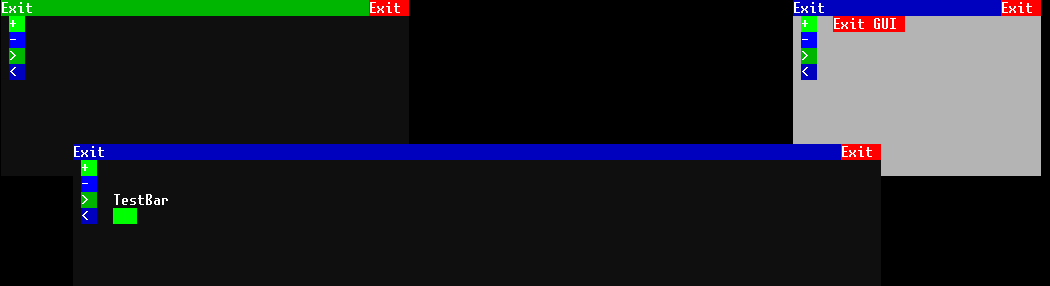
This is a project combining a super cool git-download-tool for use on the in-game computer running OpenOS and an application with a windowed GUI.
You can expect more features in future releases.
For the initial install you have to have an internet card in your computer. Also for the GUI you need at least a tier 2 GPU and screen.
Run the following command in the OpenOS shell:
pastebin run <Placeholder> <argument>
The git-tool will then bootstrap installation of dependencies, the tool itself and the application module(s).
This is a sophisticated, mostly stable yet still experimental tool to download (not only Github) repos. It will automatically fetch your files and install them as specified in installconfig.lua.
If you want to install your own application modules you can just specify to install to /usr/bin/PowerManager/applications/ and the Powerman desktop will recognize it as App.
When git-tool.lua is run without arguments it will download this here Repo as a sort of bootstrapper.
If you want to specify things you can use powerman -u -h to display the options ot the tool.
By default the git-tool installs with PowerManager in /usr/bin/PowerManager and exists there.
Target install paths of downloaded repos can be specified in the installconfig.lua of your repo to download.
The git-tool creates a manifest with each install. It writes the filepaths of files that will persist into it and can uninstall repos.
You can customize things in the installconfig.lua file of your repo.
The GUI API installs to /lib by default. It is a fork of IgorTimofeev with all dependencies tailored to our needs and expanded by a few objects. It is an object oriented Interface system to let the user decide what the application does by just pushing a few buttons or inputing a string. There are simple objects like rectangles or containerized-objects like Windows or ProgressBars.
The GUI of an application is typically contained in (creatable, moveable and deletable) Windows, but there is also the ability to hard-code objects to certain screens or whatever. For example: Display Windowed application on screen one and have a status display on screen 2
Of course this project will be installed with a shell shortcut. To run the application with GUI just type powerman.
If you want to know what arguments can be used put an -h behind it.
For example:
powerman -h displays the help text for the application it starts.
powerman -u -h displays the help text for the git-tool. (May change in the future)
The shortcut is installed in /usr/bin. If this folder does not exist yet it will be created.
This is where the fun begins. On startup you will be greeted with a desktop. On the desktop there are the applications as buttons to launch. You also have a launcher application with wich you can browse the filesystem for available modules to run.
Just try the fickDickMeter.lua!
These features are yet to be implemented, but you can expect things like Powermanagement, AE2 interfaces (including Autocrafting and stuff), redstone control, chat application for communicating with friends on a server and many more! Just wait till we are done (which will be never because there are many ideas)
There is already an app launcher and apps can be written to your Hearts content.