
Four wire fan library that provides speed control and calibrated tach measurement for microcontroller platforms.
This Four Wire Fan library is intended for use with three- or four-wire computer cooling fans. Three-wire fans provide a tachometer signal output, four-wire fans additionally have a speed setting input.
Three- and four-wire cooling fans provide a couple of advantages over generic fans (i.e. simple two-wire cooling fans).
The are specified (see references below) for built-in polarity protection, rotor lock protection, auto-restart, have a common connector and pinout, low commutation noise as well as relatively low power consumption.
Three- and four-wire fans can usually be found as 5V, 12V and 24V devices.
In order to get started quickly I recommend the 5V fan variants for safety and simplicity reasons: no higher voltage source required, lower likelihood of accidentally frying your electronics.
Notably, many 12V fans will work with a 5V supply, although at a lower speed.
A low power CPU fan or case fan can be powered via the VCC and GND pins.
For sensing, an interrupt input pin INT is required.
For speed control, a PWM pin must be used.
When using a separate fan power supply, keep in mind that a GND connection between the fan's power supply and the microcontroller board is always required for sensing/controlling.
Higher power fans should not be powered via USB or via the on board voltage regulator IC! This is true for any microcontroller board that doesn't supply dedicated power to peripherals. There are case fans out there requiring as much power as a small model aircraft. Take care not to destroy your microcontroller…
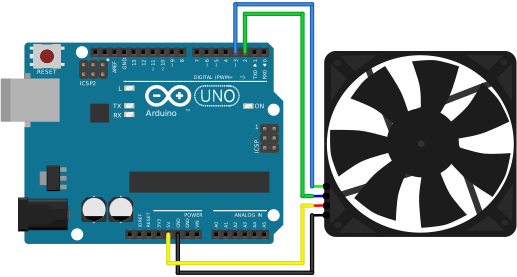
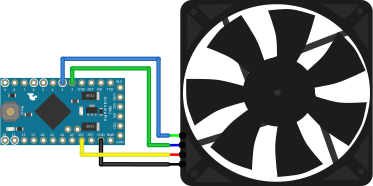
See the following wiring diagrams for low power fans (max. current: 500mA):
Using the Arduino pin naming scheme, connect fan pin 1 to GND, fan pin 2 to VCC, fan pin 3 to Arduino pin 2 and (optionally) fan pin 4 to Arduino pin 3:
A computer cooling fan runs more quietly and lasts longer at lower speeds.
Fans get louder if turbulences occur. But especially axial fans aren't necessarily slowed down when loaded or blocked. This means that fan load can't effectively be detected through speed alone.
As an example, the speed of a Noctua NF-A12 drops less than 1% until the airways are essentially blocked.
Thus, speed control is a good approach when designing a quiet and efficient system. But it's not a way to guarantee adequate cooling in all conditions (e.g. increasing fan speed does not necessarily equate more cooling).
"If driving multiple fans with a single PWM output, an open-drain / open collector output buffer circuit is required."
An Arduino compatible microcontroller takes care of that internally, so you can connect multiple fans in parallel.
"The fan shall be able to start and run at [the minimum] RPM."
"[The fan will] turn off the motor at 0% PWM duty cycle."
Some fans stop at 0% PWM, some continue running at minimum speed, both approaches have their application.
This Four Wire Fan library provides a spinup condition detection so that your fans can start up either gently or with a full speed spinup phase.
"If no control signal is present the fan shall operate at maximum RPM."
"For all duty cycles less than the minimum duty cycle, the RPM shall not be greater than the minimum RPM."
This appears to be true for all four wire fans that I have come across.
"In a Type A implementation the fan will run […] for all PWM duty cycle values".
Many computer fans are like this.
"In a Type B implementation the fan will run […] for all non-zero PWM duty cycle values".
This type of fan stops at 0% PWM.
"In Type C implementation the fan will stop running when the current provided to the motor windings is insufficient".
Realistically, any fan will stop or fail to start up with insufficient current provided, but this type of fan would not compensate for lower current at all.
Many auxillary fans or non-computer fans operate like this.
"The trace from PWM output to the fan header must not have a pull up or pull down. The pull up is located in the fan hub."
An Arduino compatible microcontroller takes care of that internally, so you can connect one or multiple fans.
- Intel specification (Internet Archive, 2018, PDF): 4-Wire Pulse Width Modulation (PWM) Controlled Fans
- Mary Burke, Analog Devices: Why and How to Control Fan Speed for Cooling Electronic Equipment
- On Semiconductor ADT7467: Datasheet (PDF)
- Noctua NF-A12x25 5V PWM: Product specifications
- Noctua PWM specifications: PWM specifications white paper (PDF)
- Chris Petrich, "Your DS18B20 temperature sensor is likely a fake": github.com/cpetrich/counterfeit_DS18B20