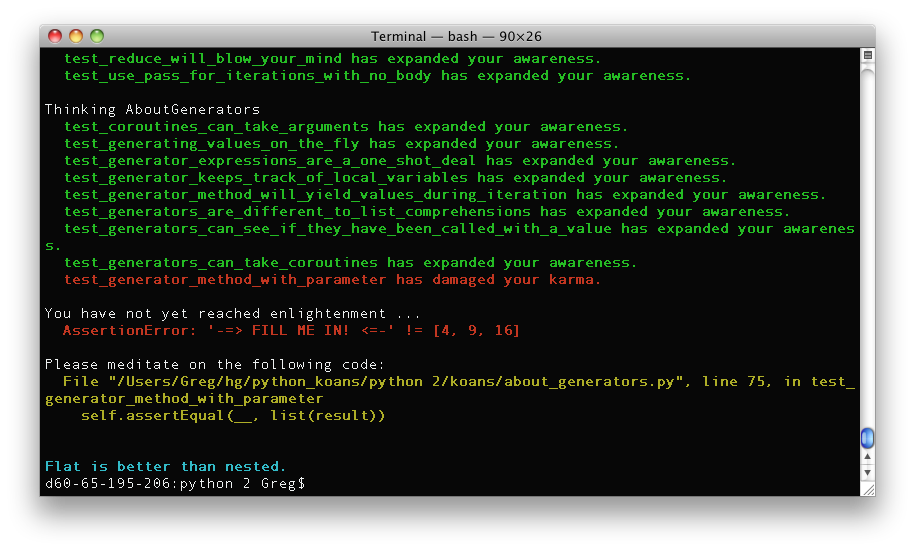
Python Koans is an interactive tutorial for learning the Python programming language by making tests pass.
Most tests are fixed by filling the missing parts of assert functions. Eg:
self.assertEqual(__, 1+2)
which can be fixed by replacing the __ part with the appropriate code:
self.assertEqual(3, 1+2)
Occasionally you will encounter some failing tests that are already filled out. In these cases you will need to finish implementing some code to progress. For example, there is an exercise for writing some code that will tell you if a triangle is equilateral, isosceles or scalene.
As well as being a great way to learn some Python, it is also a good way to get a taste of Test Driven Development (TDD).
Python Koans is available through git on Github:
http://github.com/mjrulesamrat/koans-playground
You download the source as a zip/gz/bz2.
Aside from downloading or checking out the latest version of Python Koans, you need to install the Python interpreter.
At this time of writing, there are two versions of the Python Koans:
- one for use with Python 2.7 (earlier versions are no longer supported)
- one for Python 3.1+
You should be able to work with newer Python versions, but older ones will likely give you problems.
You can download Python from here:
http://www.python.org/download
After installing Python make sure the folder containing the python executable is in the system path. In other words, you need to be able to run Python from a command console. With Python 2 it will be called python or python.exe depending on the operating system. For Python 3 it will either be python3 or for windows it will be python.exe.
If you have problems, this may help:
http://www.python.org/about/gettingstarted
Windows users may also want to update the line in the batch file run.bat to set the python path:
SET PYTHON_PATH=C:\Python27
Jake Hebbert has created a couple of screencasts available here:
http://www.youtube.com/watch?v=e2WXgXEjbHY&list=PL5Up_u-XkWgNcunP_UrTJG_3EXgbK2BQJ&index=1
Or if you prefer to read:
From a *nix terminal or windows command prompt go to the python koans\python_VERSION folder and run:
python contemplate_koans.py
or:
python3 contemplate_koans.py
In my case I'm using Python 3 with windows, so I fire up my command shell (cmd.exe) and run this:
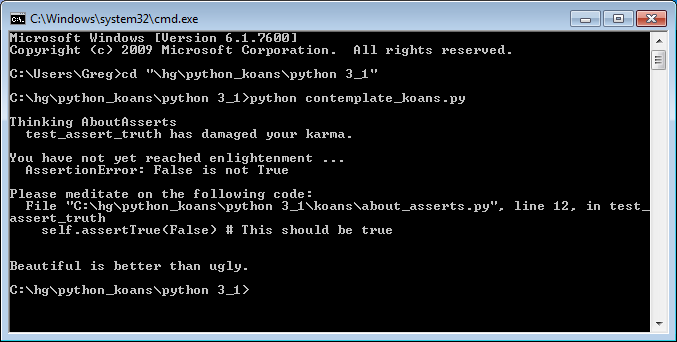
Apparently a test failed:
AssertionError: False is not True
It also tells me exactly where the problem is, it's an assert on line 12 of .\koans\about_asserts.py. This one is easy, just change False to True to make the test pass.
Sooner or later you will likely encounter tests where you are not sure what the expected value should be. For example:
class Dog:
    pass

def test_objects_are_objects(self):
    fido = self.Dog()
    self.assertEqual(__, isinstance(fido, object))
This is where the Python Command Line can come in handy. In this case I can fire up the command line, recreate the scenario and run queries:

Quoting the Ruby Koans instructions:
"In test-driven development the mantra has always been, red, green,
refactor. Write a failing test and run it (red), make the test pass
(green), then refactor it (that is look at the code and see if you
can make it any better). In this case you will need to run the koan
and see it fail (red), make the test pass (green), then take a
moment and reflect upon the test to see what it is teaching you
and improve the code to better communicate its intent (refactor)."
Most of this is lifted from Greg Malcom:
http://github.com/gregmalcolm/python_koans
I chose not to fork as I wanted a version suitable for students just getting started with python.