Releases: technobly/VEXTREME
Release list
VEXTREME v0.40

Software Changes
- Fixes 64kb bank-switching support, Y-Music and other 64kb games work now #38
Updating VEXTREME
The following instructions show:
- Installing
dfu-util - Installing Zadig WinUSB Driver on Windows 10
- Flashing VEXTREME
1. Install dfu-util on Windows 10
dfu-util is a command-line tool to flash devices that support DFU (Device Firmware Upgrade), such as STM32’s built-in USB bootloader.
Steps:
-
Download the Windows build of dfu-util
- Go to the official releases page:
🔗 https://dfu-util.sourceforge.net/releases/ - Download the latest ZIP for Windows (e.g.,
dfu-util-0.11-win64.zip).
- Go to the official releases page:
-
Extract the ZIP
- Right-click the ZIP → Extract All… to a folder, e.g.:
C:\utils\dfu-util\
- Right-click the ZIP → Extract All… to a folder, e.g.:
-
Add
dfu-utilto PATH (optional but recommended)- Press Windows Key + R, type:
rundll32 sysdm.cpl,EditEnvironmentVariables - Under System variables, select Path → Edit → New →
C:\utils\dfu-util\ - Click OK to close all dialogs.
- Press Windows Key + R, type:
-
Verify installation
- Open Command Prompt and run:
dfu-util --version - You should see the version printed.
- Open Command Prompt and run:
2. Install Zadig USB Driver for STM32 DFU Mode
Windows may install an ST driver that doesn’t work with dfu-util.
We’ll replace it with the generic WinUSB driver using Zadig.
Steps:
-
Download Zadig
- Go to: https://zadig.akeo.ie/
- Download the latest version (
zadig-2.x.exe).
-
Put VEXTREME into DFU mode
- Disconnect VEXTREME from your Vectrex and USB
- Connect the JP1 jumper (short the pins of the JP1 connector together), connect the USB connection to the computer. At this point you can disconnect the jumper if you wish, the device will stay in DFU mode.
- The device should appear as STM32 BOOTLOADER in Device Manager,
usually under Universal Serial Bus devices or Other devices.
-
Run Zadig as Administrator
- Right-click
zadig.exe→ Run as administrator.
- Right-click
-
Select the correct device
- In Zadig, go to Options → List All Devices.
- From the dropdown, select STM32 BOOTLOADER (USB ID
0483:DF11).- Confirm VID:PID is
[0483:DF11].
- Confirm VID:PID is
-
Install WinUSB driver
- In the right column, choose WinUSB (v6.x.x.x) as the new driver.
- Click Replace Driver (or Install Driver if none exists).
- Wait until Zadig reports success.
3. Flash the update to VEXTREME
-
Put VEXTREME in DFU mode
- Open a command prompt by pressing WINDOWS_KEY + R and type CMD and press ENTER
- Navigate to your Downloads folder, or wherever you have placed the VEXTREME binary.
- VEXTREME should be disconnected from your Vectrex and USB
- Connect the JP1 jumper (short the pins of the JP1 connector together), connect the USB connection to the computer. At this point you can disconnect the jumper if you wish, the device will stay in DFU mode.
-
List DFU devices
-
Try to run
dfu-util -lin the command prompt, you should see something like this.$ dfu-util -l dfu-util 0.11 Copyright 2005-2009 Weston Schmidt, Harald Welte and OpenMoko Inc. Copyright 2010-2021 Tormod Volden and Stefan Schmidt This program is Free Software and has ABSOLUTELY NO WARRANTY Please report bugs to http://sourceforge.net/p/dfu-util/tickets/ Found DFU: [0483:df11] ver=2200, devnum=2, cfg=1, intf=0, path="6-2", alt=3, name="@Device Feature/0xFFFF0000/01*004 e", serial="********" Found DFU: [0483:df11] ver=2200, devnum=2, cfg=1, intf=0, path="6-2", alt=2, name="@OTP Memory /0x1FFF7800/01*512 e,01*016 e", serial="********" Found DFU: [0483:df11] ver=2200, devnum=2, cfg=1, intf=0, path="6-2", alt=1, name="@Option Bytes /0x1FFFC000/01*016 e", serial="********" Found DFU: [0483:df11] ver=2200, devnum=2, cfg=1, intf=0, path="6-2", alt=0, name="@Internal Flash /0x08000000/04*016Kg,01*064Kg,03*128Kg", serial="********"
-
-
Flash the upgrade
- Use
dfu-utilto flash the binary with the following command via Terminal/Command Prompt:- NOTE: This is only for VEXTREME with the v0.3 jumper wire mod!
- NOTE: Make sure you at least have SW v0.24 or v0.40 to start with
dfu-util -a 0 -d 0483:df11 -s 0x08000000:leave -D stm32-sw.v0.40.hw.v0.3-64kbankfix.bin
- Use
-
Finishing up!
- Once that completes, remove the JP1 jumper, and unplug/connect the USB again. You'll see the VEXTREME USB drive mount again.
- Make sure you remove
menu.binsince the Menu is built into the binary you just downloaded. Keeping an old menu.bin on a newer updated VEXTREME can break things. - Game on!
VEXTREME v0.24
v0.24
Hardware Changes
- rename 'veccart' to 'vextreme' for hardware
- add image for v0.3 wire mod
- Fixes #17, make all pads on addressable LEDS the same size
- Fixes #10 removes soldermask ink around PCB fingers
- Fixes #11 Edge of PCB fingers should be 18.0mm from center of 3.52mm mounting hole and 1.2mm from edge, and slightly enlarged (0.2mm oversized)
- Also aligns holes, fingers and board outline on 0.1mm grid
Software Changes
- Added Turkey Pop.bin to release
- Added HACKS/LEVEL SELECT/Mine Storm 1.bin to release
- Fixed GCE/Mine Storm 1.bin in release
- rename 'veccart' to 'stm32' for firmware, and rename 'multicart' to 'menu'
- Embedded menu binary in STM32 flash image
- Update Dockerfile distro to Arch w/ newer arm-gcc (10.1)
- add .map file to build output
- Dev Mode (cart.bin) and Menu (multicart.bin) should not load a high score
- made high_score_flag readable from parmRam with new RPC ID 16, and speeds memory r/w for highscore
- Implements #55 High Score (by @TylerBrymer PR #56)
- Truncate filenames displayed to 16 characters and fix long filename bug
- Reduced rainbow mode colors so that no-buzz Vectrex owners don't hear any LED modulation
- implemented Animaction support for v0.3 hardware
- made sys_opt.hw_ver usage clearer
- added RAM Write debugging application and new dumpMemory() RPC ID 13
- added a release.sh script
- added standalone Developer Mode app (note: this is for reference only, see readme.md)
- added Develop Mode docs
- added Developer Mode (DM) to Menu. Press button 2 & 3 at any time to enter DM, or hold them down when starting the Menu. DM will also automatic re-enter when it's active. DM is active when a cart.bin is present, and DM can be disabled by removing cart.bin manually, or through the DM menu button 1: Exit.
- add USE_HW compile option, which must now be set. It will not default to a specific version. Right now specify it as USE_HW=v0.2 or USE_HW=v0.3 when running 'make clean all flash'. It can also be exported in your environment if you wish, but don't forget about it if you update your HW ;-)
- removed :leave from DFU commands since after flashing the stm32 binary, we are not really ready to reset and run. The boot0 jumper must be removed before then.
- minor changes to improve the Makefile for Windows (still WIP)
- changed delay() and millis() to use dwt_read_cycle_counter() instead of the sys_tick_handler() because romemu.S didn't like us randomly leaving to handle interrupts, and we need these functions while we are emulating ROM. There is a ~35s delay limit because of this. I added an assert so I don't forget!
- started adding some changes in fatfs to enable writes to flash memory since it was currently read-only, but ended up not needing them. No worries though, the highscore feature will require these. These changes thanks to @tbrymer!
- VEXTREME now also prints it's own HW and SW revision in logs at boot time.
- Moved start of rainbow LED code to after we are done with USB activities, so as not to load down the USB port more than necessary. Hopefully this fixes a reported bug with Windows.
- USB MSC can now be entered while the Vectrex is off, Ejected and left plugged in and the Vectrex can be turned on and boot a cart.bin for Developer Mode, or the VEXTREME menu.
- USB MSC can be started and stopped from the Vectrex now, which is necessary for Developer Mode.
- An improved reset function was added after feedback from users. Now in v0.3 hardware you will be able to press reset at any time to get back to the Menu. If you hold reset for ~700ms, it will reset the current running ROM/game. In the case of booting into Developer Mode (cart.bin already on the drive root), a first reset will not go to the Menu, but rather the cart.bin.. allowing you to skip the cold boot sequence. You may modify v0.2 hardware to act like v0.3 hardware for this feature. For now that means you will need to jumper V-OE pin 12 of the cart fingers (or U3 pin 9) to STM32 pin 29 (PB10).
- For v0.2 hardware, you can still compile in the old functionality were a short reset would reset the running ROM/game, and if you hold reset for ~700ms you will get the Menu.
- Also added to the reset sequence for both v0.2/v0.3 HW is that the LEDs light up CYAN after the "long" reset delay of 700ms, and stay lit as long as you are holding reset. When you let go, they return to rainbow. This helps you gage just how long you need to wait to hold the button for long reset.
- Added "scsi_command: %02X\n" which logs USB MSC commands to log output, this might seem chatty, but for now let's see what we see ;-)
- Set USB power to 500mA (was set to 100mA)
Instructions on updating for v0.2 HW
- Disconnect VEXTREME from your Vectrex.
- Connect the JP1 jumper, connect the USB connection to the computer.
- Unzip the download and switch to directory v0.24/stm32/hardware-v0.2/
- Use dfu-util to flash the stm32-sw.v0.24.hw.v0.2.bin with the following command via Terminal/Command Prompt:
dfu-util -a 0 -d 0483:df11 -s 0x08000000:leave -D stm32-sw.v0.24.hw.v0.2.bin - Once that completes, remove the JP1 jumper, and unplug/connect the USB again. You'll see the VEXTREME USB drive mount again.
- Backup & then delete all files on your device. Empty your Trash Can/Recycle Bin to ensure there is space on VEXTREME.
- Copy everything from the unzipped v0.24/VEXTREME/ folder to the root of your cart and eject the drive after it completes. Add some of your backed up roms/ now as well if you wish.
- You're ready to play!
✏️ NOTE: You will need to install dfu-util and zadig drivers for Windows. See the v0.40 release notes
Contributors

Assets 3
VEXTREME v0.23
- Fixes issue where VEXTREME takes several minutes to mount as USB drive on Windows #53
VEXTREME v0.22
VEXTREME v0.21
v0.21
⚠️ Added NOTICE of Current Development- Fixes Polar Rescue and implements a new Reset Heurisic #37
- A quick tap of RESET will reset the game, but holding it for a longer time will RESET to the VEXTREME menu.
- Adds addressable LED control and demo #41
- added 3 functions to control the LEDs from a Vectrex program
- updateOne() - RPC 6
- updateAll() - RPC 4
- updateMulti() - RPC 7
- added RPC function 5 to step through rainbow control of LEDs in menu
- added "LED TEST" which uses updateMulti to show how to finely control
all of the LEDs with a test program. Press UP on the joystick, try it slowly as well :D - added addressable LED control to Veccy Bird v1.5
- added 3 functions to control the LEDs from a Vectrex program
- Added a bunch of games that we have permission to include on VEXTREME :D Many thanks to the developers!!!
VEXTREME v0.2
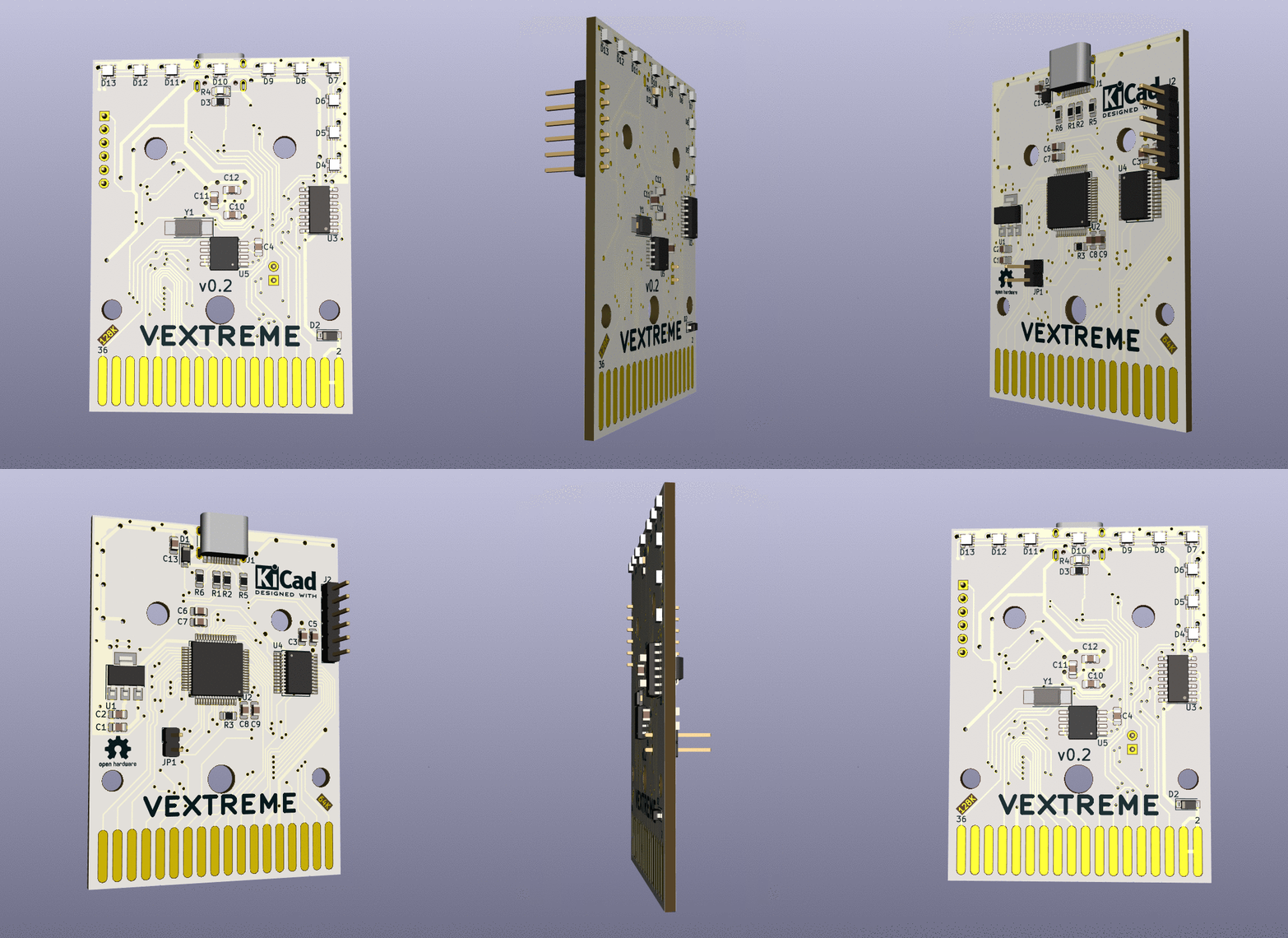
See v0.2 changes here! https://github.com/technobly/vectrex-cart/blob/master/CHANGELOG.md#v02
VEXTREME v0.1 - First working version of the Sprite_tm Extreme Vectrex Multicart!
The Build


Watch it in action here
https://www.youtube.com/watch?v=Wyxl73L8I44
This is just the start of a great new open source project for the Vectrex!