
Export Kindle highlights to Notion with automatic chapter grouping, Notion OAuth integration, and page references


Don't just clone it! Gives a star if it helped you...

Follow and Upvote us on Product Hunt
Have you ever used a Kindle to read your books? Have you ever tried to work on your notes? Maybe tried to organize for further reference?
Well, I have. And it happens to be the most boring task in the world. Copy and pasting just sucks. It's time-consuming and definitely gives you more work than organization.
Kindle To Notion was created to solve your note-taking problems.
It's your ultimate tool for organizing reading insights. It exports highlights and notes from your Kindle notebook pages directly to your Notion database. With just a few clicks, it extracts book titles, authors, cover images, and colored annotations.
Get it from the Chrome Web Store for Chrome, Brave, Arc, Orion, and other Chromium-based browsers.

Get it from Edge Add-ons for Edge LoL → Who cares? Just use Chrome Web Store.

By the way, I do use Edge :)
Get it from the Mozilla Add-ons

To make the most of your Kindle highlights, use this free Notion template built by Us:
This template helps you:
- Organize your books and highlights
- Track reading progress
- Capture insights and tasks from your reading
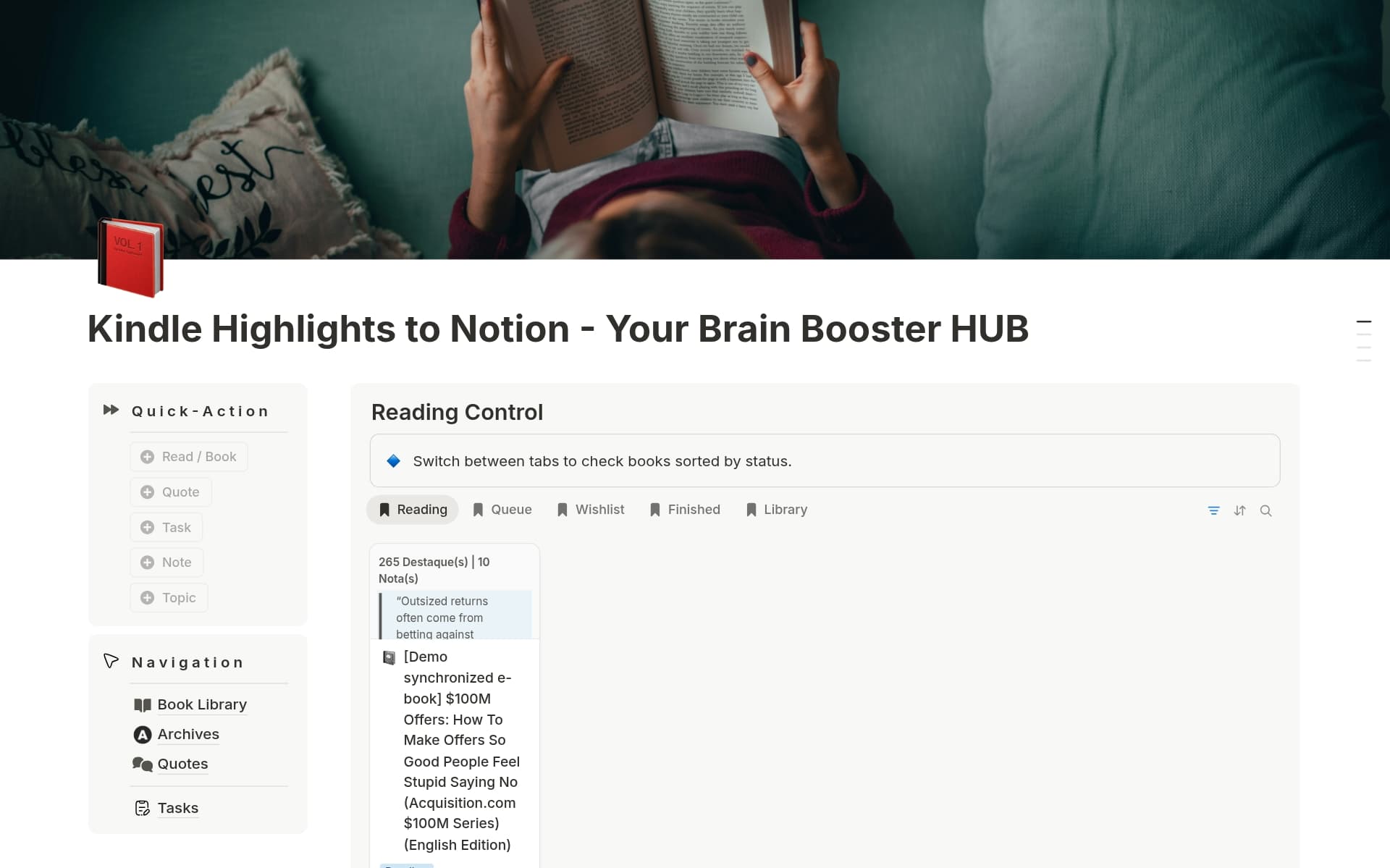
- Clone or download this repository.
- Open Chrome and navigate to
chrome://extensions/. - Enable "Developer mode" (top right).
- Click "Load unpacked" and select the folder containing the extension files.
- Voilà — The extension will appear in your Chrome toolbar.
💡 Prefer a one-click install? Get it from the Chrome Web Store for Chrome, Brave, Arc, Orion, and other Chromium-based browsers.
-
Create a Notion integration:
- Go to Notion's Integrations page.
- Create a new integration and copy the "Internal Integration Token."
- Share your target database with the integration (via the database's "Share" menu).
-
Create or open your Notion database:
- Go to Notion, create or select your destination page.
- Certify that you have a database with at least the properties for Author and Book Title.
- Open your database as a page and copy the Notion database ID
- Database Link:
https://www.notion.so/f7979b5axerequinha2f8fa?v=796edexemplokabal79a096 - Database Id:
f7979b5axerequinha2f8fa
- Database Link:
-
Open the extension's pop-up (click the extension icon in Chrome).
-
Enter:
- Notion API Token: Your integration token. (e.g.,
ntn_300224xerequinhadepilada7Xm). - Notion Database ID: Found in the database URL (e.g.,
f7979b5axerequinha2f8fa). - Title Property Name: The exact name of your database's title property (e.g.,
Título do Livro). - Author Property Name: The exact name of your database's author property (e.g.,
Autor). - Kindle Region: Select your Amazon region (e.g., US, UK, Canada, Germany, etc.).
- Notion API Token: Your integration token. (e.g.,
-
Click "Save Settings."🎉
👉Need a step-by-step help? FULL DOCUMENTATION

Watch the video to learn:
- How to set up the extension
- How to connect your Notion database
- How to export your Kindle highlights
- Open the extension popup and click "Go to Highlights"
-
Alternatively, navigate to your region's Kindle notebook page (see supported regions below).
- Once in the highlights page, open the extension popup and click "Export to Notion."
- Check the status message in the pop-up for success or errors.
- Verify the new page in your Notion database.
| Country | URL |
|---|---|
| 🇦🇺 Australia | read.amazon.com.au/notebook |
| 🇧🇷 Brazil | ler.amazon.com.br/notebook |
| 🇨🇦 Canada | read.amazon.ca/notebook |
| 🇫🇷 France | read.amazon.fr/notebook |
| 🇩🇪 Germany | read.amazon.de/notebook |
| 🇮🇳 India | read.amazon.in/notebook |
| 🇮🇹 Italy | read.amazon.it/notebook |
| 🇯🇵 Japan | read.amazon.co.jp/notebook |
| 🇲🇽 Mexico | read.amazon.com.mx/notebook |
| 🇪🇸 Spain | read.amazon.es/notebook |
| 🇬🇧 United Kingdom | read.amazon.co.uk/notebook |
| 🇺🇸 United States | read.amazon.com/notebook |
Note: You can select your preferred region in the extension's Settings tab.
### ✨ v1.9.2 - Smart Feedback & Refinement
⭐ Extension Feedback System:
- Integrated a smart engagement engine with review prompts based on activity and a persistent feedback footer.
📑 Starred Highlights Browsing:
- Dedicated view in the review tab to navigate favorited highlights with next/previous controls.
🔍 Reliability & Performance:
- Dynamic Rate-Limiting: Replaced hardcoded delays with an intelligent mechanism for smoother batch exports.
- Network Timeouts: Implemented
AbortControllertimeouts for all requests to prevent hanging on slow connections.
🎨 Polished Experience:
- Major Landing Page overhaul with scroll animations, FAQ accordion, and glassmorphism enhancements.
- Precise UI/UX refinements across popup and onboarding screens.
### ✨ v1.9.0 - Batch Export Power
📦 One-Click Batch Export:
- Export your entire Kindle library to Notion in a single operation from the notebook list page.
📊 Real-time Progress Dashboard:
- Live tracking of export progress with success/failure counters and cancel functionality.
### ✨ v1.8.0 - Major New Features
🔐 Notion OAuth Integration:
- Connect to Notion seamlessly with one click, without needing to manually copy and paste integration tokens.
🚀 Enhanced Onboarding:
- New step-by-step onboarding experience to guide users through the initial setup securely.
🌐 Global & Cross-Browser:
- Comprehensive multi-language support (i18n) and native extensions for Chrome, Edge, and Firefox.
### ✨ v1.7.0 - Major New Features
🧠 Intelligent Organization:
- Automatically groups highlights by Chapter and extracts Bookmarks (📌) with precise page/location references.
📖 Deep Kindle Integration:
- Full support for all 12 regional domains. Extracts highlights (with color mapping), notes, ASIN links, and high-resolution book covers.
⚡ Notion Sync:
- 1-click export using quote blocks. Includes summary counts, custom property mapping, and smart de-duplication to prevent clutter.
📍 Precision Tracking:
- A 5-tier location detection system ensures every highlight includes its exact page or position, supporting multiple languages.
🛡️ Security & Privacy:
- Zero data collection. Your Notion API token is stored securely via
chrome.storage.localand never leaves your device.
🎨 UI/UX:
- accessible (WCAG 2.1) compliant UI for accessibility. Smooth transitions, toast notifications, and a streamlined workflow.

- File Structure:
Kindle-To-Notion-Extension/
├── source/                    # Main extension source code
│   ├── chrome/               # Chrome extension (primary)
│   ├── edge/                 # Edge extension
│   └── mozilla/              # Firefox extension
├── docs/                     # Static marketing website
├── gitbook/                  # Technical documentation
├── assets/                   # Marketing images
├── release notes/            # Version history
└── .github/                  # GitHub templates & config
- Dependencies: None (no external libraries,
No build process required - it's vanilla JavaScript!) - Debugging:
- Open Chrome's developer tools (F12) on the Kindle page for content script logs.
- Inspect the background page (Right-click extension icon > "Manage Extensions" > "Inspect views: background page") for API logs.

We welcome contributions to improve this extension! To contribute:
- Fork this repository.
- Create a new branch (
git checkout -b feature/your-feature). - Make your changes and commit (
git commit -m "Add your feature"). - Push to your branch (
git push origin feature/your-feature). - Open a pull request with a clear description of your changes.
Please ensure your code follows:
- JavaScript ES6+ standards.
- Chrome's Content Security Policy (no inline scripts).
- Clear commit messages and documentation.
Found a bug or have a feature idea? Open an issue right here in this repo.



- Discussions: GitHub Discussions
Common Issues
| Issue | Solution |
|---|---|
| "Not on Kindle page" | Navigate to your Kindle notebook first |
| "Invalid token" | Check your Notion integration token |
| "Database not found" | Verify database ID and sharing permissions |
| "No highlights found" | Ensure the page has loaded completely |
| "Connection failed" | Use the "Test" button to diagnose issues |
- ✅ Local processing - No data sent to third parties
- ✅ Encrypted storage - Notion token stored securely
- ✅ Minimal permissions - Only accesses Kindle and Notion
- ✅ HTTPS only - Secure communication
- ✅ No tracking - Zero analytics or data collection
💡 Curious how it works or have questions?
- Browse the FAQ CALABRESO EDITION for answers, tips, and more.
- Visit our documentation page Documentation
- Wiki: Project Wiki
Smash that star button
This project is licensed under the MIT License. See the LICENSE file for details.
Since 2025 | Túlio Sousa
